The following states exist in the warehouse receipt:
State
Meaning
0-Notified
The warehouse receipt has been created.
1-Recorded
The Blanco Barcode in the Warehouse Receipt Header is entered.
2-Released MDE
The warehouse receipt has been released for the MDE.
3-Clearing QS
The warehouse receipt must be sent to quality assurance and has been set to 3-Clearing QS. This starts the time recording of the process - visible in "Home Clearing QS".
4-Clearing EK
The warehouse receipt has been set to 4-Clearing EK. This starts the time recording of the process - visible in "Home Clearing EK".
Combinations of warehouse receipt and load carrier states
If the status of the warehouse receipt is changed, this also has an effect on the status of the load carriers. The respective status combinations are listed in the following table.
Case
WHS Receipt state old
WHS Receipt state new
Change
Restriction
1
WHS Receipt
0-Notified
1-Created
Manual
SU
0-Notified
1-Receipt Processing
System
PTU
0-Notified
1-Receipt Processing
System
SSCC
0-Notified
1-Receipt Processing
System
SPU
0-Notified
1-Receipt Processing
System
2
WHS Receipt
1-Created
0-Notified
Manual
SU
1-Receipt Processing
0-Notified
System
PTU
1-Receipt Processing
0-Notified
System
SSCC
1-Receipt Processing
0-Notified
System
SPU
1-Receipt Processing
0-Notified
System
3
WHS Receipt
1-Created
3-Clearing QS
manual
SU
1-Receipt Processing
3-Clearing QA
System
PTU
1-Receipt Processing
3-Clearing QA
System
SSCC
1-Receipt Processing
3-Clearing QA
System
SPU
1-Receipt Processing
3-clearing QA
system
4
WHS Receipt
1-in processing
4-clearing Receipt
manual
SU
1-Receipt Processing
4-Clearing Receipt
System
PTU
1-in progress
4-Clearing Receipt
System
SSCC
1-Receipt Processing
4-Clearing Receipt
System
SPU
1-Receipt Processing
4-Clearing Receipt
System
5
WHS Receipt
1-Created
2-Released MDE
Manual
SU
1-Receipt Processing
1-Receipt Processing
without
PTU
1-in processing WHS Receipt
1-in processing
without
SSCC
1-Receipt Processing
1-Receipt Processing
without
SPU
1-Receipt Processing
1-Receipt Processing
without
6
WHS Receipt
1-Created
5-Posted
System
SU
1-Receipt Processing
2-Recorded
System
PTU
1-Receipt Processing
2-Recorded
System
SSCC
1-Receipt Processing
7-Ready for dispatch, 2-Recorded
System
SPU
1-Receipt Processing
2-recorded, 7-packed
System
7
WHS Receipt
2-Released MDE
5-Posted
System
SU
1-Receipt Processing
2-Recorded
System
PTU
1-Receipt Processing
2-Recorded
System
SSCC
1-Receipt Processing
7-Ready for dispatch, 2-Recorded
System
SPU
1-Receipt Processing
2-recorded, 7-packed
System
8
WHS Receipt
2-Released MDE
1-Created
manual
if not processed
SU
1-Receipt Processing
1-Receipt Processing
without
PTU
1-Receipt Processing
1-Receipt Processing
without
SSCC
1-Receipt Processing
1-Receipt Processing
without
SPU
1-Receipt Processing
1-Receipt Processing
without
9
WHS Receipt
3-Clearing QS
1-Created
manual
SU
3-Clearing QA
1-Receipt Processing
System
PTU
3-Clearing QS
1-Receipt Processing
System
SSCC
3-Clearing QA
1-in progress WHS Receipt
System
SPU
3-Clearing QA
1-in progress WHS Receipt
System
10
WHS Receipt
4-Clearing WHS Receipt
1-Clearing
manual
SU
4 -Clearing WHS Receipt
1-Receipt Processing
System
PTU
4 -Clearing WHS Receipt
1-Receipt Processing
System
SSCC
4 -Clearing WHS Receipt
1-in WHS Receipt
System
SPU
4 -Clearing WHS Receipt
1-Receipt Processing
System
11
WHS Receipt
5-Post
./.
Return / WHS Receipt Cancellation
Not sent
Adjustment of the load carriers in the inventory via reversal
State of the Load Carrier
Storage Unit (SU)
ID
State
Meaning
0
Notified
The load carrier has not yet arrived at the warehouse. It has been announced for delivery.
1
Receipt Processing
The load carrier is blocked due to progress in warehouse receipt.
2
Recorded
The load carrier is available for further processing and is in the warehouse.
3
Clearing QA
For quality inspection or clarification in quality assurance.
4
Clearing WHS Receipt
For clarification in purchasing or warehouse receipt.
9
Finished
No further internal handling is required for this load carrier; the internal process is considered completed.
Picking Transport Unit (PTU)
ID
State
Meaning
0
Notified
The load carrier has not yet arrived at the warehouse. It has been announced for delivery.
1
Receipt Processing
The load carrier is blocked due to progress in warehouse receipt.
2
Recorded
The load carrier is available for further processing and is in the warehouse.
3
Clearing QS
For quality inspection or clarification in quality assurance.
4
Clearing Receipt
For clarification in purchasing or warehouse receipt.
5
Pick Processing
The load carrier is blocked by picking – it is in the picking process.
6
Packed Processing
The load carrier is blocked by packaging – it is being processed in packaging. In the MOP process, this state is already set when removing individual PTUs from the rack, not only when completing the entire batch.
7
Packed
The load carrier is ready for loading; waiting to be loaded onto a truck, Load Carrier or transporter.
8
Loaded
The load carrier has been loaded onto a truck, CTR or transporter (but may still be in the storage area).
9
Finished
The PTU has been processed and converted to an SSCC.
Serial Shipment Load Carrier Code (SSCC)
ID
State
Meaning
0
Notified
The load carrier has not yet arrived at the warehouse. It has been announced for delivery.
1
Receipt Processing
The load carrier is blocked due to progress in warehouse receipt.
2
Recorded
The load carrier is available for further processing and is in the warehouse.
3
Clearing QA
For quality inspection or clarification in quality assurance.
4
Clearing WHS Receipt
For clarification in purchasing or warehouse receipt.
5
Pick Processing
The load carrier is blocked by picking – it is in the picking process.
6
Packed Processing
The load carrier is blocked by packaging – it is being processed in packaging.
7
Packed
The load carrier is ready for loading; waiting to be loaded onto a truck, Load Carrier or transporter.
8
Loading
The load carrier has been loaded onto a truck, CTR, or transporter. The load unit is still in the storage area (e.g. ramp).
9
Sent
The load carrier has been delivered. It has left the storage area and is on its way to the customer.
Subpackaging Unit (SPU)
ID
State
Meaning
0
Notified
The load carrier has not yet arrived at the warehouse. It has been announced for delivery.
1
Receipt Processing
The load carrier is blocked due to progress in warehouse receipt.
2
Recorded
The load carrier is available for further processing and is in the warehouse.
4
Clearing Receipt
For clarification in purchasing or warehouse receipt.
5
Pick Processing
The load carrier is blocked by picking – it is in the picking process.
6
Packed Processing
The load carrier is blocked by packaging – it is being processed in packaging.
7
Packed
The load carrier is ready for loading; waiting to be loaded onto a truck, Load Carrier or transporter.
8
Loaded
The load carrier has been loaded onto a truck, CTR or transporter, but may still be within the warehouse area (e.g. staging zone).
9
Done Sent
The load carrier has left the warehouse. It is on its way to the customer, and no further internal handling is needed.
State of the warehouse receipt
State
Meaning
0- Notified
The warehouse receipt is planned but has not yet arrived at the plant.
1- Created
The warehouse receipt has been created and a Blanco Barcode has been scanned.
2- Released MDE (Mobile Data Entry)
The warehouse receipt has been released by MDE.
3- Clearing QS
The warehouse receipt is in quality assurance and has been set to 3-Clearing QS. This starts the time recording of the process - visible in "Home Clearing QS".
4- Clearing Purch.
The warehouse receipt has been set to 4-Clearing EK. This starts the time recording of the process - visible in "Home Clearing EK".
5- Posted
The warehouse receipt has been posted.
Hinweis
If the state is 0-Notified, 3-Clearing QS or 4-Clearing EK, the warehouse receipt cannot be posted. If the state is 1-Recorded or 2-Released MDE, the warehouse receipt can be posted. With 2-Recorded MDE only via the MDE application, with 1-Recorded via Business Central and the MDE application.
Warehouse Shipment Planning State
Warehouse
Availability
Picking
Packing
Loading
Open (red)
There is at least one item that needs to be released or printed for the picking or packing process.
At least one item contained cannot be covered by existing inventory.
No item has yet been released for picking.
No item has yet been released for packaging.
The shipment process has not yet started.
Created (yellow)
Picking has been created and quantities have been reserved. There are no items in picking yet.
Partially available (yellow)
Shipping advice is set to “partial” and there are available and unavailable items.
Partially released (yellow)
Either picking or packaging is still partially released
Picking is partially released if only some of the items are being picked.
Some of the items are in packaging.
Only some of the assigned loadings are released.
Released (yellow)
All contained items are released or printed for further progress for picking and / or packaging.
Each item has been released or printed for picking.
Each item has been released or printed for packing.
The warehouse shipment has been released for loading.
Available/Finished (green)
All items in picking and packaging processing have been processed. The warehouse shipment is ready for loading or posting.
All lines can be released or printed.
All contained items have been picked in the warehouses.
All contained items have been packed directly in the picking or packing area. The loading process has been completed.
Status Picking
State
Meaning
0-created
SNCL Outbound Stock Post has been created, reservations have been made - but picking has not yet been released or printed.
1-printed
The pick list has been printed. Re-printing should be avoided if possible, otherwise double picking may occur.
2-released
The pick list has been released on an MDE and can be edited.
3-in progress
The picking process has already been partially processed and has not yet been completed.
8-cancelled
All positions have been cancelled
9-finished
All items have been picked. This state can also be assigned directly if only PTUs or SSCCs that have already been packed were entered when the Outbound Stock Post was created.
Status Picking Positions
The status of the pick document lines is independent of the status of the picking. The status of the lines is dynamically adjusted depending on the processing step.
Status
Meaning
0- Created
SNCL Outbound Stock Post is created, reservations made - but the picking has not yet been released or printed.
2- Printed
The pick list has been printed. Reprinting should be avoided if possible, as this may result in double picking.
2- Released
The pick list has been released on an MDE and can be processed. If the position is processed or the line is reported back, the line remains at this status.
3- In Processing
A user has selected this position on the MDE. Remains set until the position is reported back.
8- Cancelled
The position has been cancelled.
9- Finished
The position has been completely picked and reported back.
State of the loading list
If the shipping agent does not require loading, the loading status indicator in the warehouse shipment planning remains empty.
State
Meaning
1-Printed
The loading list has been printed. This state can only be set after the previous state was 0-created
2-Released for preparation
The loading has been released for preparation. The load carriers cannot be loaded in this status.
3-Released
The loading has been released.
7-Loading Processing
The loading process is in Loading Processing. Is set when the first SSCC has been assigned to the truck / CTR at the MDE.
8-Loading
All SSCCs are loaded.
9-Finished
The loading has been checked
State of the Series Picking
State
Meaning
0- Created
When creating the series with deactivated automatic release in the series creation strategy
1- Released
Manually or automatically released
2- In Progress
First picking document printed or first picking process selected on MDE
3- Picked
The items have been picked
4- Finished
All items in a series have been picked and posted back to PTUs
5- Clarification
A shortage has been detected and no alternative stock has been found.
State of the Cycle Counting
State
Meaning
0- Open
Manually set state for 1st and 2nd count if no progress is to be made at the MDE. Initial status for 3rd count
1- Printed
Cycle counting list has been printed for progress
2- Released
Initial status for 1st and 2nd count
3- In progress
As soon as an inventory has been counted
4- Counted
As soon as everything has been counted
8- Deleted/Discarded
Cycle counting list was discarded, e.g. if the last count value was manually accepted before another count was carried out
9- Finished
Cycle counting list was transferred to the stocktaking
State Replenishment in Production Supply
State
Color
Meaning
Action Required
Open
Red
No or insufficient replenishment move jobs available. Quantity remaining exceeds finished and considered replenishment quantities.
Replenishment must be created
Created
Yellow
Replenishment move job has been created, but processing has not yet started.
Move job must be released/started
In Progress
Yellow
Replenishment move job is currently being processed (e.g., picking is in progress, employee assigned).
Wait until replenishment is completed
Available
Green
All required components are available. Quantity remaining is covered by finished and considered replenishment quantities.
No action required
Warehouse Shipment Dates
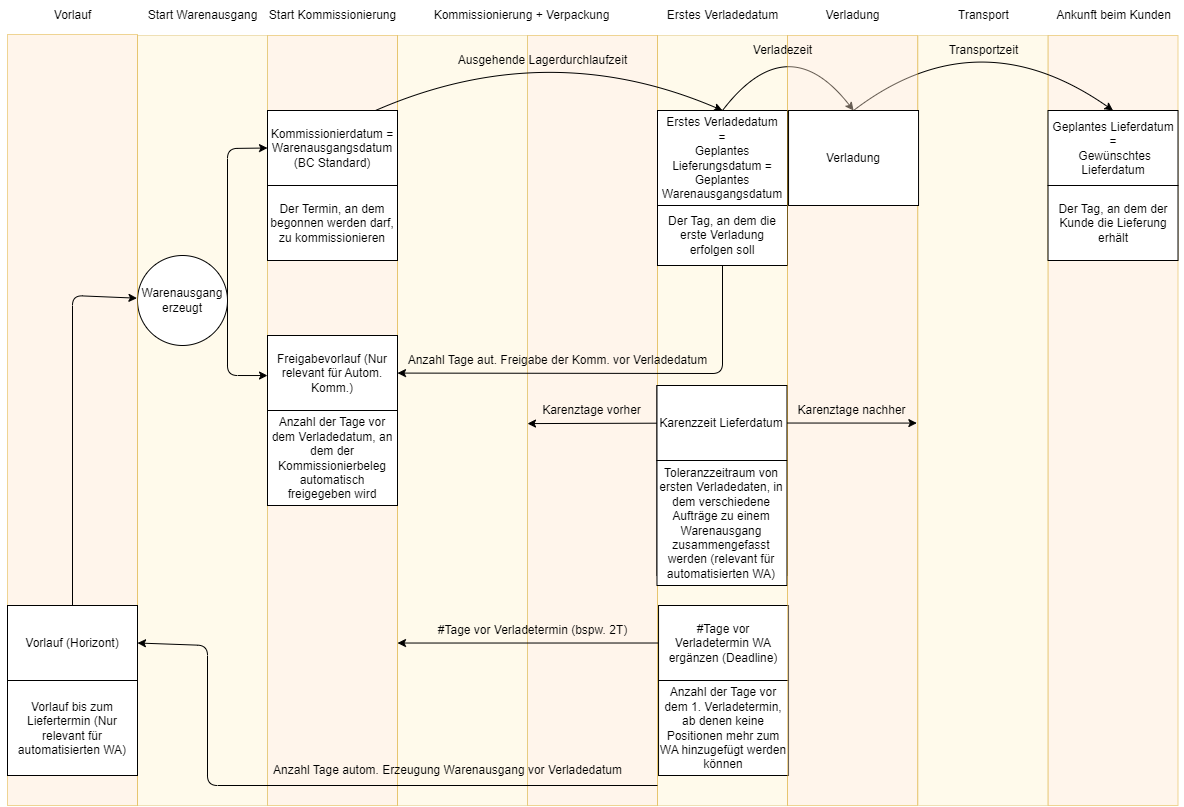
Lead Time: Relevant for automated warehouse shipments and Outbound Stock Posts. Determines the point in time as to how far in advance of the loading date/delivery date a warehouse shipment or Outbound Stock Post may be created or added to an existing warehouse shipment. If this is set to 10D, the warehouse shipment or Outbound Stock Post is created 10 working days before the first loading date or planned shipment date.
Release Lead Time: Number of days before the loading date from which the picking document is automatically released. Only relevant if the automatic picking document release is used.
Priority 1: Release lead time in SIEVERS WMS Team: Order Types
Priority 2: Release lead time in SIEVERS WMS Team: Picking & Packaging
Picking Date: First Shipment Date - Outbound Warehouse Lead Time (from the storage location map). The date on which picking may commence.
First Loading Date: Specifies the day on which the first loading can be expected. This is the date from which the rest of the Warehouse Shipment Planning is based.
Grace Period Shipment Date: Tolerance period around the first loading date in which various orders are combined into a single warehouse shipment (relevant for automated warehouse shipment). Example: Grace period = 2 business days. The first loading date of a warehouse shipment is 9/27. The planned delivery date of an order is 9/28. This order is still within the grace period and is added. Another order has a planned delivery date of 9/24. This is outside the grace period and therefore cannot be added to the warehouse shipment. The working days are defined using the basic calendar code for the customer. If no calendar code is entered there, the basic calendar code for the storage location is used.
#Days before 1st Load Date: The number of business days before the 1st load date from which no more line items can be added to the warehouse shipment.
Promised Shipment Date: The day on which we promised the shipment.
Planned Warehouse Shipment Date: The planned day of the first loading date. Calculated by Planned Delivery Date - Shipping Time.
Planned Delivery Date: The day on which the customer should receive the shipment.
Requested Delivery Date: The day on which the customer wants to receive the goods. If this field is filled, it is the basis for the planned delivery date.
Delivery Date: The day of the first loading date
Shipment Date: Arrival of the goods at the customer
Outbound Warehouse Lead Time: Specifies for the Location Code how long the warehouse shipment takes from picking to the first shipment date
Shipping Time:** Time between Shipment Date and Delivery Date. Shipping Time of the Items
Priority 1: Shipping Time at Shipping Agent
Priority 2: Shipping Time at Customer
Work Date: The current day
A
ABC code: Classifies items according to their access frequency. A is the highest possible access frequency.
Arrived on yard: Setting this indicator in the loading process defines the arrival date and time
Assigned user ID: The ID of the user assigned to and responsible for this document
Available number of spaces: Indicates how many free places are available in this storage place
Available Field No. of Spaces:
B
Barcode: A barcode is used to enable unique identification and to link digital with real processes. Not only are numbers generated and printed, but time measurements are also started when barcodes are scanned. The barcode consists of the object's code and a check digit generated according to modulo 10 (+ weighting 3; home with 3). How to create a Blanco Barcode is described in the process Generate Blanco Barcode.
By Order: This indicator in warehouse shipment controls whether items are picked and packed By Order. The opposite of this method is delivery address
C
Calculated Weight: Calculated weight per order based on the packaging hierarchy.
Category: Groups and describes a storage place in terms of its dimensions and storage properties. The occupancy matrix can be used to specify which inventory measures are to be assigned to which categories. This is necessary for an effective Inbound Stock Post strategy
Code: Enables the unique identification of many elements of the SIEVERS WMS system. Codes are used, for example, for storage places, inventory measures or load carriers
Comment text for label: A text that is printed on the package label (SU, PTU or SSCC) can be entered in this field. This can be, for example, information for the customer, references to the supplier package or a picking slip confirmation in the document-oriented picking process.
Completely Shipped: A Yes means, that the entire order has been shipped. If any part of the order hasn't been shipped yet, the field displays a No..
Completely Invoiced: A Yes means, that the entire order has been invoiced. If any part of the order hasn't been invoiced yet, the field displays a No..
Consolidation: Consolidation Storage Places are intended to simplify the work of picking and packing teams. If several order-related PTUs have been created during picking, these should be routed to one or a few consolidation locations. The employees in the packing area should always know where to find the items for the order to be packed. For this reason, the items are consolidated at as few Location Codes as possible. Consolidation Storage Places are automatically determined based on the assigned Location Code and the Consolidation Storage Place assigned to the packaging team. The Consolidation is also part of the various order handling
Delivery address: This indicator in warehouse shipment controls whether picking and packaging is carried out per delivery address. See various order handling for more information on this. The opposite of this is By Order
Inbound Stock Post strategy: Defines how storage places are searched for and found in a warehouse. It usually consists of several strategy lines that are run through in sequence to find a destination for the warehouse receipt. See also Inbound Stock Post strategies
DIVERS: This indicator is used instead of an order number wherever Various order handling is used
Document:
Due date: Specifies the due date of the document.
E
Expected arrival: This is the approximate date on which a shipment is expected. If this date is specified, sales and purchasing can plan better. The date may differ from the posting date, but must not.
Employee Marking: Shows the number of employees who have been marked during picking, move job or packaging. An employee is automatically marked when they open a corresponding process on the MDE. Marking is also possible manually in the respective document.
F
Filter to get source documents: Opens a window that can be used to configure a filter to get source documents. This allows documents to be quickly and specifically linked to several orders and filled, for example to create a new [warehouse shipment](#warehouse shipment). See Filter to get source documents
G
Gross weight Load Carrier: Load carrier weight + weight of the packaging + net weight of the items
H
Height, width, depth: The dimensions of the item. The unit definitions can be found in Units.
I
Inbound Stock Post Code: This code is a resource used to bill outside storage services for Inbound Stock Posts.
Inbound Stock Post Customer: This is an outside storage customer. This field is usually filled automatically if there are outside storage items in the receipt lines
Internal Transport Team: Defines the primary team responsible for the transport of a move job line. Used for team-based grouping in replenishment creation.
Internal Transport Follow-Team: Defines the secondary team for follow-up transports. Used together with the Internal Transport Team to create team-exclusive move jobs.
Inventory: Used to summarise items with similar characteristics. Characteristics can be for example: sell-by date, lot no., serial number, source, commercial affiliation, stock quantity qualification (full pallet/opening), variant. There can be several inventories on a load carrier.
Inventory Unit of Measure: Specifies the unit of measure of this inventory. This is important to distinguish whether it is a full pallet or an opening inventory.
Inventory Measure Code: Code that identifies a packaging type. Describes the packaging material or load carrier. Examples: Pallet, pallet cage, carton, bundle, lots, etc.
Inventory Selection Strategy: This strategy ensures that certain inventories are used in a certain order for Outbound Stock Post. The strategy consists of several lines that are run through in sequence to find the most suitable stocks. See Inventory Selection Strategy
Item description: A short description or description of the item
Item no.: The unique number of this item
Item Series: These are items picked in series that are not distributed to different sales orders until they are packed
Load Carrier: A load-bearing means of grouping goods. Contains one or more items or inventories. Can be a pallet, for example. The physical condition of the load carrier is defined by the inventory measure.
Synonyms: Load Carrier
Load carrier type: Shows in which process step the load carrier is used. In combination with the status of the load carrier, it is possible to quickly identify what the load carrier is and what order status it is in.
SU = Storage Unit: A load carrier with a quantity that has no order reference
PTU = Picked Load Carrier: Load carrier with a quantity that has already been picked (= collected for an order) but is not yet ready for shipment
SSCC = Serial Shipping Load Carrier Code: load carrier with a quantity that has already been picked (= compiled for an order) but is not yet ready for shipment
SPU = Secondary Packaging Unit as a type for the transport Load Carrier.
The SU, PTU and SSCC ensure seamless traceability from shipping to warehouse receipt.
STU = Series transport unit: A load carrier that is part of a series picking. This load carrier cannot be converted to an SSCC and cannot be loaded. An STU is not assigned to a warehouse shipment No., but to a picking series no.
Load carrier number: Unique code that identifies a Load Carrier or load carrier. The associated number series is defined in the SIEVERS WMS setup
Synonyms: Load Carrier code; description of the load carrier; barcode of the load carrier without check digit
Load Carrier replenishment: With this replenishment, no inventory is moved, only Load Carriers. Load Carrier replenishments are generated automatically when a whole inventory needs to be moved.
Loading Date/Loading Week: This is the date on which the item should leave the warehouse. Based on the planned shipment date
Logistics Team Type: The type determines the role of the logistics team in the warehouse
Warehouse receipt
Internal transport
Picking
Packaging
Loading
Stocktaking
Production supply
Loading process: See shipment
Lot no.: Used to identify and distinguish individual lots. They are relevant, for example, for warehouse receipt and inventory swaps. As a rule, lots must not be mixed in stock. It can also be enforced that items cannot be added to the warehouse without a lot no. These and more setups can be found in the SIEVERS WMS Setup.
M
Max./Standard Value Weight: Defines the maximum weight for the shipment process.
Max./Standard Value Volume: Defines the maximum volume for the shipment process.
Maximum Inventory Production Place: Maximum inventory in production. This field includes current inventory and quantities in storage. If the maximum inventory is exceeded, no further replenishment orders can be generated for this
Minimum Inventory Production Place: Indicates the minimum amount of inventory that must be available in production. This field takes into account current inventory and quantities in storage. If the minimum inventory level is exceeded, a replenishment move job must be generated, for example, by check replenishment or a job queue
Minimum Replenishment Quantity Production: Determines the minimum quantity that must be replenished in production. Can be overwritten by the step size if the quantity is small
Move order type: Indicates what type of move order it is. Each move order type has a specific function corresponding to its name. The move order types are set automatically, but can also be changed manually.
Storage place transfer
Replenishment
Inbound Stock Post
Return order
Loading preparation
Manual transfer
Production supply: For one-step production replenishment
Transport to production: Part of the two-step production replenishment process
Multi Order Picking (MOP): This is a picking method that combines several orders into one picking run. In contrast to series picking, the order reference is not lost when orders are combined. MOP is only suitable for warehouses with many small orders of up to 10 lines per order with small part relations. If the picking run has to be interrupted or orders that are too large are selected, the probability of errors increases significantly. For Multi Order Picking you need a Multi Order rack. Multi Order Picking is recommended up to an order quantity of 80 per day, as processing becomes too inefficient above this order quantity. In this case, we recommend series picking instead. You can read how to create and execute a MOP batch in the section Create and Execute MOP Batch.
MOP Batch Formation Strategy: Rule-based strategy for automatic consolidation of multiple orders into MOP batches. Enables filtering by customer, shipping address, delivery date and quantity limitations. See MOP Batch Formation Strategy
N
Newly deposited: This indicator is used to track newly created Load Carriers. It is not relevant for the user and is only used for internal system processes
Net kg per MEH: Net unit weight
Net weight per quantity: Net unit weight * content quantity
Net weight Load Carrier: Total weight of items without packaging
Number of Load Carriers: Indicates the number of Load Carriers. This is a simple text field that can be filled in when a shipment is registered by a driver or at reception.
Number of source documents: Indicates the number of linked source documents
Number of pieces deposited:
Number of pieces: The number of items in this line
Number of places: Specifies how many places this storage place contains
Number Series: Number series in Microsoft Dynamics 365 Business Central serve the unique identification of documents, master data, and processes. They ensure consistent and automated assignment of numbers, keeping processes structured and traceable. By using number series, various business processes can be efficiently controlled and documented. Number series are defined in the SNCL setup. All number series used in SIEVERS WMS must have the flag "Allow Gaps in Nos." activated to avoid performance issues. The system validates this requirement automatically.
O
Occupancy: Indicates whether a storage place is full, (partially) occupied or empty (free).
Opening inventory: Indicates whether the inventory has been opened
Outbound Stock Post Code: This code is a resource used to bill outside storage services for Outbound Stock Posts.
Outbound Stock Post Customer: This is an outside storage customer. This field is usually filled automatically if there are outside storage items in the receipt lines
Over-Receipt Code: Specifies the policy that will be applied to the customer if more items are received than were ordered. See also Over-receipt code
P
Packaging team:
Page:
Partial: Indicates whether all warehouse shipment lines for the warehouse shipment that appear on the stock document could be reserved. If an item could not be reserved at all or only partially, this indicator is activated. When a new stock document is created, the indicator is updated based on the warehouse shipment lines.
Picking place: Synonym: master storage place. Fixed storage place from which picking is to take place. See also Warehouse structure
Picking document response: The picking document response is the last step of document-based picking. The picked quantities are assigned to the order in a fixed manner.
Picked load carrier: Load carrier with picked item quantity. Bracket and description for item quantity(s), stock number(s) with a load carrier with order reference, not ready for shipment. Used to record, hold, move and track the picked Inventory.
Planned Shipment Date: This is the basis for the initial calculation of the loading day and the loading week in warehouse shipment. Planned shipment date - transportation time = Loading Date
Plausibility check: The plausibility check checks whether the weight of the PTU or SSCC matches the assigned packaging. If a deviation above the threshold value is detected, the resulting load carrier is blocked for further progress and must be checked in QA. The following plausibility checks are possible:
Master data weight: comparison of the master data weight with the actual weight
Individual weighing: Per pick with load cell scales
Length check: Comparison of the depth of the load carrier with the master data length of the smallest storage unit
Printer station: Combines several printers for different formats. This means that prints are not sent to specific printers but to a printer group and are automatically printed by the correct printer. Individual users can also be assigned to specific printer stations in the SNC/Mobile user administration. Administration takes place in the Printer station overview
Priority: Determines the sequence of warehouse shipments. The first digit is the day of the week (Monday - Sunday: 1 - 7, 8 = open) and the other two digits are determined by the priority of the shipping agent or shipping agent type. If it is a warehouse shipment with various order handling, the lowest priority of the orders contained is always shown. Please note that in such a case the quantities of the orders are shown in total.
Priority number:
Posting date: Specifies the date on which this document was posted. In exceptional cases, the posting date may change depending on the state of the document.
PU Unit of Measure: A unit of measure that differs from the base unit without a conversion function and is used in stock documents and labels. Quantity specifications per Inventory are entered in the packaging hierarchy
Q
Quantity Difference: Specifies the necessary quantity difference between the target quantity and actual quantity for a stocktaking error message. This is an integer value between 0-100%. The initial value is 0. 0 means no deviations will be tolerated. 100 means that deviations of up to 100% are tolerated. This threshold is only applied if the field Use Threshold Values is set to 2-Value Difference or 3-Quantity & Value Difference.
The quantity difference appears in various places in the system. The fields override each other. The following priority sequence applies (1 overrides 2, 2 overrides 3, etc.):
Stockkeeping unit
Item
Item category
SIEVERS WMS setup
Quality status:
Quality stock
Depot
Block Stock
Quantity in Loading: Item quantity is in an open loading process and is in a SSCC.
Quantity in Packing: Item quantity is in a PTU and in packaging.
Quantity in picking: The quantity that is currently in picking. This quantity is on a released or printed pick list and still needs to be picked.
Quantity loaded: Item quantity has been loaded onto a means of transport (truck / Load Carrier etc.) with a SSCC. The means of transport is still on the plant premises and the loading has not yet been finally checked.
Quantity packed: Item quantity is in a SSCC and is ready for shipment.
Quantity picked: This item quantity has been picked and is in a PTU, but not yet in packaging.
Quantity Picks: Indicates how much work is in the picking document. The Outbound Stock Post of an entire pallet is one pick. A partial removal of an item from a storage place is one pick.
Quantity received: Item quantity has been sent and reversal is no longer possible.
Quantity remaining: Indicates the quantity that still needs to be moved.
Quantity reserved: The item quantity reserved for this process.
Qty. to Receive: Specifies the quantity to be progressed as part of this delivery/warehouse receipt.
R
Replenishment Strategy: Similar to the inventory selection strategy but is used exclusively to find inventory for replenishment. See Replenishment strategy
Reservation method: Supplements the inventory selection strategy. See Reservation method
Reserved number of pieces: The number of reservations for this item
Reserved by document no.: Relevant for production with order reference. Indicates the source document by which this inventory is reserved
Reservation entry no.: Consecutive number of the reservation entry. Relevant for production with order reference
Replenishment Status: Shows the consolidated replenishment progress of this component line. This status is automatically transferred to the parent production order line and the production order header. The most critical status (Open < Created < In Progress < Available) is always displayed.
Possible values:
Open (red): Replenishment missing, quantity remaining is greater than finished and considered quantities
Created (yellow): Replenishment move job has been created but not yet started
In Progress (yellow): Replenishment move job is currently being processed
Available (green): Required quantity is covered by replenishment
Reusable: Activating this option means that the Load Carrier is not archived after utilization and can be used again. After posting the last document, all references are deleted and the Load Carrier is as if it had just been created. Only the Load Carrier number and the properties are retained so that no new label needs to be created
Serial Shipment Load Carrier Code: Loading equipment of packed/ready for shipment item quantities. Bracket and description for item quantities with a Load Carrier, with order reference and ready for shipment. Used to record, hold, move and track picked and packaged Inventory
Series picking: With series picking, picking is carried out without order reference. This means that several similar orders are picked simultaneously to save the picker time and travel. Series picking is particularly useful when you have many orders with one single line.
Series transport unit/STU: A series transport unit contains the items from a series picking. It can contain items from several orders. Packaging cannot be carried out from series transport units.
Small label: 90x33mm (WxH)
Shelf aisle: An aisle consisting of one shelf and the neighboring shelf
Shipment: Completed loading process
Shipment Method Code: Specifies the type of shipment.
Shipment number: loading number, consignment number
Shipping Advice: Determines whether a warehouse shipment can only be made in full or also in part. If the shipping advice in a source document is set to Complete, a warehouse shipment based on the document can only be created if all item quantities are available. Please note that the partial shipping advice has nothing to do with the partial indicator in the warehouse shipment. The shipping advice describes the target state at the time of shipment, while the indicator describes the actual state.
Shipping Advice Rules: The field shows the number of available shipping advice rules. These are defined in shipping advice rules.
Shipping Agent Code: Specifies the shipping agent for this warehouse shipment. The shipping agent determines, for example, whether loading is required. Setup in the section shipping agent.
Shipping Agent Service Code:
Size range: Freely definable classification of an item. Used to organize picking on an item-related basis. The size range can be used to organize item-related picking runs and assign specific logistics teams for picking. See SNC classification
Special order:
Sorting method: Defines the method by which shipments are sorted in warehouse shipment.
Item
Document
Shelf or storage place
Due date
Target
Source document: This is the type of source document to which the current document or line refers
Source no.: The number of the associated source document
Example: Sales order number of the source document
Source Line No.: Indicates the source line number of the source document from which the item originates.
Status of the load carrier: The state depends not only on the current work step in which the load carrier is located, but also on the load carrier type. See State of the load carrier
State of the move order:
Step Size Production: Determines the step size of the replenishment quantities in production. If it is 10, 10 will be received for every 10 requested. If 11 are requested, the replenishment move job is set to 20. This is useful if sub-packaging units are available
Stocktaking Charges: Stocktaking Charge is a cost rate that is created in the resources. This can be used to charge per stocktaking and quantity / inventory or Load Carrier (...).
Storage charges: Resource used to calculate sales prices for outside storage. Storage charges are defined in the table SNCL Storage Charges Resource Price.
Storage Place Code: The unique identification code of this storage place. See Structure of the warehouse
Storage Place Code Finished Products: The target storage place to which a finished produced item is posted during output journal. This field belongs to the context production
Storage place type: Indicates what type of storage place it is. The following options are available:
Reserve location
Pick location
Shipment Location
Receipt location
Transfer location
Consolidation Location
Storage shelf code: The unique identification code of this Storage Shelf. See Warehouse structure
Storage type:
Storage unit: Loading equipment with load/stored goods. Bracket and description for item quantity(s), stock number(s) with a load carrier without order reference.
Threshold Quantity Difference: Defines the threshold value above which another count is automatically generated during stocktaking. Available as a percentage and in LCY. Is defined in the SIEVERS WMS setup
To be shipped: Order quantity / open quantity still to be delivered.
U
Unloading Location: Indicates the Location Code where a shipment was unloaded
Unloading Place: Indicates the storage place where a shipment was unloaded
Use Threshold Values: Defines which of the stocktaking thresholds Quantity Difference % and Value Difference LCY should be used. Please note that this setting only applies to the thresholds at the respective level.
V
Value Difference LCY: Specifies the necessary value difference between the target value and actual value for a stocktaking error message. The option Use Value Difference LCY should be activated for this to work. This threshold is only applied if the field Use Threshold Values is set to 2-Value Difference or 3-Quantity & Value Difference.
The value difference appears in various places in the system. The fields override each other. The following priority sequence applies (1 overrides 2, 2 overrides 3, etc.):
Stockkeeping unit
Item
Item category
SIEVERS WMS setup
Variant Code: Enables subdivision of items into subcategories such as colors or sizes. Setup under Variants
Vendor delivery no.: This number is the shipment note number of the vendor. It can be entered at warehouse receipt so that the purchasing department has a reference for communication or when invoicing the vendor. It can be used as a reference to the shipment note or to the shipment itself.
Visible for production: Indicates whether Inventory is available for production. The setting for this can be found in the stock card.
Visible for sales: Indicates whether Inventory is available for sales. The setting for this can be found in the stock card.
Warehouse location code: The unique identification code of the Location Code. See Structure of the warehouse
Warehouse receipt: A warehouse receipt corresponds to an inbound transport. If an inbound transport ships a partial quantity of a document line and this document line is transferred to a warehouse receipt, the quantity remaining can be entered later with a second warehouse receipt. This requires the Delete source documents in warehouse receipt for partial delivery option to be activated
Weight: Specifies the weight of the Load Carrier, for example. Please note that the calculation of the Load Carrier weight depends on the selected setting of the setup field Determination Load Carrier Weight in the SIEVERS WMS setup. In packaging, the smallest storage unit according to packaging hierarchy is used as a suggestion for determining the weight. The unit definitions can be found in Units.
WHS Receipt Info: Specifies instructions for this warehouse receipt. Instructions can be entered here that the warehouse employee should take into account when checking the item with the MDE device.
Z
Zone code: Allows topology-independent zoning of storage places - for example, shelves could be partially zoned for the Inbound Stock Post/Outbound Stock Post of particularly heavy items.