Reports
SNCL Report Selection
The SNCL Report Selection is a page that allows you to assign reports to documents and labels, as well as customers. The page is a copy of the Business Central standard report selection, but has been extended to include many more documents and labels.
- Utilization: Selects the report to be processed
- Sequence: Shows the order in which the rows are to be processed
- Customer no.: The customer for whom this row is to apply
- Report ID: ID of the selected report
- Report name
Items SBD List
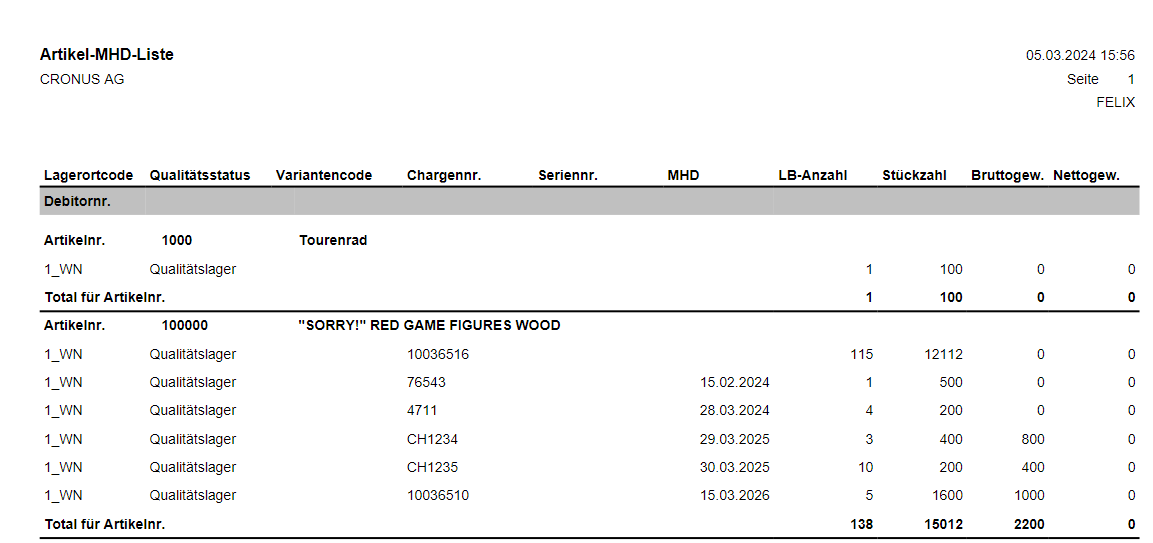
Lists items including further information such as the sell-by date sorted by item no. This report contains the following information:
- Date and time of printing
- Person who ordered the print
- Location code
- Quality status
- Variant code
- Lot no.
- Serial no.
- Sell-By Date
- SU Quantity
- Number of pieces
- Gross weight
- Net weight
SSCC Package Content List
The package content list contains all the items in the package so that you can view the contents of the SSCC without having to open it. This list can be printed automatically when the SSCC label is printed and the Minimum item quantity package content list (see Setup) has been exceeded. In addition, the SSCC package content list can also be printed manually via the corresponding report.
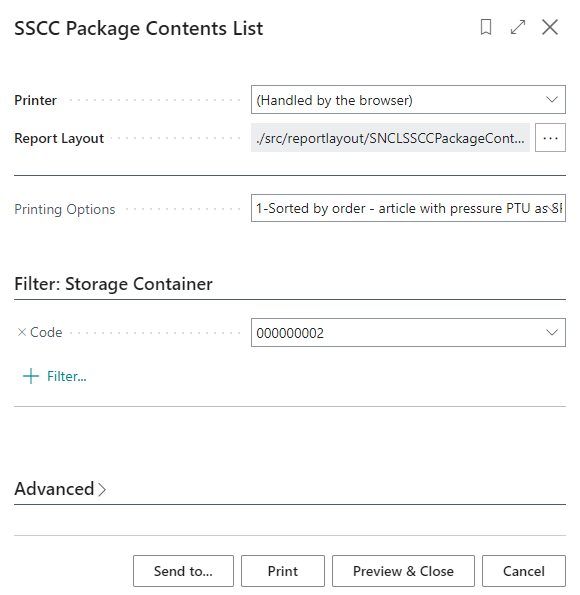
There are two print options here:
- 0-Sorted by order - items without SPU
- 1-Sorted by order - items with PTU as SPU
After printing, it can be folded and packed in a DIN A5 pocket and stuck next to the actual SSCC label.
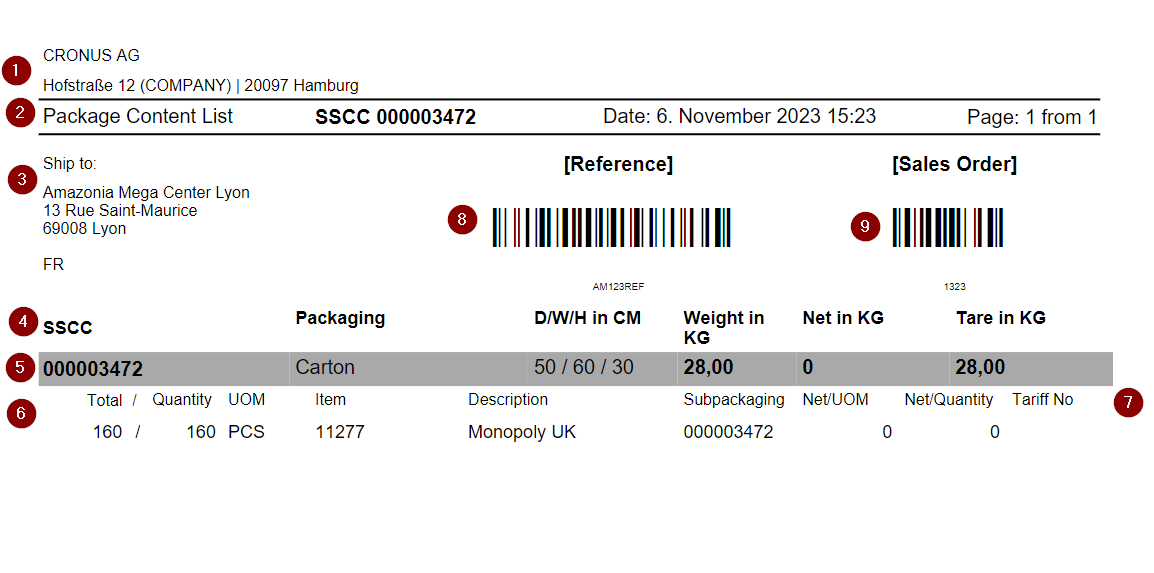
The package content list contains the following information:
Header a. Company information and, if applicable, client if it is a multi-client warehouse
Document title a. Printout name b. SSCC number c. Date d. Page number
Address and barcode field a. Delivery address from source document b. Customer reference as plain text + barcode c. Order no. as plain text and barcode
Heading package data
Package data
Contents list a. Total / quantity: If a PU unit of measure is entered for the item, the quantity is converted to this unit of measure b. Item no. c. Item description d. SPU e. Net kg per MEH f. Net quantity g. HS code
customer reference as plain text and barcode
order no. as plain text and barcode
If a GTIN is available, it is printed under the respective line.
Hinweis
The dimensions, weight units and volume values take the setup and conversion of units into account.
Hinweis
Depending on the Print options for the SSCC Packaging Content List setting in the SIEVERS WMS Setup, the SPUs of the lines are shown or not shown in the list.
Packaging Process
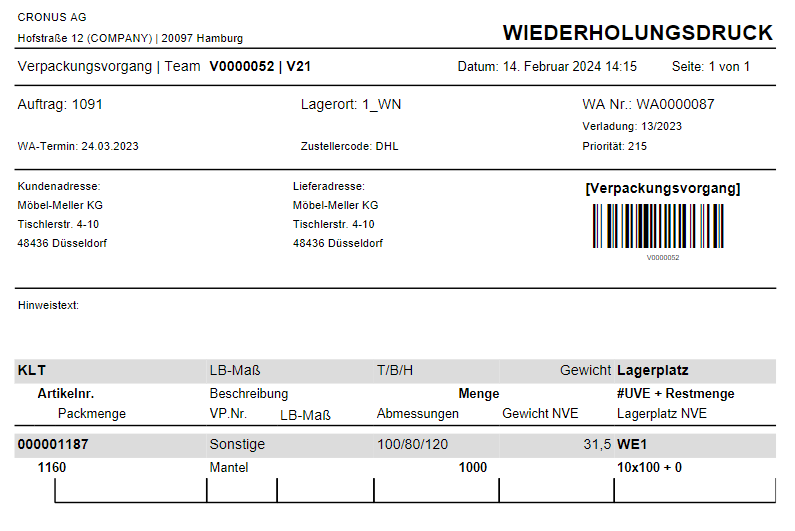
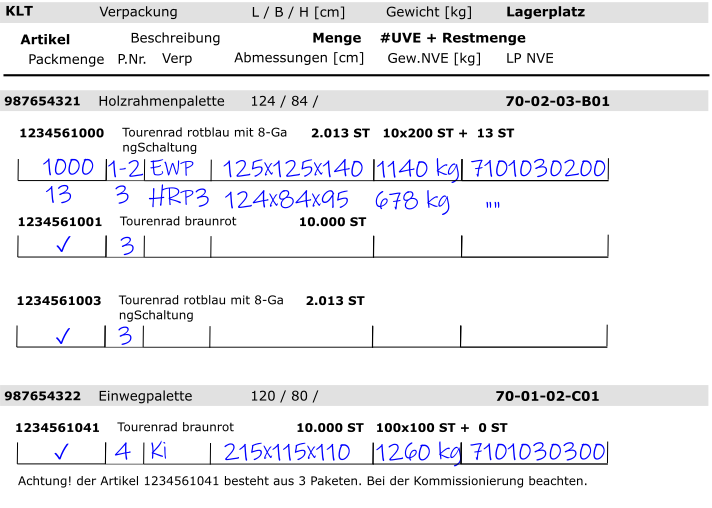
The printed packaging process contains the following information:
- Client name and address
- Information: Reprint
- Team
- Date
- Order no.
- Location Code
- Warehouse Shipment No.
- Loading week
- Priority (From the order)
- Customer address
- {{Delivery address}}
- {{Barcode}}
- Comment text
- PTU No.
- {{Inventory Unit of Measure}}
- Dimensions
- Weight
- Storage place
The employee enters the following in the list:
- Item
- Item no.
- Item description
- Quantity
- #SPU + Remaining Amount
- Pack quantity
- Packaging No. for SSCC
- Inventory Unit of Measure
- Weight SSCC
- Storage place SSCC
Packlist Exportdata
The packing list export data serves as a list of packed item quantities for warehouse shipments for which no loading exists.
Before printing, you can use a filter to set which warehouse shipment is to be printed. Please note that at least one packaged SSCC must be present in the warehouse shipment for printing. Archived source documents are taken into account when printing.
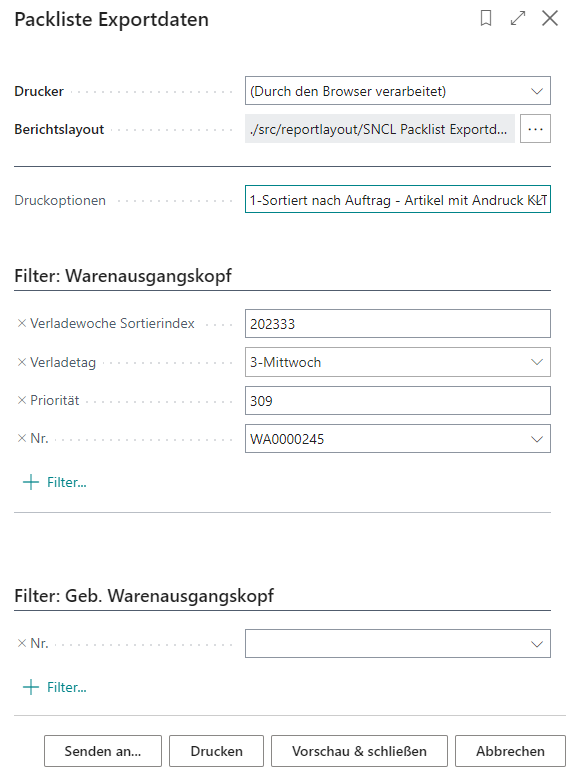
- Print options:
- 0-Sorted by order - items without SPU
- 1-Sorted by order - items with PTU print proof as SPU
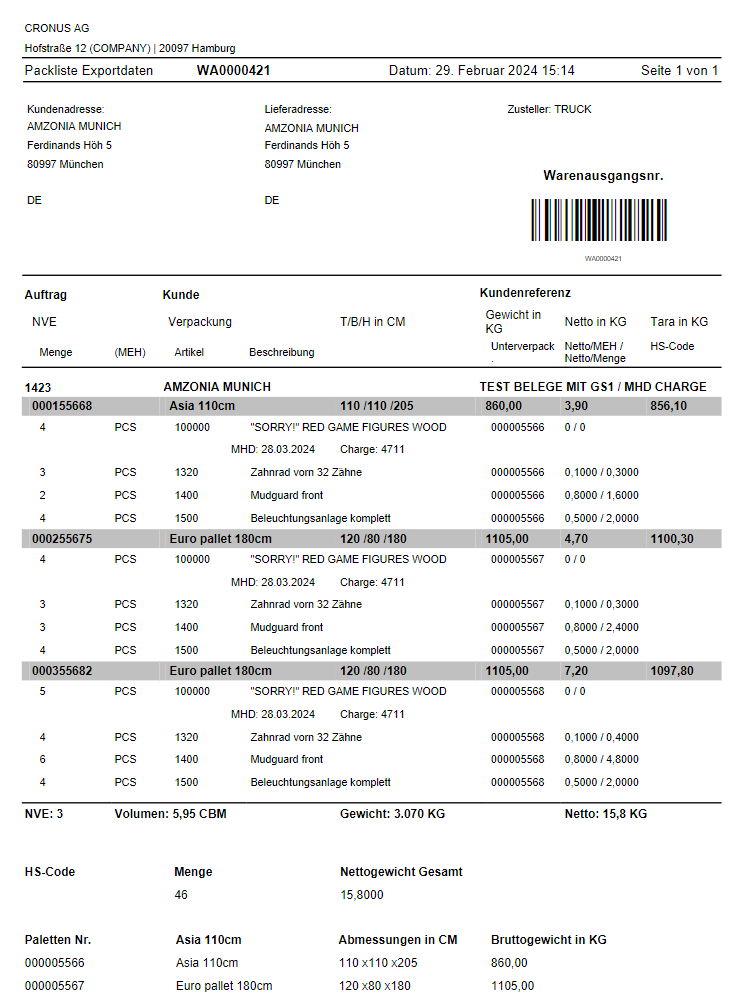
The packing list export data contains the following information:
- Warehouse Shipment No.
- Date
- Customer address
- {{Delivery address}}
- Shipping agent
- Barcode of the Warehouse Shipment No.
- Order No.
- Customer name
- Customer Reference
- SSCC No. (alternatively GS1-SSCC)
- Packaging Type
- Dimensions
- Weight in KG
- Net Weight in KG
- Tare Weight in KG
- GTIN
- Quantity
- Unit of Measure
- Item No.
- Item Description
- Sub-packaging
- Net Weight per Unit of Measure
- Tariff No.
- Number of SSCCs
- Volume in Cubic Meters
- Total Weight
- Net Weight - Total
There is also a list of pallets with their respective number, inventory measure, dimensions and gross weight. Already archived Load Carriers are also printed here.
If the items have a sell-by date or a lot no., these are also shown in the table.
::: Note The dimensions, weight units and volume values take the setup and conversion of units into account. :::
Hinweis
Depending on the Print options for the Packlist Exportdata setting in the SIEVERS WMS Setup, the SPUs of the lines are shown or not shown in the list.
Picking Document Report
The picking document is part of document-oriented picking. It can be generated in Warehouse Shipment Planning. The document serves as an overview of the picking process and its state. By default, all items in the process that have not yet been packaged are printed on the picking document.
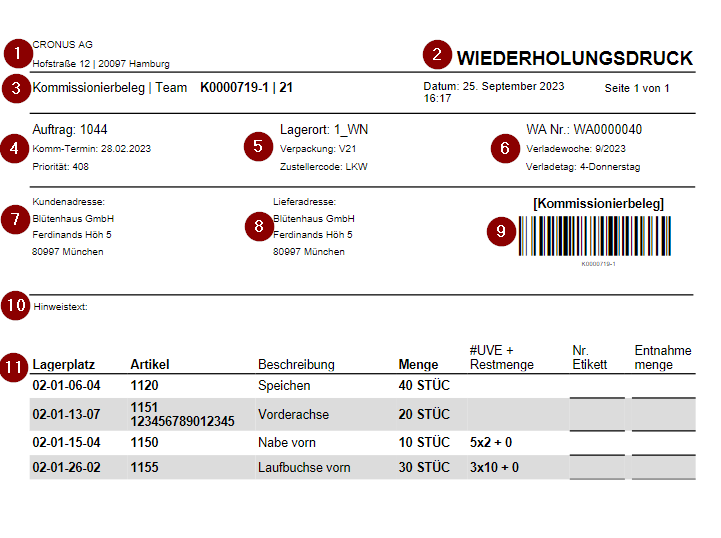
- Format: DIN A4
- Client
- The label Reprint is displayed if the picking document was printed a second time after the first print
- Left: Picking process number and picking team | Center: Date and time of printing | Right: Page number
- Order number, picking date and priority
- Location Code, packing team, shipping agent code
- Warehouse shipment number, loading week, loading day
- Customer address
- Shipping address
- Barcode for calling up the receipt on a desktop PC
- Comment text: This is the comment text of the picking document
- List of picking items. Sorting is based on the movement strategy. The number of the corresponding PTU label is entered in the Label no. field - the label can be stuck under the list or on the back of the document. If a serial or lot no. is specified in the source document, it will be printed here. If an inventory no. is printed, an inventory swap is not allowed.
Hinweis
Picking documents that contain outbound stock post lines from a MOP batch cannot be printed. These must be executed via the A4 picking program on the mobile device.
Printed Cycle Counting List
You can print the Cycle Counting List directly from the Cycle Counting Card.
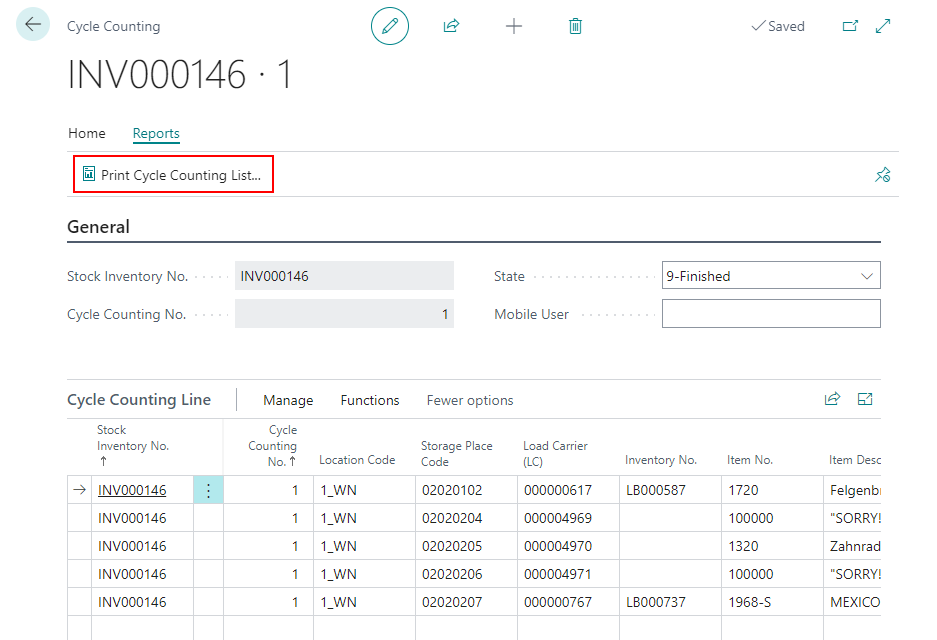
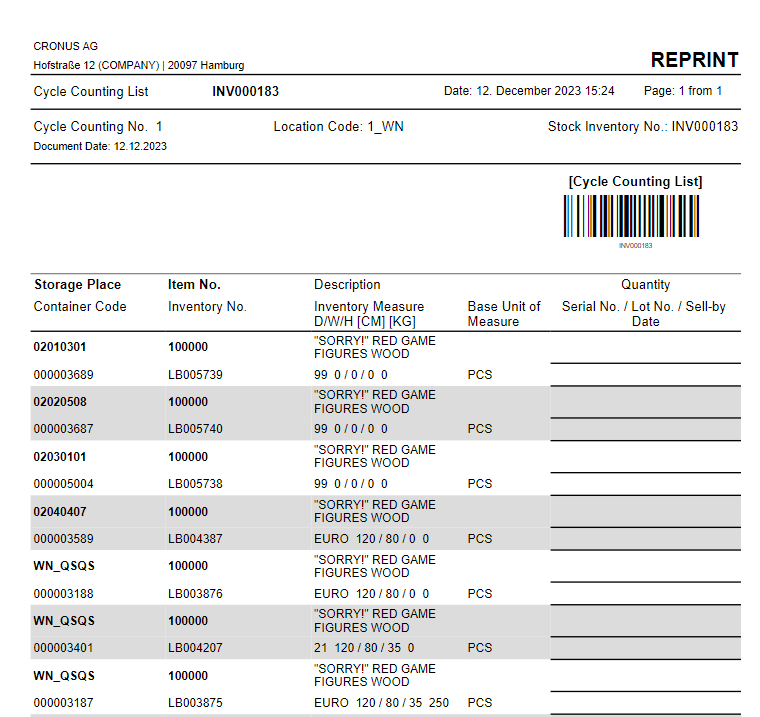
Printing the list will result in the state being set to 1-Printed. When you print it a second time, the text REPRINT will be printed on top right of the paper. The list contains the following information:
- Company name and address
- Stocktaking No. (also as Barcode)
- Date
- Page
- Number of cycle count
- Location Code
- Stock Inventory No.
- Item
- Storage Place
- Load Carrier Code
- Item No.
- Inventory No.
- Description
- Inventory Measure Code
- Dimensions and Weight
- Base Unit of Measure
The user enters the following information:
- Quantity
- Serial No.
- Lot No.
- Sell-By Date
Move Order Lists
Move Order List Inbound Stock Post
The move order list Inbound Stock Post has different functions depending on the area of application.
One-step warehouse receipt:
- The move order list is generated directly in the Warehouse Receipt Header and contains the target storage places.
2-step warehouse receipt
- The move order list is generated in the posted warehouse receipt.
- After a move order list has been generated, another one cannot be generated via the warehouse receipt. The reason for this is that storage place selection takes place during this process and cannot be repeated. If you need to print a new move order list, this can be done via the corresponding move order document.
- The item is visible for sales immediately after posting the warehouse receipt - provided the storage place has the Visible for sales label.
Sorting is done according to
- Load Carrier
- Item
This label contains the following information:
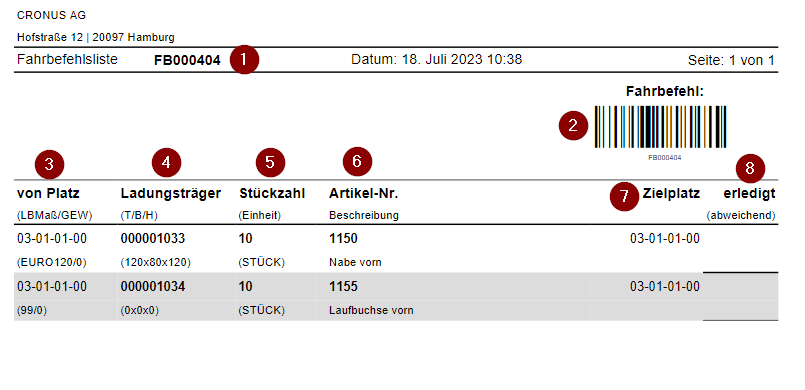
- Move order list no.
- Move order list no. as barcode
- From-place and inventory measure/weight
- Load carrier number and dimensions
- Number of pieces and unit of measure
- Destination location
- Field for signing off whether the move order has been executed
Move Order List Outbound Stock Post
The move job list or move order is an additional document designed to support the picking process. It can be used, for example, to divide the driving and picking activities between several employees. Pragmatically, the paper can also be used to label pallets that need to be returned to their original place after picking.
This paper document is particularly suitable for small warehouses or warehouses with few movements. In all other warehouses, paperless processes should be preferred.
Stocktaking Report
This report is used to evaluate stocktaking. This evaluation is in A4 format and can be output directly in Business Central and printed or exported as an Excel file. The following information is output:
- Document No.
- Journal Batch Name Global
- Storage Place Code
- Load Carrier Code
- Inventory No.
- Item No.
- Item Description
- Number of Pieces
- Number of Units Packed
- Lot No.
- Serial No.
- Base Unit of Measure
- Actual Inventory
- Inventory Value
- Item Unit Cost
- First Count
- Second Count
- Third Count
- Difference Last Count
- Difference Last Count Percent
- Difference Last Count Unit Cost
- Threshold Qty Difference
- Threshold Value Diff. LCY
- Posting Date Global
- Processed By
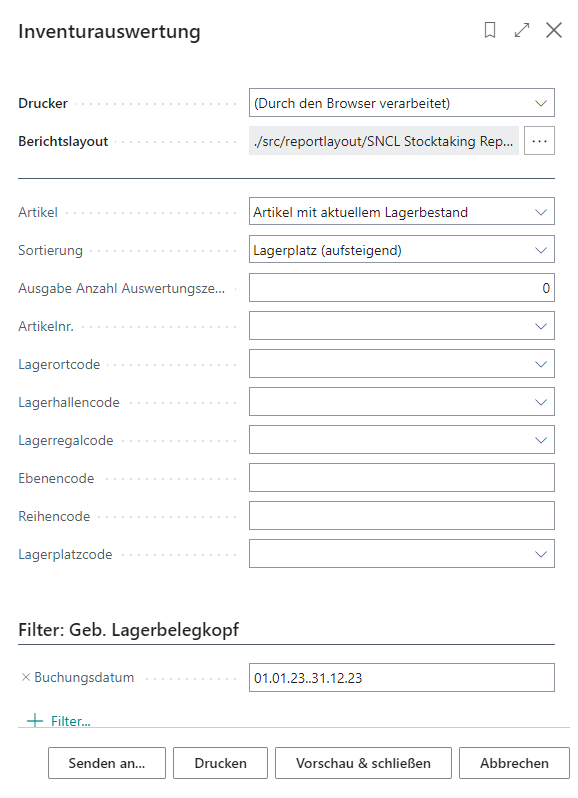
Filtering before report generation is possible with these fields:
- Items
- Items with current inventory
- All items
- Sorting
- Items
- Storage Place (ascending)
- Inventory Value (descending)
- Output Number of Report Lines
- Item No.
- Location Code
- Warehouse Code
- {{Storage Shelf Code}}
- {{Level Code}}
- Row Code
- {{Storage Place Code}}
- {{Posting Date}}
International Bill of Lading
You can print the international Bill of Lading on the following pages:
- Posted Shipment Process Card
- Shipment Process Card
- Warehouse Shipment Planning
- Posted Warehouse Shipment Card
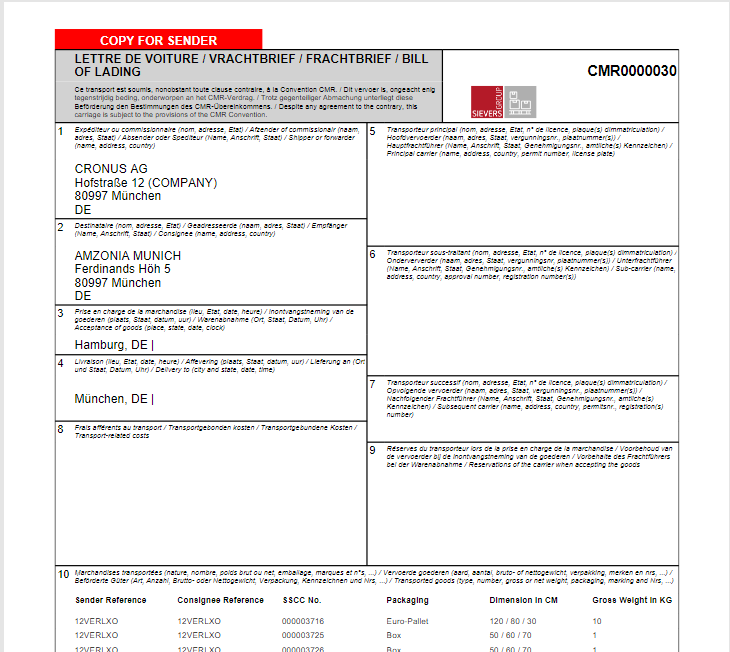
The bill has the following content:
- Ship from address
- Ship to address
- Ship from place
- Ship to place
- Shipping Agent and Carrier License Plate
- Sub Carrier
- Subsequent Carrier
- Transport-related costs
- Reservations of the carrier
- Transported goods
a. Sender Reference
b. Consignee Reference
c. SSCC No. (Or GS1-SSCC if available)
d. Packaging (Combined by the external description in the inventory measures) e. Dimension in CM
f. Gross Weight in KG - Additional Documents
- Place and date of issue
- Sender instructions
- Signature sender
- Signature actual carrier
- Signature Receiver
The company logo is printed on the top right of the bill.
You can print this bill from several pages. When you print the bill you can select the following options:
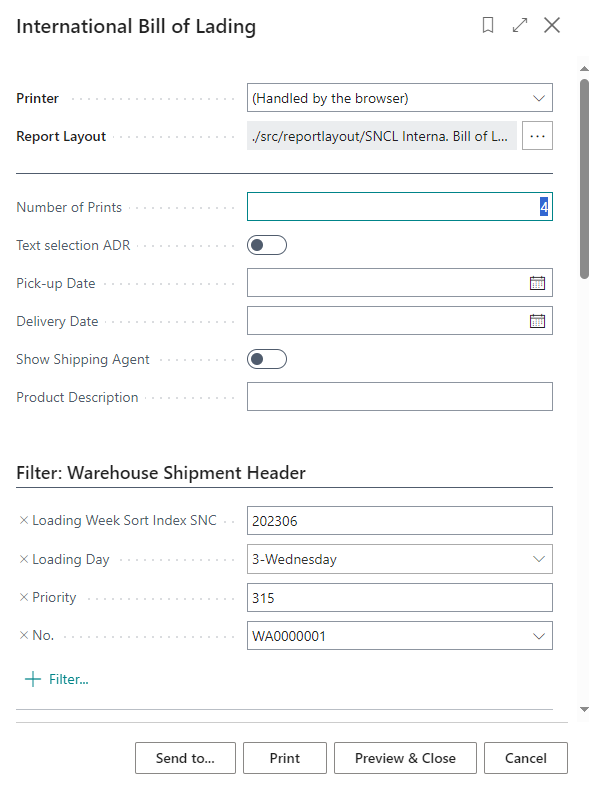
- Number of Prints
- Text selection ADR: Specifies that the ADR text is printed instead of the CMR text. Please note that the text is currently only available in German
- Pick-up Date: Will be printed on the bill
- Delivery Date: Will be printed on the bill
- Show Shipping Agent: Will be printed on the bill. You need to enter a Shipment process number at Filter: Shipment Process down below.
- Product Description: Here you can enter a description of the shipments contents. This will be printed next to the totals line on the left in box 10.
These option fields are saved by the system and filled in automatically.
Number of Prints
By default, 4 copies are printed:
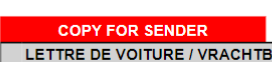
- Copy for sender
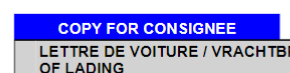
- Copy for consignee
- Copy for freight carrier
- Copy for freight carrier
These descriptions are highlighted in color at the top left of the bill.
If 3 printouts are generated, the additional copy for the freight carrier is omitted. If only 1 or 2 pages are printed, the marking is removed. If 5 or more pages are printed, the "Copy" label is utilized. For example, if 6 are printed, then the markings appear on copies 1-4 and only "Copy" on 5-6

Shipment list
The shipment list is the result of loading and can be printed as soon as SSCCs are assigned to a loading. A loading does not have to be checked for the list to be printed. The content of the shipment list is based on the package content list. It can list several orders and show a nested list of Load Carriers and transport Load Carriers as long as they belong to the same loading.
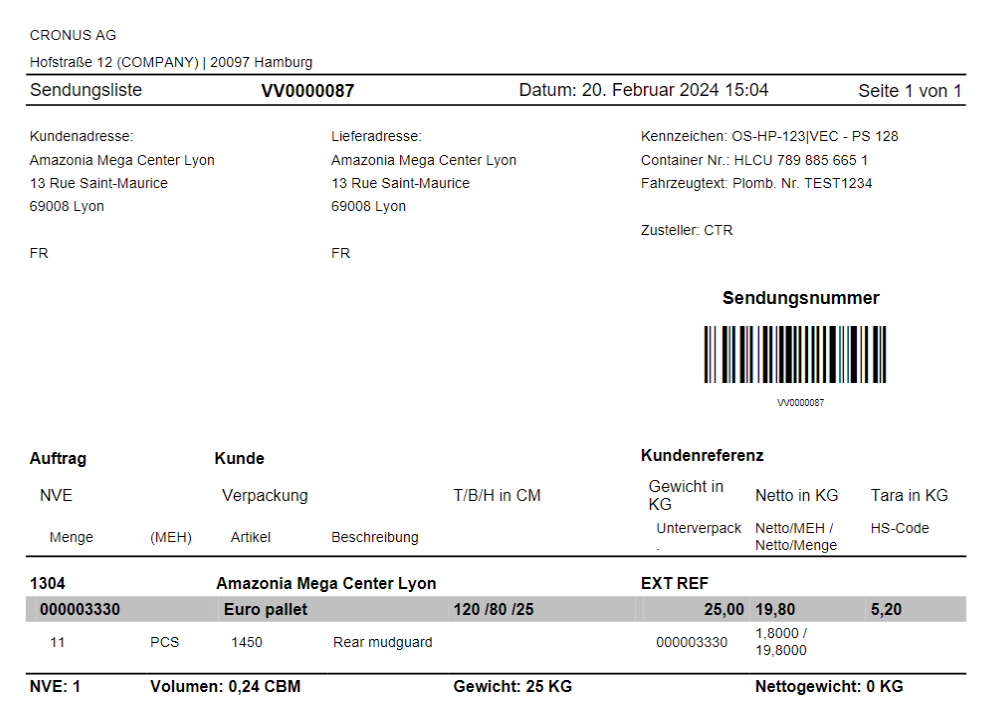
The shipment list contains the following information:
- Client and Adress
- Loading Process No.
- Date
- Customer Adress
- {{Delivery address}}
- Truck license plate front/rear
- Load Carrier No.
- Vehicle text
- Shipping Agent
- Shipment No. as barcode
- Order numbers
- Customer names
- Customer references
- SSCC no. (Or GS1-SSCC, if available)
- Packaging dimensions
- Dimensions
- Gross weight
- Net weight
- Tare: If a Outbound Stock Post already exists for a consumption journal, the fields Location code and Inventory selection strategy components in the consumption journal can no longer be changed.
- Quantity
- Unit of measure
- Item
- Item Description
- Sub-packaging unit
- Net/quantity
- Tariff No.
- Number of SSCCs
- Volume
- Total weight
- Net weight
If the items have a sell-by date or a lot no., these are also shown in the table.
If a GTIN is available, it is printed under the respective line.
Hinweis
The dimensions, weight units and volume values take the setup and conversion of units into account.
Hinweis
Depending on the Print options for the Shipment List setting in the SIEVERS WMS Setup, the SPUs of the lines are shown or not shown in the list.
Loading List
The loading list is necessary in order to carry out document-oriented loading, as it is the working basis for the loading personnel. This list contains the SSCCs that have the state 7-packed and belong to a warehouse shipment.
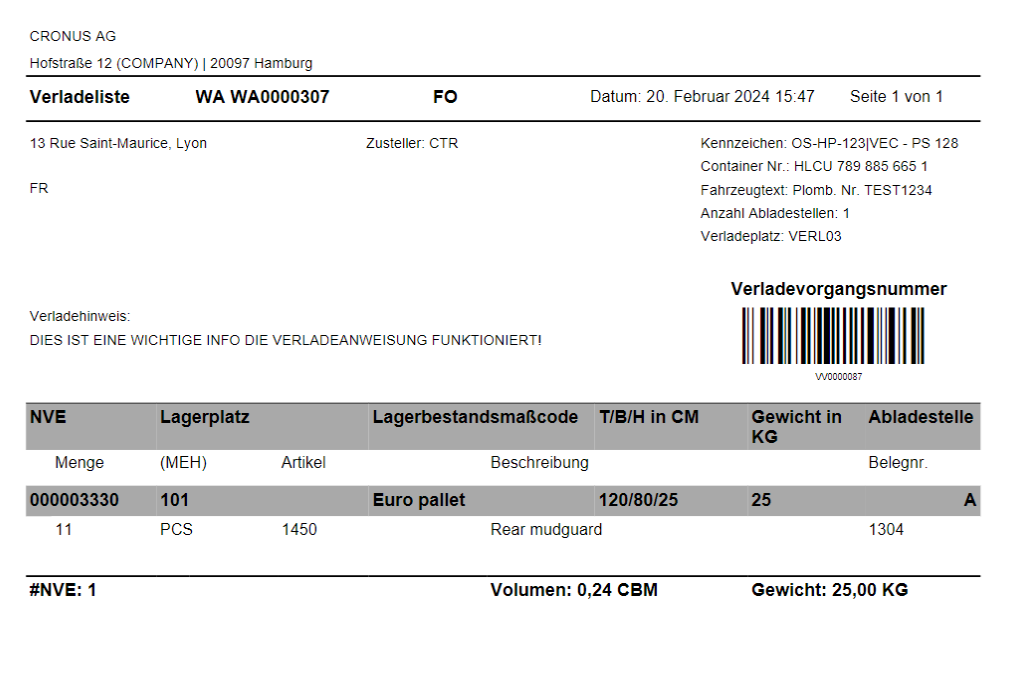
The loading list contains the following information:
- Client and address
- Warehouse Shipment No.
- User abbreviation
- Date
- {{Delivery address}}
- Shipping agent
- Truck license plate front/rear
- Load Carrier no.
- Vehicle text
- Number of unloading places
- Shipment Location
- Loading note
- Loading process no.
- SSCC
- Priority (from shipment process line. 1 = high, 2 = normal, 3 = low)
- Storage place
- {{Inventory Measure Code}}
- Dimensions
- Weight of goods
- Unloading place
- Quantity
- Unit of measure
- item
- Item description
- Document no.
- Number of SSCCs
- Volume
- Total weight
Hinweis
The dimensions, weight units and volume values take the setup and conversion of units into account.
SNCL Stock Entries
You can use this report to generate a desired list of stock entries. The current month is used as the standard filter.
You can find the following information in the report:
- Entry No.
- {{Posting Date}}
- Inventory no.
- Original document no.
- Type
- Stock Document No.
- Item no.
- {{Storage Place Code}}
- Quality status
- Number of inventories in stock
- Number of pieces
For a better overview, we recommend outputting the report as an Excel document. There are additional fields here.
- Entry No.
- {{Posting Date}}
- Inventory No.
- Transport Load Carrier Code
- Load Carrier Code
- Stock Document Type
- Stock Document No.
- Item No.
- Item Description
- Lot No.
- Serial No.
- Number of Inventories
- Number of Pieces
- Base Unit of Measure
- Sell By Date
- Location Code
- Storage Place Code
- Original Post Document No.
- Customer No
- Customer Name
- Vendor No.
- Vendor Name
- Original Item Ledger Entry No.
- Processed By
- Inbound Stock Post Customer No.
- Outbound Stock Post Customer No.
- Format Today
- Company Name
- UserID
- Net Weight
- Gross Weight
- Quality State
Sales - Shipment
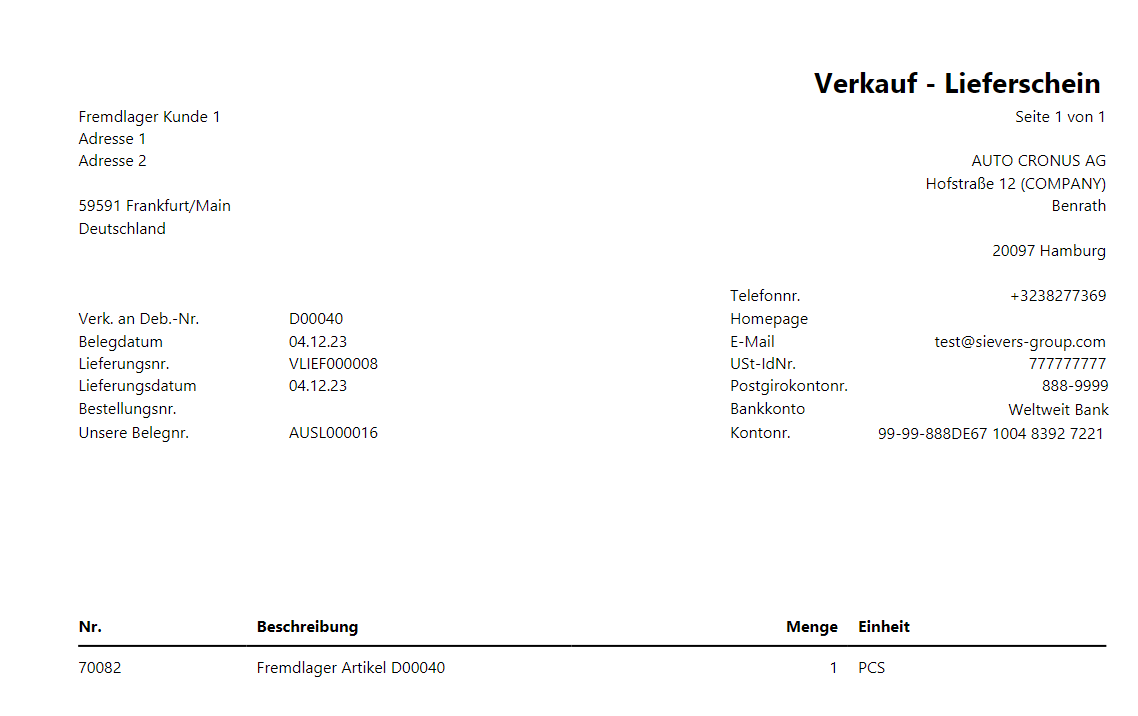
- Ship-to name
- Ship-to address
- Ship-to address 2
- Ship-to ZIP code
- Ship-to city
- Sell-to customer no.
- Document Date
- Delivery no.
- Delivery Date
- Order No.
- Our Document No.
- Client name
- Client address
- Telephone no.
- Homepage
- E-Mail address
- VAT ID no.
- Postgiro account no.
- Bank account
- Account no.
Item Table
- No.
- Item Description
- Quantity
- Unit