Features
Important Topics
- New Shipping Rule Warehouse Shipment Creation Allowed
- New Shipping Rule Stock Document Creation Allowed
- Vendor Filter in Warehouse Shipment Automation
- Archiving of Canceled Picking Documents
- A1.6s - Serial Number Entry During Load Carrier Creation in Warehouse Receipt
Setup
- New Shipping Rule Warehouse Shipment Creation Allowed
- New Shipping Rule Stock Document Creation Allowed
- New Mobile Tabs for Customer-Specific Extensions
- Consolidation of Follow-Up Move Jobs During Warehouse Receipt Posting
- Archiving of Canceled Picking Documents
- Threshold for Negative Picking
Merge Inventories with Same Characteristics on Item Category and Item – Items 127617 and 127618
The function Merge Inventories with Same Characteristics can now also be controlled at the item category and item card level. This enables differentiated configuration for different item groups.
New Field in Item Category and Item Card:
- Merge Inventories with Same Characteristics: When this setting is activated, posting to an existing load carrier checks whether an inventory with the same item (No., Variant, Lot, Sell-by Date) already exists. If so, the posting is made to this inventory.
Hierarchy of Settings:
- Item overrides item category
- Item category overrides SWMS Setup
- If nothing is configured, the setting from SWMS Setup applies
Number Series in Setup Import/Export – Item 122515
When importing and exporting the SIEVERS WMS Setup, number series can now also be included. This function saves time when setting up new environments, as the manual creation of number series is no longer necessary.
Export:
- When exporting the setup, the option Number Series can be selected
- When activated, all number series stored in the SIEVERS WMS Setup are exported
Import:
- When importing, you can also choose whether number series should be imported
- If the option is activated, the number series from the export file are imported, if available
SWMS Feature Setup - Item 127689
The page WMS Feature Setup has been renamed to SWMS Feature Setup and is now accessible via the Business Central search as well as in the SWMS menu under Setup.
Default Values for New Installation:
- Sell-by Date, Lot No., Serial Number: Activated by default
- Series Order Picking (SOP), Multi Order Picking (MOP): Deactivated by default
Existing setups are not changed.
::: Note After changes to the feature setup, the client must be restarted. :::
Warehouse Receipt
Consolidation of Follow-Up Move Jobs During Warehouse Receipt Posting – Item 126405
When posting a warehouse receipt with the setting Follow-up Move Job for Receipt Storage Places activated, only one move job with all load carriers of the warehouse receipt is now created. Previously, a separate move job was created for each load carrier.
The change simplifies the overview and handling of put-away:
- Before: A separate move job header is created for each load carrier
- After: One move job header contains all load carriers of the warehouse receipt as move job lines
::: Note No action required. This optimization applies automatically to all warehouses where the setting Follow-up Move Job for Receipt Storage Places is already activated. :::
Transfer Storage Place Logic for Inbound Stock Posting – Item 127267
The automatic transfer logic now also applies to inbound stock postings. When inventory is stored via inbound stock posting on a storage place with filled transfer fields (Transfer Location and Transfer Storage Place), the inventory is automatically transferred to the configured transfer location/storage place.
Previously, this automatic process only worked with move jobs.
Warehouse Shipment
New Shipping Rule Warehouse Shipment Creation Allowed – Item 106243
The shipping rules now include the option Warehouse Shipment Creation Allowed. This allows a warehouse shipment to be created even if the order is not fully available.
- For partial delivery: Warehouse shipment creation possible, picking document remains locked until all items are available.
- For complete delivery: Warehouse shipment creation possible, even with missing items, but without releasing the picking document.
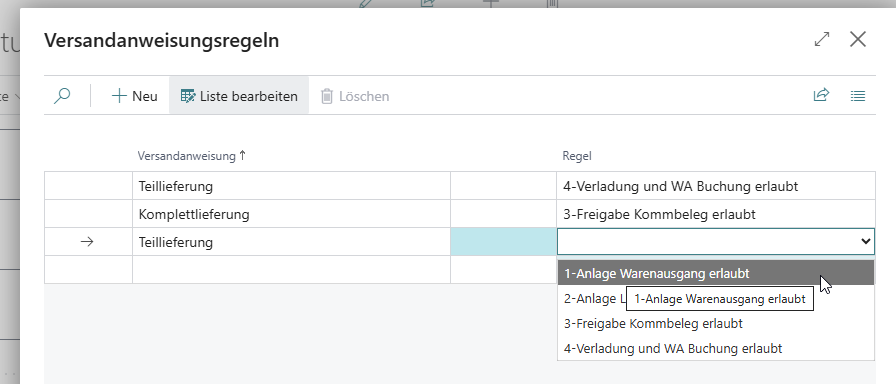
::: Note If you want to use this feature, set the field Warehouse Shipment Creation Allowed to Yes. The setting is available at the following locations:
- SWMS Setup (applies as default)
- Customer (controls customer-specific)
- Warehouse Shipment Planning (controls order-specific)
:::
New Shipping Rule Stock Document Creation Allowed – Item 106099
The shipping advice rules now include the option 2-Stock Document Creation Allowed.
This rule allows the creation of the stock document even if warehouse shipment lines are completely or partially missing. The creation of the stock document ensures the reservation of inventory. With this approach, the warehouse shipment lines secure available inventory without pickers being confused by picking documents that have not yet been released.
- The stock document may be created even if warehouse shipment lines are completely or partially missing
- Releasing the picking document is not allowed. Neither via automation nor via manual picking release
::: Note If you want to use this feature, set the field Shipping Advice Rules to 2-Stock Document Creation Allowed. The setting is available at the following locations:
- SWMS Setup (applies as default)
- Customer (controls customer-specific)
- Warehouse Shipment Planning (controls order-specific)
:::
Archiving of Shipping Advice Rules in Posted Warehouse Shipment - Item 106101
Shipping advice rules are now also archived in posted warehouse shipments.
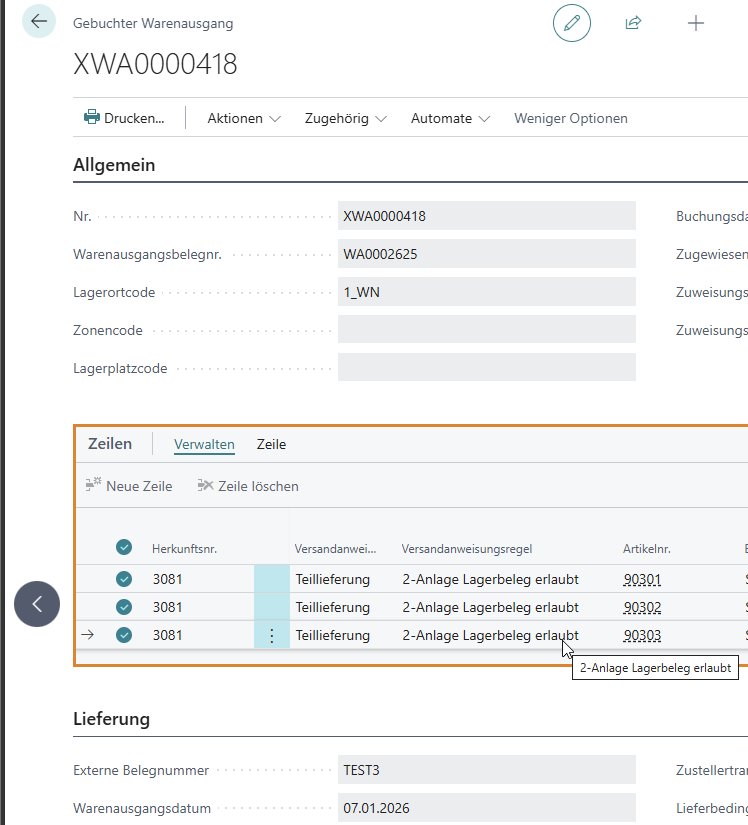
In addition, the source no. is now displayed by default, which was not the case before.
Vendor Filter in Warehouse Shipment Automation – Item 113452
Additional fields are now available in Warehouse Shipment Automation:
- Vendor Clean: Activates exclusive application to the specified vendor.
- Vendor No. Filter: Specifies that this automation line only applies to a specific vendor. If nothing is entered here, the line is applied to all vendors.
If no vendor is specified, the automation applies to all vendors. The functionality corresponds to the existing control for customers.
Picking
Loading Date and Priority in MOP Picking Documents – Item 126438
Loading date and priority are now correctly calculated and stored at the header level of MOP picking documents. These values form the basis for sorting MOP batches and will also be displayed in the MDE screens A4.1, A4.2, and A4.3 in the future.
These are the specific changes:
- In MOP picking documents, the earliest loading date of all assigned warehouse shipments is now stored at the header level
- The priority is taken from the warehouse shipment with the earliest loading date. For multiple warehouse shipments with the same date, the lowest priority applies
- Changes to the loading date in Warehouse Shipment Planning affect the MOP picking document in real time
- MOP batches are sorted by loading week, loading day, and priority
New Action "Create Picking Document" – Item 127053
A new action Create Picking Document is available in Outbound Stock Postings. This creates a picking document for all dislocation lines that do not yet have an associated picking document but still need to be picked.
The action is particularly useful after the cancellation of picking documents to continue the process without inconsistent data.
Threshold for Negative Picking – Item 127895
A new field Threshold Negative Picking is available in SWMS Setup. This threshold defines from which percentage of the required quantity a negative picking is suggested.
Example: With a threshold of 80% and an inventory of 100 pieces, a negative picking is suggested for a demand of 85 pieces (= 85%), as the demand exceeds the threshold.
::: Note If you want to use this feature, enter a percentage value (e.g. 80) in the Threshold Negative Picking field in SWMS Setup. Without an entry, the function is deactivated. :::
Archiving of Canceled Picking Documents – Item 127049
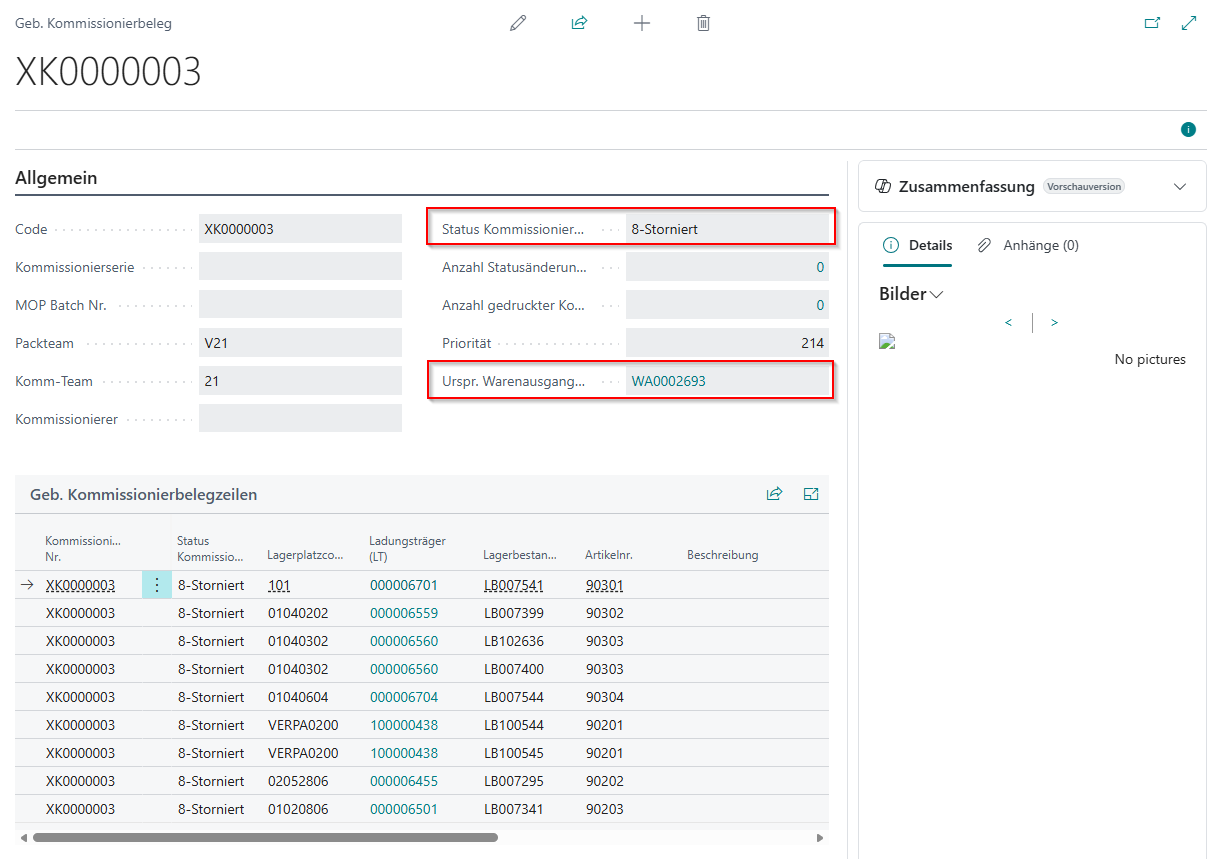
When canceling printed or released picking documents, they are now archived instead of deleted. This significantly improves traceability.
::: Note No action required. Archiving occurs automatically with each cancellation. :::
Changes:
- Canceled picking documents are transferred to posted picking documents with status 8-Canceled
- All lines of the document also receive status 8-Canceled
- New field Original Whse. Shpt. No. shows the warehouse shipment number to which the picking document belonged before cancellation
- The field is displayed in the list view (existing documents are not updated retrospectively)
- After cancellation, the dislocation lines can be edited again
Validation of Load Carrier Type During Label Printing – Item 126557
The request pages for load carrier label printing now validate the load carrier type (SU, PTU, SSCC, STU) analogous to the validation in the report call from the load carrier list.
Previously, it was possible to enter any load carrier number when manually calling the label reports, regardless of its type. This led to the generation of incorrect labels.
Affected Reports:
- SSCC Label
- Storage Unit Label
- Picked Load Carrier Label
- Series Load Carrier Label
When entering a load carrier number with a different load carrier type, an appropriate error message now appears.
Packaging
Lookup for PTU and SSCC in Packaging Process - Item 126425
Lookup functions for the fields PTU No. and SSCC No. have been added to the page SNC Packaging Process (1 PTU>SSCC). Via the lookup, you can now navigate directly to the respective load carrier card.
Load Carriers
Field Transport Load Carrier Quantity Hidden - Item 126428
The field "Transport Load Carrier Quantity" has been removed from the load carrier card, as transport containers are not supported in SIEVERS WMS.
Cleanup of Stock Load Carriers Page - Item 126435
The outdated page SNCL Stock Load Carriers has been removed from the system. All links, lookups, and menu entries that referenced this page have been redirected to the Load Carriers page.
The Load Carriers page is the only overview for load carriers and provides all required information and functionalities.
Mobile
A1.6s - Serial Number Entry During Load Carrier Creation in Warehouse Receipt - Item 63757
The new MDE screen A1.6s enables the entry of serial numbers when creating load carriers in the warehouse receipt. This function is designed for cases where no load carriers have been created in advance in the SNCL Warehouse Receipt and therefore no serial numbers can be transferred from pre-entry.
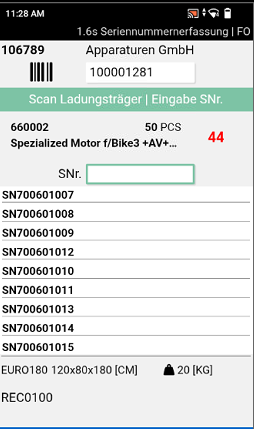
The screen A1.6s opens automatically after quantity confirmation in A1.6 when:
- a serial number requirement exists in the receipt line from A1.2
- and no load carrier has yet been created in the SNCL Warehouse Receipt
Process:
- In A1.6, a blank barcode or an empty load carrier is scanned
- For items requiring serial numbers, the message "Enter serial numbers next" appears
- After quantity input, A1.6s opens automatically
- The focus is automatically on the serial number scan field
- Exactly one serial number is entered per unit of measure
- A quantity counter shows progress: Red for incomplete entry, Green for complete entry
- With F5, the entry is completed, the load carrier is marked as checked, and the load carrier label is automatically printed
Restrictions for Serial Number Requirement:
- Splitting the quantity across multiple load carriers is not possible – the fields Qty / LC and No. LC are disabled
- Only one load carrier barcode can be scanned
Validation:
When scanning a serial number, a plausibility check is performed:
- "Serial no. is already contained in WHS Receipt" – The serial number has already been entered in this warehouse receipt
- "Serial no. - Item already exists in inventory" – The combination of serial number and item number already exists in inventory
Menu:
- F1 (Ctrl+B): Enter/edit weights and dimensions
- F4 (Ctrl+O): Check load carrier
- F5: Complete serial number entry
::: Note The "Take Photo" function (F6) is not available in A1.6s. An automatic completion when reaching the target quantity does not occur. The entry must be completed manually with F5. :::
Full Pallet Handling in C1.2 – Item 111994
In screen C1.2, a complete storage unit (SU) can now be used as a container when the required quantity of the position corresponds to the SU quantity.
- Scanning the SU selects the position and automatically equips the SU as a container.
- For additional positions, a prompt asks whether the SU should be dispatched as a full pallet.
- In the position overview, a full pallet symbol is displayed when the position concerns the entire SU.
Prompt for Full Pallet Picking with Existing PTU - Item 92371
When picking a full pallet (complete quantity of a load carrier without opening), a prompt now appears when a PTU is already on the floor conveyor vehicle:
- Yes: The quantity is posted to the existing PTU
- No: The SU is converted to a standalone PTU
Previously, the full pallet was automatically posted to the existing PTU without prompting. With this change, pickers now have the choice of whether to treat the full pallet separately or merge it.
Menu Adjustment in A3.2 – Item 122322
In screen A3.2 (Take Out), the menu item Create Load Carrier is now disabled, as creating a new load carrier is not intended in this process step. In A3.3 (Put To), the function remains available.
Receipt Entry in MDE Overview Screens - Item 124752
We have standardized the behavior of receipt entry in the MDE overview screens. The entered value now remains visible in the scan field after confirmation in all screens (A1.1, A3.1, A4.1, A5.1, A6.1, B4.1, B5.1, C1.1).
D and X: New Tabs for Customer-Specific Extensions - Items 105472 and 125959
The new tabs "D" and "X" for customer-specific extensions are available in the MDE function menu. These areas enable a clean separation between standard functionality and individual customizations.
The tabs are not visible by default after installation. Activation is done with these settings:
SNC Mobile Setup:
- Use Indi Tab Menu SNC: Activates area X in the SNC menu
- Use Indi Tab Main Menu SNC: Activates area D in the main menu
The tabs are delivered without standard functions and serve as placeholders for project-specific implementations.
Technical Notes:
- Tab D contains six pre-filled entries. This structure ensures that customer-specific customizations are not overwritten during updates.
- Pressing empty buttons has no effect.
- The tabs are populated via events and require a project-specific implementation.
Small Changes
- Performance improvement in the picking process: The functions "Confirm Quantity" and "Create Load Carrier" have been optimized - Item 127627
- In Warehouse Shipment Planning, the status indicator for loading now remains empty when the shipping agent does not require loading. This makes it immediately apparent that no loading is necessary - Item 127576
- The menu entry "Check Production Supply" in the WMS Role Center has been renamed to "Check Replenishment Production Places" - Item 126426
- The report "Stocktaking Receipt" has been removed from the system. The associated menu entry under Actions in the Storage Place Overview is no longer available - Item 126728
- Series Distribution is now part of the function menu on the Business Central homepage in the Stock Documents area - Item 127541
- Series Creation Strategies are now part of the function menu on the Business Central homepage in the Strategies area - Item 127668
- Obsolete extended stocktaking functions for reserved and packed inventory have been removed. The basic functions (warning/rejection for reserved inventory) remain - Item 127771
Bugfixes
Keyboard Menu Entry on MDE Devices - Item 125070
We have fixed an error that caused the "Keyboard" menu entry on devices with function keys not to open the on-screen keyboard. The keyboard can now be reliably accessed via the menu in all MDE screens, regardless of device type.
Error Message for "Convert All SU to PTU" - Item 127888
We have improved an error message for the function "Convert All SU to PTU". When only a single storage unit is present, the system now indicates that the function "Convert SU to PTU" should be used in this case.
Display of Info Symbol in A4.2 for MOP Documents - Item 127129
We have fixed an error that caused the info symbol (i) not to be displayed for MOP picking documents in A4.2. The symbol is now displayed as with regular picking documents, and the info text can be accessed via F3.
PTU Creation with F5 in A4 - Item 129992
We have fixed an error that caused duplicate label numbers to be generated in the picking document under certain circumstances when creating a PTU with F5 in picking (A4). This led to error messages when selecting positions.
Permission Error During Inventory Swap with Optimization - Item 127889
We have fixed a permission error that occurred during inventory swap within a load carrier on the MDE when the optimization option was activated.
Change of Inventory Measures in Picking Document - Item 127967
We have fixed an error that sometimes caused changes to inventory measures (e.g., weight, dimensions) in the picking document not to be saved. The entered values are now correctly applied.
Cleanup SNC Storage Place Overview - Item 60242
The non-functioning menu entries "Warehouse" and "Storage Shelf" have been removed from the Related menu of the SNC Storage Place Overview.
Replenishment Display for Production Supply via A3.x - Item 126191
We have fixed an error that caused the status and quantity in replenishment not to be correctly updated for production supply move jobs that were processed via the MDE screen A3 (Item Transfer). The fields "Replenishment Status" and "Quantity in Replenishment" are now also correctly displayed when processed via A3.
Series Distribution with Reusable Load Carriers - Item 126718
We have fixed an error that caused series distribution not to work with reusable load carriers as STU. When distributing the last quantity from a reusable STU, an error message appeared because the system tried to transfer the load carrier to posted load carriers. Series distribution now works correctly with reusable load carriers.
Unnecessary Change Log Entries During Quantity Confirmation - Item 128528
We have fixed an error that caused unnecessary entries in the load carrier change log during quantity confirmation on the MDE. The system previously logged a status change (from 5 to 2 and back to 5) even though no actual status change occurred. Quantity confirmation no longer generates superfluous change log entries.
Automatic SSCC Label Printing During Series Distribution – Item 126551
We have fixed an error that caused automatic SSCC label printing not to work correctly during series distribution.
Unpacking from SSCC with Reusable Load Carriers – Item 128564
We have fixed an error that occurred when unpacking partial quantities from an SSCC in connection with reusable load carriers.
Warehouse Shipment Posting When Using Reusable PTUs - Item 128877
We have fixed an error that blocked warehouse shipment posting when reusable load carriers were used in the picking process.
Quantity Change During Load Carrier Creation in Warehouse Receipt - Item 128394
We have fixed an error that prevented the quantity per load carrier from being changed during load carrier creation in warehouse receipt (A1.6). After scanning a blank barcode to create a new load carrier, it is now possible again to adjust and confirm the quantity.