Features
Important Topics
Setup
- Optimized Display of SWMS Mobile on Tablets and Terminals
- Default Storage Place for Reusable Load Carriers
Unlimited Capacity for Storage Place Categories - Item 102953
The SNCL Categories now have a new flag Unlimited Capacity available. When this flag is activated, a storage place with this category will never be marked with the occupancy "Full", regardless of the entered no. of storage places. The storage place update will not be performed for these places.
Typical use cases are functional places such as warehouse receipt places that should remain permanently available. Additionally, this prevents KPIs for storage place utilization from being distorted by functional places.
Warning Message when Reducing the No. of Storage Places - Item 105647
When making changes to the storage place category or to the storage place itself, the system now checks whether the change would lead to a capacity shortfall.
- SNCL Categories: If the no. of storage places of a category is reduced, a warning message appears if storage places with this category already have more places occupied than the new no. of storage places allows.
- Storage Place Card / Edit Storage Places: When changing the category at the storage place, a warning message appears if the new category offers fewer places than are currently occupied at the storage place.
The change can be carried out despite the warning. However, it is recommended to check the affected storage places afterwards.
Set Load Carrier Type Change when Creating Load Carriers - Item 126398
The action Create Load Carrier has been extended with the option Chg. Load Carrier Type allowed.
When this option is activated, all newly created load carriers automatically receive the flag Load Carrier Type Change Allowed. This eliminates the manual maintenance of this field on each individual load carrier. After the warehouse shipment posting, these load carriers are automatically reset and are available for new warehouse processes.
Default Storage Place for Reusable Load Carriers - Item 126399
In the SIEVERS WMS Setup, a Default Storage Place for Reusable Load Carriers can now be stored.
After the warehouse shipment posting, reusable load carriers are automatically reset and posted to this storage place. This makes them centrally available for new warehouse processes without requiring manual transport.
Load Carriers
Source at Load Carrier Creation - Item 126409
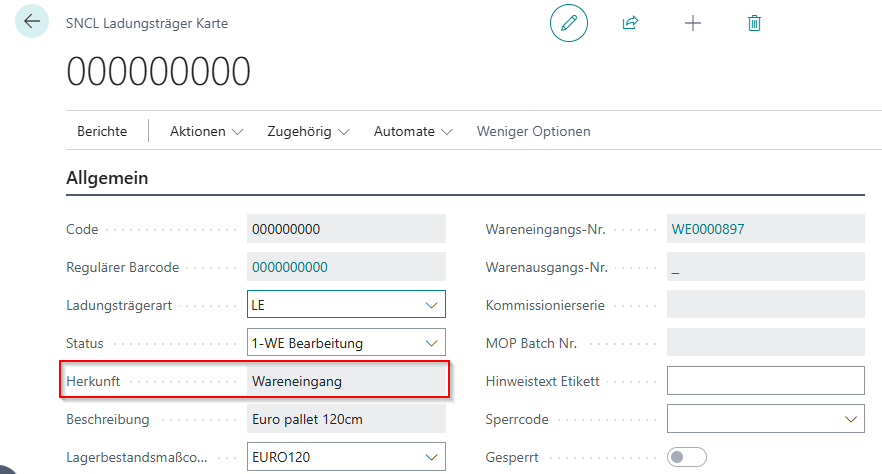
When creating load carriers via the report Create Load Carrier, the field Load Carrier Source is now automatically filled with the value "Load Carrier Creation". This makes it immediately recognizable that the load carrier was created via this report.
Storage Places
Automatic Update of Storage Places after Category Change - Item 105683
Changes to an SNCL category are now automatically passed on to all associated storage places.
Previously, after a change to the category (e.g. no. of storage places, height, width, depth, volume), a storage place update had to be performed manually so that the new values became visible on the storage places. This update now occurs automatically when saving the category change. A manual storage place update is no longer required for category changes.
Storage Place Update Extended by Weight, Volume and No. of Storage Places - Item 105693
The functionality of the storage place update has been extended. In addition to the occupancy information, the following values from the assigned category are now also updated:
- Weight
- Volume
- No. of storage places
The storage place update can be executed via the storage place card (Manual Update) or for multiple places simultaneously via Edit Storage Places in the SNCL storage place overview.
Move Jobs
Team Finding for Move Jobs Considers All Storage Area Filters - Item 124985
The automatic team finding for move jobs now considers all filters configured in the "Storage Area" tab of the team card.
Previously, individual filters (e.g. only storage shelf) could apply independently, which could lead to unintended team assignments. With this change, all set filter criteria (area, warehouse, storage shelf, row, level) are evaluated in combination. A move job is only automatically assigned to a team if all configured filters are met.
Shipping
Automatic Filling of the Delivery Date in the Shipping Shipment Order - Item 113258
The field Delivery (Delivery Date) in the SIEVERS Shipping Shipment Order is now automatically filled.
The delivery date is automatically calculated from: Pickup (Loading Date) + Shipping Time from the Shipping Agent Service
The shipping time is stored in the Shipping Agent Services of the respective shipping agent. The automatic calculation eliminates the manual processing of each individual shipment order. This prevents error messages when transferring to shipping service providers such as ECOVIUM / SHIPXPERT, which expect a delivery date.
Transfers
Optimization of Automatic Transfer Posting - Item 123179
The posting of transfers via the fields Transfer Location Code and Transfer Storage Place Code in the storage place card has been optimized. With high transfer volume, processing is now more efficient. This particularly affects scenarios where stock is regularly transferred via defined transfer storage places (e.g. sorting places) to other locations. No adjustment of the setup is required.
Picking
Put Down PTU/SSCC Directly from A4.2 Position Overview - Item 126006
In the MDE mask A4.2 Position Overview, putting down load carriers can now be started directly by scanning a PTU or SSCC.
Previously, after completing the picking, the function Assign/Unload TU had to be called via the menu (F8), even though the instruction "Put down load carrier" was already displayed. Scanning the PTU or SSCC had no effect. With this change, scanning a load carrier in A4.2 automatically starts the put-down process.
Menu and PTU Creation in A4.MOP - Item 127224
In A4.MOP there is now the regular A4 menu, through which all important functions can be called directly. In addition to dimensions and weights, information and label printing, MOP pickers can now also create new PTUs via F5 without having to scan a blanco barcode. The function is available when the setup Create PTU/SSCC via Hotkey A4, A5 is activated in the SIEVERS WMS Team Card. The PTU label is automatically printed.
Production
Automatic Printing without Dialog for Output Posting and Finish Products - Item 122599
The functions Post Output and Finish Products in the released production order now execute automatic printing without a print dialog.
Previously, when automatic printing was activated, a dialog was displayed that interrupted processing. In case of a posting error, this could lead to the output having to be posted manually or the output journal having to be deleted in a cumbersome way. With this change, printing occurs in the background, so that posting runs through without interruption and can be rolled back cleanly in case of errors.
Automatic Team Finding for Production Supply Move Jobs - Item 120596
Move jobs of type Transport to Production, which are created in the MDE mask C1 Production Take Out, now receive automatic team finding.
Previously, the team was rigidly taken from the source move job. Now the appropriate team is determined based on the parameters maintained in the SIEVERS WMS Teams (location, warehouse, storage area, type, move job type filter) – related to the destination of the move job.
If no suitable team is found, the assignment remains empty. These move jobs are displayed in a new stack in the role center and can be assigned manually there.
Mobile
A4.2/A4.3/A4.MOP Empty Reusable Load Carriers Use as PTU - Item 125947
Empty reusable load carriers can now be used directly as PTU in picking.
Previously, pickers had to scan a blanco barcode for each new picking container and stick it on the container. With this extension, empty reusable load carriers (SUs without stock) can alternatively be scanned. The system automatically converts these into a PTU, provided the flag Chg. Load Carrier Type allowed if Reusable is activated.
Prerequisites:
- The load carrier must be completely empty (no stock)
- The flag Chg. Load Carrier Type allowed if Reusable must be activated on the load carrier
MDE A2 Internal Transports: Automatic Filtering on Team - Item 124984
The MDE list A2 - Internal Transports now shows exclusively move job lines that are assigned to the selected team.
The filter criteria are already considered when creating the move job for team finding (see Item 120585 from the last release). Additional filtering on the MDE is therefore no longer required.
Optimized Display of SWMS Mobile on Tablets and Terminals - Item 126095, Item 126097, Item 126093
SWMS Mobile has been optimized for use on larger screens such as tablets and terminals.
New functions:
- Scaling Factor: A scaling factor can now be stored in the device model, which proportionally enlarges all fonts and graphic elements. This reduces empty areas on larger displays and improves readability.
- Maximum Width/Height: These fields limit the maximum expansion of the display, so that the content is displayed centered on very large screens. These setups can be found in the SNC Mobile Setup.
- Keyboard in Landscape Format: When a device is used in landscape format, the on-screen keyboard now appears to the right of the main content instead of at the bottom edge. The work area thus remains fully visible.
Work Indicator in C2.1 Production Supply Overview - Item 116377
In C2.1 Production Supply Overview, a footer with work indicator is now available. Production suppliers can see at a glance how many load carriers need to be brought to production and how many move job lines need to be distributed. The two key figures are visualized by a pallet or document symbol and update automatically with each position confirmation. For numbers over 999, a compact display with one decimal place and "k" is shown (e.g. 1.9k). The color coding shows gray for open tasks and green when all work is completed.

Miscellaneous
Performance Optimization Status Function Production - Item 127418
We have significantly improved the performance of the status function for production orders.
With a large number of stock entries and component lines, considerable delays could previously occur that affected other system areas. The status update now occurs much faster and scales better.
Small Changes
- A mobile help has been added for page A4.MOP (Multi-Order-Picking LC Box Assignment), which can be called via the menu - Item 125690
- Add new field Inventory Measure Code to the cycle counting list - Item 116365
- When creating a stock document from the warehouse shipment card, the Picking Overview now opens automatically - Item 124142
Bugfixes
Deleting a Load Carrier in Warehouse Receipt Corrected - Item 122729
An error has been fixed where deleting a load carrier in the warehouse receipt was not possible under certain circumstances.
Posting of Non-Deliverable Items in Warehouse Shipment Corrected - Item 126114
An error has been fixed where unavailable items were incorrectly posted when posting the warehouse shipment. This led to negative item entries without associated stock entries.
Occupancy Display at Storage Places - Item 125035
An error has been fixed where the occupancy display at storage places was not updated correctly. After certain posting processes, the storage place continued to show "Full" even though no load carriers were present anymore.
Output Posting with Serial Numbers and Lots - Item 125470
Serial numbers and lots from the output journal were not transferred to the stock document. This meant that finish messages with specific serial numbers or lots could not be posted. The error has been fixed.
Loading Date Calculation in Warehouse Shipment - Item 125530
The loading date in the warehouse shipment was calculated incorrectly when the sales order contained comment lines. Comment lines without a date were incorrectly interpreted as the current date. Now only lines with the type "Item" are considered for the calculation.
Display of Long Load Carrier Numbers in A4.2/A4.3 - Item 125997
We have fixed an error that caused load carrier numbers with more than 9 characters to not be displayed correctly and to be overwritten by other display fields. In A4.2 and A4.3, the last 9 digits of the load carrier code are now displayed.
Resetting MOP Batches Possible - Item 124248
An error has been fixed that prevented released or finished MOP batches from being reset.
Wrong Picking Document in Warehouse Shipment Planning - Item 125364
An error has been fixed where an incorrect picking document was displayed in the warehouse shipment planning when the actual document was not yet released. From now on, only the correct document is displayed in this case.
SSCC Label without Data for VARIOUS Orders - Item 125078
A problem has been fixed where the SSCC label contained no data for consolidated orders (VARIOUS). The address data of the first order as well as the marking "VARIOUS" are now correctly output on the label.
Incorrect Translation of Status "In Packaging" - Item 124705
The translation of the status for load carriers has been corrected. The status is now "IN PACKAGING" instead of the previous incorrect designation.
Production Orders via Locations without WMS - Item 123046
An error has been fixed that meant production orders could no longer be processed via locations without WMS functionality. From now on, the standard logic of Business Central is used for locations without WMS.
Change of Inventory Measure for Inbound Stock Postings - Item 125064
An error has been fixed that prevented the field New LC Inventory Measure from being changed for inbound stock postings from output postings.
Error Fix: Printing via Job Queue - Item 126156
An error has been fixed that prevented the printing of reports via the job queue.
Correction in Label Printing - Item 126553
An error has been fixed where printing an STU label via picking documents incorrectly also printed other labels (PTU, SSCC). From now on, only the labels linked to the respective picking document are printed.
Status Update of Production Supply Faulty - Item 126766
The status in production orders is now correctly updated when move jobs for production supply are created, processed or completed.
Function Bar A4.1 Contains Incorrect Symbols - Item 127538
The symbols in the function bar of A4.1 have been corrected. Additionally, it is now possible to jump directly from the A4.1 menu or via the function bar to Information or Item Transfer.
Mobile Users: Error with Missing FCV Specification - Item 127584
A problem has been fixed that occurred when a new mobile user had no specification for a floor conveyor vehicle (FCV). Login and use is now possible without errors even without an FCV specification.
Consolidation Storage Place System for Reusable Load Carriers - Item 126412
We have fixed an error that caused the consolidation storage place system to no longer function correctly for reusable load carriers.
When an empty reusable load carrier (PTU/SU) was used in picking, it retained its previous storage place instead of receiving the correct consolidation storage place. As a result, consolidation no longer worked for subsequent PTUs.
Permission Error for Production Order Components in Companies without SWMS - Item 125760
We have fixed an error that caused a permission error when opening production order components in companies without SIEVERS WMS.
Change Log Load Carrier Corrected and Extended - Item 126427
We have fixed several errors in the Change Log for Load Carriers:
- Changes are now only logged when they actually occur
- No more erroneous entries for dimensions, inventory measure or load carrier type
- Duplicate entries (e.g. for warehouse shipment no.) have been eliminated
Additionally, the following fields are now tracked in the change log:
- Consolidation No.
- Warehouse Receipt No.
- Packaging Process / Loading Process
- MOP No. / Picking Series
- Comment Text
Rounding Precision for Consumption Posting in Production Orders - Item 126948
We have fixed an error in consumption posting in production orders.
For the functions "Post Consumption" and "Finish Products", the field Rounding Precision for Consumption on the item was not considered. As a result, quantities were posted with too many decimal places (e.g. 0.51234 KG instead of 0.513 KG).
Automatic Deletion of Shipment Order Lines - Item 123003
We have fixed an error where shipment order lines were not automatically deleted when the associated outbound stock post line was removed.
Inventory Selection Does Not Consider Reservations - Item 127522
We have fixed an error where inventory selection did not consider reservations when creating stock documents. Inventory that was reserved for a sales order was incorrectly suggested for picking for other orders.
Incorrect Load Carrier Creation During Automatic Warehouse Shipment Creation from Production Order - Item 127528
We have fixed several errors that occurred during automatic warehouse shipment and stock document creation from production orders:
- Load carriers were created with incorrect load carrier type (SU instead of PTU)
- Picking documents were not created
- Packaging processes could not be released when the packaging number was 0
Client Freeze When Creating Stock Document - Item 127539
We have fixed an error where the client froze when creating a stock document if the demand quantity exceeded the available inventory.
Error in Consumption Posting with Reservations - Item 128174
We have fixed an error in consumption posting in multi-level production orders. For components that were both reserved and partially already consumed, the inventory selection was disrupted.
Error in Mobile Function with Decimal Quantities - Item 126829
We have fixed an error where an error message occurred when picking quantities with decimal places.