Features
Major Topics
- Improved Mobile Login behaviour
- Acceleration of the A2 process when there is only one load carrier on the forklift
- Combination of Post Output and Post Consumption: Finish Product
- Post Output automatically
- Check Production Supply Takes Relevant Information Only From Released Production Order Components
- Storage Place Code Finished Products in WMS Setup With New Dropdown Filter
- A1.GS1 Scan multiple GS1 Barcodes from outside storage customers in a row
Setup
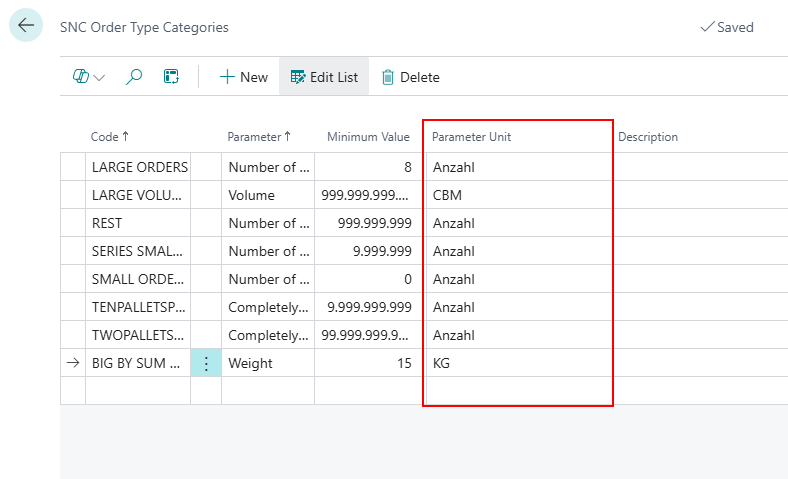
Parameter Units on SNC Order Type Categories Page - Item 102921
We have added the column Parameter Units to the SNC Order Type Categories page. The units from the base unit of measure list matching the parameter are displayed here.
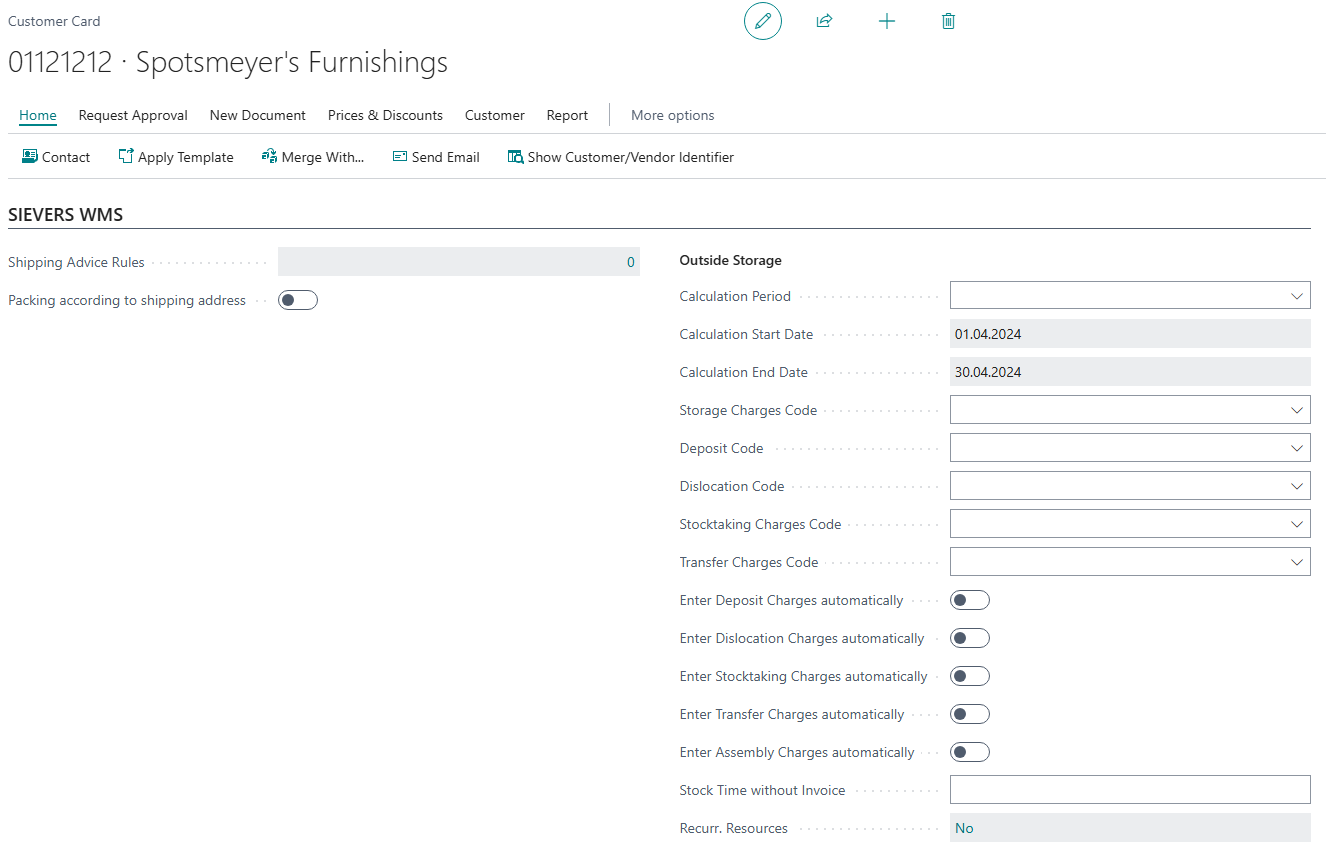
Reorganized SIEVERS WMS Section on Customer Card - Item 104729
We have reorganized the section SIEVERS WMS on the customer card. The fields Shipping Advice Rules and Packing according to shipping address are now on the left side. All fields for outside storage are now located on the right-hand side.
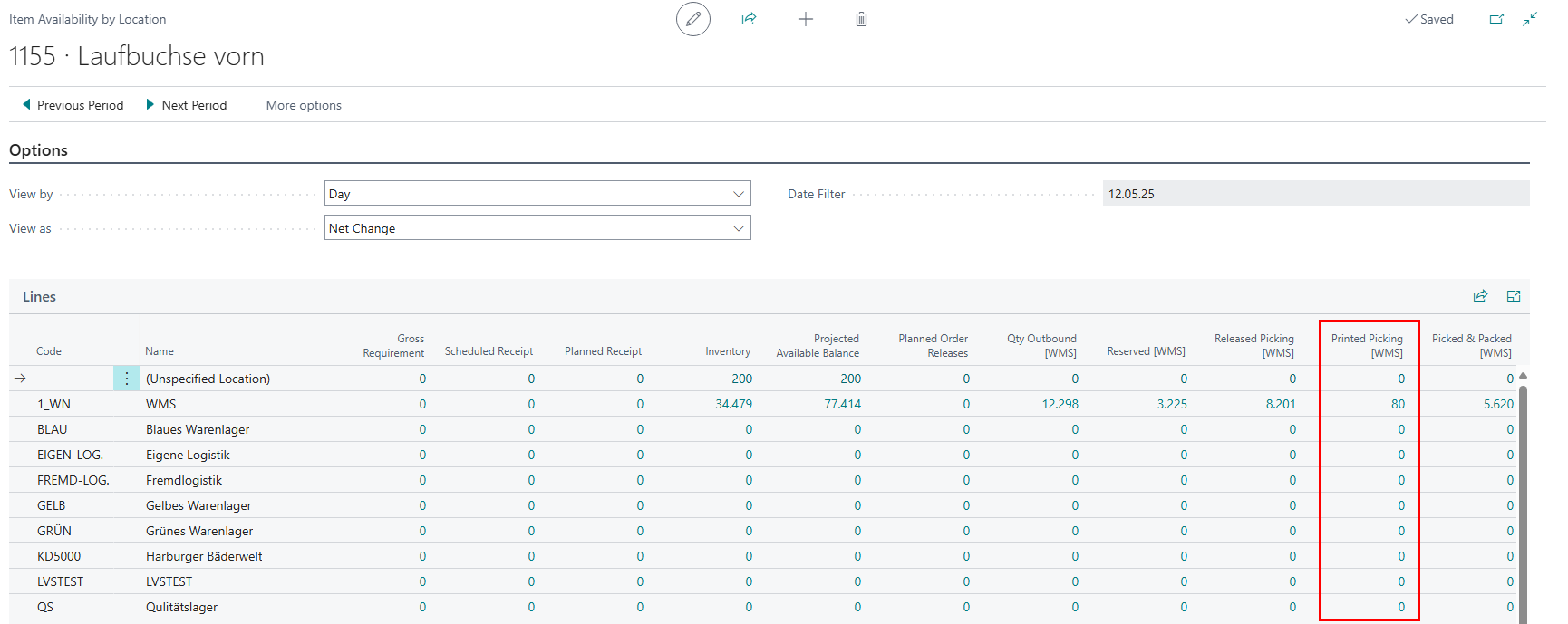
New Column on Item Availability by Location Page - Item 104713
We have added a new column on the Item Availability by Location page:
- Printed Picking [WMS]: Item quantity, which was printed on a document for picking. The quantity is systemically available for picking, is in open "Outbound Stock Posts" and has the "Picking status" = printed. This is only an information field, which is not getting considered the business central availability.
SIEVERS WMS Setup
New Rules for Number Series Syntax For Load Carriers - Item 107753
With this release we are introducing new rules for the number series for load carriers. From now on the numbers used in new number series must have this format:
- 9 characters
- numeric
- must have an end number
The reason for this is that this number series in particular is used for more than just counting. For example, these numbers are also used to calculate check digits.
Shipment Process
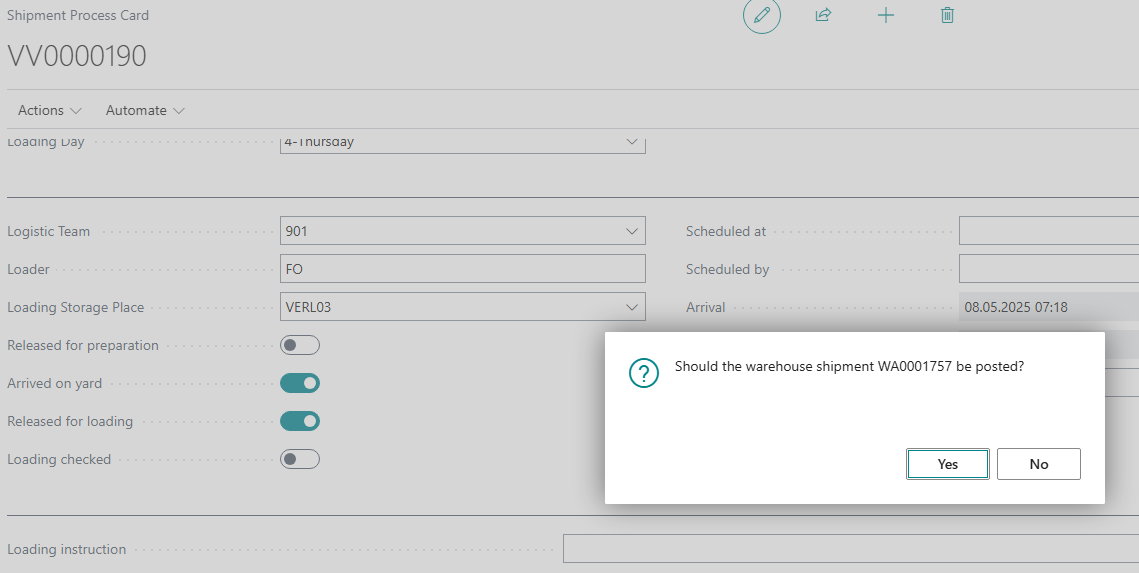
Loading Checked Now With Confirmation Prompt - Item 105151
The Loading Checked switch in the shipment process is used to mark the shipment process as completed and to post the warehouse shipment at the same time. However, there are of course scenarios in which you only want to mark the shipment process as done and not post the warehouse shipment. We have now included a confirmation query for this case. This query asks whether you also want to post the warehouse shipment. If you click No, only the mark is set and the shipment process done.
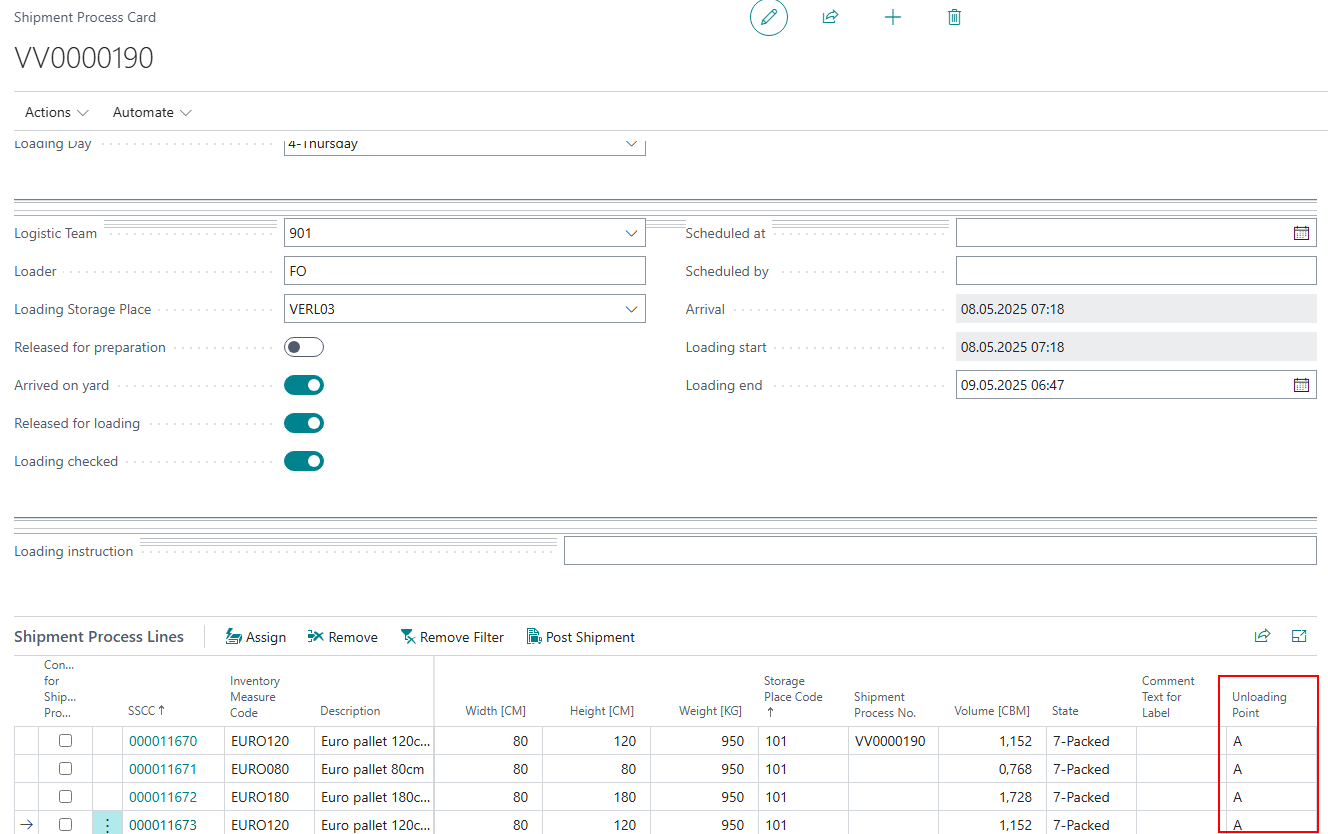
New Field: Unloading Point - Item 105224
We have added the field Unloading Point to the Shipment Process Lines.
Mobile
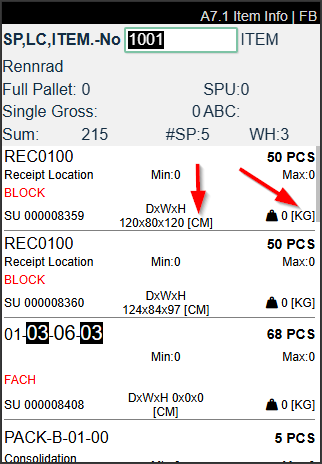
Added Units from Base Unit of Measure List to A7 Pages - Item 106594
We have added the weight and dimension units from the base unit of measure list to all of the A7 info pages.
Improved Login Screen Behaviour - Item 106056
We have improved the mobile login page with the following new features:
- If the user is not allowed to change location and device and has a Business Central user assigned to them, the login screen is skipped. The user does not need to enter any credentials and starts on the main menu
- If the user is allowed to change location, the login screen will open with focus on the location field
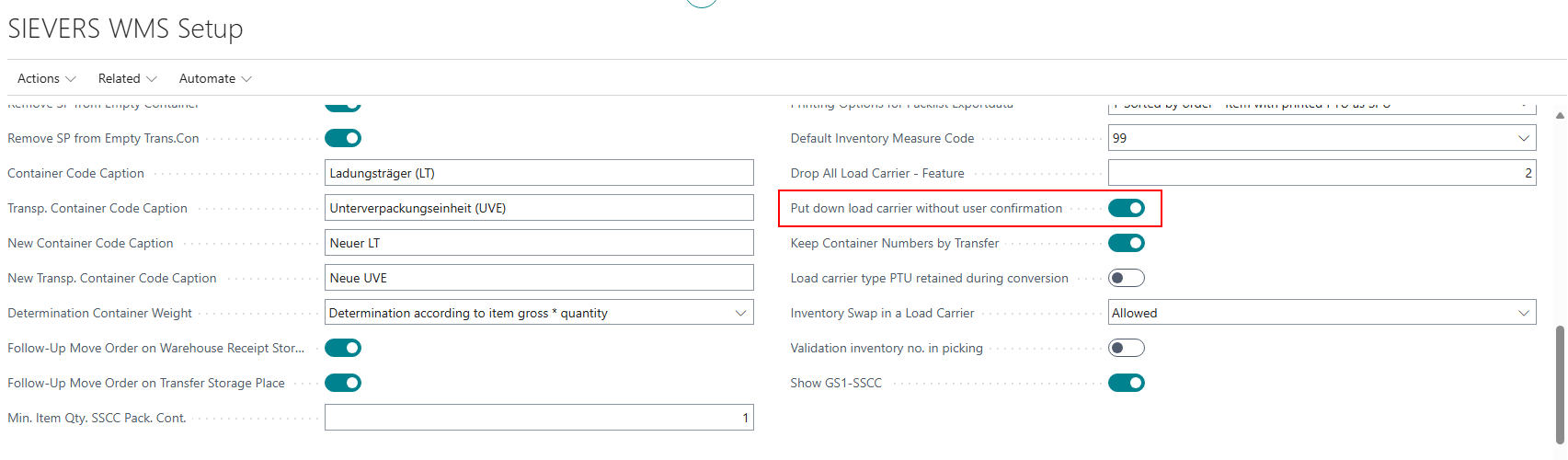
A2 Option to Speed A2 Up - Item 104791
When the user puts down a load carrier in A2 they normally need to confirm the put down, even if it is just one. In this release we have implemented a new option in the SIEVERS WMS Setup to give you the option to skip this extra confirmation:
- Put down load carrier without user confirmation: If the flag is activated, a forklift driver does not have to confirm the allocation of a load carrier again. This only happens if the forklift driver has picked up just ONE load carrier. If several load carriers have been collected in A2, the confirmation window appears.
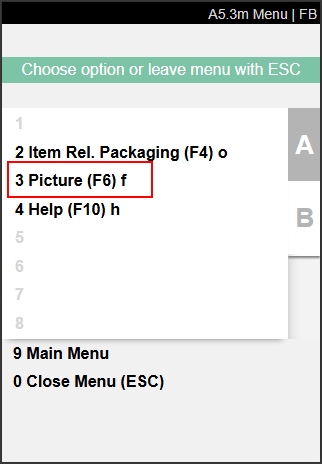
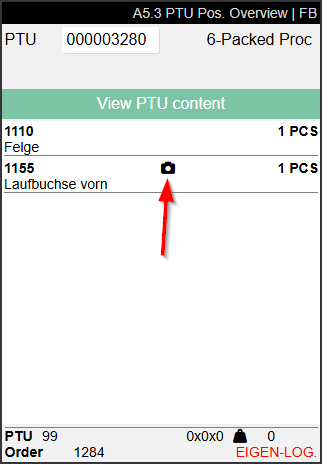
A5.3, A5.4, A5.5, A5.6: Photo Improvements - Item 103413
We have made a number of improvements to the handling of photos on several A5 pages:
- An inline camera icon is displayed when a photo is saved for the item.
- Users can open the saved photo with F6 if they need help with identification
- Users can press F6 to take a photo of an item if one does not already exist.
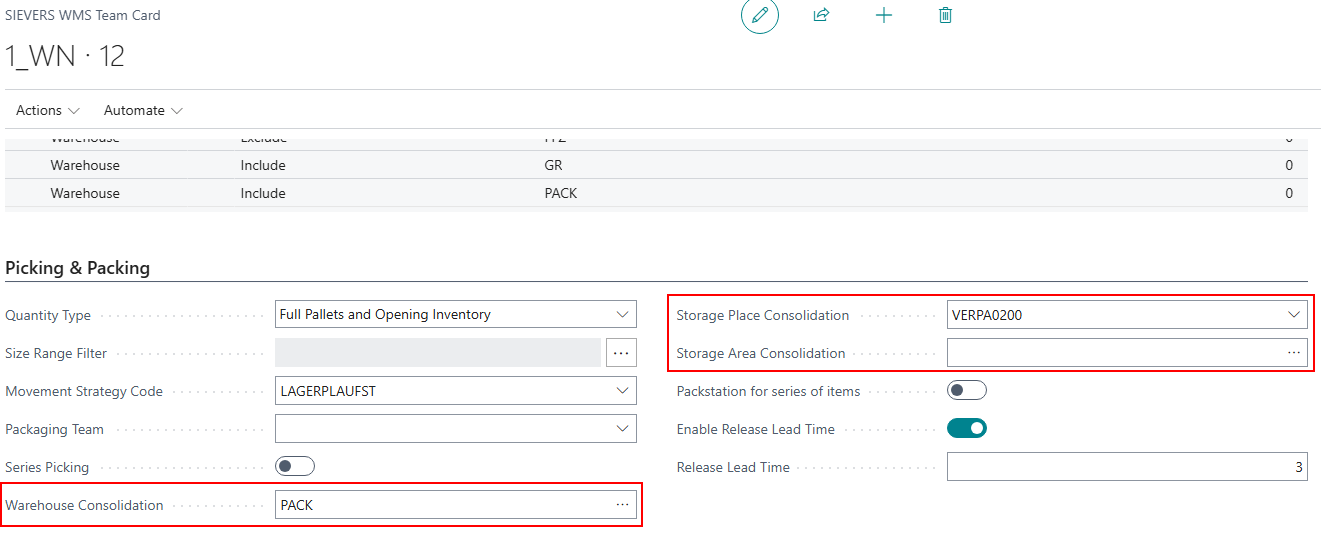
A4.2e and A4.3e: 2-Stage Consolidation - Item 81141
We have implemented the 2-stage consolidation on pages A4.2e and A4.3e Load Carrier Take / Drop. This means that if a consolidation storage place is entered for the picking team, this place is automatically entered as the transfer location between picking and packaging.
There are now two possibilities:
- If no consolidation warehouse, storage area or storage place has been entered in the picking team, the PTU is moved directly using the function Determination of Packaging Consolidation Storage Place for PTUs. It determines the destination storage place for the first PTU of an order based on the packaging team's consolidation storage place. Beginning with the the second PTU of an order, the consolidation storage place that was last utilized is automatically assigned.
- If consolidation fields are filled, the PTU is moved there and further processed with the consolidation no.
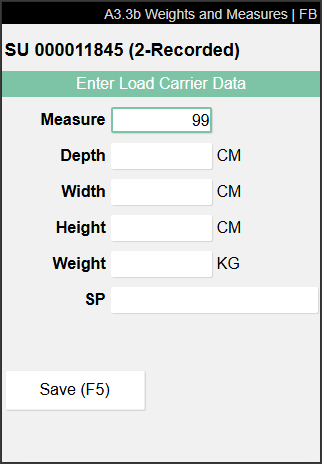
Create New Load Carrier on A3.3 - Item 92830
Users are now able to create new load carriers on page A3.3 via the menu or the shortcut F5.
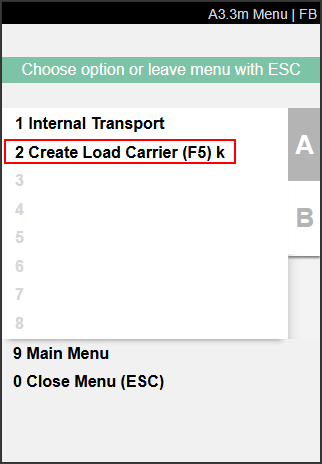
Previously, users had to scan a Blanco Barcode if they wanted to put something to a load carrier but did not have a suitable load carrier. Now they can just press F5 and create a specific load carrier with an inventory measure. Also the storage unit label will be printed.
A1.GS1 Scan Multiple Outside Storage GS1 Barcodes in a Row - Item 110688
We have now implemented a feature that allows you to scan multiple GS1 barcodes directly into A1 one after the other, even for customers with outside storage. This greatly speeds up goods receipt, even for customers with outside storage. Simply create a new unloading in A1. Once you have scanned the first GS1 barcode and confirmed the quantities, A1.2 opens, where you can see the result of the scan. If you now go back, you can immediately scan a new barcode without having to reopen the warehouse receipt.
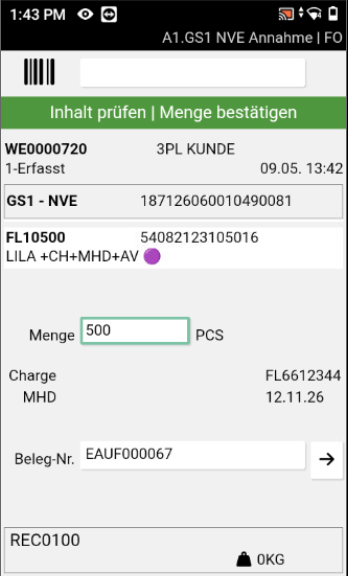
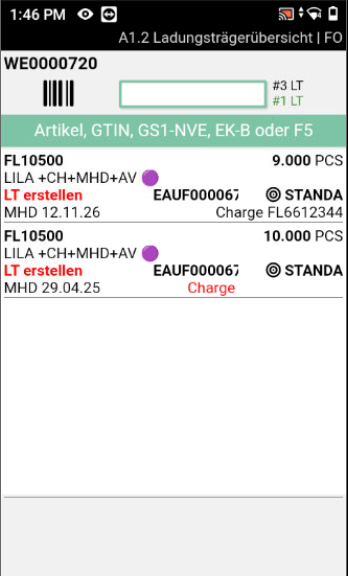
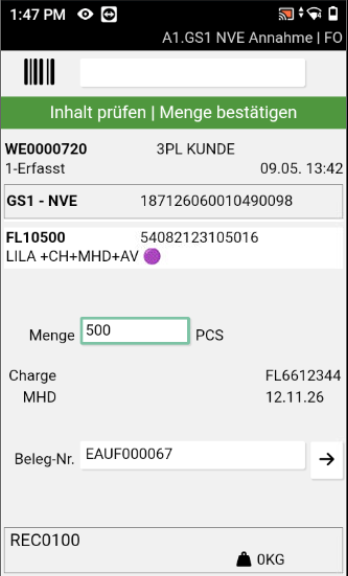
Move Job
Added Optional Fields - Item 105384
We have added two new optional fields to the SNCL Move Job:
- Category Code
- New Category Code
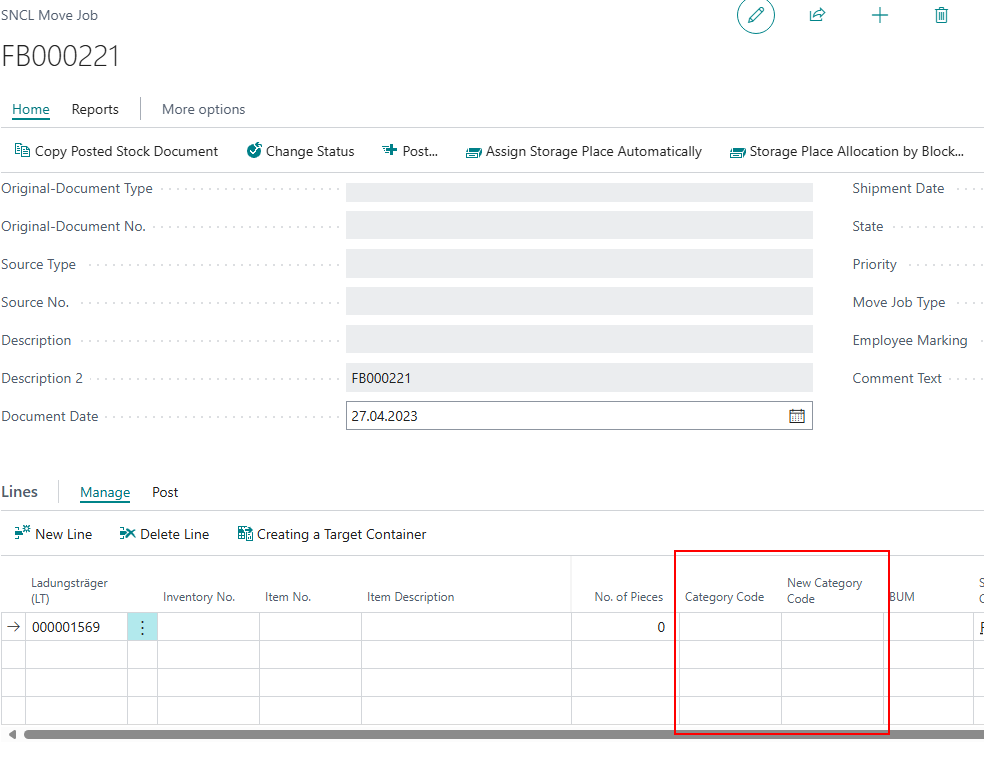
You can add these via Personalize.
Warehouse Shipment Planning
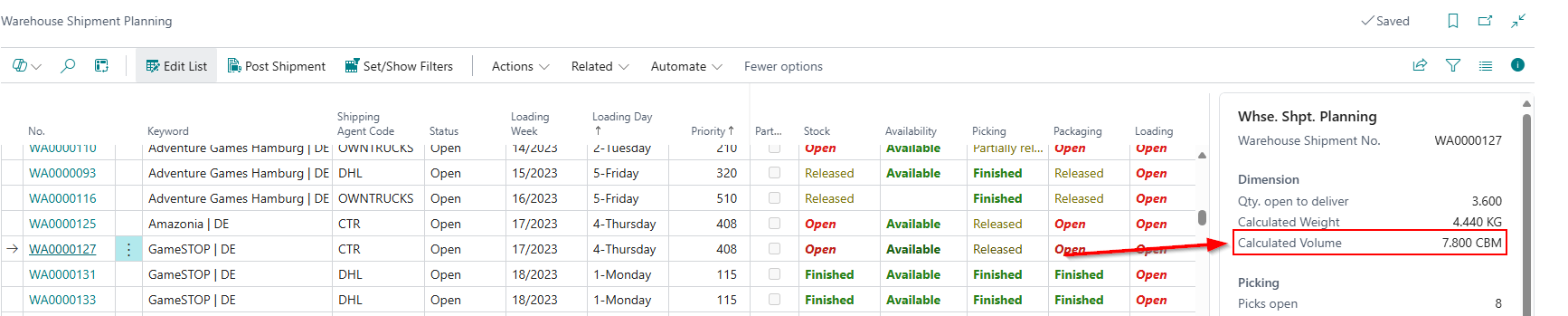
Calculated Volume in Factbox - Item 99035
We have added the field Calculated Volume to the Warehouse Shipment Planning factbox in the Dimension section.
Production Supply
Post Consumption And Output At Once: New Feature 'Finish Product' - Items 107167 and 107168
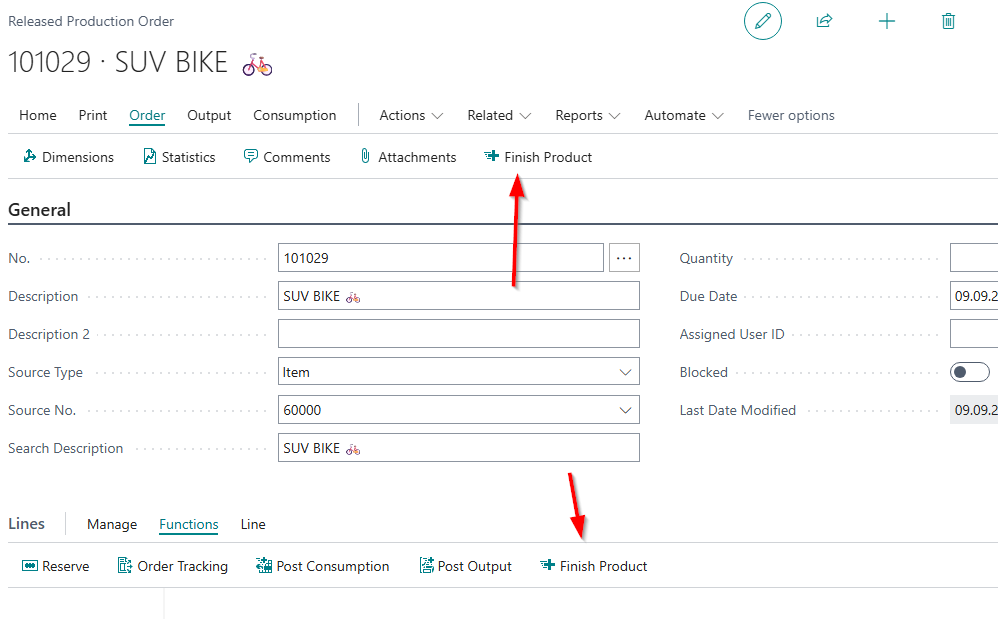
We have created a new action for th Released Production Order and the Released Production Order lines:
- Finish Product: Posts Consumption and Output at once. This action combines the two other new actions, Post Consumption and Post Output, so that even less manual work is required. If you use this function, consumption will always match the completed quantity.
You can find this action in the order menu of the Released Production Order and in the lines so that you can decide if you want to finish the whole order or just specific lines.
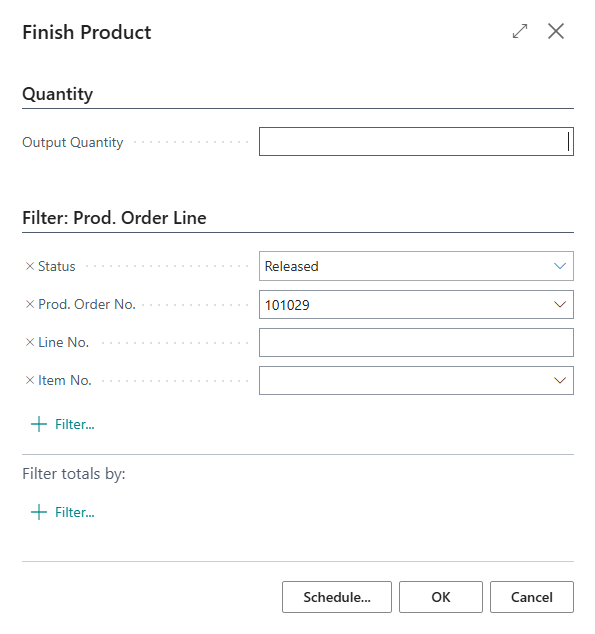
Just enter the quantity you want to post and press OK. All operations in the work plan are automatically reported as completed. If an error occurs, all steps are rolled back. No inconsistent data is created.
Changes to the Auto Print Settings - Item 110081
We have renamed the production setting Auto Print PTU/SSCC on Output in the WMS Setup to Auto Print LC on Output. The function of the setting has not changed.
Post Output Automatically - Items 107137 and 107136
We have created a way to automatically post an output. To do this, we have added a button to the output menu of the released production order. When you press the button, the following steps are performed automatically:
- Creation of an output journal posting
- Creation of a stock document (Inbound Stock Post) for the output journal
- Determination of the storage place
- Finish message and posting of the Inbound Stock Post document to the output journal
Input the output quantity and start the process via OK
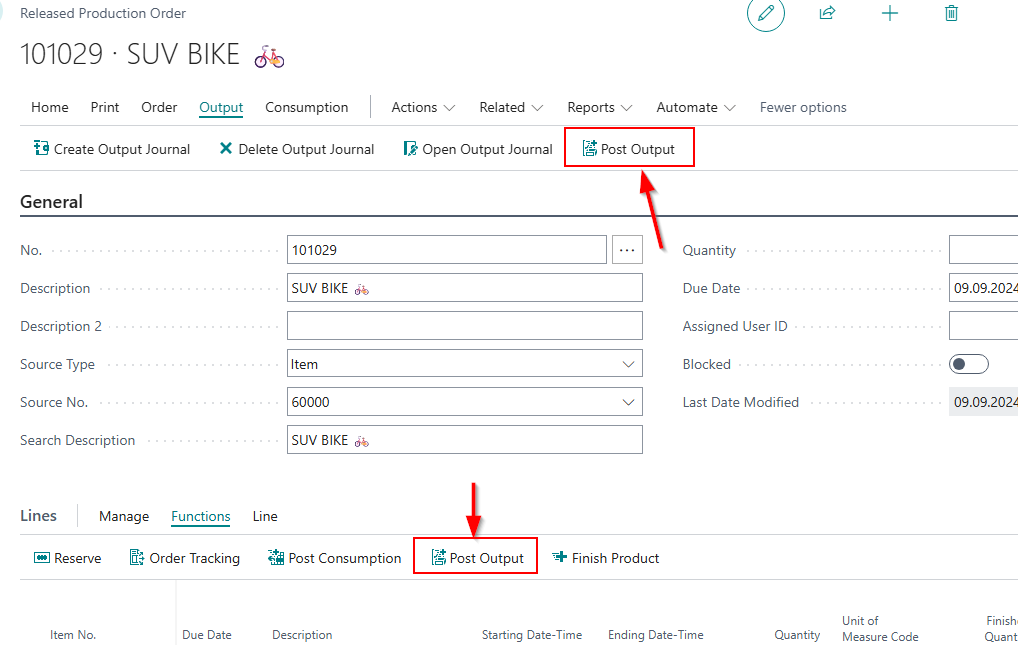
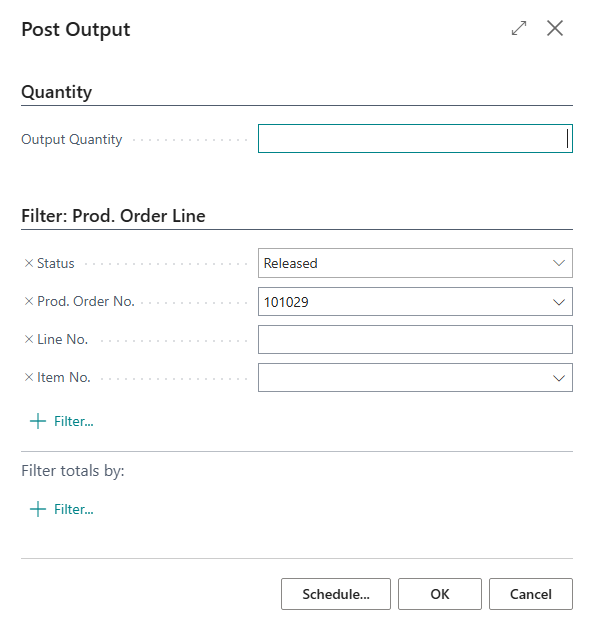
If you have selected a specific line, the process is only executed for this line. If no line is specified, all lines are posted.
All operations in the work plan are automatically reported as completed.
If an error occurs, all steps are rolled back. No inconsistent data is created.
Check Production Supply Takes Relevant Information Only From Released Production Order Components - Item 106394
We have changed the Check Production Supply report so that the info from these relevant fields is only getting pulled from the released production component lines:
- Location Code
- Storage Place Code Components
- Replenishment Strategy Code Components
- Provisioning Strategy Code Components
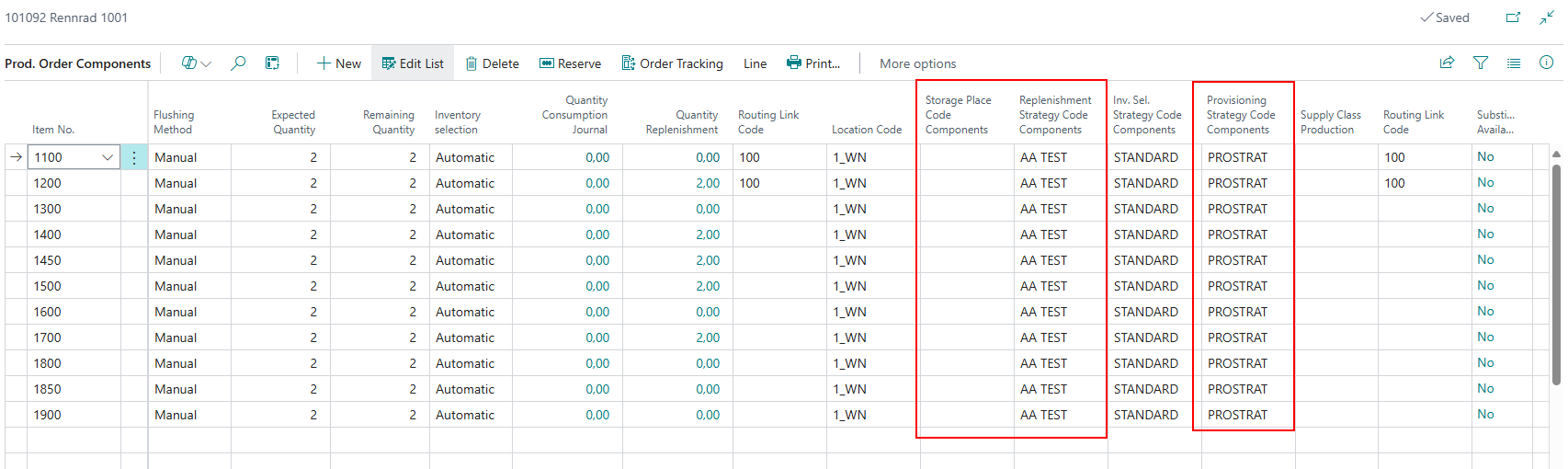
This data is no longer pulled from other tables. If there are empty fields in the component line when trying to start the check an error message will be displayed.
The data in these component fields must not be changed while a replenishment move order exists.
Outbound Stock Post Created From Consumption Journal Uses Specific Fields Only From Released Production Order Components - Item 106395
We have changed the creation process of a Outbound Stock Post from the consumption journal so that the info from these fields is only getting pulled from the released production order component lines:
- Location Code
- Inventory Selection Strategy Code Components
This data is no longer pulled from other tables. If there are empty fields in the component line when trying to create the Outbound Stock Post an error message will be displayed.
The data in these component fields must not be changed while a consumption journal with a Outbound Stock Post with these components exists.
Inbound Stock Posts Created From Output Journal Uses Specific Fields Only From Released Production Order Lines - Item 106396
We have changed the creation process of a Inbound Stock Post from the output journal so that the info from these fields is only getting pulled from the released production order component lines:
- Location Code
- Storage Place Code Finished Products
- Inbound Stock Post Strategy Code Finished Products
This data is no longer pulled from other tables. If there are empty fields in the order line when trying to create the Inbound Stock Post an error message will be displayed.
The data in these production order line fields must not be changed while a output journal with a Inbound Stock Post with these lines exists.
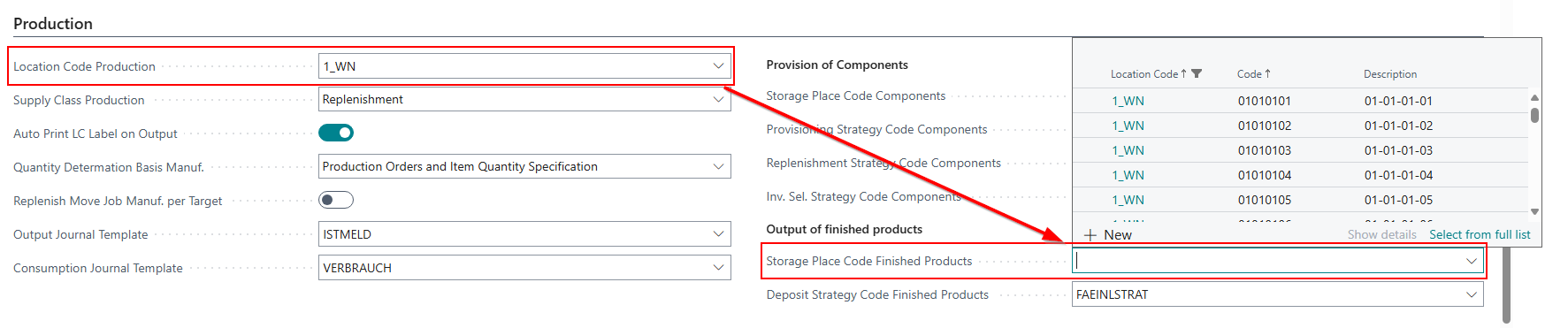
Storage Place Code Finished Products in WMS Setup With New Dropdown Filter - Item 109591
The field Storage Place Code Finished Products in the Production section of the SIEVERS WMS Setup previously always filtered the storage places via Warehouse Code Finished Products. However, as this field no longer exists due to optimization, the filter now uses Location Code Production.
Moved Fields From Components to Released Production Order Lines - Item 110557
We have moved these fields from the Component lines to the Released Production Order lines:
- Storage Place Finished Products
- Inbound Stock Post Strategy Code Finished Products
Nothing changes in terms of functionality.
Small Changes
- New tooltips in Outbound Stock Post automation - Item 110660
- It's now possible to press enter in the Number of Processes field in the Create Shipment Process window to create the desired number of processes - Item 105213
- Action note corrected in A3.3, as only target Load Carriers or blank barcodes should now be scanned. Since the last release, storage places are found automatically - Item 105543
- Removed current storage place from A3.3 since it is always a forklift anyway - Item 105539
- Reduced the confirmation popups when users try to post an output journal line from two to one - Item 110083
- SNCL Inbound Stock Post page: Original-Document No. lookup leads to SNCL Warehouse Receipt when it's a warehouse receipt and to the original source document when it's not - Item 102439
- Improved instructions on top of the screen when the user presses escape after confirming the transfer of a load carrier in B5 - Item 105086
Bugfixes
Fix for Non-SIEVERS WMS Location Validation - Item 48244
We have resolved an issue where warehouse shipments were incorrectly validated against SIEVERS WMS fields when delivered to non-SWMS managed warehouse locations.
Fix for Number Series Code Length Error - Item 105842
We have resolved an issue where changing the code of a number series to more than 10 characters resulted in an error.
Update of Expected Delivery Date in Mobile - Item 110284
We have fixed a bug where manual changes to the expected delivery date in Warehouse Shipment Planning were sometimes not reflected in the Mobile view, particularly when set to a past date.
Empty Location Code in Assembly Line - Item 110698
We have resolved an issue where the location code was not being populated in the assembly line, leading to an empty entry created through the output journal.
Scanning Order in B5.5 New Inventory - Item 106844
We have resolved an issue where the scanning order of barcodes on page B5.5 New Inventory was critical, causing lot no. and sell-by date information not to be displayed if the item barcode was not scanned first.
Focus Shift to Quantity Field After Scanning - Item 106846
We have fixed a bug where the scan field remained focused after scanning a GS1 barcode on page B5.5 New Inventory, even when all necessary information had been scanned.
Machine Center Card: Storage Places Selection Not Possible - Item 110221
We have fixed a bug that prevented the selection of storage places in the machine center card.
Special Order Quantity Posting Error - Item 110652
We have resolved an issue that sometimes prevented the posting of quantities for special orders, resulting in an error message related to the target Load Carrier being a PTU or SSCC with order reference.
Number of Picks in Warehouse Shipment Planning Factbox Incorrect for Diverse Orders - Item 102804
The fact box on the right side of the warehouse shipment planning also displays various figures relating to the number of picks. We have fixed a bug that caused these figures to be incorrect for diverse orders.
Automatic Transfer to Non-WMS Managed Location Fixed - Item 109626
We have resolved an issue where the automatic transfer of stock to a non-WMS managed location resulted in an error message during the process.
Synchronization of Item Units of Measure With Packaging Hierarchy - Item 111085
We have fixed a bug that caused an error when changing dimensions such as weight or volume in Item Units of Measure because the synchronization with the packaging hierarchy did not work correctly.
Fix for Missing Phone Number in Shipping Order - Item 103213
We have resolved an issue where the shipping order was created without the correct phone number, despite it being available in the sales order.
Automation Stuck on Blocked Customer - Item 110259
We have resolved an issue where the automation process would get stuck when attempting to process a blocked customer, causing delays in workflow.
Picker Status Correction for Serial Items - Item 111117
We have fixed a bug where the picking status was incorrectly set to "partially released" instead of "open" when a stock document was deleted in a series.
Item Tracking Information Deletion - Item 104018
We have resolved an issue where item tracking information was incorrectly deleted during the posting of a warehouse receipt, leading to error messages when the posting dates did not match.
Tab Navigation Issue in A7.3 - Item 108487
We have fixed a bug that caused the display to revert to Tab A instead of showing the expected Order/LC Info. In the course of this bugfix we have also changed the label from Order/C Info to LC Info
Barcode Scanning Consistency in Mobile Masks - Item 109825
We have resolved an issue where barcode scanning behavior differed between direct scanning and keyboard input in mobile masks.
Transfer Order Error with Sell-By Dates - Item 109773
We have resolved an issue where creating a transfer order from a non-WMS-managed location to a WMS-managed location resulted in an error when attempting to transfer an item that required both lot no. and sell-by date.
Mobile Picking: Zero Input Possible - Item 111972
We have fixed a bug that allowed users to enter a zero in the mobile picking process where it was not permitted.