Features
Major Topics
This release includes the following highlights:
- New Field on Release Items For Picking Page
- Residual Term in Warehouse Shipments
- [Deletion of Picking and Outbound Stock Post Document with Employee Marking Improved](#deletion-of-picking-and-Outbound Stock Post-document-with-employee-marking-improved---item-106793)
- Another Release of Cancelled Picking Lines With Changed Picking Team
- New Field Customer No. on Warehouse Receipt
Setup
These topics may be relevant for your setup:
- Residual Term in Warehouse Shipments
- Renamed Fields in Warehouse Receipt
- New Option to Sync Weights
- New Fields and Captions in Production Supply
- Follow-Up Move Order on Warehouse Receipt Storage Place Improved
Warehouse Receipt
Renamed Fields - Item 106070
We have renamed a few fields for the warehouse receipt to make their association more obvious:
| Page | Old Name | New Name |
|---|---|---|
| Item Card | Residual Term | Residual Term Whse Receipt |
| WMS Setup | Default Residual Term | Def. Whs Receipt Residual Term |
| WMS Setup | Reaction SBD Residual Term | Reac. SBD Resi. Term Whse Rec. |
New Field Customer No. on Warehouse Receipt - Item 101938
We have added the field
- Customer No.
to the General section of the warehouse receipt. This will be automatically filled if the imported source document contains a customer.
Please note that a warehouse receipt can only contain one customer. You cannot add a document to a warehouse receipt if it contains a different customer than the warehouse receipt already has.
Follow-Up Move Order on Warehouse Receipt Storage Place Improved - Item 104753
In the WMS setup, there is a setup field called
- Follow-Up Move Order on Warehouse Receipt Storage Place
If activated, the system will always create a follow-up move order when a warehouse receipt Inbound Stock Posts items on a storage place with the type Receipt Location. The advantage of this is that receipt locations are automatically kept free.
However, this setup previously only applied to Inbound Stock Posts from warehouse receipts. We have now expanded it so that follow-up move orders are automatically created for any items placed in the places, even if they do not come from warehouse receipts.
Reaction When Trying to Inbound Stock Post Item with Sell-By Date Not Above Residual Term Whse. Receipt - Item 106078
If a sell-by date is entered in the receipt line, load carrier line, or item tracking in the Warehouse Receipt Process, a check is made to see if a "Residual Term Whse. Receipt” has been stored for the item. If this is the case, a calculation is made to determine if the remaining time of the inventory is sufficient.
This is calculated as sell-by date minus the work date. If the number of days calculated in this way is greater than the number in the item field Residual Term Whse. Receipt, nothing happens. If the number is lower, a warning, an error message or nothing is issued according to the field Reaction SBD Residual Term.
Warehouse Shipment
New Fields - Items 106090 and 106091
We have implemented these new fields:
- Residual Term Whse. Shipment on the Item Card in the SNC Classifications and Units section
- Default Residual Term Whse. Shipment in the setup section Warehouse Shipment: Initial value when creating a new item. Indicates whether die Item must have a minimum remaining term for dispatch.
- Reaction SBD Residual Term Whse. Shipment in the setup section Warehouse Shipment: Indicates whether a warnung, an error, or nothing should be issued when a stock with insufficient remaining term is manually selected.
When it comes to warehouse shipments, it is important that only items with sell-by dates in an acceptable range are sent. This range is specified in the item using the Residual Term Warehouse Shipment field. The number specified there is used as the basis for calculating the maximum residual term.
The maximum residual term is calculated as follows: Sell-by date - working date = maximum residual term.
If a value is entered in the Residual Term Warehouse Shipment item field, a check is always made for this item during inventory selection in the context of a warehouse shipment to determine whether the maximum residual term is higher than the Residual Term Warehouse Shipment or equal.
When the inventory is automatically selected, the inventories are automatically filtered for suitable remaining terms. With manual inventory selection, the check also takes place, but the person performing the process can decide what should happen, depending on the setup:
- If the maximum residual term is higher than or equal to the Residual Term Warehouse Shipment, nothing happens and the inventory selection process continues.
- If the maximum residual term is shorter than the Residual Term Warehouse Shipment, then a warning, an error message or nothing will occur, depending on the setup Reaction SBD Residual Term in the WMS setup.
::: Note Please note the setup effort required when working with residual terms in warehouse receipts and/or warehouse shipments. :::
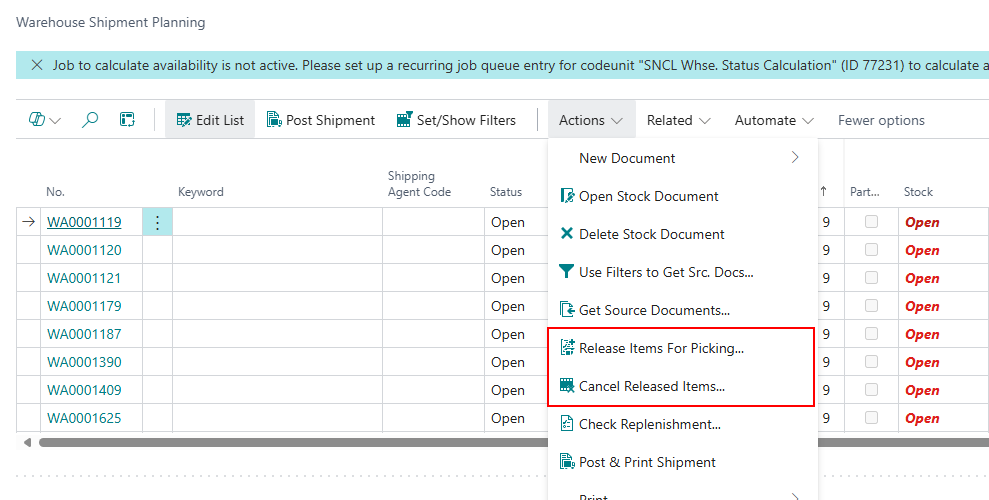
New Actions on Warehouse Shipment Planning - Item 103323
We have implemented new actions on the warehouse shipment planning page:
- Release Items for Picking: Opens a separate page where you can list items in warehouse shipments and release them manually for picking. Keep in mind that this is not possible anymore when there is already an employee marking on the picking document.
- Cancel Released Items: Opens a separate page where you can list items in warehouse shipments and cancel items with the status 0-created or 2-released.
You may know these actions already from the picking document list.
Release Items for Picking and Cancel Released Items Sorting Improved - Items 103324 and 103477
We have improved the lists on the Release Items for Picking and Cancel Released Items pages by implementing a specific sorting. The lists are now getting sorted by
- First Loading Date
- Priority
Packaging Hierarchy
New Option to Sync Weights - Item 107256
We have added a new option to the setup page. In short, this ensures that the packaging hierarchy remains consistent in terms of weights and supports the system during conversion.
Sync. Weight in Pack. Hierarchy Entries: Activating this option means that if the gross or net weight of the smallest storage unit in the packaging hierarchy changes, the other entries can be adjusted automatically. Before the change, there is a confirmation prompt. For example, the formula ‘number of pieces of stock ÷ number of pieces of smallest storage unit * gross weight of smallest storage unit = new gross weight of stock’ applies. This formula also applies to the other lines and the net weights. For the smallest storage unit, the following applies: ‘Gross weight of inventory ÷ number of pieces of inventory = new gross weight of smallest storage unit’. This also applies to the net weight.
If you want to use automatic conversion of weights in the packaging hierarchy after query, activate this setup. Set the recommendation to True so that the packaging hierarchy remains consistent and the system supports conversion.
Picking
Another Release of Cancelled Picking Lines With Changed Picking Team - Item 103325
We have implemented a function for a special case: If a line is removed from a picking document using the “Cancel Released Items” function, it can be added back to a picking document using the “Release Items For Picking” function. However, it may be that in the meantime the conditions have changed and the original picking team is no longer suitable, so a new one has to be found. Once a new team has been found, a new picking document is created and the line added. However, the state of the picking line is now set to “0-created”. This is wrong. We have ensured that the state is correctly set to “2-released”.
Even if it looks like it, this is not a bug in this case because this requirement did not previously exist.
::: Note This function is particularly important when working with the automatic functions in SWMS. Outbound Stock Post lines without a team are checked repeatedly and corrected if possible. :::
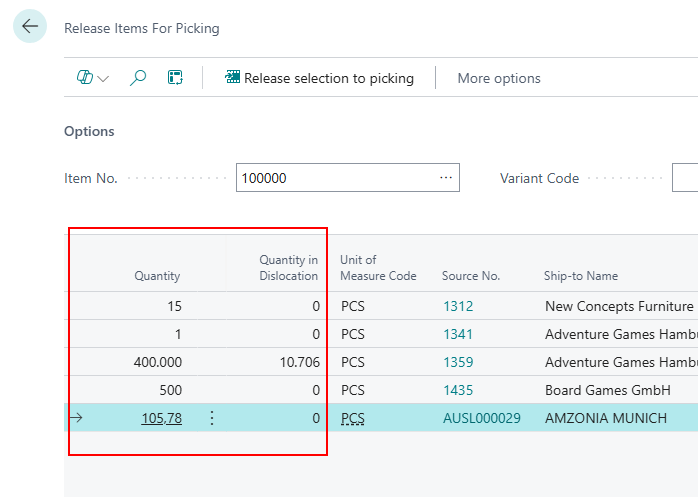
New Field on Release Items For Picking Page - Item 103341
We have added the new field Quantity in Outbound Stock Post to the Release Items for Picking page. This page indicates how much quantity is already part of a Outbound Stock Post. As long as this number is not the same as the one in Quantity, the line remains in the Release Items for Picking page and can be released.
Deletion of Picking and Outbound Stock Post Document with Employee Marking Improved - Item 106793
In one of the recent releases we have implemented that you are not able to delete a regular picking document or the associated Outbound Stock Post stock document when one of those has an employee marking. This is to prevent the deletion of documents which are already in processing.
We have now extended this protection to diverse and serial documents.
Production Supply
New Fields and Captions - Items 108791 and 105920
We have implemented several new fields and improved and corrected captions which will be relevant for the production supply in the future.
Please note that you may need to maintain production Inbound Stock Post strategies.
- Prod. Order Components:
- Storage Place Code Components
- Replenishment Strategy Code Components
- Inv. Sel. Strategy Code Components
- Provisioning Strategy Code Components
- Storage Place Code Finished Products
- Inbound Stock Post Strategy Code Finished Products
- Machine Center
- Storage Place Code Components
- Replenishment Strategy Code Components
- Inv. Sel. Strategy Code Components
- Provisioning Strategy Code Components
- Storage Place Code Finished Products
- Inbound Stock Post Strategy Code Finished Products
- Work Center
- Storage Place Code Components
- Replenishment Strategy Code Components
- Inv. Sel. Strategy Code Components
- Provisioning Strategy Code Components
- Storage Place Code Finished Products
- Inbound Stock Post Strategy Code Finished Products
- Stockkeeping Unit Card
- Replenishment Strategy Code Components
- Inv. Sel. Strategy Code Components
- Provisioning Strategy Code Components
- Storage Place Code Finished Products
- Inbound Stock Post Strategy Code Finished Products
- Item
- Replenishment Strategy Code Components
- Inv. Sel. Strategy Code Components
- Provisioning Strategy Code Components
- Storage Place Code Finished Products
- Inbound Stock Post Strategy Code Finished Products
- Item Category
- Replenishment Strategy Code Components
- Inv. Sel. Strategy Code Components
- Provisioning Strategy Code Components
- Storage Place Code Finished Products
- Inbound Stock Post Strategy Code Finished Products
- Released Production Order
- Storage Place Code Components
- Replenishment Strategy Code Components
- Inv. Sel. Strategy Code Components
- Provisioning Strategy Code Components
- Storage Place Code Finished Products
- Inbound Stock Post Strategy Code Finished Products
- WMS Setup
- Storage Place Code Components
- Replenishment Strategy Code Components
- Inv. Sel. Strategy Code Components
- Provisioning Strategy Code Components
- Storage Place Code Finished Products
- Inbound Stock Post Strategy Code Finished Products
Production
Output Journal Weights Calculated - Item 104724
The weights when creating a Load Carrier in the output journal are now calculated based on the Determination Load Carrier Weight field from the WMS setup page.
::: Note Setup note: All variants are calculated correctly. The correct load carrier weight field is not shown in the Inbound Stock Post. :::
Small Changes
- Removed unnecessary prompt when trying to remove a specific stock document - Item 106813
- Added tooltips - Items 104423, 106004
Bugfixes
Load Carrier Blocking Issue - Item 106630
We have fixed a bug where the load carrier was not being blocked correctly as configured in the setup.
Creation of Warehouse Shipment Without Shipping Agent Possible - Item 107144
We have resolved an issue that allowed a warehouse shipment to be created without a designated shipping agent.
Fix for Batch Processing Error - Item 107564
We have resolved an issue that caused several batch processes to fail, specifically due to processing bad data.
Fix for Picking Document Selection Error - Item 107565
We have resolved an issue that caused an error when selecting any picking document during the picking process.
Outbound Stock Post Automation Loop Issue - Item 106203
We have fixed a bug that caused the automation process to enter a loop, resulting in multiple iterations of the same order being processed repeatedly. However this had no effect on the actual processing. It just slowed the performance down a little bit.
Posting Error in Warehouse Receipt - Item 106427
We have resolved an issue that caused an error message when attempting to post a position with an order reference in a warehouse receipt.