Features
Front Page
Standard Colouring of Certain Tiles - Item 104399
We have set the following tiles to turn red if their quantity is greater than 0:
- Receipts Clearing
- Warehouse Shipment & Partial
- Blocked Inventories
- Inv. passed Sell-by Date
- Blocked Storage Places
- Third Counting Lists
Move Jobs
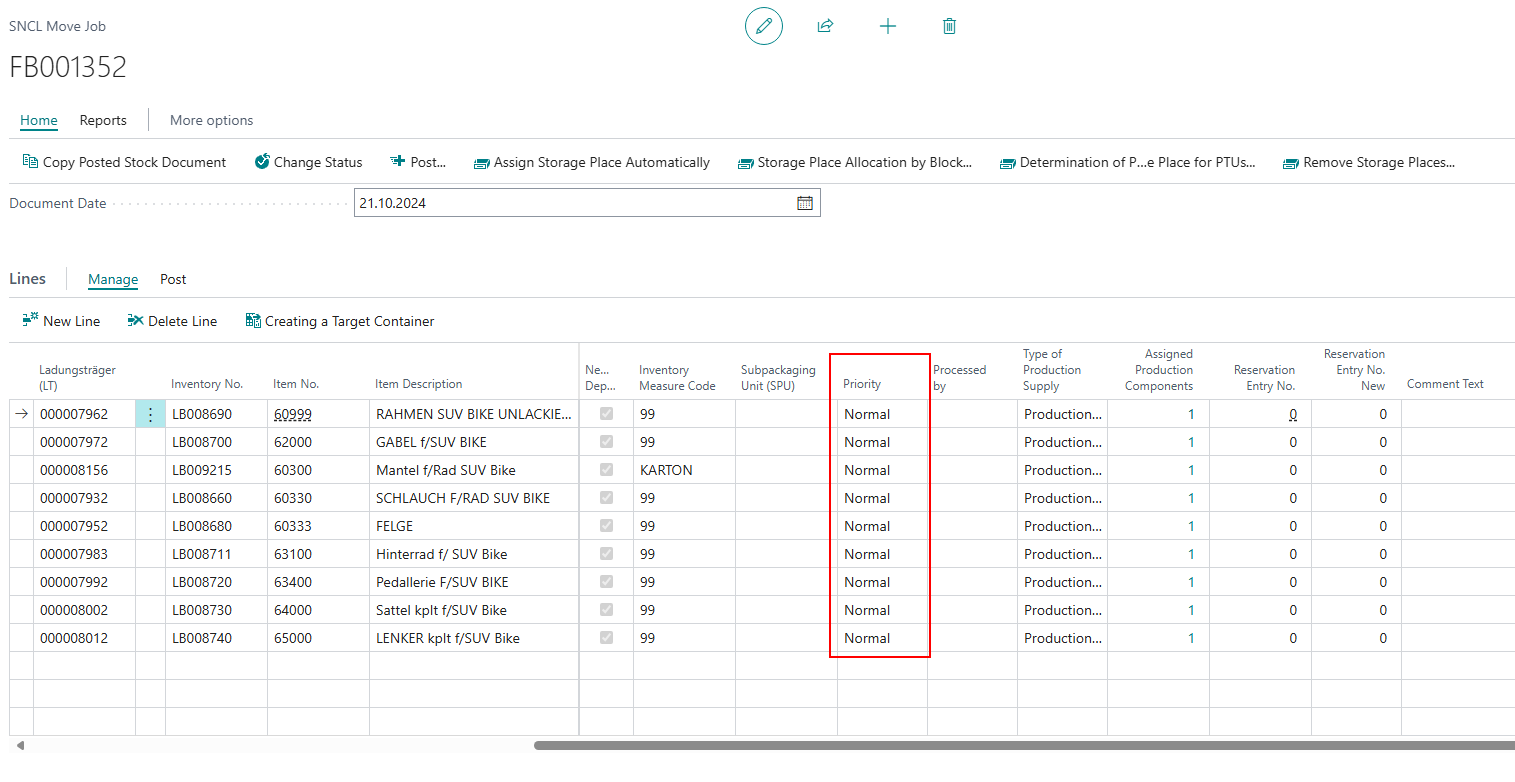
Line Priorities Changeable - Item 104759
It is now possible to change the priority of individual move job lines. If you change the priority in the document header, all lines will inherit this priority. Please make sure that you have inserted the field via Personalize.
Mobile
A4.2: New Sell-by Date and Lot No. Fields - Item 95618
We have added the fields sell-by date and lot no. to the A4.2 page.

A4.3: SPU Fields Appear After Scanning SU - Item 106013
On A4.3, it could happen in certain constellations that the page first showed all SPU fields, only to hide them again after entering the SU. This was basically the correct behaviour, but understandably led to confusion in practice. We have changed the page's behaviour. Now, the SPU fields are only shown explicitly when the necessity for them arises after scanning the SU.
Furthermore, the fields are not shown if the required quantity is less than one SPU.
A4.3: Several Visual Changes - Item 104804
We have made some visual changes on page A4.3:
- Display of last 9 characters of lot no.
- Label BBD added
- Font size same as quantity
- Sell-by date and lot no. set in grey
- If there are several inventory items with different sell-by dates or batches on the load carrier and the user can select them, the display shows *Div Lot and *Div Sell-by Date.
Load Carrier
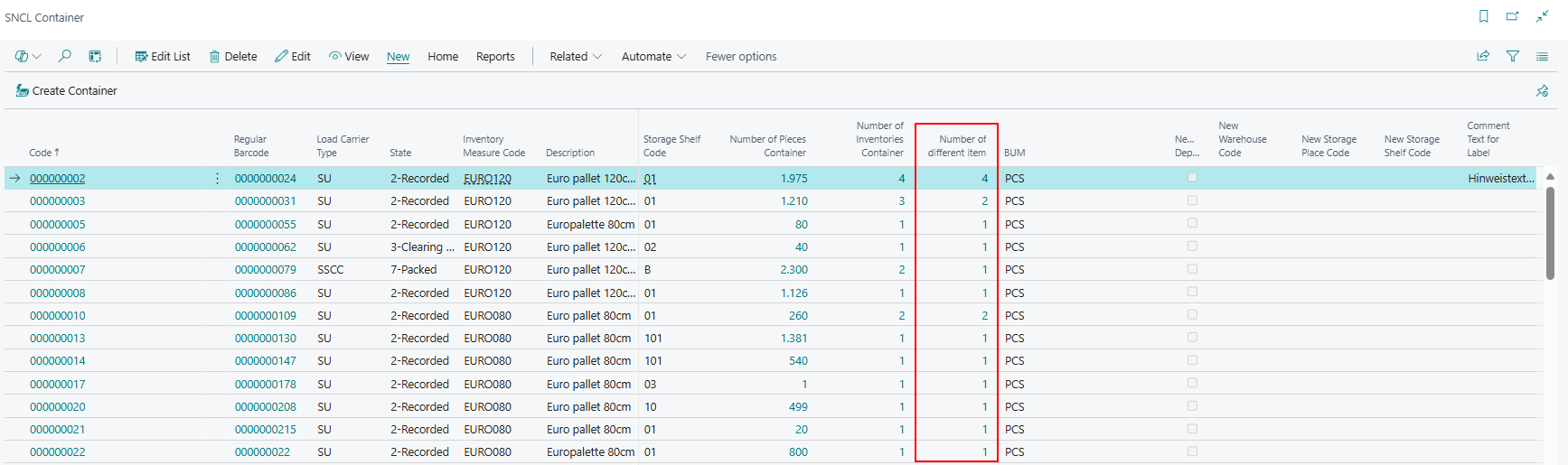
Added Number of Different Items to SNCL Load Carrier List - Item 102466
We have added the column Number of different items to the SNCL Load Carrier list. This is where the number of items on the load carrier is determined and shown. It is a calculated field with a lookup to the inventory list, so you can click on it to see the inventories.
Optional Field Additions to SNCL Load Carrier Card - Item 105093
You now have the option of adding the following fields to the SNCL Load Carrier Inventory table on the SNCL Load Carrier Card:
- Lot no.
- Sell-by date
- Serial no.
- Variant
Add these fields by using the Business Central action Personalize.
Stock
New Columns on Stock Outbound Stock Post Lines List - Item 102715
We have added many new data fields to the stock Outbound Stock Post lines list:
- Warehouse Shipment No.
- Load Carrier
- Item Description
- Picking Document No.
- Picking State
- Picking Team
- Packaging No.
- Packaging Team
- Shipment Process Document No.
- Shipment Process Team
We have also hidden the following fields as they were not necessary anymore:
- Description
- Quality Status
- External Inventory Number
- Production Date
- Blocking Date
- Gross Weight
- Net Weight
However, if you need them, you can always add them to the table via Personalization.
Warehouse Shipment
Shipment Process State After Printing - Item 103240
Previously, the state of the shipment process was always set to 1-printed after a loading list was printed. We have now changed this. This state is now only set after printing if the previous state was 0-created.
Stocktaking
Enter Inventories by Storage Place Now Saves Values - Item 96596
We have improved the Enter Inventories by Storage Place form by making the entered values retain for the next entry. This allows you to enter several almost identical stocktakings one after the other without having to enter each value each time.
Picking
Error in Picking Release Automation Protocol When Blocked Inventory Was Found - Item 102748
From now on, an error will be recorded in the log if a blocked inventory is affected by the automatic release of picking documents. This error does not cancel the release process.
New Picking Storage Place Label - Item 102235
We have created a new picking storage place label for fixed picking storage places.
- Dimensions: 90x35mm

It consists of
- Item description
- Item name
- Barcode
- Storage Place no.
Small Changes
- Removed Warehouse Receipt and Move Order List from the reports menu on the SNCL Outbound Stock Post page since they are not in use - Item 96991
- Removed SNCL Order Control Center as it is not in use in the WMS - Item 102182
- Removed the Actions sub menu on the print load carrier label page to make the preview and print actions visible at a glance - Item 102632
- Made source document no. in Outbound Stock Post automation protocol clickable. A click redirects to the warehouse shipment on the warehouse shipment planning page - Item 102709
- You can find and open the SNCL Stock Outbound Stock Post Lines page now via the Business Central search and the Stock Documents front page menu - Item 102714
- Cancel Released Items and Release Items for Picking: Added clickable lookups to Source Document No. and Warehouse Shipment No. - Item 103483
- Improved Warehouse Shipment Planning Source Document Table layout by setting the column fixation next to the Customer/Vendor Name column - Item 104422
- Removed Edit Buffer Move Order action from SNCL Outbound Stock Post menu as it is not in use at the moment - Item 102912
- Reduced the supply class options and their tooltips to the currently working options Replenishment and Empty - Items 107516 and 105383
- Changed Show SSCC action target page on warehouse shipment planning to SNCL Load Carrier List filtered by warehouse shipment no. - Item 105212
- Reduced space of grey detail area slightly on A2.0, A2.1 and A2.2 - Item 104784
- Added clickable lookups to picking release automation protocol fields Warehouse Shipment No., Picking Document No. and Outbound Stock Post No. - Item 104747
- Reduced number of error messages when trying to reset a picking document which is already in use - Item 102705
Bugfixes
Fix for Alternative Stock Allocation in Serial Picking - Item 94878
We have resolved an issue where multiple picking documents were incorrectly generated for alternative stock during serial picking when a shortage occurred.
Incorrect Data on international Bill of Lading from Posted Warehouse Shipment and Shipment Processes - Item 107384
We have fixed a bug that caused incorrect data from a previous loading to be printed on the international bill of lading when the report was printed from a posted warehouse shipment or a shipment process.
Labels Not Printing Correctly - Item 107406
We have resolved an issue where some labels were not being printed as expected when multiple SSCCs were processed at once.
Label Printing Warning - Item 107407
We have resolved an issue where a warning incorrectly appeared when attempting to print a label for a load carrier that had not been printed before.
SSCC Label Dots - Item 107412
We have resolved a bug that caused strange dots to appear on the SSCC label when the character "Ü" was included in the order reference.
Removal of Line Breaks in Serial Picking Documents - Item 106012
We have fixed a bug that caused line breaks in serial picking documents in A4.2 and ensured that the variant is now correctly considered during the aggregation of items in A4.2/A4.3.
Display of Selected Variant in A4.3 - Item 106009
We have fixed a bug that caused the system to incorrectly display a dash ("-") instead of the selected variant.