Features
Warehouse Shipments
Changing Shipping Agent Displays Prompt for Shipping Agent Service - Item 101898
If you change the shipping agent in Warehouse Shipment Planning to a different shipping agent, a prompt for the Shipping Agent Service will automatically appear. It doesn't matter whether the shipping agent is set up with or without a shipping order.
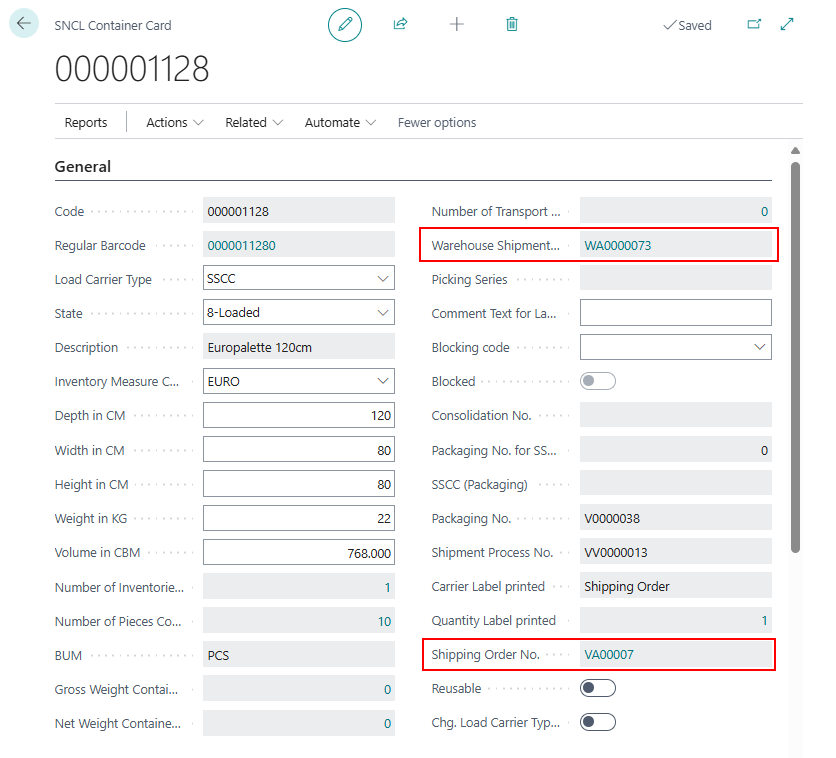
Lookup to Warehouse Shipment and Shipping Order in Load Carrier Card - Item 102209
We have added a clickable lookup to the Warehouse Shipment No. and Shipping Order No. in the Load Carrier card.
Tooltips - Items 104390 and 104746
We have added some more tooltips on the warehouse shipment pages.
Improvements to Warehouse Shipment Status Calculation - Items 105258 and 105257
We have improved the caluclation of the warehouse shipment status. We had some minor problems with it from time to time, and have now made a few fundamental improvements that should prevent future issues.
Warehouse Shipment Data Stored in Lines - Item 96118
In preparation for planned future functionalities, we have now implemented that some data will be stored directly in the warehouse shipment lines instead of in the warehouse shipment headers.
Recalculation of Warehouse Shipment States - Item 105253
From now on, the warehouse shipment states in warehouse shipment planning will be recalculated each time new lines are added via ‘Get Source Documents’ or the warehouse shipment automatic. This ensures that the state is always correct.
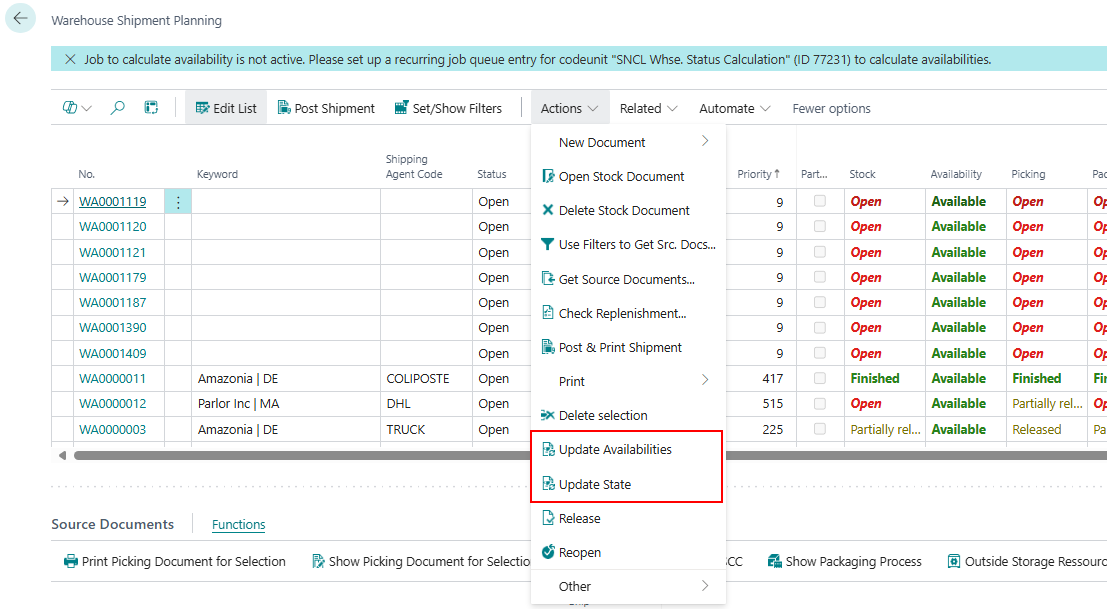
'Update State' and 'Update Availabilities' in Warehouse Shipment Planning Work As Intended - Item 105259
The Update State field now recalculates all states for the selected warehouse shipments. This applies to the warehouse shipment and order level. It does not update the availabilities. The Update Availabilities field only updates the availabilities for the selected warehouse shipments.
These two actions are used, for example, for recalculation when changes have been made and the automatic status update process would take too long.
No Posting into PTU or SSCC Without Order - Item 103181
There is now a restriction that without an order reservation no longer in PTUs or NVEs. This applies, for example, to
- move orders from an SU or inventory into a PTU.
- item journals
- warehouse receipts
- Inbound Stock Posts from an output journal in the production order.
For order-related Load Carriers, the rules for putting to must always be followed. Quantities may only be posted into them if they have the same source document.
Mobile
Save History Option - Item 102276
We have implemented a Save History option on the the SNC Mobile User setup.
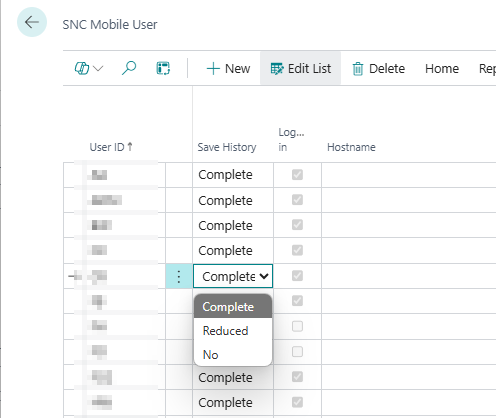
This option field allows you to make the following settings for each user:
- Complete: Saves the complete mobile history of this user
- Reduced: Only saves the most necessary information of the history of this user
- No: Does not save any history of this user.
Error Message and Removal of Position When Trying to Select An Already Cancelled Position in A4.2 and A4.3 - Item 103455
If you are currently processing a picking operation on the MDE, it may be that a line has to be cancelled spontaneously. Of course, this item should no longer be processed on the MDE. Previously, the line could simply no longer be selected and was no longer shown after the programme was accessed again. However, we have now implemented a function that checks for cancellation while the line is being selected. If the line has been cancelled in the meantime, a corresponding error message is shown and the line is removed from the list.
Inbound Stock Post Strategy in A3.2 and A3.3 - Item 103950
From now on, the Storage Place: autom. allocation function of the move order will be used for item transfers on the mde. This means that the warehouse employee no longer has to search manually for a new storage place, but is instead suggested a suitable storage place.
Inventory Merge Only For Non-blocked Inventories - Item 101899
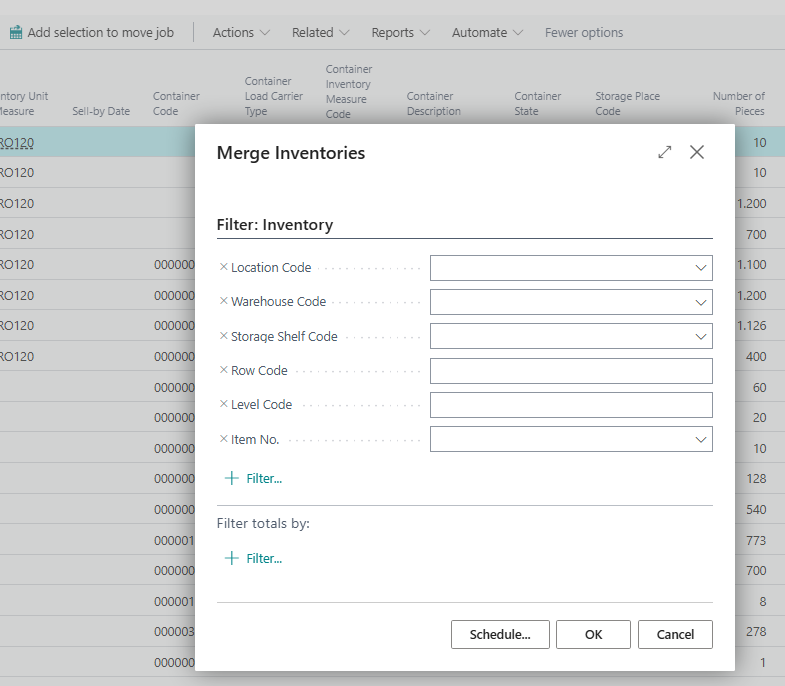
We have removed the Blocked field from the Merge Inventories page which opens when you try to merge inventories in the SNCL Inventory List. This field was unneccessary, because merging blocked inventories was not allowed anyway.
Technical Improvement of Storage Place Occupancy Detection - Item 105027
We have fundamentally changed something in the calculation of storage space occupancy. As a result, occupancy for internal processes is now easier to track and understand. This topic will come up a few more times in future sprints, as we are not quite finished with it yet. However, the functionality remains the same and nothing changes for the user.
Post Old Item Journal Entry - Item 103834
An item of inventory that has already been sent with an old lot no. can now be posted via the item journal. The sell-by date is also calculated correctly and can be posted, even if it has already been exceeded. If the ‘Require Expiration Date Entry’ tracking option is set, the sell-by date must be entered manually.
Sell-by Date in Receipt Lines Automatically Calculated - Item 105692
The sell-by date in the receipt line of the warehouse receipt is now automatically entered according to the following rules:
- If an expiry date has been entered manually in the item tracking lines or if the item tracking parameter ‘Require expiry date entry’ is activated, the sell-by date from the item tracking lines is always taken.
- If the rule from the previous bullet point cannot be used, the expiration calculation formula from the item card is used to calculate the sell-by date.
Reuse Load Carrier Feature Fully Functional - Item 77205
We have completed the reuse Load Carrier feature. Now, Load Carriers can be reused provided that the associated warehouse shipment has already been posted.
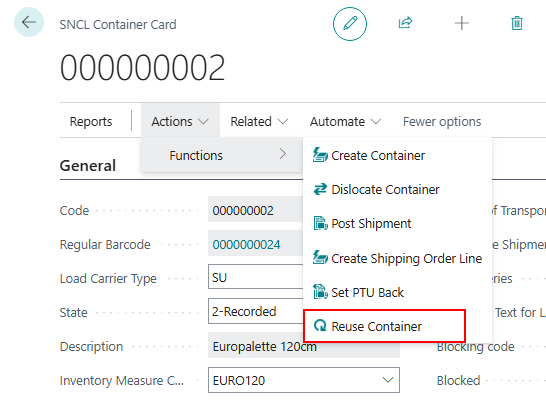
This feature resets the following fields:
- Load carrier type to SU
- Warehouse shipment number
- Comment text
- Packaging number
- SSCC (packaging)
- Packaging process number
- Loading process no.
- Shipping order number
- Picking document
- Label no.
- Status to 2-recorded
- Dimensions
- Storage place
- Description will be set to reused
Furthermore, this change is recorded in the change log Load Carrier.
Small Changes
- Improved displayed feedback message when trying to post an unchecked loading process - Item 102159
- It is no longer possible to set a Load Carrier status to 0-Notified or 1-Receipt Processing if this Load Carrier is not part of an open warehouse receipt - Items 102207 and 102208
- It is no longer possible to set a Load Carrier status to 5-Pick Processing if this Load Carrier is not part of an open picking document - Item 102215
- Quantities in the item tracking lines of the warehouse receipt are now positive and no longer negative - Item 64078
- Field Type in Sales Order Subform is now visible by default - Item 105728
- Corrected typo - Item 106100
- Added Tooltips - Items 106104 and 106104
- When the Load Carriers are put down after picking, the consolidation storage place with the largest no. of free storage places is suggested - Item 88065
Setup Help For New Features from Releases 35-42
We have released many new features in releases 35-42, some of which require special settings.
General
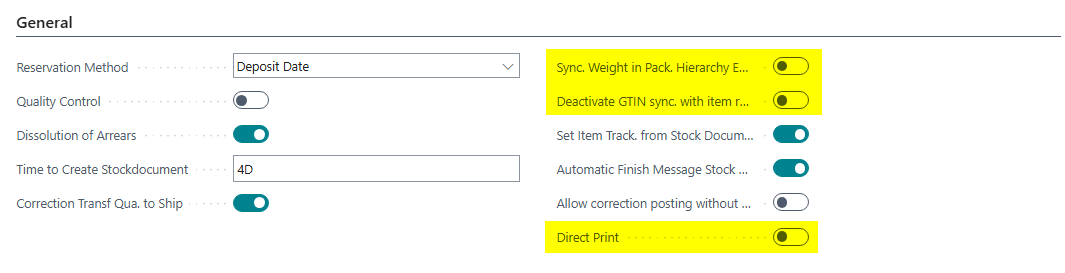
- Sync. Weight in Pack. Hierarchy Entries: Please leave this setup switched off – work on the packaging hierarchy is not yet complete.
- Deactivate GTIN sync. with item references: Deactivates the GTIN synchronisation between the field on the item card and the references of type barcode on the item – only activate in exceptional cases, otherwise functionality will be lost or data will diverge and picking, for example, may no longer be possible with reference barcodes (GTIN quantity confirmation). See tooltip.
- Direct Print: Direct printing causes the job queue to be bypassed. See tooltip.
- Improved sorting | Fewer disruptions due to failed job entries.
- Initially disabled, still being improved
Load Carrier
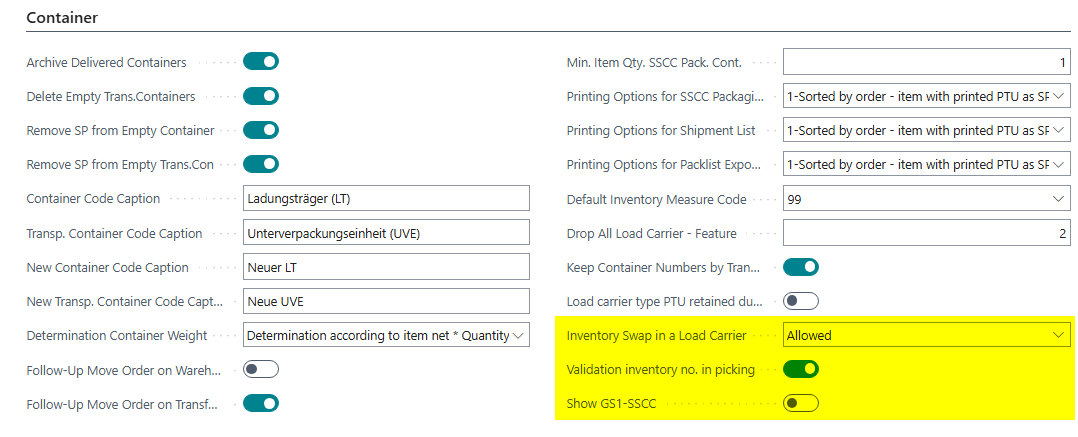
- Validation inventory no. in picking: This setup is used to activate/deactivate whether inventories should always be validated or not if more than one inventory is on a load carrier. If it is set to False, the report SNCL Merge Inventories (77183) should also be run regularly in the job queue so that the individual inventories on the load carriers are posted together again.
- Inventory Swap in a Load Carrier: If the validation is active, the setup determines whether the picker can select any inventory within the load carrier. Recommendation: Allowed. In only a few cases, the picker must strictly adhere to the specification. If it is, the result is that the employee has to search in the load carrier – the setup would then be ‘not allowed’. The effect can be seen in the picking A4.3 in the information field and on the printed picking document. This option is also available on the items and the item categories.
- Show GS1-SSCC: Shows the vendor's GS1 SSCC instead of the load carrier code in different places. If this is active but there is no vendor's GS1 SSCC, the system simply shows the load carrier code of the SU, PTU or SSCC.
Warehouse Shipment
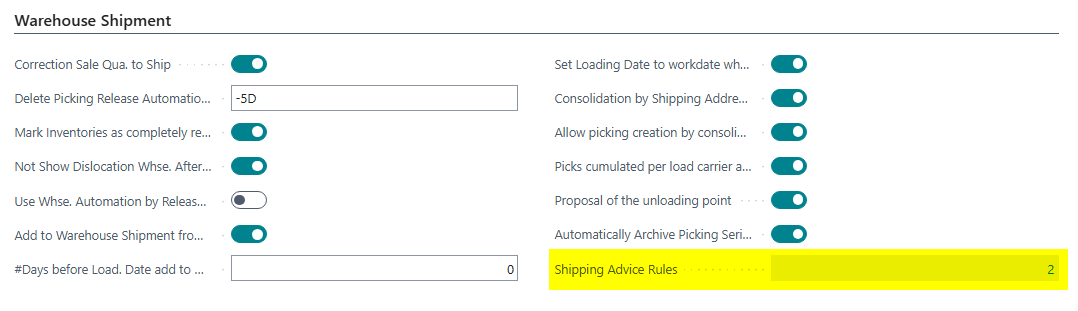
Shipping Advice Rules: Setting the shipping advice rules in SIEVERS WMS can add value. If it is left blank, the BC standard shipping advice rules apply. Setup suggestion:
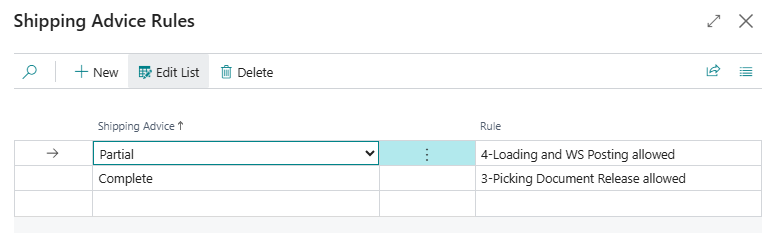
This allows you to start picking immediately, even though the source document specifies 'Complete Delivery'. With the above setup, it is not possible to post a warehouse shipment with missing parts with the specification 'Complete Delivery'. The shipping advice rules can be overridden at customer or order level of the warehouse shipment. At the warehouse shipment order level, the shipping advice rules for the warehouse shipment lines can be changed at any time during the process if there are employees who have the right to maintain them. Please check your user rights.
In later sprints, two more specifications will follow.
Stocktaking
- Difference Blocking Type: Please set the selection to Load Carrier.The setup blocks both all inventory and the load carrier itself.If there is more than one item in inventory on a load carrier, the probability of error increases significantly. A typical problem occurs when an employee scans the correct inventory but accidentally removes the wrong item. When an inventory discrepancy occurs, a stock-taker should check the entire pallet and pinpoint the discrepancy. This process may uncover other potential mispicks.
- Action Reserv. Inventory in Stocktaking: Please set the selection to Warning. When adding storage places to a stocktaking that are currently reserved, a warning is issued that these storage places will be left out. This makes the current stocktaking process more transparent. Further improvements will follow.
- Confirm inv. by selection (MDE): See tooltip. Enables manual selection of an inventory in the inventory process without validation. In warehouses with many mixed load carriers, it is not a good idea to activate this. If the mixed load carriers are in low-traffic areas and otherwise only single-item items are stored, the flag can be activated.
Batches
Please use the following batch actions:
- Update Sort Indexes
- Update Consoludation No.
- Update SBD Defaults
- Update Source Subtype
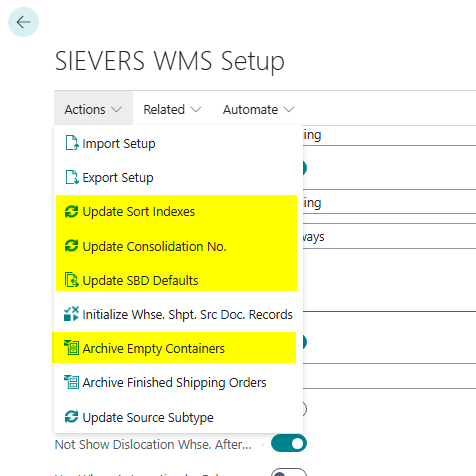
Location Card
Please enter a valid base calendar code on the location card.
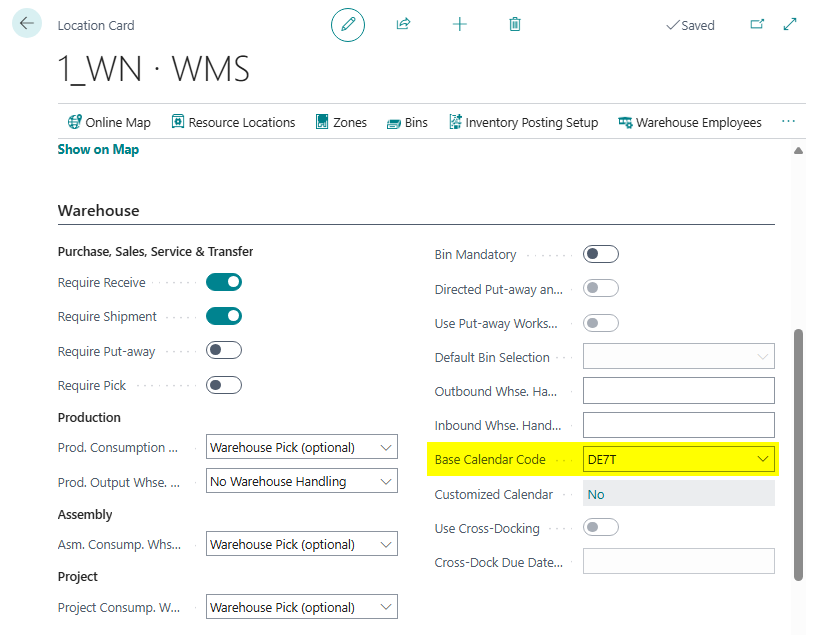
This is important for the lead times and grace periods for Whse. Ship. Automation, Outbound Stock Post automation and automatic release of picking documents. The calendar can be overridden for the customer.
Inventory Measures
Please check if the calculated volume of the inventory measures is correct.
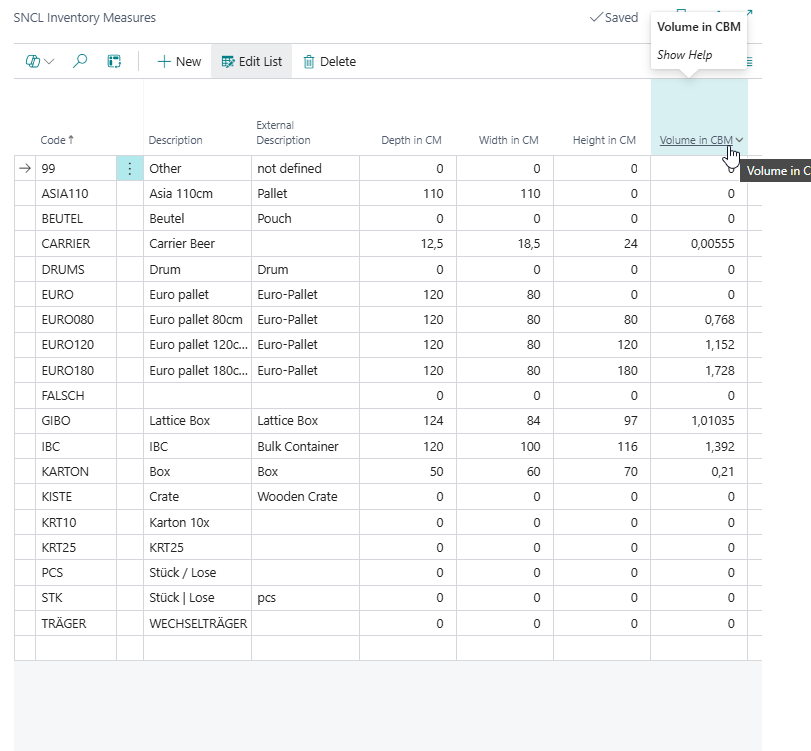
Due to an update, it is possible that the volume is not initially calculated correctly. If this is the case, please change one of the dimensions and it will be correct again.
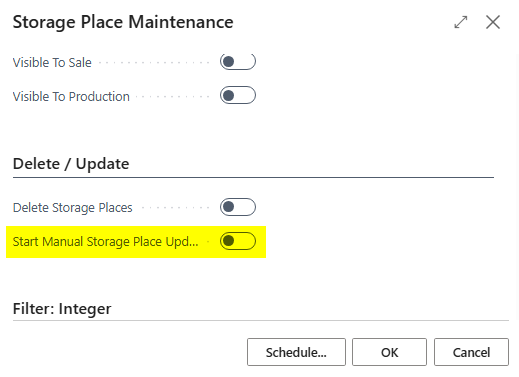
Storage Place
::: Attention Please start a manual storage place update over all storage places! This ensures that the new assignment determination works. :::
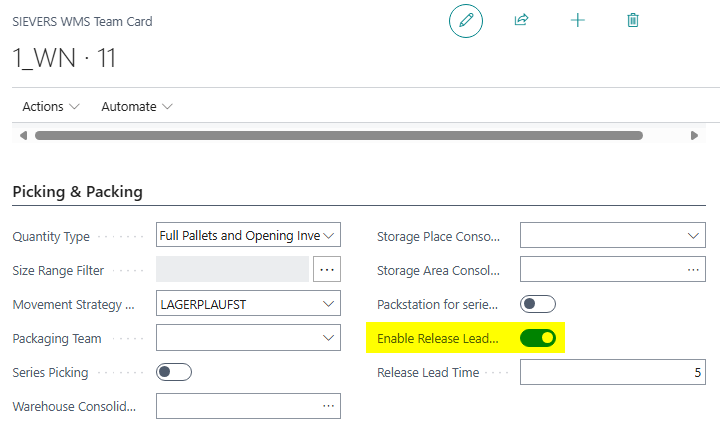
SIEVERS WMS Teams
If you want to use the automatic release of picking documents you have to active the option Enable Release Lead Time and fill in the Release Lead Time field below. See tooltip for further information.
Warehouse Shipment Automation
There are new fields on the warehouse shipment automation page:
- Deactivated: When this field is checked, the automation row is not applied
- Lead Time: Specifies how many working days before the delivery date a warehouse shipment can be created. If a 10 is entered here, a warehouse shipment can be created 10 days before the loading date.
- Deadline: Specifies the number of days before the first loading date of the warehouse shipment that no more orders are assigned. This can be useful if it takes one or more days from the creation of the warehouse shipment until loading is possible. If no base calendar is entered, calendar days apply.
- Grace Period Shipment Date: Tolerance period around the first loading date in which various orders can be grouped into a warehouse shipment.
All day specifications refer to the operating calendar of the location or the customer.
Mobile
Please make sure that you have updated to current mobile forms release 42 and the associated help pages.
Customer
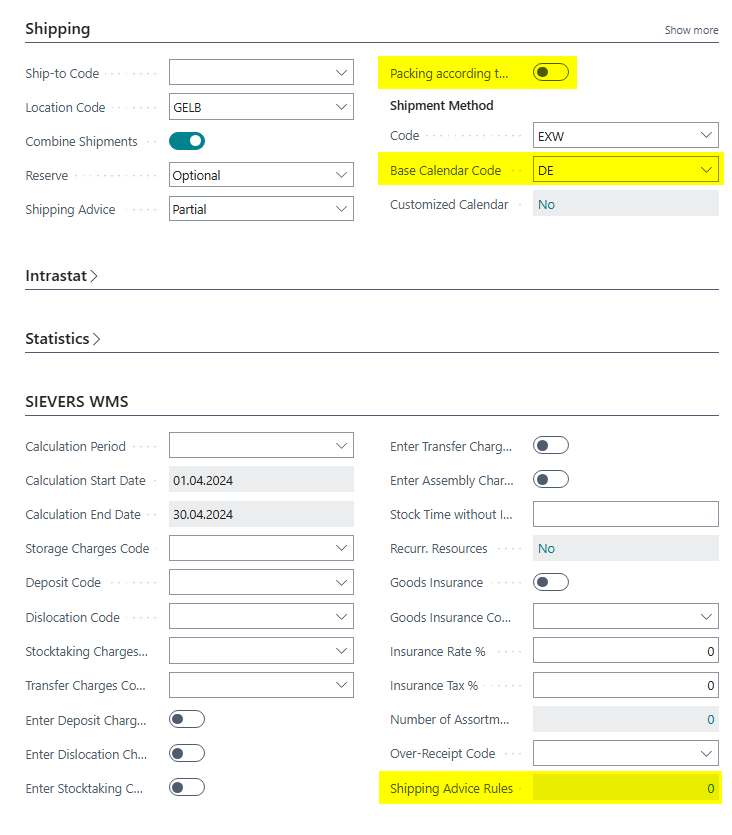
- Packing according to shipping address: This option controls whether orders for the customer may be packed together.
- Base Calendar Code: As in the location card this is important for the lead times and grace periods for Whse. Ship. Automation, Outbound Stock Post automation and automatic release of picking documents. The calendar overrides the location calendar.
- Shipping Advice Rules: See Warehouse Shipment. These rules are used for customer-specific setup of the shipping rules and overwrite the rules in the SIEVERS WMS Setup.
Reports and Labels
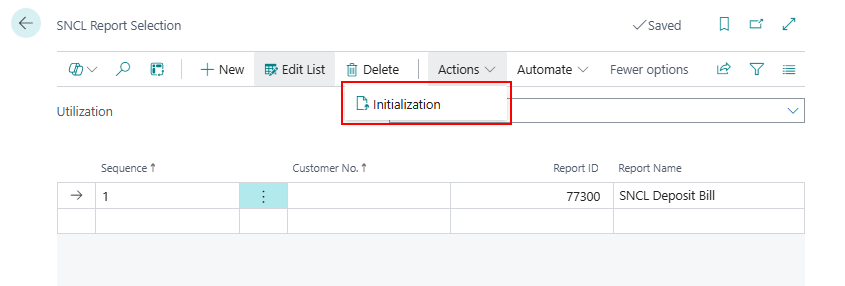
Please initialize the reports in the SNCL Report Selection to ensure the label and report generation is working correctly.
Bugfixes
Correction of Unit Conversion on Shipment List - Item 89015
We have fixed a bug where the unit of measure for an item was not being considered when printing the shipment list.
Shipment Order Log Getting Deleted - Item 97595
We have fixed a bug which caused the shipping order log to get deleted when a shipping order gets archived.
Shipping Order Creation Wrong - Item 99894
We have resolved an issue where a shipping order was incorrectly created for each line item in a warehouse document when the shipping address of the original document differed from the address linked by the shipping code.
Carrier Label Printed and Load Carrier Change Log Not Being Updated - Item 101817
Normally, printing a carrier label should update the Carrier Label Printed field and the Change Log Load Carrier. However, this did not always happen reliably. We have fixed the bug that caused this.
Inventory Transfer Error - Item 101952
We have resolved an issue that caused an error when attempting to transfer inventory from an empty storage location with the "Aut. Takeover Cycle Counting Lists 1-2" option enabled in Sievers WMS settings.
Selection of Items on Cancel Released Items Page Has No Effect - Item 102155
We have fixed a bug which caused the items dropdown menu und the Cancel Released Items Page did not select the items correctly.
Fix for "SNCL Check Replenishment" Report Error - Item 102270
We have resolved an issue where the "SNCL Check Replenishment" report would occasionally fail in the task queue due to a missing value in the Location Code field.
Priority Update for Picking Documents - Item 102290
We have resolved an issue where the priority of completed diverse picking documents were not being updated correctly in the warehouse shipment planning.
Wrong Storage Places With Replenishment Strategy - Item 102352
We have fixed a bug that caused the existing storage place to always be used as the new storage place when replenishing the pick location.
Prevention of Incorrect Stock Replenishment - Item 102736
We have fixed a bug that allowed stock replenishment to incorrectly utilize Load Carriers marked as PTU and SSCC, which should not have been processed back into the warehouse.
Fix for Inventory Deallocation Error - Item 102758
We have resolved an issue where selecting an unreserved inventory item resulted in an error message indicating that the item did not exist, due to rounding remnants from production.
Team Area Filter Not Working Correctly - Item 102762
We have fixed a bug which caused the team area filter to not work correctly on the mobile page for internal transports. The page showed move orders which were not included in the teams area filter.
Weight Calculation Update for Load Carriers - Item 102811
We have resolved an issue where the weight of load carriers was not recalculated correctly when the calculation method was set to Determination according to article net * Quantity + inventory measure weight and the inventory measure code was changed in the load carrier lines.
Fix for Expiration Date Validation Error - Item 103301
We have resolved an issue where the expiration date validation incorrectly triggered a mismatch error between item tracking and quantity during the posting of a consumption journal, despite no mandatory expiration date being set for the item.
Item Transfer Journal Not Taking Over Lot No. - Item 102810
We have fixed a bug that prevented the item transfer journal from being posted when a new lot no. was entered. In addition, we made the fields Lot No., New Lot No., Sell-by Date and New Sell-by Date visible.
Improved Handling of Stock Allocation - Item 96432
We have fixed a bug that incorrectly reported a stock position as zero when a one-to-one match could not be found, ensuring that needs can now be fulfilled from multiple stock locations.
Printing Issue - Item 103443
We have fixed a bug that sometimes prevented users from printing the picking document correctly, resulting in incomplete layouts and error messages.
Inventory Variant Display Issue - Item 103054
We have resolved a bug that caused inventory variants to not display correctly on mobile page B5.4 and resulted in incorrect values being shown.
Consistent Warning for Repeated Print Jobs - Item 102636
We have fixed a bug that caused a warning to not appear when printing directly to a printer, ensuring that a warning is now consistently displayed for repeated print jobs, regardless of whether they are sent to a printer station or directly to a printer.
Fix for Zone Code Handling in Items - Item 97277
We have resolved an issue where the unloading location was incorrectly derived from the warehouse receipt header when no zone code was assigned to an item.
Fix for Missing Assembly Head Error in Picking - Item 103497
We have resolved an issue that caused an error message indicating a missing assembly head when opening the picking document, which halted the entire process.
Item Cancellation Issue - Item 103463
We have resolved a bug that allowed items to be canceled even when a user was actively working on them in the system.
Stock Status Not Updating on Orders - Item 103568
We have resolved an issue where the stock status was not being populated on orders, even after refreshing the page.
Correction of Picking Status in Warehouse Shipments - Item 103588
We have fixed a bug that incorrectly displayed the picking status for warehouse shipments when multiple documents were involved.
Reference in Sales Order Causes Error - Item 103603
We have fixed a bug where the reference in the sales order led to an error depending on the character used.
Overflow Error in Sales Order Release Fixed - Item 103956
We have resolved an overflow error that occurred when trying to release a specific sales order.
Fix for Incorrect Status Reassignment in Loading Processes - Item 104419
We have resolved an issue where completed loading orders were incorrectly reset to an open status during the verification process, leading to unnecessary status changes.
Printing Selection Option Fixed - Item 104484
We have resolved an issue where the "SELECTION" option was incorrectly printed under certain conditions in the SWMS setup.
Missing Lines in Printed Picking Document - Item 104529
We have fixed a bug that caused the printed picking document layout to be incorrect.
Automatic WA Creation on Release Fixed - Item 104573
We have resolved an issue where the automatic creation of a Warehouse Shipment upon document release was not functioning correctly.
Packaging Hierarchy Changes Unit - Item 61263
We have fixed a bug that caused discrepancies in the packaging hierarchy when the unit quantity was changed, preventing the hierarchy from updating accordingly.
Invalid Filter Error in Sales Order List Resolved - Item 102959
We have fixed a bug that caused an invalid filter error when accessing posted warehouse shipments in the sales order list.
Correction of Quantity Display in Stock Transfer - Item 104463
We have fixed a bug that incorrectly displayed the quantity to be taken next to the total quantity during stock transfers when scanning a different stock item.
Incorrect Calculation of SSCC Count and Total Weight on CMR - Item 104317
We have fixed a bug that caused the SSCC count and total weight to be incorrectly calculated on the CMR when multiple orders were packed into the same SSCC during the warehouse shipment process.
Manual Stock Selection Corrected in Transfer Orders - Item 103672
We have fixed a bug where manually selecting stock in a transfer order incorrectly reserved the base unit quantity instead of the intended transfer unit quantity.
Replenishment: Blocked Inventory Is Ignored - Item 102130
We fixed a bug that prevented replenishment from being generated because the replenishment check detected blocked inventory as available inventory.
Item Weight and Dimension Changes on Mobile - Item 105375
We have resolved an issue where the system incorrectly validated item weights and dimensions during the placement process, leading to errors when attempting to change these values.
Missing Address Data in Label Printing Fixed - Item 105455
We have resolved an issue where address data was missing when printing labels after changing the shipping agent.
Inventory Error During Mobile Item Transfer - Item 104277
We have resolved an issue that caused an error message when processing an existing picking order line with a target Load Carrier, provided the source Load Carrier was not empty.
Incorrect Display of SSCC in A6.2o - Item 105223
We have resolved an issue where the SSCC was not displaying correctly in the A6.2o screen, which was caused by an unexpected configuration change.
Printing of Package Content List with Special Characters - Item 105152
We have resolved an issue where the package content list could not be printed with special characters, preventing the generation of customer reference barcodes.
Cancel Released Items Process Did Not Cancel All Positions - Item 104532
We have fixed a bug that caused not all positions to be cancelled that should have been cancelled.
Fix for Picking Document Release Issue - Item 103597
We have fixed a bug that prevented the creation of a second picking document for the same order and team from a different work assignment.
Display of Employee Markings in Warehouse Shipment Planning - Item 105584
We have fixed a bug that prevented the Employee markings from being displayed in the warehouse Shipment Planning when a diverse picking document was selected by the warehouse employee.
Release Notification Issue - Item 105581
We have resolved a bug that prevented the release of a picking document, displaying an unclear error message, and failing to refresh the page correctly upon reloading.
Division by Zero Error in A3.2 - Item 105492
We have resolved a bug that caused a division by zero error when entering a specific storage place number in A3.2.
PTU Value Loss During Processing - Item 105820
We have resolved an issue that allowed PTU values, including shipping and consolidation numbers, to be lost during processing, affecting further handling of the PTU.
Missing Data on CMR - Item 105235
We have resolved an issue where data was missing on the international bill of lading due to a field incorrectly referencing open loading processes instead of the posted loading process.
Validation of Fields in A1.6 - Item 90077
We have fixed a bug that caused an error message to appear when creating load carriers in A1.6, even if the fields were correctly entered in the form.
Item Swap Issues in Picking - Item 104459
We have resolved an issue that allowed item swaps in A4.3 even when an inventory was specified in the original document, leading to potential discrepancies in picking.
Shipment List Wrong SSCC Quantity - Item 105229
We have fixed a bug which caused a wrong number of SSCCs in the shipment list when the order was diverse.
Footer Display Issue on International Bill of Lading - Item 76904
We have fixed a bug where a long reference on the international bill of lading caused the footer to be cut off and displayed on the next page.
Incorrect Pre-Filling of International Bill of Lading Request Page - Item 99031
We have resolved an issue where the request page for printing international bills of lading was incorrectly pre-filled, leading to error messages and the creation of incorrect shipping documents.
Incomplete Item Descriptions and User Assignment in Stock Entries - Item 105173
We have resolved an issue where item descriptions were not being populated in stock entries, and the "Processed By" field was not being filled during quantity confirmations in picking processes in A4.3.
Ability to Split DIVERSE Order Lines - Item 105200
We have fixed a bug that prevented users from splitting multiple lines in a DIVERSE order document, allowing for improved functionality when managing order quantities.
Incorrect Weight Calculation in SSCCs - Item 105262
We have resolved a bug that caused incorrect weight calculations for SSCCs during the packaging process when converting PTU with multiple items.
Move Order List Layout Issue Resolved - Item 105337
We have fixed a bug that caused the move order list layout to break.
Weight Calculation Issue in A1.6 - Item 105395
We have fixed a bug that caused incorrect weight calculations for items based on their packaging hierarchy in the WMS setup.
Picking Document for Assembly Headers Not Creatable - Item 105813
We have resolved an issue where the picking documents for assembly headers could not be created.
Validation Consistency for Load Carrier Status Changes - Item 102295
We have resolved several issues where the validation for status changes on Load Carriers was inconsistent, leading to unpredictable behavior in specific cases.
Correction of Quantity Display in Picking Documents - Item 104466
We have fixed a bug that caused incorrect quantity displays in diverse picking documents until a load carrier was scanned.
Reinstatement of Posted Load Carriers in B5.5 - Item 105100
We have fixed a bug that prevented posted Load Carriers from being reinstated in B5.5 as intended.
Manual Inventory Selection Display Issue - Item 105999
We have resolved a bug that caused the manual inventory selection window to appear unexpectedly during the automated inventory process, which should not occur.
Wrong Employee Markings Shown in Warehouse Shipment Planning - Item 106199
We have fixed a bug which caused the display of wrong employee markings in the warehouse shipment planning after using the warehouse shipment automation.
Transfer Order and Sales Order Not Getting Merged - Item 106218
We have fixed a bug that caused a transfer order and a sales order not to be merged into a single warehouse shipment, even if the necessary key data matched.
Mobile Translations Not Always Correct - Item 106140
We have fixed a bug which caused a few translations on the mde to be incorrect.
Fix for Packing List Export Error - Item 105236
We have resolved an issue that prevented users from printing packing lists for shipments that had been processed with loading, resulting in an error message prompting them to print the shipment list instead.
A5.5 SSCC Status Not Updating - Item 106185
We have fixed a bug that caused the SSCC status to not update correctly in A5.5 even after having entered all necessary attributes.
Printing Error on International Bill of Lading at Printer Station Resolved - Item 105836
We have fixed a bug that caused an unclear error message when attempting to print the International Bill of Lading at a printer station.
New Positions Being Added in Finished Picking Document - Item 106186
We have fixed an issue which caused new positions being added in a finished picking document when creating a stock document with new positions in the source document.
Complete Generation of Stock Documents for Components - Item 103469
We have fixed a bug that prevented the complete generation of stock documents for components, resulting in only one line being created instead of all available items.
Focus Issue During Picking Process - Item 105139
We have fixed a bug that caused the focus to remain on the original Load Carrier line when scanning a Load Carrier with a lower quantity than required, leading to incorrect posting of the original Load Carrier.
Request Page Pre-Fill Issue - Item 105239
We have fixed a bug that caused the international bill of lading request page to be incorrectly pre-filled, resulting in incomplete packing items and missing pickup location and address.
Non-Postable Consumption Journal - Item 105697
We have resolved an issue where certain consumption journals were not postable, causing the posting process to fail with an error message.
Correction of Serial Document Number Color - Item 106006
We have fixed a bug that incorrectly colored the serial document number in red when no orders were released with partial quantities.
Item Tracking Error During Transfer Order Posting - Item 106093
We have resolved an issue that caused an error message regarding item tracking when posting a warehouse shipment based on a transfer order with multiple item lines.
Picking Document Creation Issue - Item 106418
We have resolved a bug that prevented the creation of picking documents for transfer orders due to issues with team identification and order status updates.
Fix for Full Pallet Picking Issue - Item 87506
We have resolved a bug that prevented the picking of full pallets when multiple identical stocks were present in the source Load Carrier, resulting in an error during the conversion from SU to PTU.
Fix for Original Number of Pieces Calculation - Item 87459
We have resolved an issue where the "Original Number of Pieces" field in the "SNCL Stock Outbound Stock Post Line" was incorrectly populated, leading to discrepancies in picking quantities during the order fulfillment process.
Packaging Status Update - Item 105310
We have resolved an issue where the packaging status was incorrectly displayed as "completed" when there were still items pending in the order.
Status Updates Not Reflecting Deletion - Item 106010
We have fixed a bug where the status was not being updated after a stock document was deleted.
Deletion of Stock Items During Picking - Item 104575
We have fixed a bug that allowed the deletion of stock items while they were still being picked, which could lead to inconsistencies in the inventory process.
Correction of Warehouse Status Display - Item 106226
We have fixed a bug that incorrectly displayed the warehouse status for sales orders, ensuring it now reflects the lowest status from all related warehouse actions.
Packaging Process Inconsistencies - Item 105055
We have resolved several issues with the packaging process leading to inconsistencies in the system, such as incorrect system behaviour when content is retrieved from the SSCC.
Picking Status Not Updated Correctly - Item 106417
We have fixed a bug where the picking status did not update to "completed" when the last quantity was set to zero and there was no alternative stock available.
Printing of Load Carrier Labels Fixed - Item 106656
We have resolved an issue where not the correct amount of load carrier labels were printed.
Validation of Test Returns Improved - Item 106676
We have resolved an issue where excessive field validations during the implementation of test returns led to an overwhelming number of queries.
Inconsistent Expiry Date Handling in Storage Orders - Item 106683
We have resolved an issue where the handling of expiry dates in storage orders was inconsistent compared to purchase orders.
SSCC Posting Status Issue - Item 106878
We have resolved a bug that caused records to be created that could not be processed further when an SSCC was incorrectly posted, as the status was not reverted to its previous state.
SSCC Field in Packaging Process Retained After Declining Change - Item 106453
We have resolved an issue where the SSCC field remained populated in the packaging process (1 PTU > SSCC) even after the user selected "NO" to a change request.
Wrong Shipping Agent on International Bill of Lading - Item 105231
We have resolved an issue where the international bill of lading sometimes included an incorrect shipping agent.