Features
MDE
B3 and B5 Show GS1 SSCC - Item 82138
The load carrier number has always been shown on pages B3 and B5. If there is a GS1 SSCC, these programs now show it instead. The same applies
Info Symbol on A3.1 and A3.2 - Items 93929, 93932
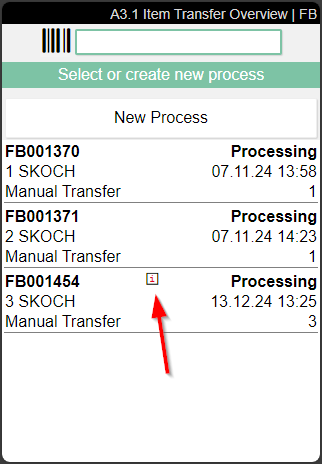
We have added an i to the lines in A3.1 and A3.2 when there is a comment text in the document header. The user can read it via F3.
A7.1, A7.2, A7.3 Sell-By Date, Lot No., Serial No. - Items 98863, 99503, 99506
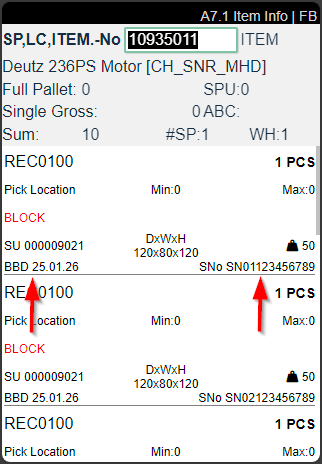
We have improved the pages A7.1, A7.2 and A7.3 by implemented the fields
- Sell-By Date
- Lot No. and
- Serial No.
If both the serial no. and lot no. exist, only the serial no. is shown.
Report Selection - Item 92173
We have added a lot of documents and labels to the SNCL Report Selection Utilization. With the report selection you can assign reports to documents, labels and customers. This is the list of new documents and labels:
- Storage Unit Label
- Warehouse Receipt Storage Unit Label
- PTU Label
- Subpackaging Unit Label
- Series Transport Unit Label
- GS1 Amazon Label
- SSCC Package Content List
- Warehouse Receipt SSCC Package Content List
- Item Label
- Optional Picking List
- Packaging Process
- Picking Document
- Picking Series Document
- Cycle Counting List
- Loading List
- Shipment List
- Packlist Exprtdata
- International Bill of Lading
- Shipping Label
- Shipping Label Archive
In the course of this, we have adapted the report selection as well as some documents and labels to make them consistent with each other. These changes were made in the following works:
- Item 92173
- Item 92177
- Item 92180
- Item 92181
- Item 92183
- Item 92187
- Item 92189
- Item 92195
- Item 92196
- Item 92197
Implemented Units From Base Unit of Measure List - Items 92599, 96008, 96009, 96011. 94240
We have implemented the units from the base unit of measure list in the following pages:
- Item Categories
- SNCL Outbound Stock Post
- SNCL Inbound Stock Post
- SNCL Transfers
- SNCL Move Job
New Columns on Outbound Stock Post Automation Protocol - Items 96723, 96722
We have added two new columns to the Outbound Stock Post automation protocol:
- Partial: This makes it clear to the user that the stock document was created with missing parts
- Outbound Stock Post updated: Shows that this Outbound Stock Post was modified by the process
Order Type Determination Now Also After Warehouse Shipment Creation - Item 96120
Until now, the order type was only determined once when the source document was created. As soon as the document is split into several open warehouse shipments, it may be necessary to reevaluate the order type. This is exactly what this feature achieves. It ensures that when a warehouse shipment is created for a source document, the order type is reevaluated based on the lines of the warehouse shipment. If the order type differs, it is updated for the warehouse shipment, otherwise it remains unchanged.
Improved Setup Export and Import - Item 87383
It has always been possible to export and import parts of the SIEVERS WMS setup. This makes it easy to create test systems based on real systems. However, this function has always been quite minimalist and did not include many essential setup tables. We have now changed that.
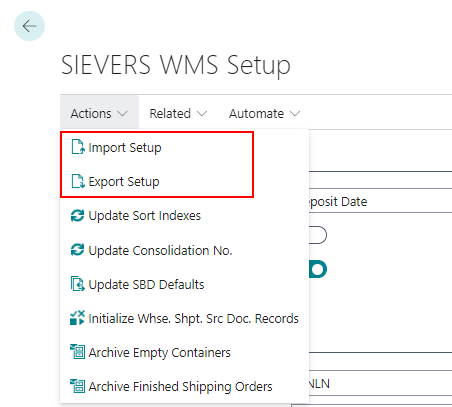
When you want to export the setup, just start the action via the setup menu. After that a windows opens where you can select all of the tables you want to export manually.
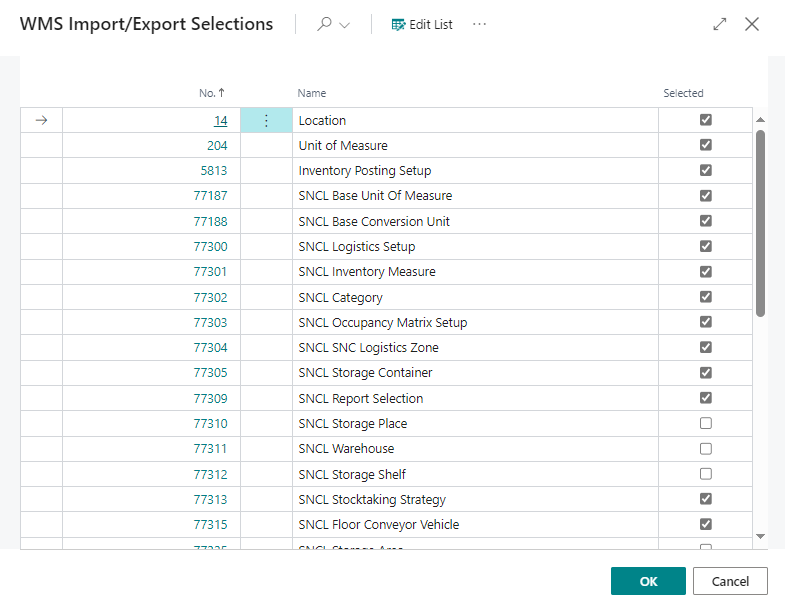
Please be sure to make a reasonable selection. For example, it makes little sense to export strategy lines without a strategy header.
The import works in exactly the same way. The difference is that the import window only shows the tables that are actually contained in the export file. This means that you can also select which tables you actually want to import. A rudimentary check is carried out during import, so that tables that are necessarily interdependent can only be imported together. Please note that there are so many different dependencies that the check is not infallible.
In addition, a check is now partially carried out during the import to determine whether the data is valid. This means that TableRelations are checked. For example, if a storage place with a blocking code is to be imported, but this blocking code does not exist in the database, nor are blocking codes generally included in the import, this blocking code is simply discarded at the storage place and not imported. An alternative example is the assignment of a report/format, which is also included in the export: if this is imported into a system without the respective report with the ID existing in the system, this data record is discarded and not imported because the value does not exist in the TableRelation. This should now result in less inconsistent data being imported through the import – but at the same time, data could now be discarded automatically.
::: Attention This function is only suitable for setting up test systems or a minimal initial setup. Please do not use this function for your productive system! :::
Small Changes
- Selecting the option 3-Selected load carrier label(s) when printing load carrier labels now throws an error message when the user did not enter load carriers in the field below - Item 96214
- Pressing escape in A3.2 after filtering on a specific storage place or load carrier opens the full list again instead of reverting to A3.1 - Item 97340
- Doubled the possible character quantity of the n.a.g. field - Item 98197
Additional Changes
- Implemented standard values for GS1 setup - Item 66367
- Adapted following reports to the improved report selection: - Item 92182
- SSCC Label
- GS1 Amazon Label
- SSCC packaging content list
- Improved shipping advice rules - Item 95633
Bugfixes
Wrong Partial Indicator - Item 75646
We have fixed a bug that caused the partial indicator to be set incorrectly at the warehouse shipment level. The error occurred when the sales unit and storage unit of an item were different.
Multiple Fixes on SNCL Stock Entries Page - Item 94949
We have done the following on the SNCL stock entries page:
- added tooltips
- item description is now filled in correctly
- fixed order by column
A7.3 Weight and Measures Inventory Measure Codes Fixed - Item 96126
If you scanned a load carrier that had an inventory measure that was not marked as “use as packaging” using the info mask, the inventory measure was always empty when you opened the list. We have solved this problem. Now all inventory measures are shown correctly.
Sum Fields Removed from Sales Order - Item 96568
We have fixed a bug which moved the sum fields in the sales order from under the lines into the lines as columns. The sum fields are now back where they were before.
Warehouse Shipment Priority Not Updating - Item 96736
The priority of a warehouse shipment matches the lowest priority of the orders that are part of the warehouse shipment. However when you increased the priority on the source document, the priority on the warehouse shipment did not get updated. We have fixed this bug.
B5: Not Manual Entry of a Date - Item 98131
We have fixed a bug which caused a manual entry of a date not possible in B5. You always had to enter the date via datepicker.
Inbound Stock Post Strategy Did Not Take Reservations into Account - Item 98396
We have fixed a bug that in special cases did not count reservations on places when it came to whether the place was already full or not.
Outbound Stock Post Document Not Removeable From Item Journal - Item 98572
We fixed a bug that prevented the Outbound Stock Post from being deleted from the item journal because the system mistakenly searched for a warehouse shipment that did not exist.
Enter Inventories by Storage Place Not Working Properly - Item 98927
We have fixed a bug which caused the function Enter Inventories by Storage Place to not enter all available inventories in the stocktaking document despite them not being reserved or related to another outside storage customer.
Date of Handling & Handling Start Time Not Entered Correctly - Item 99335
If, during the picking process, Outbound Stock Post lines were combined on the MDE (because the same item, Load Carrier, etc. was involved), only one of the lines was correctly updated with the values for the date of handling, handling start time and handling end time when these lines were processed. We have fixed this bug.
Multiple Picking Documents in One Report Not Working Correctly - Item 99605
We have fixed a bug that caused the printed lines to be incorrect when printing multiple picking documents at the same time.
Deleting Second Cycle Counting List Leads to Too Big Deleted Inventory - Item 100124
We have fixed a bug that caused too much inventory to be posted out when a second cycle counting list was deleted.
Warehouse Shipment Automation Creates Two Warehouse Shipments - Item 100754
We have fixed a bug that caused two warehouse shipments to be created in a certain constellation in the warehouse shipment automation.
Multiple Printing of SU Labels Not Possible - Item 100850
We have fixed a bug that prevented the printing of multiple SU labels at once.
Small Bugs and Spelling Mistakes
- As intended, empty stock documents for stocktaking will be deleted after creation - Item 99386