Features
Hidden Setup Fields - Item 84366
We have hidden the fields Load Carrier retain Inventory Measure and Transport Load Carrier retain Inventory Measure because they no longer fulfill a function in the new SIEVERS WMS. These are obsolete settings that are no longer necessary. In one of the next versions, the fields will be completely removed from the product.
Mobile
Adopting New Source Documents in the Warehouse Receipt - Item 89323
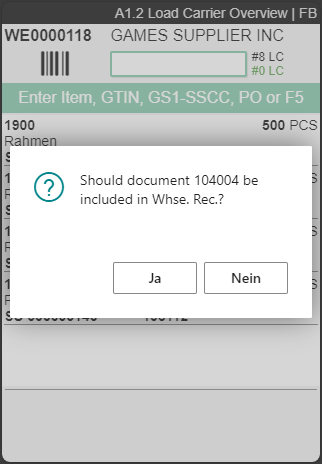
In A1.2 Load Carrier Overview, you can now also add new source documents to the current warehouse receipt. To do this, simply enter the document number. The system then asks whether you want to adopt this document into the warehouse receipt. If you confirm this query, the receipt lines are entered into the warehouse receipt.
Moved New Unloading to Menu B4 - Items 93849, 89324 and 89328
We have now removed the New Unloading page from the A1 warehouse receipt and moved it to its own menu item: B4 Whse. Rec. Unloading. The reason for this is that the forklift driver, for example, can now focus 100% on unloading.
B4.1 is the same page as A1.1. When a warehouse receipt is selected, instead of opening the load carrier overview, a new unloading process can be created. This immediately populates the arrival time in the warehouse receipt.
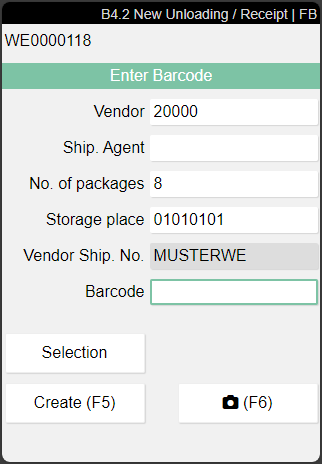
This screen is almost identical to the old version. The only new feature is that you can now select a vendor via Selection. Only vendors with an open source document are shown here. With Create or F5 you create the new Unloading.
Improved B3.3 New Inventory - Item 95363
We have improved the B3.3 page with these implementations:
- Input field sizes harmonised
- Feedback in the feedback field instead of popups
- Page closes automatically after entering the quantity
- Green feedback as confirmation
A4.3: Same Inventories are Shown Accumulated + Inventory Swap Features - Item 94241
Inventory with the same properties in the same load carrier is now shown cumulatively in A4.3. Here we have further implemented a feature from the last release. In release 34, a corresponding option field was added to the WMS setup:
- Picks cumulated per load carrier and item
In this item we have also implemented the changes on A4.3 regarding the Inventory Swap Inside of Load Carriers.
A3 Cumulation of the Lines - Item 94684
Analogous to the previous item, we have also changed A3 so that lines are now shown cumulatively by load carriers and items. This greatly reduces the number of retrievals and confirmations on the MDE.
A3 Consideration of the Defined Storage Areas - Item 94688
In the SIEVERS Teams settings, you can define dedicated storage areas for each team, which are then filtered. This filtering now also works for the lists displayed on A3.
::: Note Please note that this storage area filtering only applies to the original storage place. If this is later changed, the same team can still access it. :::
Stocktaking
Open or Delete Phys. Inventory Journal - Item 92564
You now have the option to open or delete the corresponding Phys. Inventory Journal directly from the SNCL Stocktaking page. This is especially useful if an error or a mistake happens during stocktaking and you want to restart it.
Picking
New Fields in Picking Document - Item 96185
We have added the fields:
- Serial No.
- Lot No.
- Sell-By Date
to the picking document lines. Add them to the table via Personalize.
Inventory Swap Inside of Load Carriers - Items 94163, 94164, 94200 and 94292 {#inventoryswap}
We have added a new feature: now pickers can also exchange inventory within load carriers. For example, if during picking it is determined that an inventory item in the load carrier is defective, the picker can independently decide to take a different inventory item from the load carrier instead.
For this feature we have added a new setup field in the SIEVERS WMS Setup in the Load Carrier section, the item categories, the item card and the stockkeeping unit data:
- Inventory Swap in a Load Carrier
This setting allows inventory to be exchanged within a load carrier. Regardless of whether lot no. or serial numbers are used. Regardless of whether the inventory swap is permitted or not permitted in the storage place categories. If a lot no. or serial number is specified in the source document, swapping is not permitted, even if the inventory swap is permitted in this setting (unless it is the same batch).
The fields on the respective pages overwrite each other (-> means 'is overwritten by') like this:
SIEVERS WMS Setup -> Item Category -> Item Card -> Stockkeeping Unit Data
The field currently has the following values:
-
- Allowed
- Not Allowed
It is possible that further values will be added at a later date.
::: Note Please note that when a lot no. or serial no. is specified, only inventory with numbers that match the specification may be swapped. :::
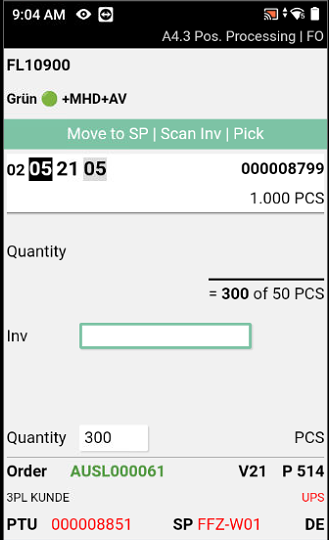
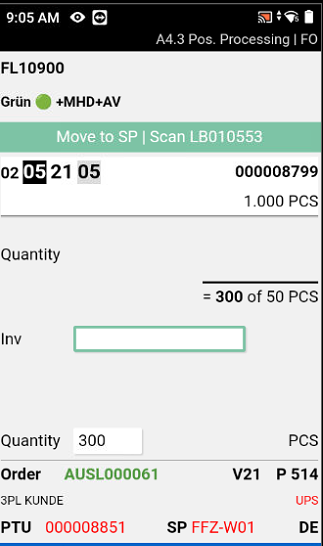
You can see whether an exchange is allowed for a particular inventory item by looking at the exact task in the feedback section on the top of the A4.3 page. If it says Scan Inv you can scan any inventory in the load carrier. If it says Scan SU0102322 for example, inventory swap inside of this load carrier is forbidden and you have to scan this exact inventory.
If you are working with Business Central in document-based mode, you can use the Swap Inventory function to swap the inventory in the picking document lines.
::: Note Please note that if inventory swap is allowed, the inventory number will not print on the printed pick list. :::
Units
Improvements to Handling of Item Units - Item 92684
We have improved the handling of item units with the following features:
- Item units can no longer be changed or deleted if they are used in the packaging hierarchy
- If a unit is not in use, it can be deleted
- If the Number of Pieces per Unit of Measure is changed in the item units, then the same field in the packaging hierarchy is updated automatically
- If you delete entries in the packaging hierarchy, the entries in the units are also deleted
- Units still have to be entered manually in the packaging hierarchy
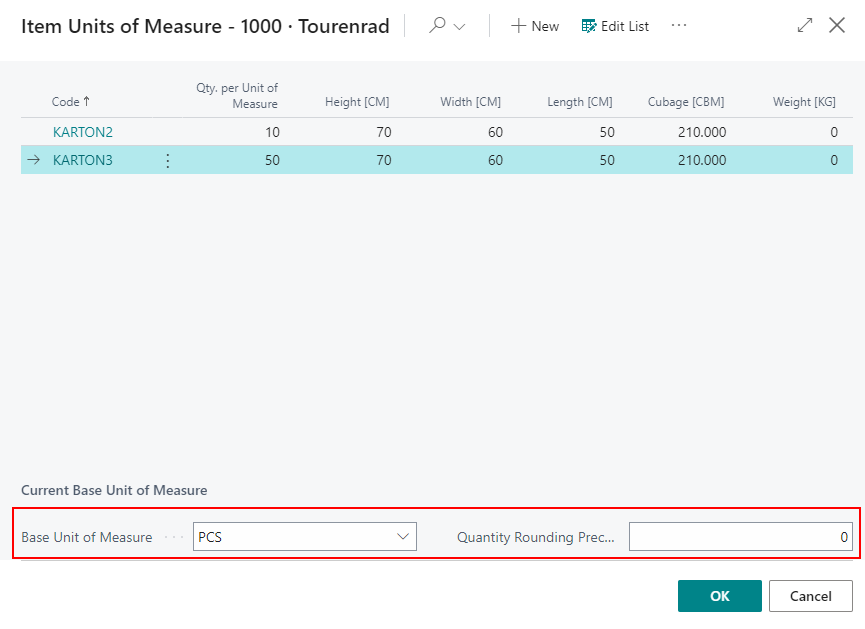
Item Units of Measure Page Shows Basic Unit - Item 83823
The base unit is now shown when you want to maintain the subpackaging unit (SPU) using the field in the SNC Classification tab.
Warehouse Receipt
Check and Notification for Quantities of Load Carriers to be Corrected - Item 94868
From now on, the system checks whether the allocation of receipt lines to load carriers is plausible. If the number of load carriers in the receipt lines is not equal to the number in the allocated load carriers, the number is highlighted in red and a message is displayed.
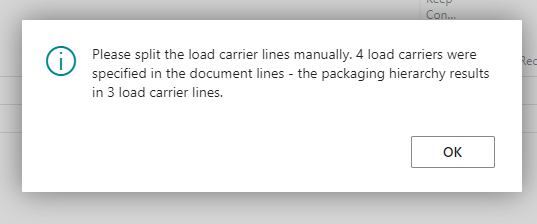
The advantage of this is that the employee is now always notified if there are discrepancies and can respond to them.
New Field: Number of Tracking Lines - Item 94869
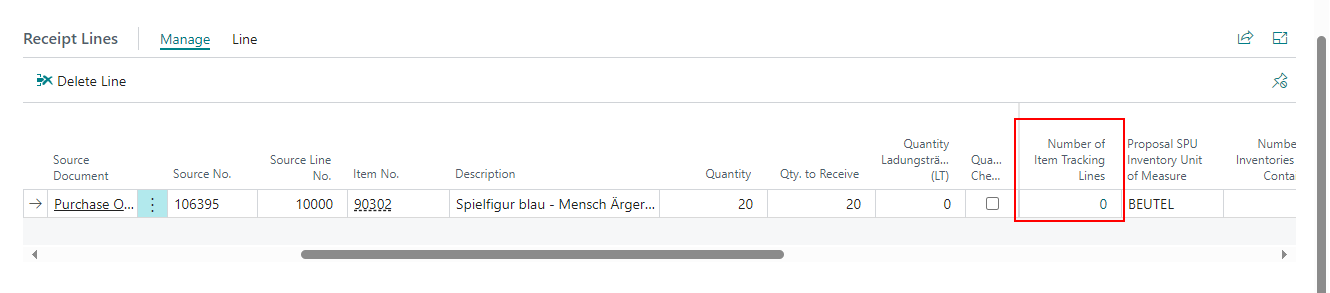
We have added a new field to the receipt lines in the SNCL Warehouse Receipt:
- Number of Tracking Lines: Shows the number of item tracking lines associated with this receipt line
Automatic Warehouse Shipment and Outbound Stock Post
Priority from Warehouse Shipment Automation is Default - Item 82027
We have implemented that the priority from the Warehouse Shipment Automation will serve as default value for automatically created warehouse shipments. The priority determines the sequence of the stock documents per source document.
New Field in Warehouse Shipment Planning - Items 83504 and 83506
We have added a new optional field to the warehouse shipment planning:
- Variable for aut. creation of stock doc
This field is also known as Var. for Auto. Creation SNC.
Here you can enter a flexible value or a description, which is used as a filter in the Outbound Stock Post automation. Only warehouse shipments that have entered a value corresponding to the Outbound Stock Post automation are taken into account in the automation. In short: With this field you can manually decide which warehouse shipments should be processed automatically.
You can find the corresponding counterpart of the field in the Outbound Stock Post Automation. Here it is called Variable for Auto. Creation Filter.
SIEVERS Teams
Move Job Type Filters - Item 95146
We have added a new filter field to the sievers teams page in the General section:
- Move Job Type Filter: Sets one or multiple Move Job Type filters for this team. Unless a filter is set all Move Job Types are available.
You can use this filter only if the team has the type Internal Transport.
Quantity of Move Job Lines - Item 95153
We have added two new fields to the sievers teams page in the General section:
- Show Move Job Lines: Restricts the visible/selectable worklist in A2 - Internal Transports, analog to Max #. Documents. If you select Custom, please define a number in the Number of Move Job Lines field.
- All
- None
- Custom
- Number of Move Job Lines: Specifies the number of rows visible for worklist in A2 - Internal Transports. To be used when selecting Custom in the Show Move Job Lines field.
Load Carriers
Printed SSCC Label and Shipment Label in Posted Load Carriers - Item 94933
You can now view or print the most recently printed shipping labels again from the list of Load Carriers and Load Carrier cards. This can be helpful, for example, for return orders. Just enter the posted Load Carrier list or card and open the SSCC label via Reports.
Small Changes
- Added the Storage Place Type column to the SNCL Storage Place List - Item 92600
- The presence of a comment text marked with an i is now also shown on pages A4.1 and A4.2. Look it up with menu A5 or -> - Item 93940
- The item descriptions and quantities are now also shown in the load carrier lines of posted warehouse receipts - Item 94197
- Picking Document List: You can now click on the warehouse shipment number to open it - Item 94236
- Item unit list now shows the respective dimension units from the base unit of measures in the header - Item 96303
- SNCL Stock Entries weight columns now show the respective units from the base unit of measures in the header - Item 96003
- Stocktaking line weight columns now show the respective units from the base unit of measures in the header - Item 96005
- Added help file for A1.2 Src. Doc. Entry - Item 96751
- Improved A1.GS1 looks - Item 95186
- Improved A2 looks - Item 95221
- Added Inventory Label Print Action to inventory list in report menu - Item 94936
Other Changes
- Source document filter for warehouse shipment automation - Item 89606
- Shipping advice rules - Items 95631 and 95632
Bugfixes
Multiple Success Messages After Using Switch All SU to PTU - Item 86996
We have fixed a bug that caused a separate success message to be generated for each converted Load Carrier when using the Switch All SU to PTU function after picking.
Not Able to Delete Picking Place and Production Place - Item 92247
We have fixed a bug that caused the picking place and production place to remain in the item card despite being deleted.
Wrong Filters on Shipment Tiles - Item 92286
We fixed a bug that caused the tiles Picked Full Load Carriers and Picked Opening Carriers to access exactly the same page with the same filters. Now the filters have been customized for opening and full load carriers.
Load Carrier Lines and Quantity Checked Not Being Removed after Changing Warehouse Receipt Line - Item 93689
If the Qty. to Receive or the Number of Load Carriers are changed in a warehouse receipt line after the quantity has already been checked and load carrier lines have been created, the latter must actually be deleted and the “Quantity Checked” indicator must be removed. This was not the case. We have fixed this bug.
Entering a 0 in Stocktaking Response Triggers Error - Item 93734
We have fixed a bug that prevented the entry of a 0 during a picking response. Now, when a 0 is entered in Business Central, the system will ask whether an alternative load carrier should be searched for.
Attention: Please note that when entering a 0 on the mobile system, the inventory can only be blocked.
Shipment Date Set in the Past - Item 94101
We have fixed a bug that caused the Shipment Date in the Warehouse Shipment to be set in the past under certain circumstances, which prevented further progress of the Warehouse Shipment.
Shipment Method Code Not Being Filled Correctly - Item 94545
We have fixed a bug that caused the shipment method code not to be filled during a warehouse shipment if the warehouse shipment was created manually and the get source documents function was used.
Packaging Hierarchy No 0 Possible - Item 94230
We have fixed a bug that caused an error in the packaging hierarchy when a 0 was entered in the number of pieces.
B5.0 Input Fields not Aligned - Item 95369
We have realigned the fields in B5.0 and changed their size so that the fields are looking as expected.
A5.1 SSCC Scan not Opening Packaging Order - Item 95389
We have fixed a bug where scanning SSCCs in A5.1 did not open the corresponding packaging order.
Partial Delivery not Possible - Item 95647
We have fixed a bug that prevented a partial delivery when an item was created including SNCL item tracking and Business Central item tracking.
Stocktaking and Cycle Counting Lines not Updating after Inventory Move Job - Item 95856
We have fixed a bug which caused the stocktaking lines and cycle counting list lines to not be updated after an inventory move job.
Check Replenishment for Production Orders not Working - Item 96708
We have fixed a bug which sometimes prevented the replenishment check for production orders to work correctly.
Counted Value from 2nd Count not Being Taken into Account - Item 95846
We have fixed a bug that caused the counted value from the second count in a stocktaking not being taken into account.
Automatic Warehouse Shipment: Updating Shipment Loading Day Not Updating Priority - Item 96756
We fixed a bug that caused the priority not to be changed during an automatic warehouse shipment after the delivery date was updated.
Wrong Inventory Measure Code in Stocktaking Line - Item 96496
We have fixed a bug that, under certain circumstances, caused an incorrect Inventory measure code to be entered when creating an inventory line.
Production Order Replenishment Not Working - Item 96169
We have fixed a bug in the replenishment calculation. Normally, the replenishment settings at the workstations, the production order, the components, etc. should override the replenishment settings at the master data. However, in some cases this did not work.
Small Bugs and Spelling Mistakes
- Fixed wrong button color in B5.1 - Item 95843