Features
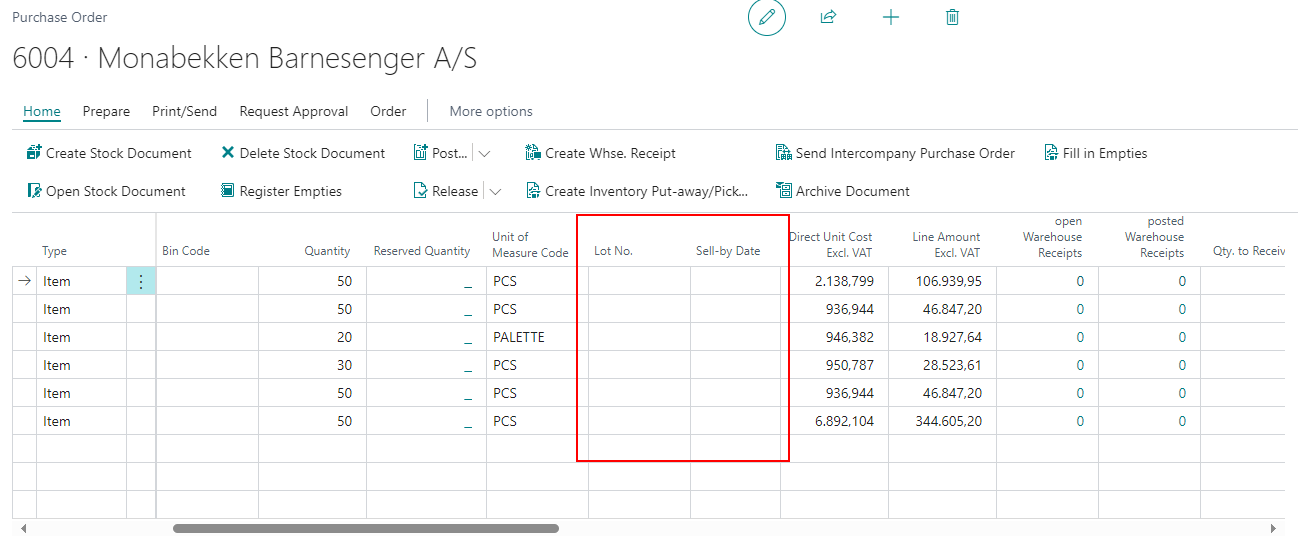
New Line Columns in Purchase Order - Items 83694 and 83695
You can now enter a lot no. and a sell-by date directly in the lines of the purchase order as long as it's open. When a purchase order becomes a warehouse receipt, these fields are also automatically adopted. The prerequisite for this is that there is only one item tracking line per order line.
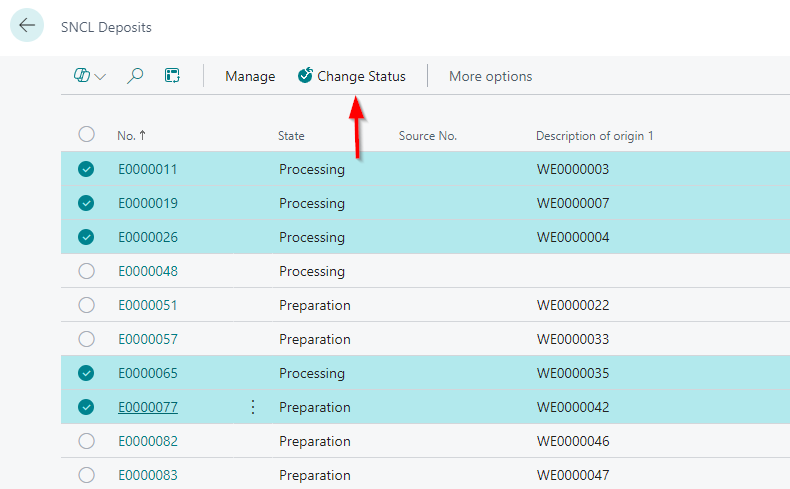
Change Status in SNCL Inbound Stock Post and Outbound Stock Post List - Item 89052
You can now change the status of multiple Outbound Stock Posts or Inbound Stock Posts at once in the respective lists.
Warehouse Shipment
Improved Warehouse Shipment Auto. Protocol - Items 89622 and 89696
We have improved the Warehouse Shipment Protocol for automatic warehouse shipments by implementing lookups on these fields:
- Source Document to Sales Order, Transfer Order or Purchase Return Order
- Whse. Ship. Header No. to Warehouse Shipment Planning with the correct shipment being selected
- Loading Week
- Loading Date
- First Loading Date
Working Days Instead of Calendar Days - Items 89684, 89686 and 89685
We have changed the way multiple fields in the warehouse shipment work with the base calender. Previously, the calendar days in the base calendar were used to calculate the fields. Now the working days are used. This affects the following fields:
- #Days before Load. Date add to Whse. Ship.
- Deadline
- Lead Time
Mobile
Redesign - Item 89610
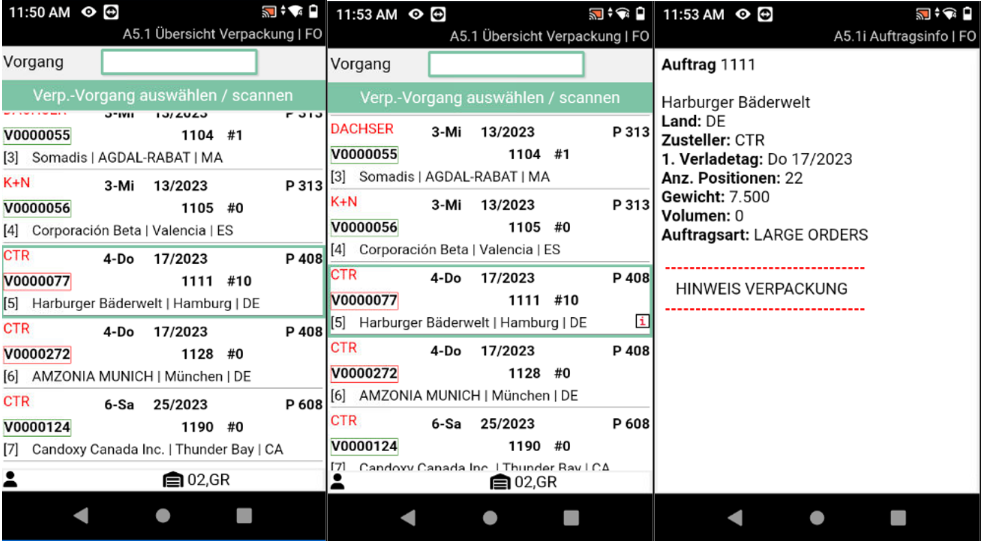
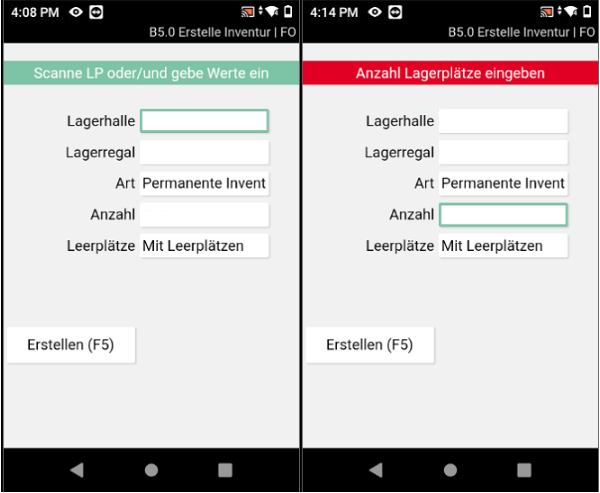
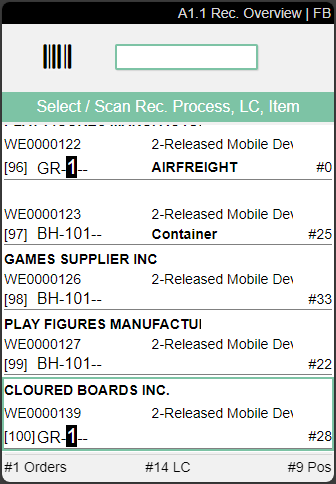
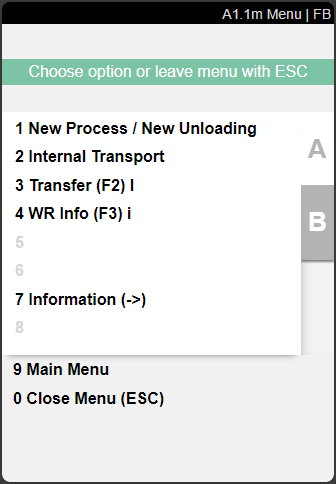
We have completely redesigned the mobile system. The layouts and fields remain largely the same, but we have changed the design and colors. Here are a few example screenshots in german language:
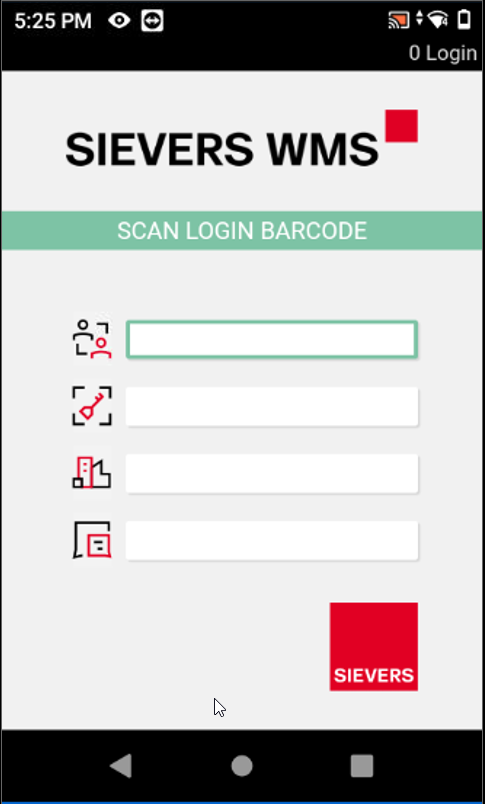
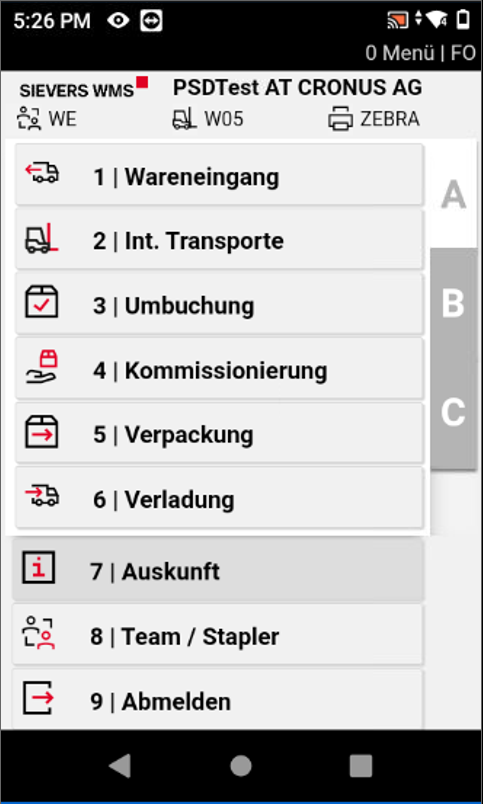
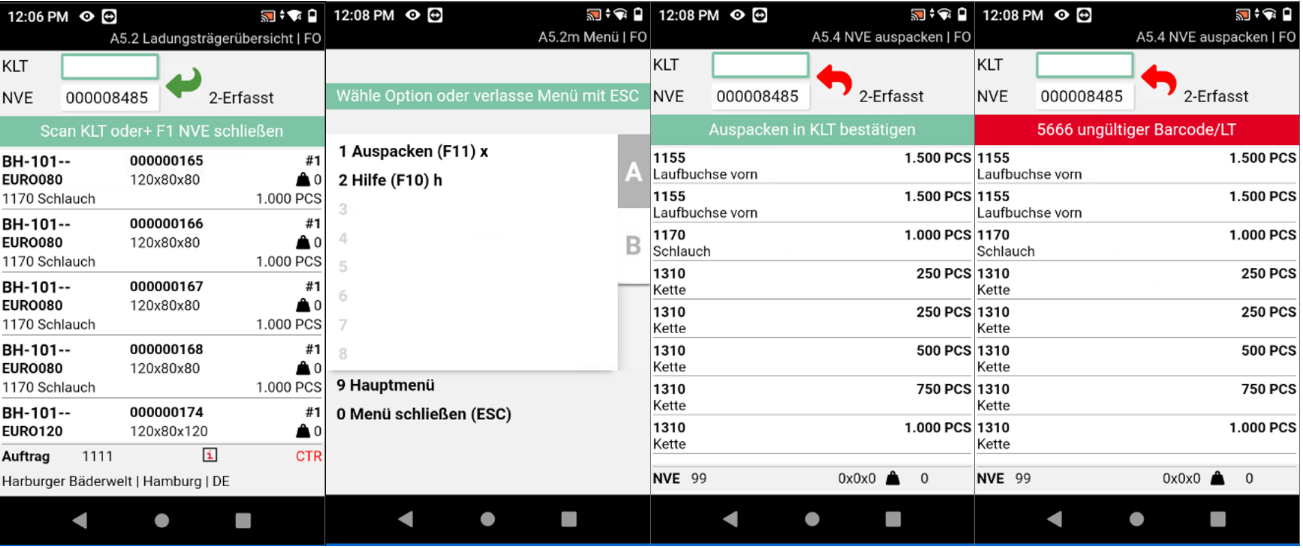
::: Attention We have removed the New Process/New Unloading button on top of the A1.1 page. You can now create a new process via the A1.1 menu.
 :::
:::
We have also implemented the option to setup android scanners without the navigation bar on the bottom. Please get in touch with your SIEVERS contact person if you are interested in this service.
Improved A5.1 Packaging Process Overview Handling - Item 84233
We have improved the process in A5.1 Packaging Process Overview. Previously, the packer had to search for his process in the overview by hand. Now it is possible to simply scan the PTU or SSCC and jump directly to A5.2.
Improved B5.3 Perm. Stocktaking Handling - Item 93455
Now you can also scan inventory numbers in B5.3 to go through the stocktaking by inventory. This means that you no longer have to select the inventories on the screen.
Improved A2 and A3 to Set Employee Markings and Stark/End Handling Time - Items 85262 and 85264
We have implemented the following improvements in A2 and A3:
As soon as the user scans a load carrier and thus posts it to his forklift, the employee marking, start time and end time are filled in this posted move order.
A new move order is automatically created. The employee marking and start time are automatically filled in for this. As soon as the user returns the load carrier, the end time is filled.
If the user picks up a load carrier on the forklift and closes the mask, the employee marking and start time remains set. If a new employee now takes this forklift and posts the load carrier to the target location, the employee marking is updated. The start time remains the same.
Production
Changes to Production Order Components Page - Items 92607 and 92608
We have hidden the Bin Code column on the Production Order Components page. Although this is part of the Business Central standard, it can cause confusion because there is a column with almost the same name (Storage Place Code) in the SIEVERS WMS. If you still want to use it, you can easily unhide it.
We have also added the column Routing Link Code to the pages table. This connects the material required for production with the operation in the work plan stored on the item.
A3 on MDE: Select from Internal Transport or Production Supply Teams - Item 93046
When you enter A3 for the first time, you must select a team, a forklift, and a printer station. Previously, only teams of type Internal Transport were displayed. We have added teams of type Production Supply to the selection.
Replenishment
We have implemented a lot of improvements for the replenishment.
Check Replenishment Action Now In Move Job List - Item 85191
We have added the Check Replenishment action to the Move Job List.
Added New Field to Item Card - Items 85196 and 85237
We have added the field Step Size Replenishment to the SNC Replenishment section of the Item Card. With this field you can gradually increase the replenishment amount based on the demand. For example if the demand for replenishment is 3 and the step size = 10, then the replenishment quantity is 10. If the demand is 11 pieces, the replenishment quantity is 20. This ensures replenishment at the appropriate level of the sub-packaging unit (e.g. carton-by-carton replenishment).
New Section in SNC Inbound Stock Post/Outbound Stock Post/Storage | Replenishment on Item Card - Item 91606
We have added new calculated fields in the item card to display how many items are part of the replenishment system.
- Number of Inventories in Picking Area: Calculated field that counts the number of inventories located in picking areas (places, areas, halls, etc.).
- Number of Pieces in Picking Area: Calculated field that counts the sum of the items located in picking areas (places, areas, halls, etc.).
- Quantity in Inbound Stock Post Picking Area: Calculated field showing the total of the items that are in open move orders with a picking area as their destination
- Quantity in Reservation Picking Area: Calculated field showing the total of the items that are in picking areas in reservations
Added New Optionfields to SNCL Check Replenishment - Item 91638
We have added the new fields
- Target Warehouse Code and
- Target Storage Area Code
to the SNCL CHeck Replenishment request page. This allows you to further specify the replenishment check.
Move Jobs
Added Employee Marking Field to Move Jobs - Item 85261
We have added the field Employee Marking to the General section of the SNCL Move Job. This will be automatically filled by the user which selected one or more move job lines on A2 and A3 on the MDE. If a move order is posted on the MDE, the employee marking is also stored here as “Processed by” in the stock entry.
Improved Move Jobs List - Item 85270
We have implemented a few improvements in the move jobs list:
- Added action to print the Move Order List
- Added action Change Status
- Added option to select multiple entries to change multiple states or delete multiple entries at the same time. Please note that this is only possible for entries without employee marking
New Columns in SNCL Stock Move Job Lines - Item 85271
We have added these Columns to the SNCL Stock Move Job Lines:
- Processed By
- Move Job Type
- Priority
- Original-Line No.
New Columns in SNCL Move Job List and SNCL Move Order - Item 92795
We have added new columns to the move job list and order:
- Number of Move Job Lines
- Priority
- Move Job Type
- Employee Marking
Improved Consumption Journals and Output Journals - Item 93752
We have implemented lookups on both the consumption journals and output journals:
- On consumption journal: Stock Document No. lookup to Outbound Stock Post Order
- On output journal: Stock Document No. lookup to Inbound Stock Post Order
Furthermore we have added a Open Stock Document action to both of these pages.
Warehouse Receipt
New Fields on Warehouse Receipt Source Documents - Item 70476
We have added the following columns to the rows of the source documents Purchase Order, Sales Return Order, Transfer Order, and Inbound Stock Post Order:
- Number of open Warehouse Receipts
- Number of posted Warehouse Receipts
If you click on the numbers in these fields the respective list will open.
Posting Warehouse Receipt on MDE Sets 'Processed By' Field in Stock Entries - Item 90082
From now on the Processed By field on the stock entries will be filled with the user ID of the mobile user who posted the quantities in the warehouse receipt.
New Option to Display Accumulated Picking Positions - Items 94204 and 94205
We have added the option Picks cumulated per load carrier and item to the Warehouse Shipment section of the SIEVERS WMS Setup. If this setup is activated, the quantities of the picking items in A4.2 are shown summarized by load carrier and item. If the setup is not active, they are shown by inventory number.
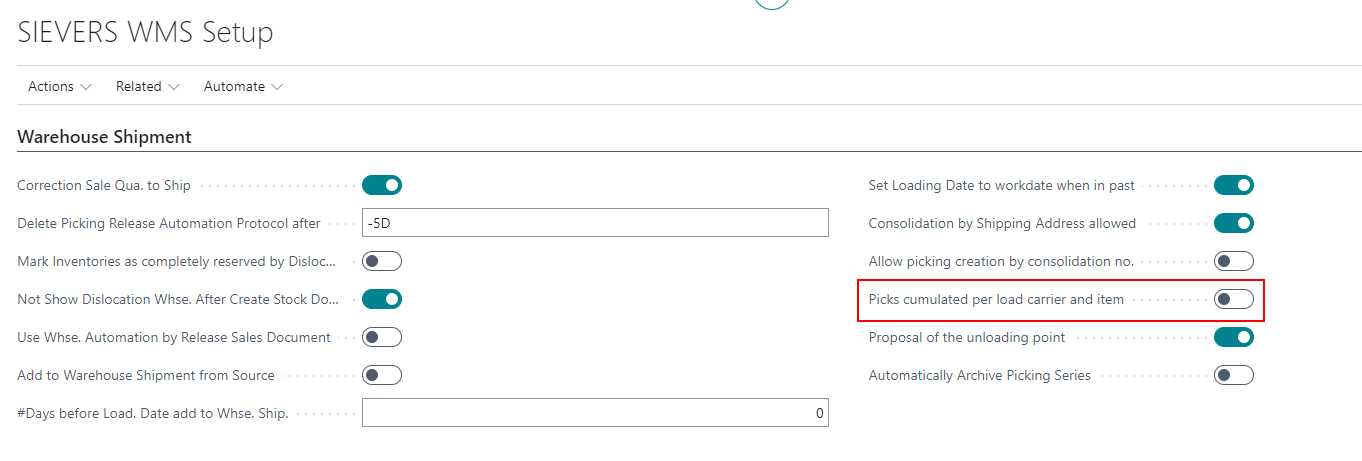
::: Note Please note that the feature is not yet completely functional. We have identified a small number of bugs, which will be fixed in the next release. :::
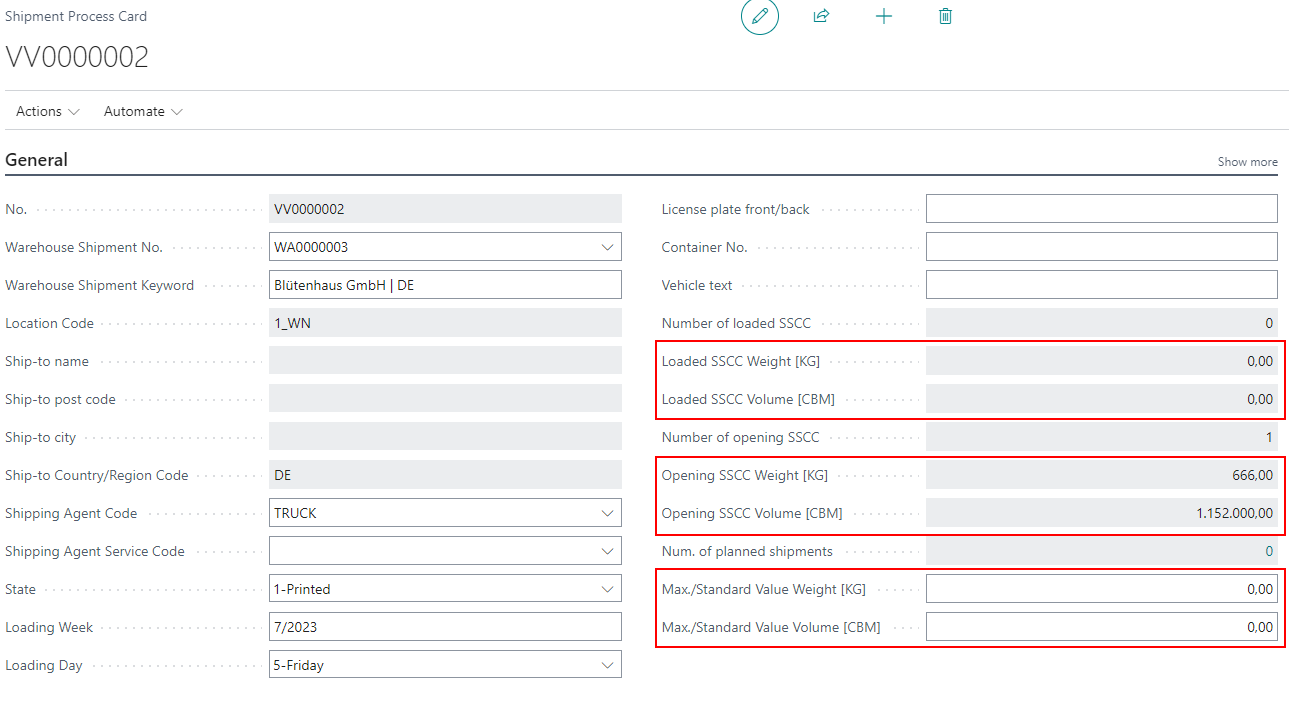
Shipment Process Weights And Volume With Units - Item 94242
The weight and volume field captions in the shipment process now include the units you have entered in the Base Unit Of Measure List.
New Column in Source Documents on Warehouse Shipment Planning - Items 83509 and 83510
We have added the new column Shipping Advice to the Source Documents table in the Warehouse Shipment Planning. This column is derived from the source document field of the same name. This field is just informational and the user can't change it.
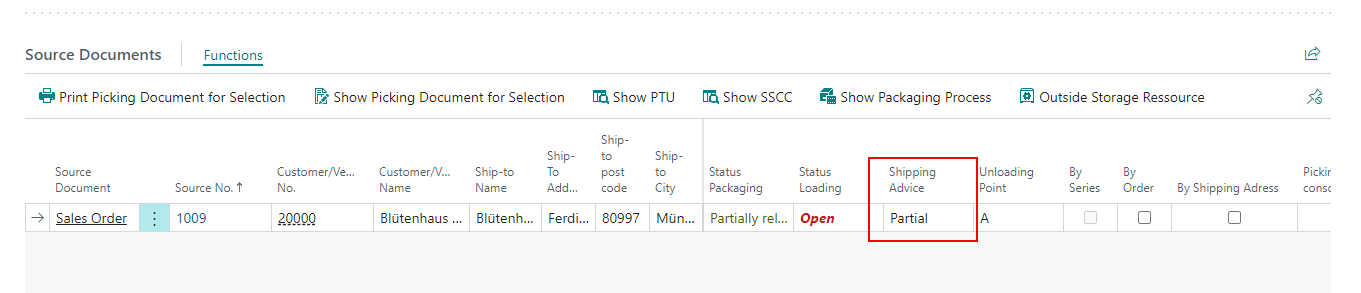
::: Note We are aware that this new field can cause confusion because of the option Partial since the SIEVERS WMS already has a Partial indicator. We are already discussing if a new name for the Partial indicator could be necessary.
The difference is that the Partial indicator describes the actual state of the warehouse shipment, i.e. whether it is currently a partial shipment. The shipping advice field describes the target state at the moment of shipment – i.e. how the shipment should leave the warehouse.
If you have further questions about this, please consider asking your SIEVERS contact. :::
New Option on the Storage Place Maintenance - Item 85273
We have added new options to the Storage Place Maintenance which you open with the Process Storage Places action on the SNCL Storage Place list:
- Change Display Description MDE: If activated, the set option for Display Description MDE is applied to the storage places.
- Display Description MDE: Specifies if the Storage Place description should be used to display a Storage Place on MDEs. Howver, if this is activated, the functionalities to format the Storage Place display can not be used.
Add GS1-SSCC Reference Field to SNCL Load Carrier List - Item 81881
You can now add the optional field GS1-SSCC Reference via the Personalization to the SNCL Load Carrier List.

Small Changes
- Removed the field New Item Description from Move Order Lines and reordered the columns - Item 93597
- Removed the fields Prod. Output Warehouse Code, Prod. Output Stor. place code, Inbound Stock Post Strategy Code Manuf. and Inv. Sel. Strategy Code Manuf. from the Location Card since they are obsolete - Item 85550
- Improved the error message in A4.3 when attempting to perform picking without a picking team being defined - Item 84365
- Added and extended tooltips - Items 94158, 94822 and 95047
Bugfixes
Deactivated functions still accessable on MDE - Item 91554
We fixed a bug that allowed disabled functions on the MDE to still be accessible by the user.
Check Replenishment Sometimes Not Working Correctly - Item 93576
We have fixed a bug which caused the report Check Replenishment to not work correctly sometimes. The value could not be retrieved when the item had a category.
Outbound Stock Post Lines Being Overwritten - Item 92483
We have fixed a bug that could cause Outbound Stock Post lines to be overwritten in certain situations when individual programming was attached.
Production Supply Move Order Not Showing Provisioning Strategies - Item 93693
We have fixed a bug that prevented you from changing the provisioning strategy when using a move order with the production supply type.
No Sell-By Date Entry Possible in Warehouse Shipment Planning - Item 90307
We have fixed a bug that prevented the sell-by date from being entered in the source lines of the Warehouse Shipment Planning if no lot no. was entered before.
Opening Inventory Flag Getting Lost - Item 92232
We fixed a bug that sometimes caused the Opening Inventory flag to be lost during the removal process.
Factbox Error on Warehouse Shipment Planning - Item 93933
We fixed a bug that prevented the Warehouse Shipment Planning factbox from being loaded in some systems.
Old Team Still Being Displayed After Team Change - Item 94016
We have fixed a bug that caused the old team to be displayed instead of the new one after changing teams during picking due to a blocked inventory while searching for a new pick location.
Warehouse Receipt Not Creating Multiple Inbound Stock Post Lines For Different Lot Numbers - Item 94129
We have fixed a bug that caused only one inventory to be created when an item with different lot numbers was received into the warehouse.
Load Carrier Move Job Finish Message Not Possible - Item 94199
We have fixed a bug that sometimes caused a Load Carrier move job to not be able to be completed when it was required to have a lot number.
Inventory Measure Code Not Entered in A3 - Item 94226
We have fixed a bug that caused the inventory measure code not to be entered automatically when creating a new Load Carrier in A3 Item Transfer.
Creation of Multiple Stock Documents Possible - Item 94249
In a specific constellation, you could create any number of stock documents in a warehouse shipment, which each time reserved a separate inventory. We have fixed this bug.
Indelible Outbound Stock Post - Item 94543
We have fixed a bug that made it possible to create an indelible Outbound Stock Post in a production supply that no longer had any references.
Production Supply Move Order Not Complete - Item 94574
We have fixed a bug which caused the move orders created for production supply to be incomplete sometimes.
Unnecessary Blocking Code in PTU - Item 95051
We have fixed a bug that occurred when shortages were reported during picking. In this case, the storage unit in question should be blocked. However, an additional blocking code was entered in the PTU Load Carrier, which should not have happened.
Job Queue Availability Error - Item 92778
We fixed a bug that sometimes caused the job queue for calculating stock availability to run into an error and had to be restarted manually.
Stocktaking Quantity Negative - Item 93345
We have fixed a bug that, in certain situations, caused the quantity of items in the stocktaking journal to be entered negatively when a stocktaking was reported as completed.
Stock Quantities Not Correctly Transferred to Shipping Order - Item 93377
We have fixed a bug that caused not all stock quantities to be correctly transferred to the shipping order in certain cases.
Variant Code Not Being Entered in Cycle Counting Lists - Item 91639
We have fixed a bug where the variant code was not included in the cycle counting list when entering a new inventory.
Inventory Move Job Not Having Impact on Cycle Counting List - Item 91888
We fixed a bug where using an inventory move job on an affected inventory during a stocktaking would update the stocktaking document itself but not the cycle counting list. However, the bug still exists for Load Carrier move jobs, but will be fixed in the next iteration.
Shipping Agent Not Getting Entered into Empties Entries - Item 67863
We have fixed a bug which caused the shipping agent not getting entered correctly into the empties entries after entering empties lines on the source document.
Warehouse Posting Not Possible Due To Wrong Unit - Item 61109
We have fixed a bug that prevented a warehouse receipt from being posted when the ordered unit is not equal to the base unit.
Small Bugs and Spelling Mistakes
- Fixed a bug that prevented stocktaking from being opened from the start page - Item 92690
- Changed caption Provisioning Production to Inbound Stock Post Strategy Production in the stockkeeping unit card because it was misleading - Item 92734
- Fixed a bug that caused the cancel button to not work on the Calculate Consumption* page - Item 93052
- Added German translation for SNCL Disloc. Auto. Protocol page - Item 94090
- Fixed a small layout error on the MDE that caused the quantities on some pages to no longer be shown correctly - Item 94793