Features
Changed Column Order in SNCL Inbound Stock Post Order Lines - Item 90129
We have moved the following columns further to the right next to the unit code:
- Number of Pieces per Inventory
- Lot No.
- Sell-by Date
- Serial No.
Added New Columns to SNCL Stock Move Job Lines - Item 85440
We have added the new columns
- Load Carrier
- New Load Carrier
which show the respective codes, to the SNCL Stock Move Job Lines.
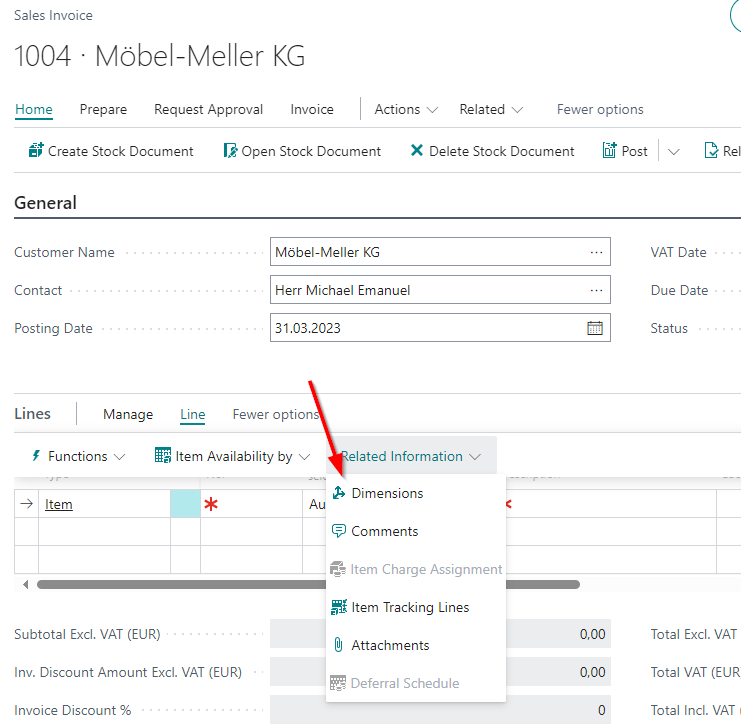
Added Dimensions to Sales Invoice - Item 87569
We have added a link to the dimensions to the sales invoice lines.
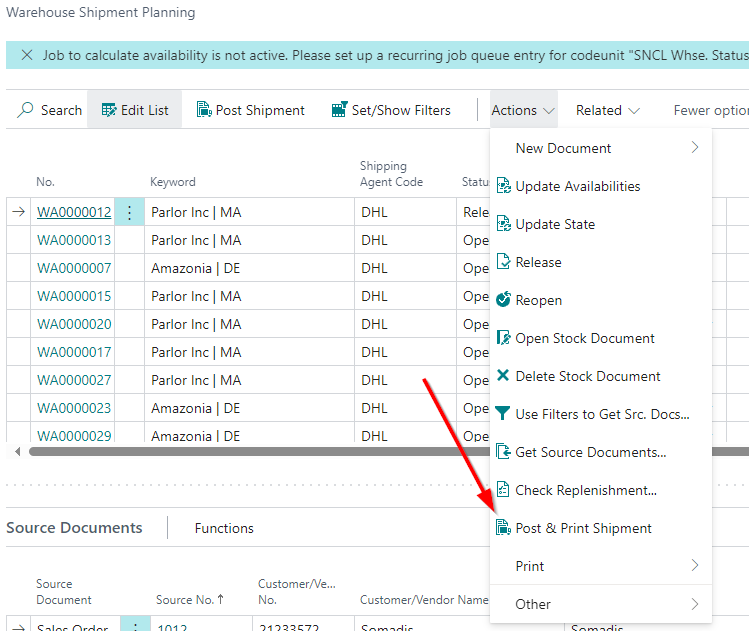
Moved Action in Warehouse Shipment Planning - Item 90332
We have moved the action Post & Print Shipment to the Actions dropdown menu.
SNCL Stock Entries List Order Per Entry No. - Item 90394
We have changed the default order on the stock entries list. The entries are now ordered by entry no.
Added Two More Printing Setups on Front Page Menu - Item 85028
We have added the printing setup page links
- Paper Tray List and
- Virtual Printer Card
to the Setup -> Printing-Menu.
Please note that you can only access these, if you have the SNC Print add-on installed.
Changed Column Order on Outbound Stock Post Order - Item 87746
We have changed the column order of the Outbound Stock Post order lines. The new order is this:
- Type
- No.
- Customer item no.
- Description
- Location code
- Quantity
- Unit of Measure code
- Lot no.
- Serial no.
- Qty. to Ship
- Quantity shipped
- Outbound Stock Post charges recorded
- Unit Price Excl. VAT
- Line amount Excl. VAT
- Line discount %
- Planned Shipment Date
- Planned delivery date
- Shipment date
- Inventory selection strategy
- Stock Document Type
- Stock Document No.
- Stock quantity reserved. Outbound Stock Post
- Stock quantity packed Outbound Stock Post
- Stock selection
- Created at
- Created by
ShipXpert
We have added a few features to the ShipXpert interface.
Requests Can Now Be Deleted - Item 91363
Previously, ShipXpert requests could only be deleted if they were set to processed. This meant that incorrect requests that could not be processed by ShipXpert remained in the request list and could not be removed. As a result, no new request could be made. We have now added the action Delete on the ShipXpert Shipping Label Requests page under Manage. This can be executed line by line and removes the entire request so that a new request can be made.
Increased Performance and Stability of Job Queue - Item 91681
We have received feedback from time to time that ShipXpert's job queue is somewhat unstable. We have looked at this again in detail and improved it.
Shipment Closing Request - Item 91308
It is now possible to perform a daily closing via ShipXpert. To do this, the "SHIPMENTCLOSING" function must be sent with the request. Please get in touch with your SIEVERS contact person. The subsequent response is processed in such a way that the shipping costs are entered in the first order line. The remaining shipping costs are set to 0.
Outside Storage
Resources Unit Price Is Calculated From Bill of Resources - Item 66363
The unit price of a resource is now automatically calculated from its bill of resources. However, the field can still be edited manually.
Added Unit Price and Component Unit Price to Bill of Resources - Item 69006
We have added the columns Unit Price and Component Unit Price to the page Bill of Resources. The sum of the unit prices gives the unit price of the higher-level resource.
Entering an Outside Storage Customer Item in a Stocktaking Enters Customer Automatically - Item 90772
If empty storage places were entered on the MDE and during a stocktaking a new inventory is entered right at the beginning, the outside storage customer of the item will now be entered automatically. If you try to enter another item from another outside storage customer afterwards you will get an error message since this is not possible.
If there is no outside storage customer no. for the item, all places checked afterwards that belong to the same stocktaking must belong to the same warehouse. Empty storage places or items that also belong to the warehouse may be counted.
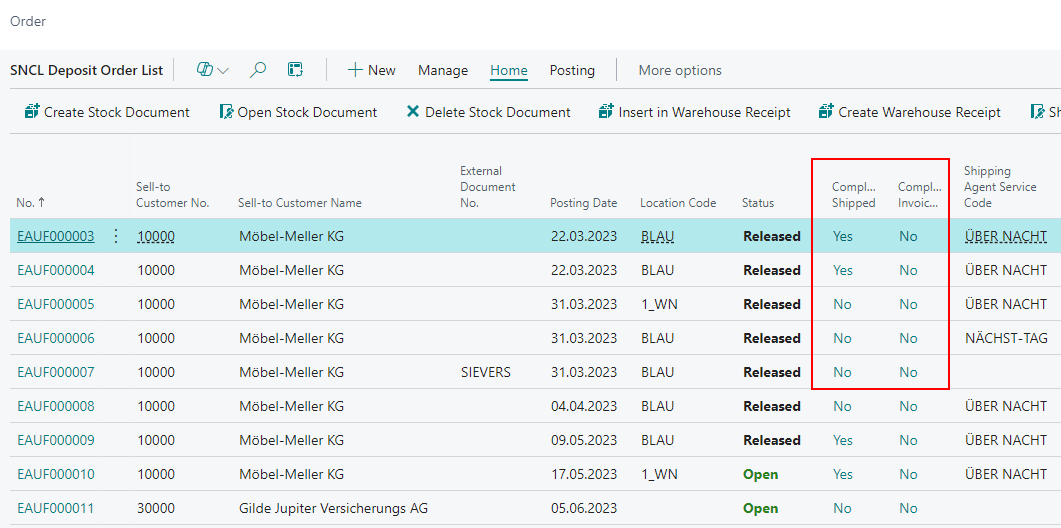
New Fields on Orders - Item 77147
We have added two new fields to the Inbound Stock Post order, Outbound Stock Post order and service order warehouse lists:
- Completely Shipped
- Completely Invoiced
These will fields display either a No or a Yes, depending on whether the order quantity has been fully shipped or invoiced.
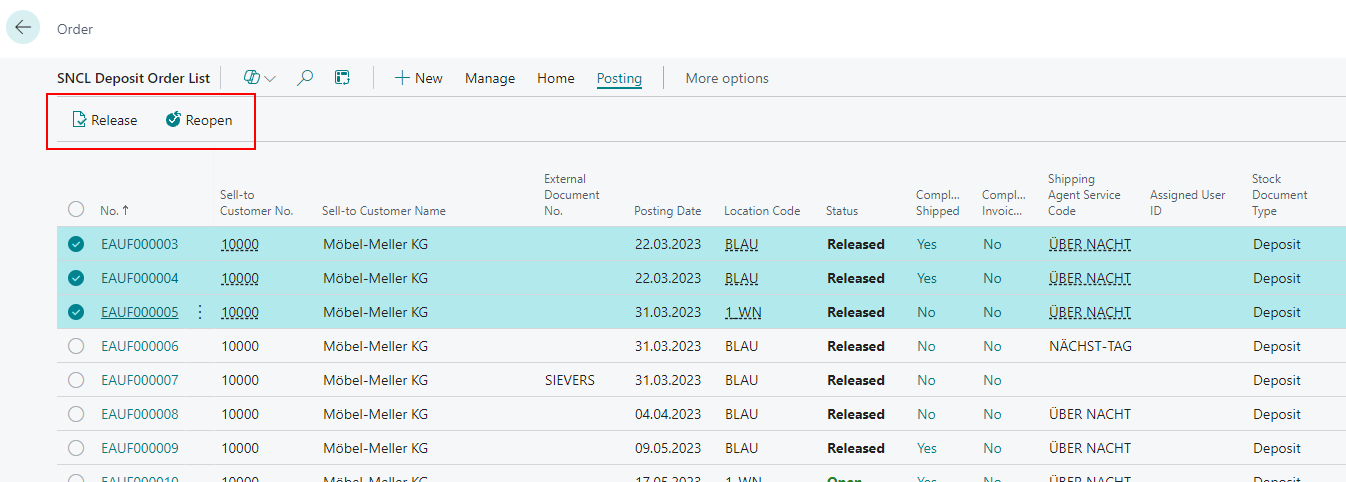
Change Status of Multiple Entries in Inbound Stock Post and Outbound Stock Post Orders Lists - Item 84443
We have introduced actions for Inbound Stock Post orders and Outbound Stock Post orders that allow you to change the status directly from the list view. It is also possible to change the state of multiple selected orders at the same time.
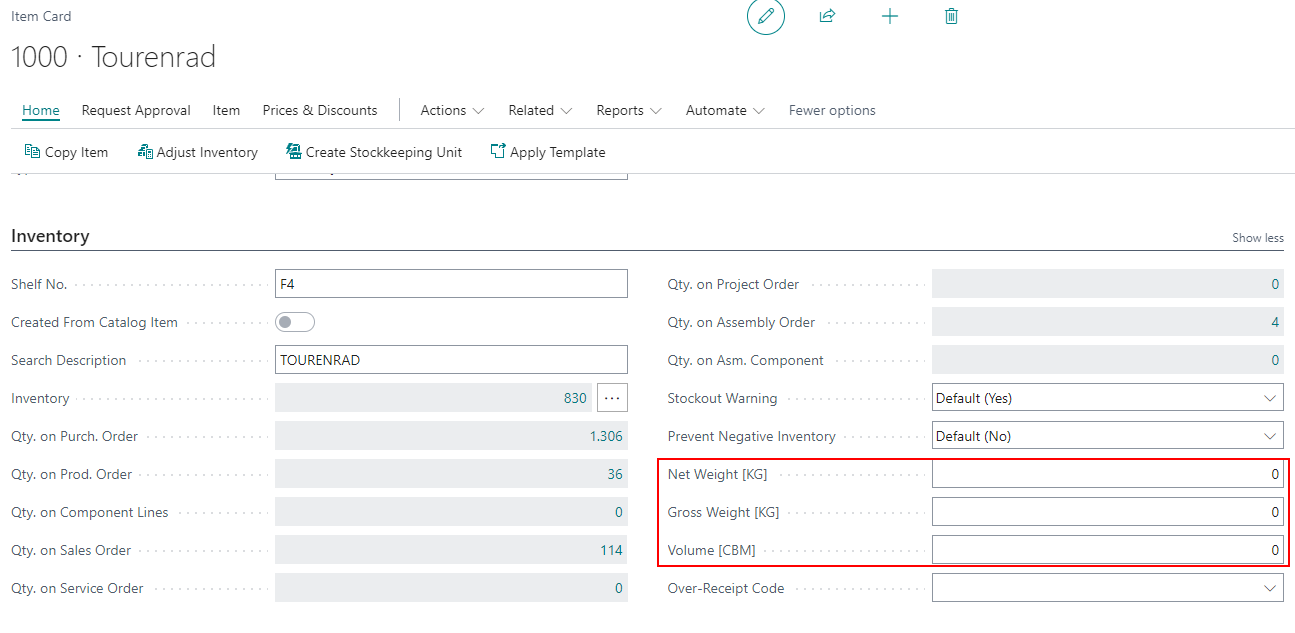
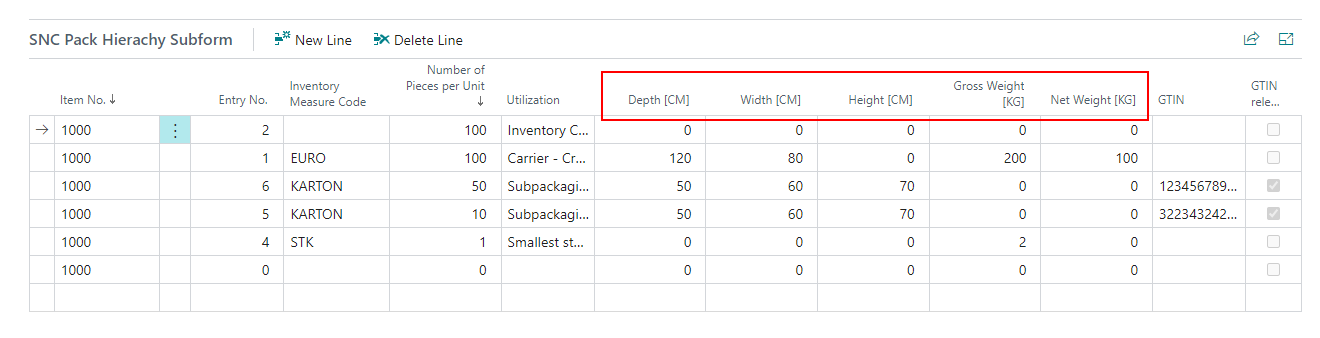
Improved Item Card With Units - Item 83964
We have integrated the units from the Base Unit Of Measure List into the dimension and weight field captions on the item card. In addition, we have removed the fields created specifically for the purpose of displaying the unit.
The new captions are in the packaging hierarchy and the inventory section.
Load Carrier
Added New Fields to SNCL Create Load Carrier - Item 70273
To create a new Load Carrier via SNCL Create Load Carrier, you currently have to fill in the fields From Load Carrier Code and To Load Carrier Code and thus enter the code(s) manually. This is not practical in the hectic pace of everyday life. For this reason, we have added two new fields:
- Use No Series: This field is activated by default and causes the regular Load Carrier number series to be utilized.
- Quantity: Number of Load Carriers to be created.
If you deactivate the field Use No Series, you can use the fields From Load Carrier Code and To Load Carrier Code again.
Item Unit of Measure Cubage Now Calculated - Item 83822
The cubage (volume) in the Item Unit of Measure table will now be calculated with the Base Conversion Units and Base Unit of Measure tables.
Improved Homepage - Item 90831
We have improved the Business Central custom homepage for SIEVERS WMS.
- The Inventory menu is now called Warehouse
- Added Storage Place List to the Warehouse menu.
Production Orders
New Section in WMS Setup: Production - Item 86325
We have added the new section Production to the WMS Setup page.
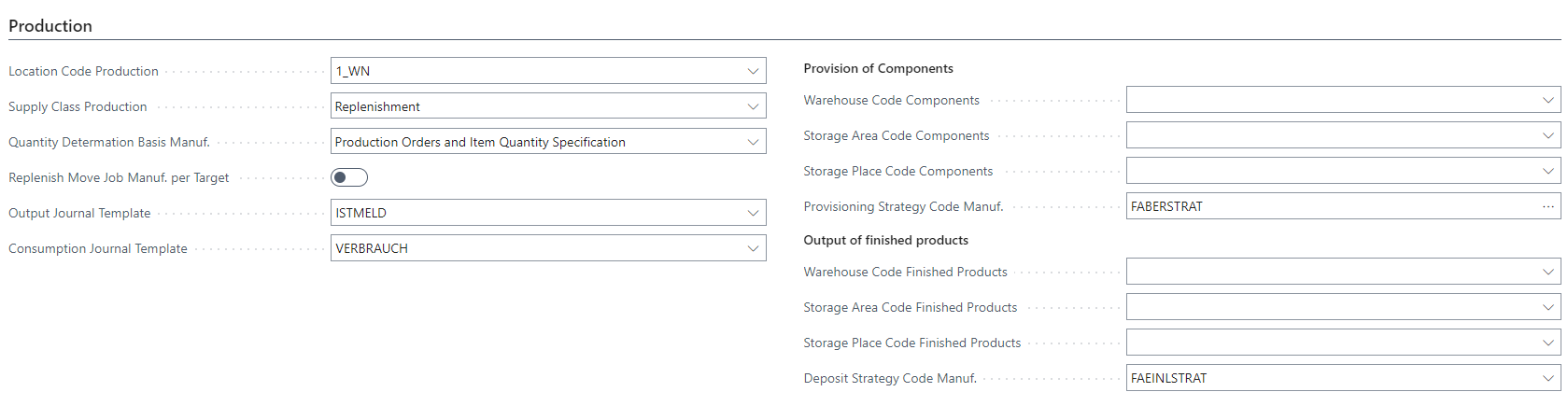
- Location Code Production: Defines where production takes place, where the components are made available and the finished product is posted
- Supply Class Production: Defines, how the supply should be organized. For further information read the respective tooltip
- Picking
- Replenishment
- On Demand
- Kanban
- Quantity Determination Basis Manuf.: Specifies the basis on which quantity determination for production supply should be carried out
- Only Item Quantity Specification
- Only Requirements from Production Orders
- Production Orders and Item Quantity Specification
- Replenish Move Job Manuf. per Target: This causes a replenishment order to be created for each production area.
- Output Journal Template: Is used for creating the output journals from the production order
- Consumption Journal Template: Is used for creating the consumption journals from the production order.
Provision of Components
- Warehouse Code Components: Defines the warehouse where the components should be provided from
- Storage Area Code Components: Defines the storage area where the components should be provided from
- Storage Place Code Components: Defines the storage place where the components should be provided from
- Provisioning Strategy Code Manuf.: This strategy determines the target location for all required input materials per production order.
Output of finished Products
- Warehouse Code Finished Products: Defines the warehouse where the finished products should be posted to
- Storage Area Code Finished Products: Defines the storage area where the finished products should be posted to
- Storage Place Code Finished Products: Defines the storage place where the finished products should be posted to
- Inbound Stock Post Strategy Code Manuf.: Defines the Inbound Stock Post strategy for the finished products
New Section in Item Category Card: Assembly & Manufacturing Supply - Item 86433
We have added the new section Assembly & Production to the Item Category Card.
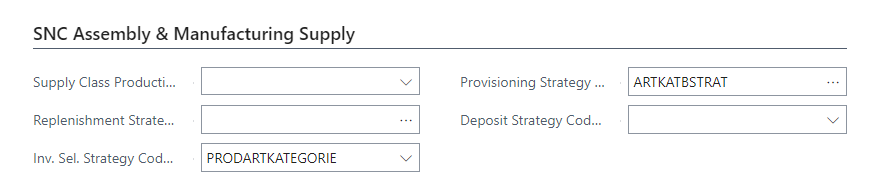
- Supply Class Production: Defines, how the supply should be organized. For further information read the respective tooltip
- Picking
- Replenishment
- On Demand
- Kanban
- Replenishment Strategy Code Manuf.: Determines the inventories that are required as input materials in production for move jobs with the production supply type.
- Inv. Sel. Strategy Code Manuf.: Determines the ivnentories that are required as input materials in production for Outbound Stock Post.
- Provisioning Strategy Code Manuf.: This strategy determines the target location for all required input materials per production order.
- Inbound Stock Post Strategy Code Manuf.: Defines the Inbound Stock Post strategy for the finished products
New Section in Stockkeeping Unit Card: SNC Assembly & Manufacturing Supply - Item 86436
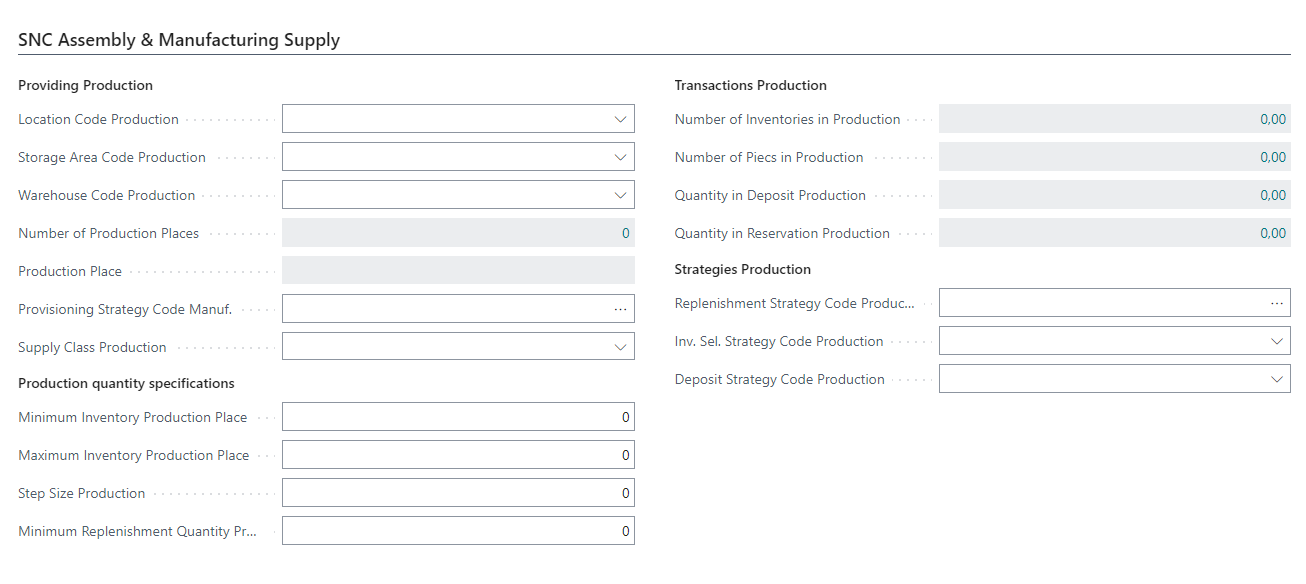
- Location Code Production: Defines where production takes place, where the components are made available and the finished product is posted
- Warehouse Code Finished Products: Defines the warehouse where the finished products should be posted to
- Storage Area Code Finished Products: Defines the storage area where the finished products should be posted to
- Number of Production Places: In which storage locations should the components required for production or assembly be provided.
- Production Place
- Provisioning Strategy Code Manuf.: This strategy determines the target location for all required input materials per production order.
- Supply Class Production: Defines, how the supply should be organized. For further information read the respective tooltip
- Picking
- Replenishment
- On Demand
- Kanban
Production quantity specifications
- Minimum Inventory Production Place: If the minimum stock (stock + quantities in additional storage) is reached or fallen short of, a replenishment move job with the type production supply must be created. Synonymous reporting stock production.
- Maximum Inventory Production Place: If the maximum stock (stock + quantities in additional storage) is reached or exceeded, no further replenishment move job with the production supply type may be created.
- Step Size Production: Determines the amount to be increased gradually. Example: if the requirement for replenishment in production is 3 and the production step size = 10, then the replenishment quantity is 10x. If the requirement is 11 pieces. the replenishment quantity is 20. This ensures that replenishment is created appropriately at the level of the sub-packaging unit (e.g. replenishment by carton).
- Minimum Replenishment Quantity Production: Determines the minimum quantity to be replenished in production. From this minimum quantity onwards, a step size can, but does not have to, apply.
Transactions Production
- Number of Inventories in Production: Calculated field that counts the number of inventories that are in the storage area, warehouse, storage bins production
- Number of Pieces in Production: Calculated field that shows the sum of the inventories that are in the storage area warehouse, storage bins production
- Quantity in Inbound Stock Post Production: Calculated field that shows the sum of the quantities that point to the production storage area, the warehouse or the storage bins in open stock documents.
- Quantity in Reservation Production: Calculated field that displays the sum of the quantities reserved in the production storage area, hall or production storage bins.
Strategies Production
- Replenishment Strategy Code Manuf.: Determines the inventories that are required as input materials in production for move jobs with the production supply type.
- Inv. Sel. Strategy Code Manuf.: Determines the ivnentories that are required as input materials in production for Outbound Stock Post.
- Inbound Stock Post Strategy Code Manuf.: Defines the Inbound Stock Post strategy for the finished products
Provisioning Strategy Manuf. Priority for Production Supply Move Jobs - Item 91342
We have established the following priorities for the provisioning strategy manuf.:
- Workstation
- Stockkeeping Unit
- Item
- Item Category
- Production Order
This list of priorities means that the provisioning strategy is considered from top to bottom. Example: If there is no strategy at the work center, the one at the stockkeeping unit is used.
Calculation of Production Replenishment Without Production Places - Item 91589
We have removed the production places from the replenishment calculation function.
Detailed Confirmation After Production Replenishment Function - Item 91580
We have implemented the option Details on the Production Replenishment function. If this option is activated, the Protocol for replenishment creation with filter for the created move order is opened after the move order has been created, so that you can follow the movements that have been created. In addition, possible shortages are shown.
More Items
We have also added other features that are not described in detail:
- New Features to work with Consumption Journals
- New Features to work with Output Journals
- Determining the move order – features of the threshold values
- Extensions of the Replenish for Production request page: 1, 2
- Taking the inventory selection strategy in the consumption journal into account for the Outbound Stock Post
- Taking the Inbound Stock Post strategy into account for finished parts
- Production supply additional captions
- Combine quantity requirements
- Delete empty move orders from the function
- The move orders can be opened from the Details view
- SNCL Repl. Storage Buffer Save permanently
Added Column to Log Replenishment Creation - Item 91584
We have added the column Source Table Name to the Log Replenishment Creation table.
Inheritance of Fields from Work Centers to Machine Centers - Item 88987
The SIEVERS WMS values from a work center are now transferred to the machine centers created by this. If the work center is modified the system asks whether the previous values on the machine centers should be overwritten.
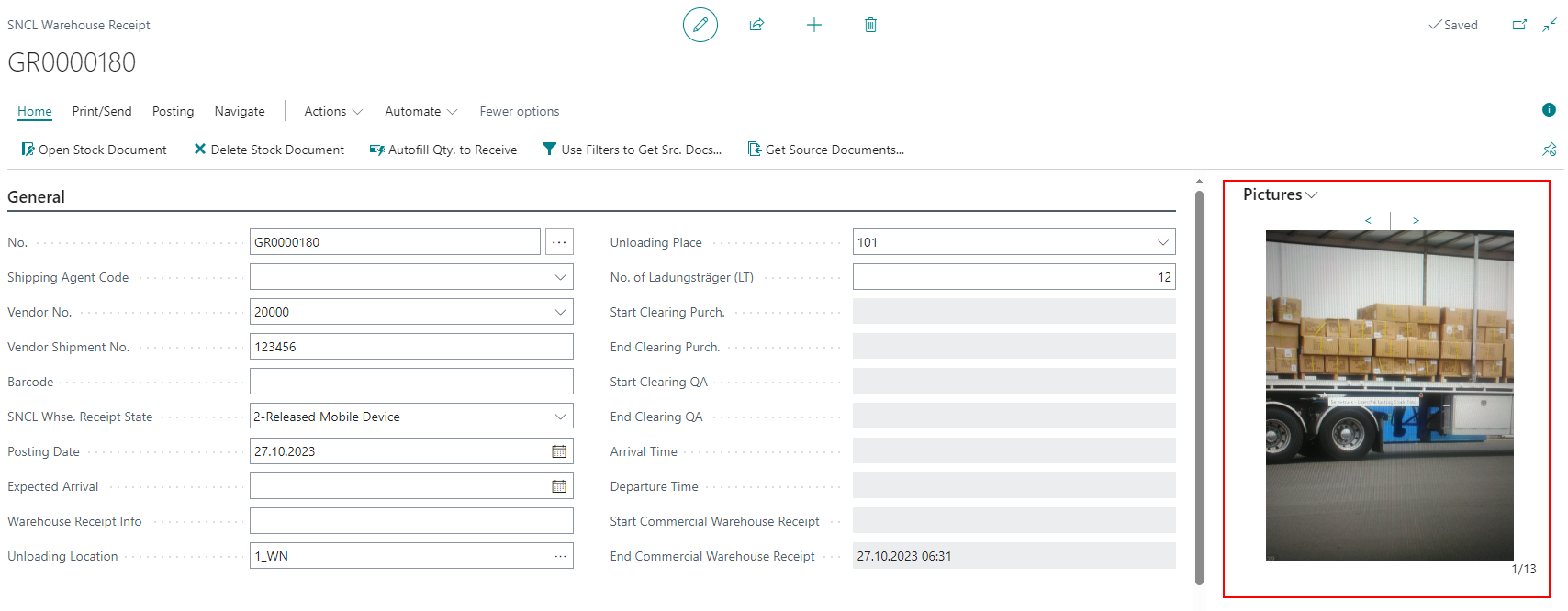
Warehouse Receipt and Shipment Process: New Photo Gallery - Item 85428
We have improved the photo gallery in the warehouse receipts and shipment process card. Now you can click through the images taken during the warehouse receipt or loading process.
Setup to Retain PTU Type During Load Carrier Conversion - Item 88527
We have implemented this new setup in the Load Carrier section of the SIEVERS WMS Setup:
- Load carrier type PTU retained during conversion: If a full pallet is picked, the SU can be converted directly into an SSCC when doing the picking response by entering all attributes (inventory measure, dimensions, weight). This eliminates the process of converting from SU to PTU and then from PTU to SSCC. If this is not desired, it can be prevented by activating this indicator.
A3 Now Shows Move Jobs With Type Production Supply - Item 91455
We have now adjusted the A3 item transfer program so that inventory move jobs with the type production supply are also shown on the page. Please note that only production supply move orders that contain partial quantities are shown here. Full pallets continue to be shown in A2 Internal transports.
Automatic Picking Document
We have implemented a few features for the automatic picking document:
- Cancellation of a specific item from all created and released documents
- Item picking release
- Response to what happened after the “Automatic release” action
WMS Mobile
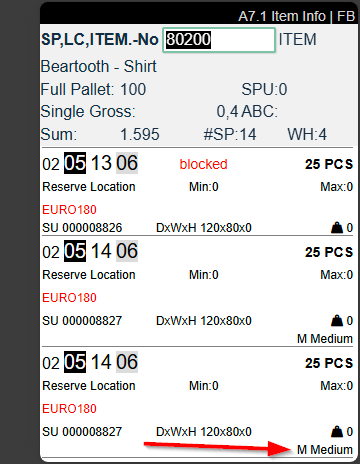
Variant Shown on Multiple Pages - Item 89294
The variants of an item are now displayed on many more mobile pages. If necessary, a fourth line is added to an entry to show the variant.
We have implemented the variant on the following pages:
- A2.0, A2.1, A2.2 Internal Transports
- A3.2, A3.3 Transfer
- A4.2, A4.3 Picking
- B3.2, B5.3, B5.3o, B5.4, B5.5 Stocktaking
- A7.1, A7.2, A7.3 Information
New Field Variant on B5.5 and B3.3 New Inv. - Item 89290
We have implemented the field Variant on the pages B5.5 and B3.3 where you enter new inventory. If the field is shown, entering a variant is mandatory.

Improved Calender Input Help - Item 90765
If a date has been entered on the mobile device in the sell-by date field via B3.3 and B5.5 New Inventory, the date always had to be selected from an overview. Now it is possible to enter the date directly.
More MDE Features
We have implemented a few features on the MDE software:
- B2.1 Reprint SU Label
- B5.3, B3.2 Perm. stocktaking positions -> Show item variant
- A1.2, A1.2o Source document: Show last 9 characters of document number, then truncate
- A1.6 Put To in Existing Load Carriers – Show Data of Selected Load Carrier in the Footer
- B5.3, B3.2 Allow inventory selection per setup
- B5.3, B5.5 Expansion of comment texts and program flow for items
Other Changes
This section contains items that did not fit into other sections thematically.
- Picking: Blocking of Load Carriers/inventory can be set up
- Warehouse Shipment Planning: Status Change for Multiple Selection with/without Filtering
- Warehouse Shipment: Deletion with single or multiple selection from Warehouse Shipment Planning
- Shipping: plausibility check for the delivery date
- Various Orders: Determining the pick numbers – various picking documents in the picking release
- Transfer variant code to inventory, stock entry, and item entry
- Do not change print success parameters/set Load Carrier information even with longer printer names
Small Changes
- Added and changed a few more tooltips - Items 85012, 90792 and 91252
- Added a specific error message when you try to create a warehouse receipt without warehouse receipt strategy - Item 90333
- Removed unnecessary check for shipping orders - Item 91364
- Added Item Description to SNCL Stock Entries List - Item 90309
- New internal events: Items 91728 and 94029
- GS1-SSCC references are now also deleted when a Load Carrier is deleted - Item 85057
- Changed the Sorting of Outside Storage Resource table - Item 90290
- Changed name of the page SNCL Repl. Storage Buffer to SNCL Replenishment Log - Item 91693
Bugfixes
Quantity Not Being Reduced After Shortage Report - Item 91047
We have fixed a bug that occurred when a shortage was reported in the picking process. In this case, the quantity in the original line was not reduced. In addition, the new line was not assigned to a picking document.
Picking Document Being Released Despite Click On No - Item 89969
We have fixed a bug that caused picking documents to be released even though the user clicked No after clicking Automatic Release on the Picking Team card.
MDE A1.5: Similar Load Carriers Not Scannable - Item 90739
We have fixed a bug that prevented the same type of load carrier from being scanned on MDE Page A1.5. Instead, only the one that was shown could be scanned.
Changed Posting Logic - Item 92170
We have had to adapt a posting logic in the system, as the previous logic could affect the function of other extensions in rare cases. You will not notice any difference when posting.
ShipXpert Setup: Delete Requests After x Hours wrong - Item 92309
In the ShipXpert setup we have implemented the field Delete Requests After x Hours. However, we just realized that the originally intended field was Delete Requests After x Days, so we changed that.
Purchase Order: Unit of Measure not Equal to Base Unit Results in Inability to Post Warehouse Receipt - Item 91837
If a purchasing unit other than the base unit was utilized in the purchase order, the warehouse receipt could not be posted. The problem was that a check was made for the wrong quantity field when posting. We have solved the problem by filling the Qty. Shipped (Base) field instead of the Quantity Shipped field when posting. In addition, the quantity from the stock document is now converted to the purchasing unit.
Changing Shipping Agent in Shipping Order Not Possible - Item 92595
We noticed that it was not possible to change the shipping agent on the shipping order if lines were already included in the order. This was due to the fact that it is only possible to change the shipping agent if the correct shipping agent service is entered. However, as it is not possible to change both fields at the same time, an error message was displayed.
If you now change the shipping agent, the Shipping Agent Service window opens automatically, where the user must select one of the associated shipping agent services. The shipping agent and shipping agent service are then changed in the shipping order.
Picking Status Not Updating with Picking Series - Item 93445
We have fixed a bug that prevented the picking status from being updated correctly with a picking series.
Packaging Hierarchy Divides By 0 - Item 67144
We have fixed a bug which caused the packaging hierarchy to divide the quantity by 0 in specific circumstances.
International Bill of Lading: SSCCs Not Being Combined Correctly - Item 87812
The packaging units in the Transported Goods section of the international bill of lading should be combined by the external description of their assigned inventory measures. This was not the case. We have fixed this.
International Bill of Lading: SSCC Order and Receiver Reference Not Working Correctly - Item 87813
We have noticed that the SSCC Order and Receiver References are not working as expected. After fixing them, they now work as follows:
- Generally, the order number and reference number are printed regardless of how many load carriers are associated
- If the load carriers belong to different orders, DIVERS is printed for the sender reference and the receiver reference is left blank
Added Units and Volume to SNCL Load Carrier List - Item 87385
We have added the column Volume to the SNCL Load Carrier List. We also extended the dimensions, volume and weight column header by the respective units.
Entry of the Same Warehouse Shipment No. Causes Line Duplicates - Item 91360
We have fixed a bug which caused multiple duplicates of shipment process lines if you entered the same warehouse shipment no. in the shipment process header again.
Wrong Dimension Values in Outside Stock Unit Billing - Item 91553
We have fixed a bug which caused the wrong dimension values to be entered in invoices when trying to create multiple invoices for different customers in very specific circumstances.
MDE A4.1 Shows Picking Documents Not Released - Item 89433
We have fixed a bug that caused the MDE page A4.1 picking list overview to show picking documents that had not yet been released. It was also possible to scan picking documents that had not been released.
Error When Trying To Post Stocktaking With Blocked Item - Item 71147
When posting a stocktaking with an item with a purchase block, an error message was always displayed. This was due to an incorrect posting check, which has since been corrected.
Both SUs and PTUs Are Blocked in Picking When There As A Shortage - Item 89439
If a shortage is found during picking, the SU in question should be blocked. However, due to a bug, the corresponding PTU was also blocked. We have fixed this bug.
Stock Status in Warehouse Shipment Planning Not Correct - Item 91317
We have fixed a bug that could lead to an incorrect stock status under certain circumstances in Warehouse Shipment Planning.
Number Series Error - Item 90133
We have fixed a bug that occasionally occurred when you tried to post a document and the system tried to use an already used number.
Additional Bugs
We have fixed these additional bugs:
- Package content list: Improvement of the barcode of the customer reference from the warehouse receipt
- A1.1, A1.2 - Error message when input is incorrect
- Stock shipment created stock document -> Quantity field only reserved and not in picking document
- Auto picking document: release protocol with incomprehensible error messages
- Auto picking document: employee marking reset
- Various Orders Print Shipping Label: unnecessary prompt
- Move order creation from stock list: empty move order headers created
- Replenishment for load carriers with multiple inventories
- Warehouse Shipment Planning: State Not Reset After Posting Partial Delivery
Small Bugs and Spelling Mistakes
- Fixed an error message which pops up when trying to insert a wrong date formula in the Delete Picking Release Automation Protocol after field in the SIEVERS WMS setup - Item 90008
- Fixed an error message which pops up when trying to archive a faulty Load Carrier - Item 91109
- Fixed wrong page name of ShipXpert Archived Shipping Label Response - Item 92418
- Removed a duplicate “Type” field in the purchase order lines - Item 92575
- Storage Place volume now calculated via unit conversion list - Item 90798