Features
Improved Front Page Menus
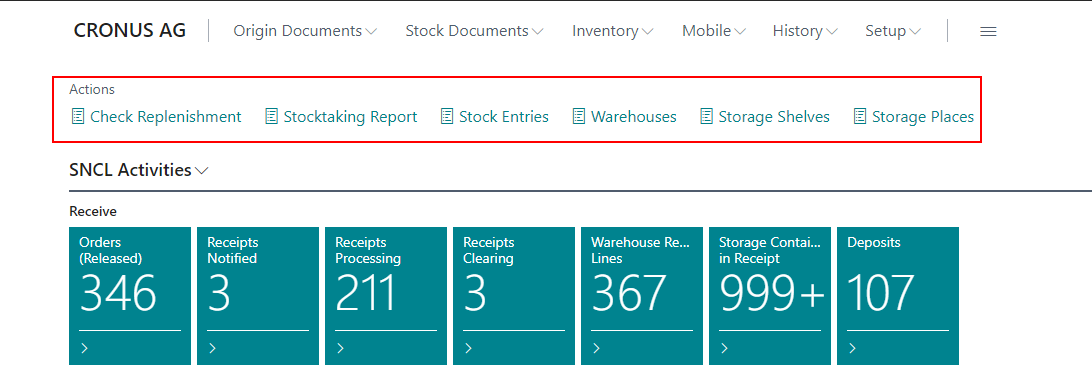
New Actions onFront Page Action Menu - Item 82951
We have removed the old actions from the role center action menu of the SIEVERS WMS role and added some new, more useful actions in their place:
- Check Replenishment
- Stocktaking Report
- Stock Entries
- Warehouses
- Storage Shelves
- Storage Places
Restructured Primary Menu Row
We have added and removed a few menu points in the primary menu row. The default menu is now like this:
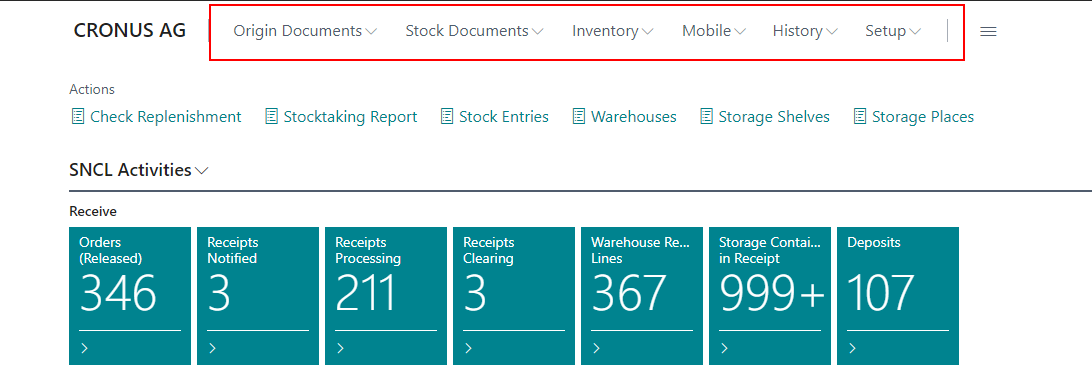
- Origin Documents
- Purchase Orders
- Sales Orders
- Transfer & Return Orders
- Item Journals
- Production & Assembly Orders
- Outside Storage
- Stock Documents
- SNCL Warehouse Receipts
- Warehouse Shipment Planning
- Inbound Stock Posts Outbound Stock Posts
- Move Jobs
- Move Job Lines
- Picking Documents
- Packaging List
- Shipment Processes
- Stocktakings
- Empties
- Inventory
- Items
- Inventories
- SNCL Load Carriers
- Blanco Barcode
- Stockkeeping Units
- Mobile
- SNC MOBILE LOGIN
- SNC Mobile User
- SNC Mobile Forms
- SNC Help for Mobile Forms
- SNC Mobile Setup Wizard
- History
- SNCL Stock Entries
- Item Ledger Entries
- Posted Stock Documents
- Posted Load Carrier
- Posted Origin Documents
- Posted Outside Storage Documents
- Setup
- General
- Order Type, Shipping Agents & Priorities
- Topology and Inventory Measures
- Strategies
- SIEVERS WMS Teams
- Floor Conveyor Vehicles
- Warehouse Shipment Automation
- Printing
- Setup Extra Functions
Removed Old Tiles and Added New Tiles - Items 82953, 82961, 82965 and 82966
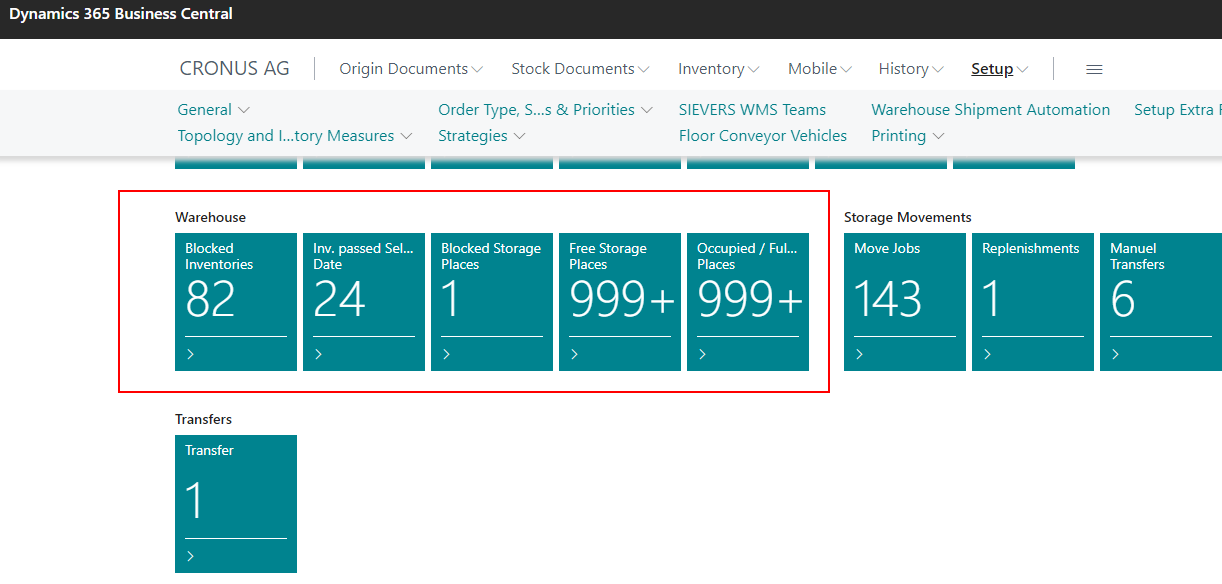
We have removed a few outdated tiles from Receive and Shipment and added a few new ones in the Warehouse area instead:
- Blocked Storage Places
- Free Storage Places
- Occupied / Full Storage Places
New Tile Sections - Items 82954 and 85521
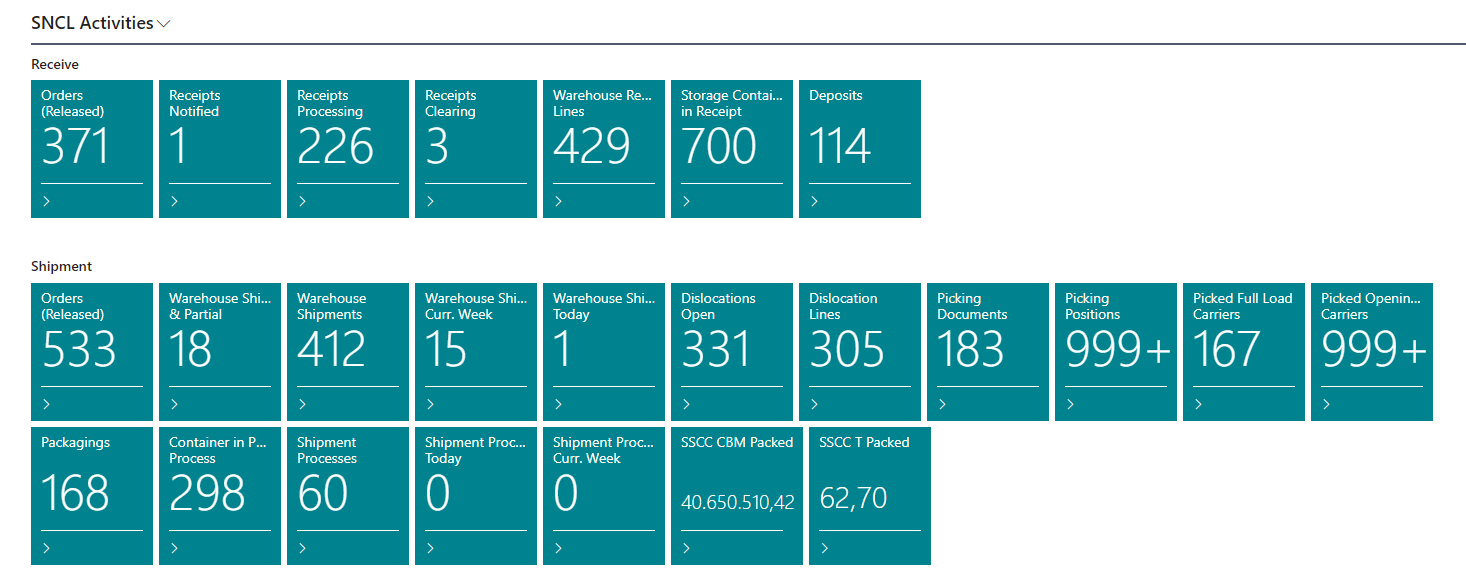
We have added three new tile sections to the startpage to make it more clear:
- Warehouse
- Storage Movements
- Transfers
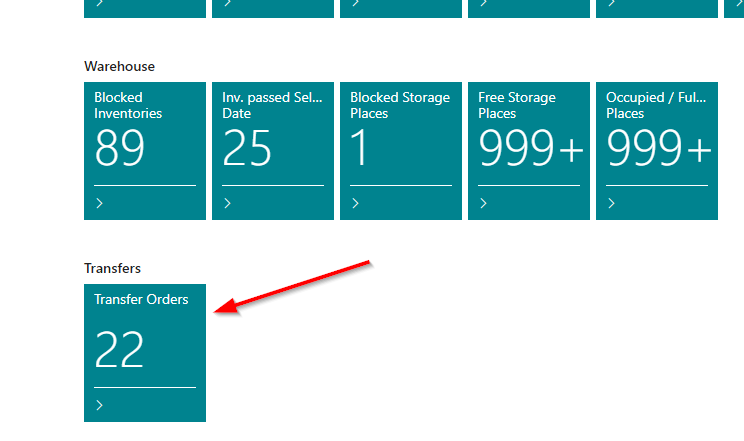
Tiles for Storage Movements - Item 82964
We have added these tiles to the Storage Movements section:
- Move Jobs
- Replenishments
- Manual Transfers
Transfer Orders
Transfer of Outside Storage Items now possible - Items 75067, 75064 and 75202 and 84248
It is now possible to enter outside storage items in transfer order lines. As soon as an outside storage customer is entered in a transfer order, only the associated outside storage items can be entered in the lines.
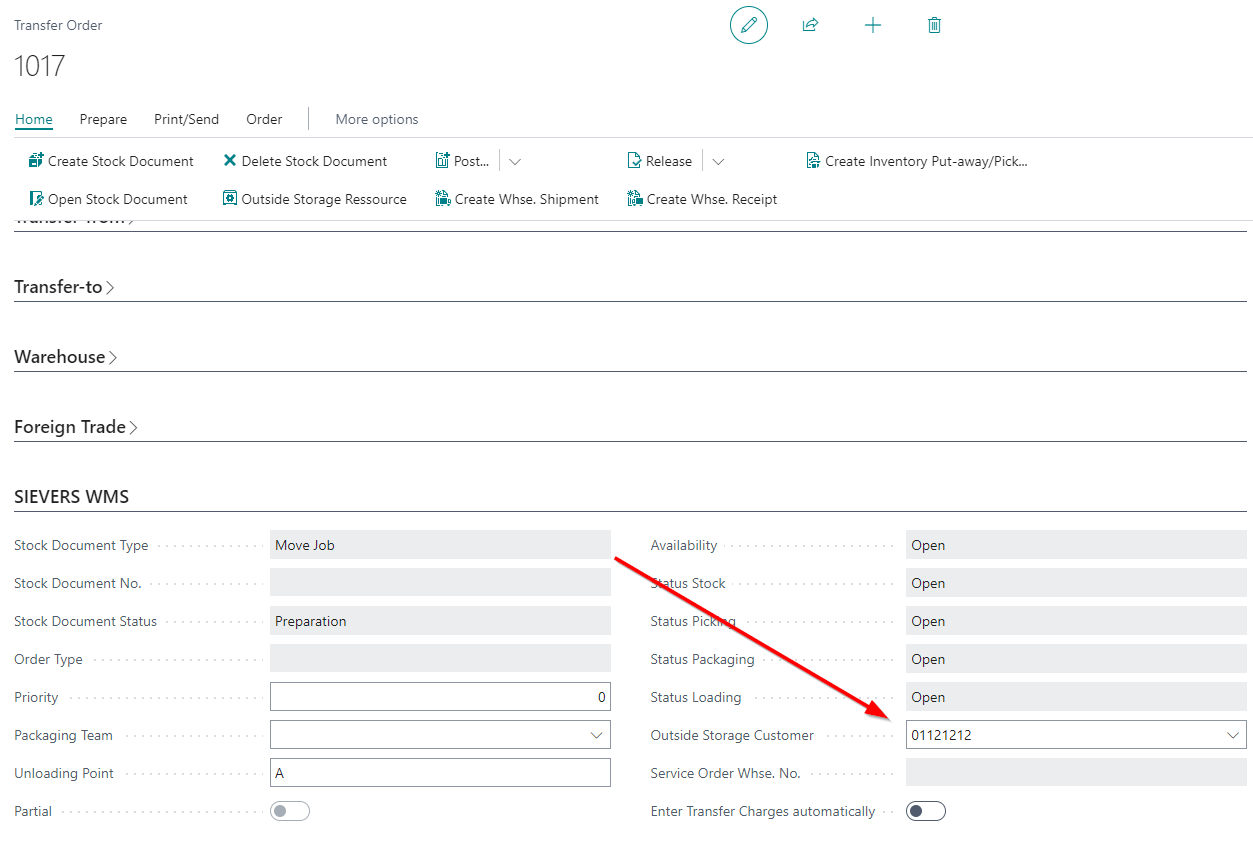
::: Note Please note that transfer orders are still only possible between WMS managed locations. :::
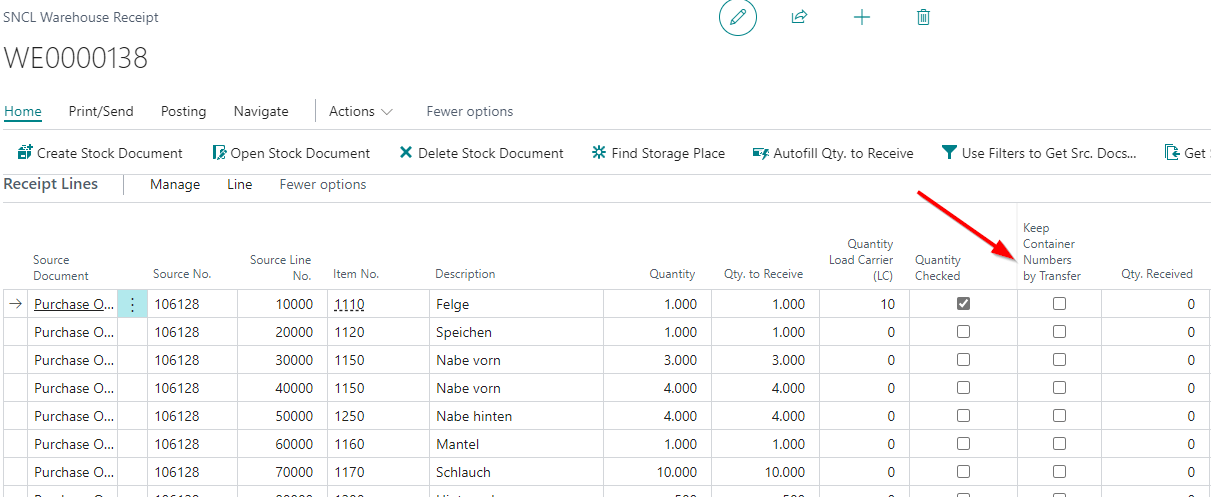
If the transfer order is accepted by a warehouse receipt in the other location, you can now decide whether the original Load Carrier number should be retained. If this indicator is activated, not only the Load Carrier number but also other Load Carrier properties are transferred:
- the inventory measure code
- the dimensions and
- the weight.
We have also added another two fields to the transfer order:
- Service Order Whse. No.: This field shows the stock service order
- Outside Storage Yes/No (Not visible): This field just indicates if the order is an outside storage order
Items in Transfer Order now Filtered - Item 86358
We have improved the article selection in the lines of the stock transfer order. If it is an external warehouse customer, the item selection is now automatically filtered to the items of this customer.
Outside Storage
Outside Storage Enter Charges Automatically - Items 83089, 83268, 83271, 84303, Items 75581 and 75181
There are now new setup fields in the SIEVERS WMS setup, the customer card and the stock documents.
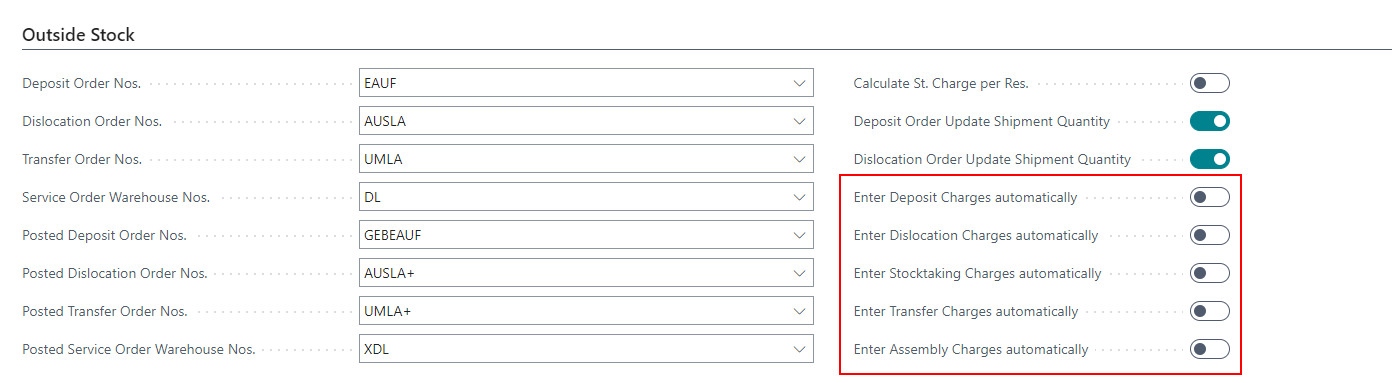
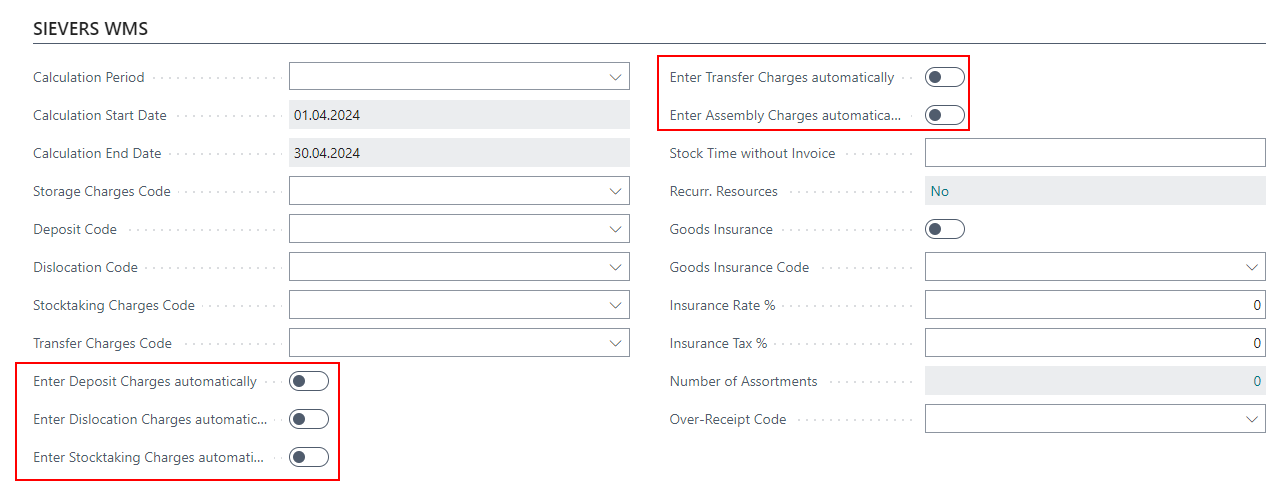
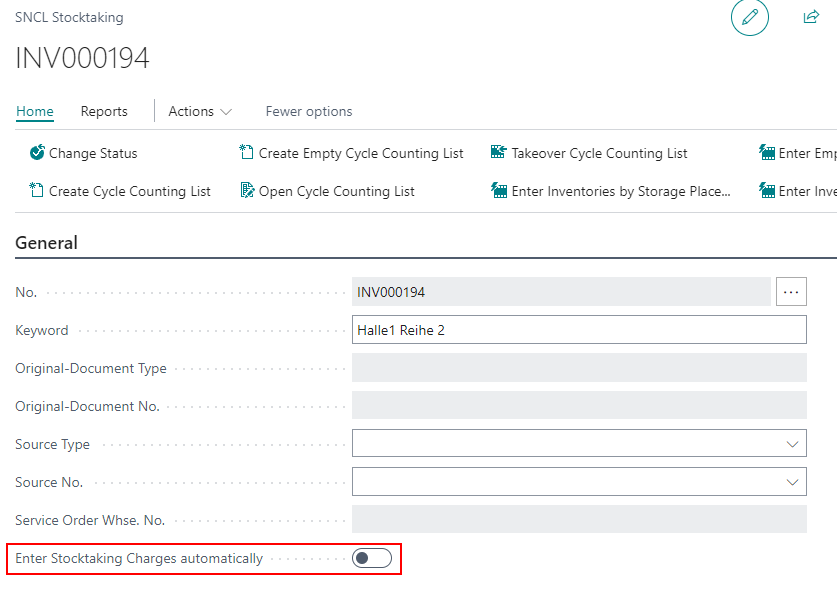
These Enter Charges Automatically fields have the effect that the corresponding storage charges are automatically entered in the respective stock document upon completion.
::: Note Please note that if this option is activated, the charges codes for external warehouse items must be filled correctly. ::::
Although there was already a field that automatically entered storage charges, this applied equally to all stock documents. Now you can switch the automatic process on and off individually. We have removed the old option field.
The priority of storage charges remains the same:
- Setup on the document
- Setup on the customer
- Setup in the SIEVERS WMS setup.
Enter Storage Charges in Assembly Orders - Items 84299 and 85738
It is now possible to enter Inbound Stock Post charges, Outbound Stock Post charges and assembly charges in the assembly order at the touch of a button. To do this, open the outside storage resources after posting the Inbound Stock Post or Outbound Stock Post order and click on the corresponding action.

Of course, additional charges can also be entered manually.
If there is not yet a service order warehouse for the outside storage assembly document, one is created when the outside storage resources window is accessed. The number of the service order warehouse is entered in the new respective field under the SIEVERS WMS section.
Added Outside Storage Fields to the Assembly Order - Items 84293 and 84297
We have added these fields to the SIEVERS WMS section in the assembly order:
- Inbound Stock Post Customer No.
- Service Order Whse No.
- Outside Storage Order marker (not visible)
In addition, the Outside Storage Ressource action has been added to the menu bar. If there is not yet a service order warehouse for the outside storage assembly document, a service order warehouse is created when outside storage resources are accessed.
These fields make it possible to record assembly orders in the context of outside storage.
Outside Stock Unit Billing Not Using Dimensions - Item 86392
We have fixed a bug that caused sales invoices generated with the outside stock unit billing to have no customer dimensions.
Assembly Order: Entry of Outside Storage Items Now Possible - Items 84295 and 84304
It is now also possible to enter assembly orders in the context of outside storage. This means that you can enter a Inbound Stock Post customer in the assembly order. This is done automatically as soon as you add an item to the lines that is an outside storage item. If this is the case, the order is automatically registered as an outside storage order and no other items can be entered that do not explicitly belong to this customer.
MDE
A1.4 Pos. Processing: Item Photos - Items 75617 and [75636]
On the MDE page A1.4 there are now new functions concerning the item picture.
A camera symbol now shows that at least one picture of the item is stored.
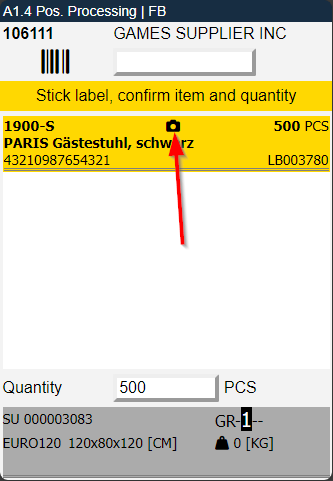
To view the image, simply press F6 or go to the Picture menu. You can also take and save new photos there.
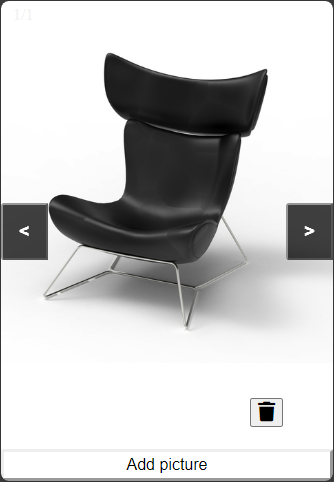
If no item picture exists yet, pressing F6 will start the camera directly so that a photo can be taken. This picture will be stored in the item master data.
A1.2 and A1.2o: Interface Now Shows Inbound Stock Post Strategy for Each Load Carrier - Item 75350
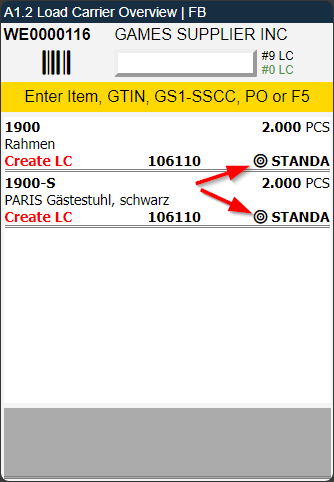
In each receipt line on A1.2 or A1.2o to which no load carrier has yet been assigned, the Inbound Stock Post strategy is now shown at the bottom right. The reason for this is that an employee can thus recognize a tendency where an item quantity must be placed after the assignment.
New Help Pages for A1.1 and A1.2 - Item 83997
We have added new help pages to the MDE pages A1.1 and A1.2. You can open them via F10.
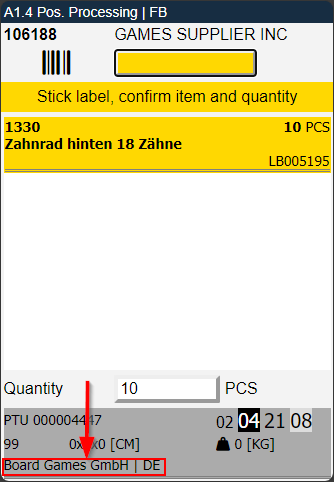
A1.4 and A1.5: Added Two Fields to Grey Info Section - Items 75665 and 75681
We have added the fields
- Ship-to Name and
- Ship-to Country
to the grey info space at the bottom or top of the pages below the packaging dimensions.
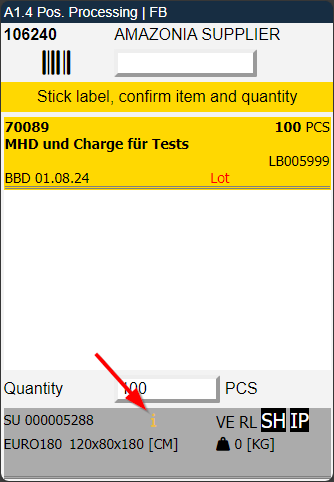
A1.4: i Symbol When the Load Carrier Has a Comment Text - Item 75664
We have now added the i symbol to the grey info area at the bottom of the A1.4 page.
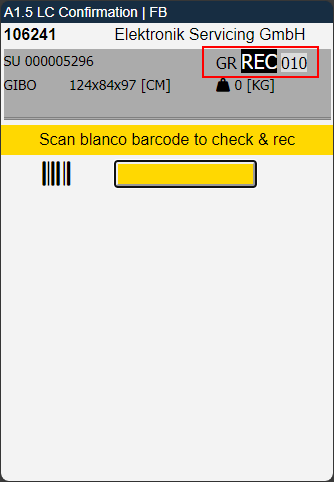
A1.5 Now Shows Storage Place From Load Carrier Line - item 75683
In Release 24, we have already modified the display of A1.4 so that the place from the load carrier lines is shown if it differs from the storage place in the Warehouse Receipt Header. We have now also implemented this in A1.5.
A7 Information: Scanned Value And Blocked Inventories Getting Highlighted - Items 83586 and 85097
In the past, it was always the case on the information pages that you scanned something and the scanned value then remained in the scan field. This way you could see what information was currently being shown. Unfortunately, you had to manually remove the contents of the field before the next scan, which made it difficult to retrieve several pieces of information in succession.
For this reason, the content of the scan field is now automatically marked and can therefore be overwritten directly with a new scan.
In addition, we have now implemented a highlighting of blocked inventories. These are circled in red and labeled with a red “blocked”. This change will be implemented on all appropriate MDE pages in the next releases.
Added Ability to Take Photos in A1.6 - Item 85418
We have added the ability for the user to take item photos in A1.6 using the F6 key or the A2 menu item. Photos taken will be saved to the item. This is the same photo function which is already implemented on A1.4.
A1.6 Only Prints Necessary Labels - Items 83784 and 83785
If load carriers are created in A1.6, the labels for the created load carriers are also printed automatically. However, if A1.6 is accessed again to create further load carriers, the system prints all the labels for all the load carriers created again. This is not necessarily a bad thing, but it does result in the printing of unnecessary labels.
We have now rebuilt the logic so that in A1.6, after new load carriers have been created, only those labels that have not yet been printed are printed.
Added Main Menu Help on MDE - Item 84809
We have added a detailed help page on the main menu on the mobile device. You can open it by pressing F10.
Load Carriers
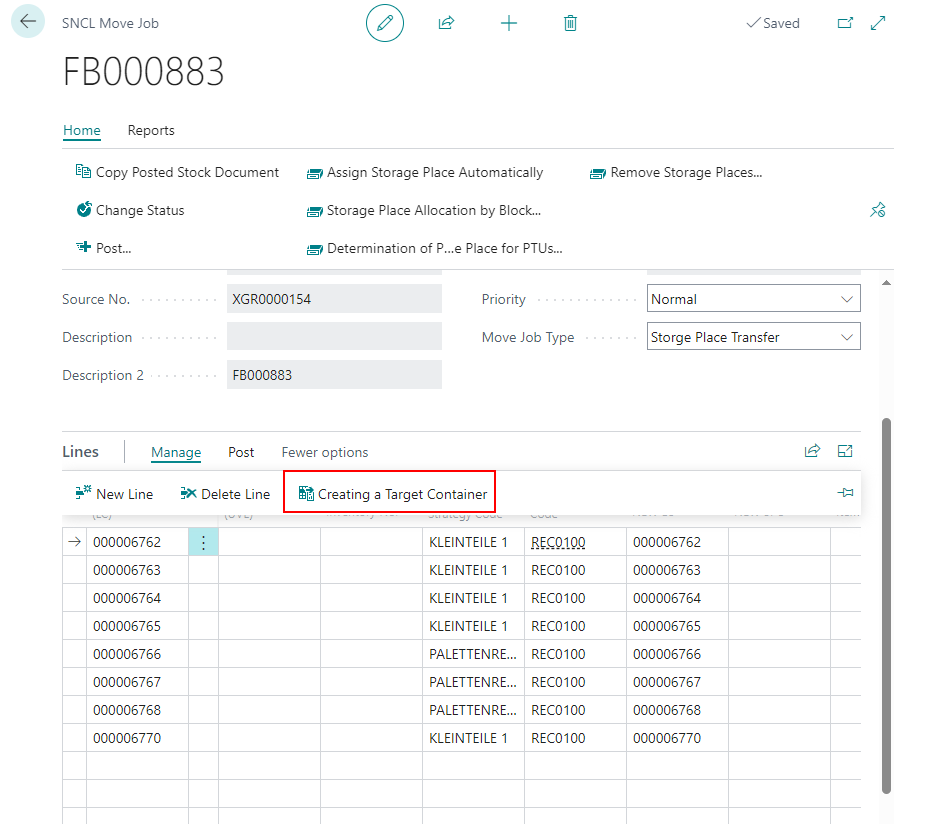
Error Message When Trying to Create Target Load Carriers for Multiple Load Carriers
We have fixed a bug that caused an error to occur when creating target Load Carriers in a move job for multiple Load Carriers at the same time.
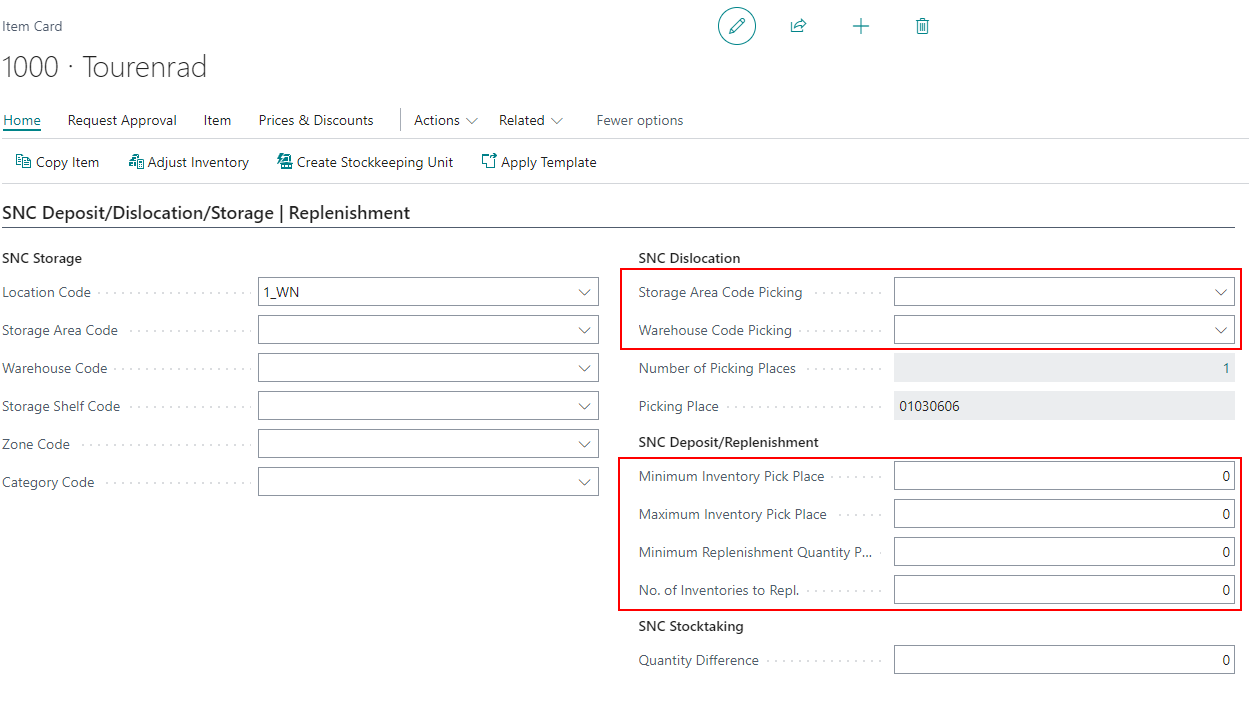
Replenishment Now Always Works With Load Carriers in Areas - Item 81084
In Sprint 23, we have added the feature that replenishment now also works with items in Load Carriers. Previously, only inventories were used for replenishment and Load Carriers were ignored. However, this feature only worked for general replenishment and not for replenishment areas defined in the items. We have now extended it to these.
Replaced Setup Field 'Inventory Measure Code Picking' - Item 70378
We have replaced the outdated field Inventory Measure Code Picking and instead created the field Default Inventory Measure Code. The purpose of this field is to provide a default inventory measure value wherever a load carrier with an unknown inventory measure is created.
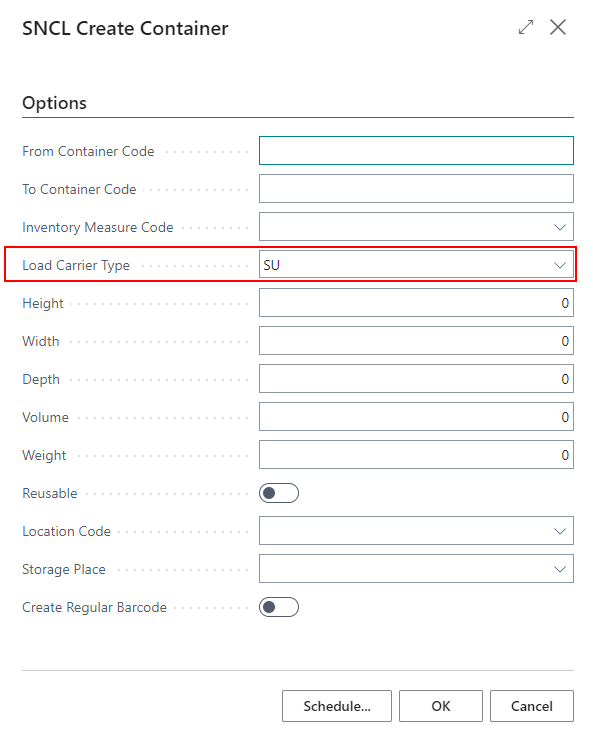
Define Load Carrier Type When Creating a Load Carrier - Items 81404 and 85243
It is now possible to define a load carrier type directly when creating Load Carriers. You can choose between SU, PTU and STU.
Move Order after Load Carrier Type Conversion - Item 84038
If an entire pallet is to be picked during picking, the system converts the pallet from SU completely into a PTU. This makes the process much simpler and more efficient. Previously, however, a move order had to be generated to guide the pallet to the next storage location. We have now also automated this step. When an SU is converted to a PTU, a move order is now generated automatically according to these rules:
- Consolidation Storage Place from Packaging Team
- Consolidation Storage Place from Picking Team
- Or the last place which got used to put a pallet down in the consolidation section
Labels
Added Variant Code to LE Label - Item 84536
We have now added the “Variant code” column for the Excel version of the SU label - integrating it into the data basis of the label. This makes it easier for us to print this code on the label if required by the customer.
SU label Extended - Items 84442 and 76891
We have extended the SU label with more information. If available, these fields are printed on the label:
- Sell-by date
- Lot no.
- Serial no.
- Item no.
- Item description
If there are several items with different values on the SU, a * is printed in the relevant fields.
Shipping
ShipXpert Connection - Item 70847
The shipping module integrated in the SIEVERS WMS can be used to automatically generate shipping labels, among other things. The provider used here so far is ECOVIUM. In order to give users of the shipping module more freedom of choice when selecting a shipping label provider, we have now also integrated ShipXpert into the system.
Added Shipping Agent field to Purchase Order Card - Item 81244
We have added the field Shipping Agent to the purchase order card in the section Shipping and Payment.
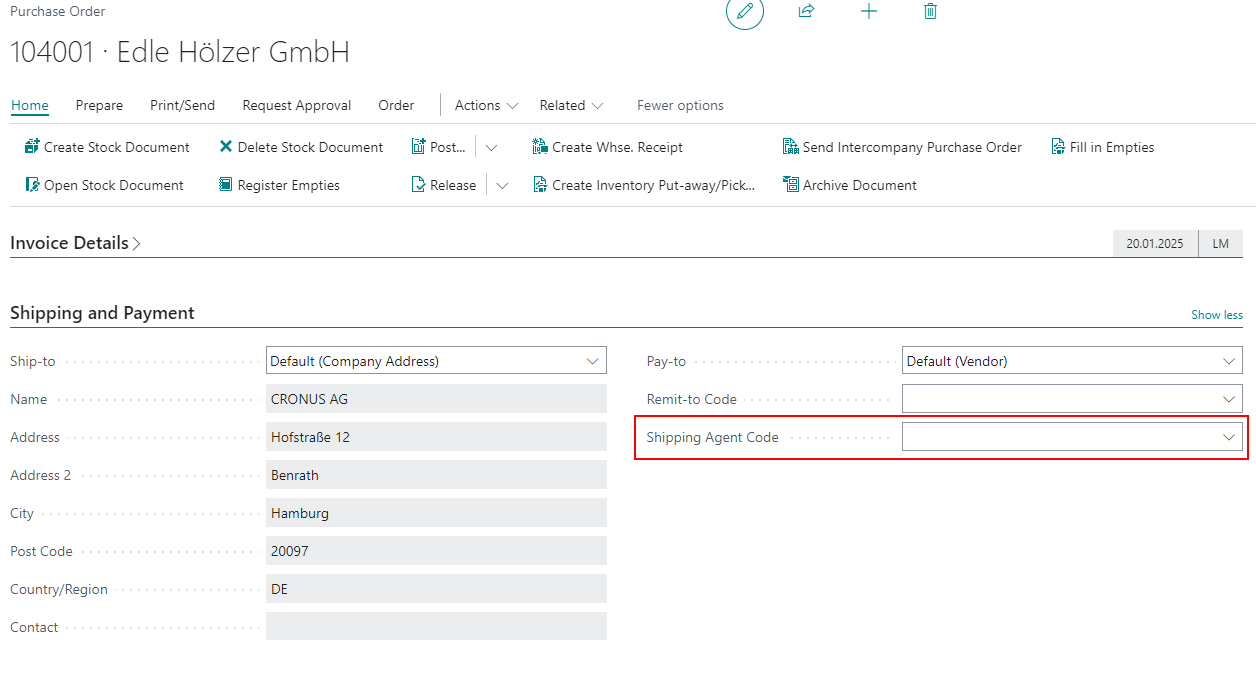
Please note that you have to click on Show more to see it.
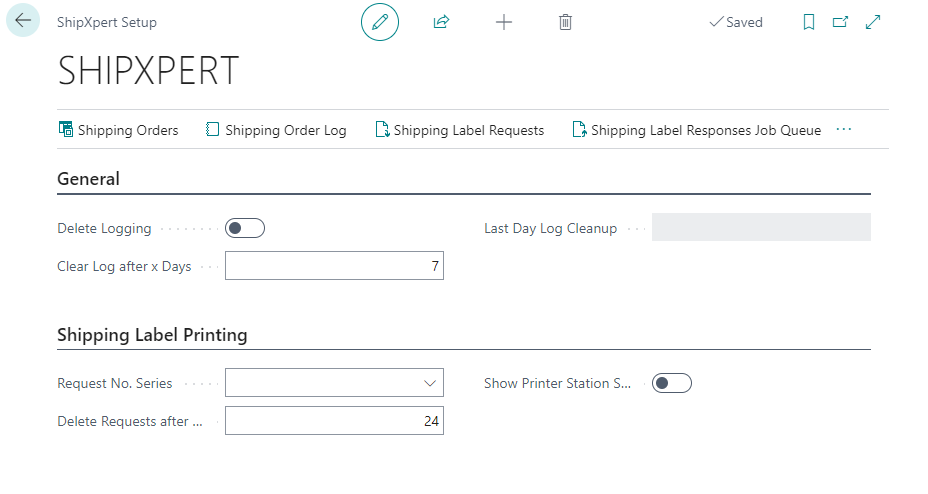
We have created a new setup page for the ShipXpert setup. This is structured similarly to the ECOMSUITE setup page. However it does not have a regular authentication option at the moment. Please get in touch with ShipXpert if you want to use their services.
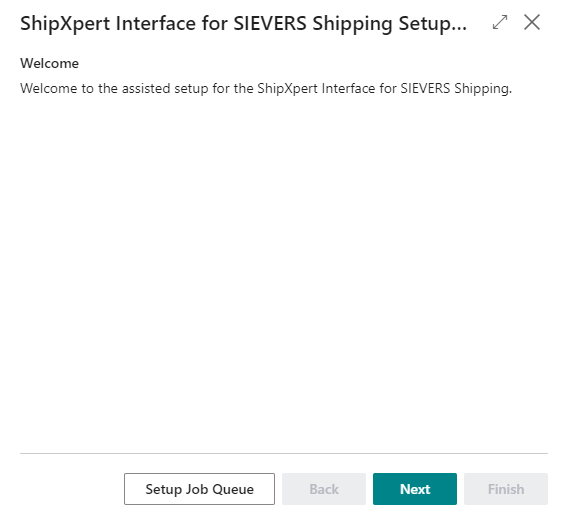
For the setup, however, it is better to use the ShipXpert Interface for SIEVERS Shipping Setup Wizard.
Adding Subsequently Entered Items to Existing Warehouse Shipments - Item 74798
We have added two new fields to the SIEVERS WMS Setup:
- Add to Warehouse Shipment from Source: Allows the user to continue adding lines to the source document after the warehouse shipment has been created and to add these new lines to the existing warehouse shipment with the regular Create Warehouse Shipment action
- #Days before Load. Date add to Whse. Ship.: Defines how many days before the first loading day new lines may be added to an existing warehouse shipment. If a 0 is entered here, the function is deactivated.
Switch SU to PTU Now Turns SU to SSCC Instantly if Dimensions Are Entered - Item 75234
In one of the latest releases we have implemented the function Switch SU to PTU to the picking document lines. By clicking this function all suitable SUs will be turned into PTUs instantly and be picked after that. Until now the user had to enter the dimensions after that to finish the packaging of the load carrier, even if they were already entered before. We removed this restriction.
If the SU already has the dimensions (depth, width, height and weight) set correctly, it will be switched to a packed SSCC by clicking this button. The user does not have to enter the dimensions again anymore.
Warehouse Receipts
Removed Actions from SNCL Warehouse Receipt - Item 85093
We have removed the two functions Create stock document and Find storage place from the warehouse receipt, as these no longer fit into the warehouse receipt process and were causing confusion. In particular, Create Stock Document occasionally caused errors in the process, as the employee was able to create load carrier lines in the batch and did not go through the receipt lines line by line as intended.
Removal of Barcodes from Warehouse Receipt - Item 66970
You are now able to remove barcodes from warehouse receipts. Removing them will not affect the status, posting date, arrival time or the time protocol. However, the arrival time and the posting date will be reset when you insert a new blanco barcode.
Further Checks for BBD in Warehouse Receipt - Items 85608 and 80168
We have improved the sell-by date check in warehouse receipt. Previously, the sell-by date check was only carried out when entering or changing the sell-by date in a regular warehouse receipt. From now on, a check will also be carried out when the sell-by date is filled by the WMS setup in the warehouse receipt and when a GS1 warehouse receipt is created.
SNCL Inventory Card: Sorting Changed and Two Fields Removed - Item 82916
To make the inventory card a little clearer and more logical, we have rearranged a few of the fields in the inventory section. In addition, we have hidden the VE Unit of Measure and Number of Pieces per VE fields, as these are not in use at the moment anyway.
Removed Fields from SIEVERS WMS Setup Page - Item 85000
We have removed the following out-of-service fields from the SIEVERS WMS Setup page:
- Activate autom. Stock Document
- Delete Empty Autom. Stock Doc.
We have removed these two fields as they have become unnecessary with the latest version of SIEVERS WMS. They are explicitly intended for Outbound Stock Posts, but the Outbound Stock Post functions are now consolidated in the warehouse shipments.
Follow Up Move Order Now Uses Target Storage Place from Previous Move Order - Item 65848
In the SIEVERS setup there is the Follow-Up Move Order on Transfer Storage Place option field. This causes a follow-up move order to be created automatically when a load carrier is placed in a transfer location so that the load carrier does not get stuck in the place. Previously, however, a new storage place was searched for with the follow-up move order using the Inbound Stock Post strategy. However, this is not good if a destination storage place was already specified before the items were placed in the transfer location.
We have changed the function so that the previously defined destination storage place is now also used in the follow-up move order after the transfer location. Of course, this only applies if a move order with a destination storage place actually existed before parking at the transfer location.
The process now works as follows, for example:
- Move order to destination storage place has been generated. The load carrier is picked up with a large forklift.
- On the journey to the destination storage place, the driver realizes that he cannot get to the destination storage place with the large forklift. So he spontaneously places the load carrier in the transfer location.
- The system automatically generates a new move order to the destination storage place.
We recommend that you always activate this option.
Same Barcode Can Now Be Added to Multiple Different Items - Item 81399
It is now possible to store the same barcode for different items in the item references. The prerequisite for this is that the Inbound Stock Post customer of the items is different.
Originally, this change was not planned, but there is the exceptional case that the owner of an external warehouse item changes, but the barcode remains the same. Due to this special case, we have added this option. In the course of this implementation, we also had to create a check for duplicate article numbers as otherwise errors would be generated.
Various Order Handling
The term various order handling refers to cross-order packaging in one packaging process and or cross-order picking with various picking documents. Various order handling is always about the orders within a warehouse shipment. Several steps have already been taken in the past to implement this process and a few more are coming in these releases. You can decide whether you want to use the functions or not.
New Setup Fields on WMS Setup - Items 85927, 86220, 86212 and 85933
There are now the new fields Consolidation by Shipping Address allowed, Allow picking creation by consolidation no. and Proposal of the unloading point in the Warehouse shipment area of the SIEVERS WMS Setup.
- Consolidation by Shipping Address allowed: Allows the By Shipping Address indicator to be set in the source document table of Warehouse Shipment Planning. This indicator allows this order to be picked and packed with other fitting orders.
- Allow picking creation by consolidation no.: If this option is activated, cross-order picking can be summarized by consolidation number and picking team. If this is activated, your customers will receive an SSCC containing various items that have not been picked with an order reference.
- Proposal of the unloading point: When this indicator is activated, orders with the same delivery address are assigned the same unloading place. This basically ensures that orders with different addresses are not inadvertently packed together and reduces the manual maintenance effort. Please note, however, that the items leave the customer's warehouse in mixed order packages.
Check if Shipment Addresses of Orders With The Same Unloading Place Match - Item 85935
We have implemented a check in Warehouse Shipment Planning that verifies whether orders with the same unloading place have a different delivery address when the unloading place is changed. This is to prevent several load carriers with a different destination ending up at the same unloading place.
Create Stock Document Creates one Shipping Order per Unloading Place - Item 85960
The Create Stock Document action in the warehouse shipment planning has now been adjusted so that a shipping order is now created for each unloading place in the warehouse shipment.
Stocktaking Improvements - Items 56351 and 70874
We have improved the stocktaking process with these new implementations:
- If shortages are determined during stocktaking, the system checks whether the inventory is reserved. If this is the case, the reservation is first reduced to the existing inventory before the stocktaking can be posted, otherwise overreservations could arise due to shortages. This happens in the posting process, before the document is posted.
- A missing quantity in the stock document should now be compensated for. In the case of a regular move order, this task must currently still be carried out by the employee. If it is a Outbound Stock Post document, a new inventory is automatically searched for and assigned in the lines. If no sufficient inventory is found to cover the document completely, the partial delivery indicator is set in the warehouse shipment.
- Inventories that are in packed or already printed picking lines are no longer entered into the stocktaking. This applies to the entire load carrier if there are several inventories on the load carrier.
Small Changes
- A1.6 LC Creation now displays shipping agent if there is no vendor in the warehouse receipt - Item 75744
- A1.6 LC Creation: Create Load Carrier now via hotkey F5 possible - Item 75760
- Added field Order Type to Posted Sales Shipment at SIEVERS WMS section - Item 80220
- Moved the SIEVERS WMS Setup field Whse. Ship. Automation from the General section to Warehouse Shipment - Item 81797
- Improved error message when trying to scan a load carrier label for validation on A1.2 Load Carrier Overview - Items 80423 and 85586
- Added feedback in A1.1 after successfully or dissolving load carrier assignments via F11 - Item 83983
- Added feedback in A1.1 after trying to dissolve load carrier assignments when there are none - Item 83984
- Removed the field Use one Load Carrier from receipt lines in warehouse receipt as it had no function - Item 81388
- Improved feedback in A4.3 Pos. Processing when trying to pick less or more than minimum or maximum quantity - Item 83236
- Removed two out-of-service actions from the stocktaking page - Item 84834
- Renamed MDE B5 Permanent Stocktaking to Stocktaking - Item 84953
- The Load Carrier field on the Print Load Carrier Label is now a drop down field - Item 85613
- Resources descriptions now sync with the descriptions in document lines - Item 65329
- Created By and Changed By fields now show username - Item 75265
- When a stock transfer order is posted, the linked service order warehouse is now also posted automatically - Item 75188
- Added Sell-By Date to Inbound Stock Post order lines - Item 82957
- Increased the PTU label size so that it is the same size as the other labels - Item 84279
- Increased the barcode size on the item label so it has better scan range - Item 84281
- Increased error feedback on MDE when trying to scan a wrong barcode - Item 75207
- Lot no. from Inbound Stock Post orders are now automatically transferred to the warehouse receipt - Item 85531
Additional Changes
- Series Oriented Picking - Features 70416 and 70415
- A1.6 Put To in existing load carriers - Item 75765
- Warehouse Shipment Lines State: Updating the Warehouse Shipment Lines and Order Status when new Warehouse Shipment Lines are added - Item 75063
- MDE Main Menu: Display of the BC environment - Item 77042
- A1.1: Input check for identification of incoming items - label comparison - Item 80165
- Reusable Load Carriers - Item 81401
- B1: Access the info with F3 “ctrl+i” - Item 81418
- Automatic Warehouse Shipment - Items 82029 82036 82038 82039 82040 82041 83401 83403
- Automatic picking document - Items 83538 83546 83547 83549 83550
- Bug: Warehouse shipment status picking - Item 84239
- Split Inbound Stock Post lines - Item 84364
- Warehouse receipt: reconcile quantity - check batch by setup - Item 84813
- Sievers WMS Setup: Deactivating zero stocktaking in the picking process - Item 85441
- Warehouse Receipt: both SU layouts with GS1 => change barcode type Code 128 => GS1-128 and identifier 00 - Item 85623
- SSCC label: Conversion to PU unit - Item 85666
- Package content list: Convert PU Unit - Item 85667
Bugfixes
Printer string length too long - Items 84022 and 82106
We have fixed a bug that sometimes prevented you from selecting certain printers. The reason for this was that in some places a name length check was still built in.
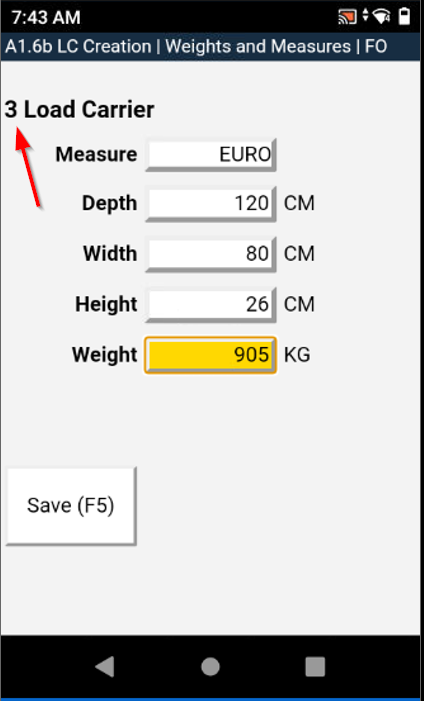
A1.6b LC Creation Weights and Measures not showing Load Carrier Quantity - Item 80192
We have fixed a bug that caused A1.6b not to show for how many load carriers the dimensions and weights are entered.
Move Job for Replenishment Not Always the Correct Move Job Type - Item 80988
In the case of a replenishment move job, a Load Carrier move job or an inventory move job is generated depending on the stock quantity and the quantity to be moved. The default rule is that an inventory move job is generated. However, if the quantity to be moved is exactly the same as the quantity in the inventory, a Load Carrier move job is generated so that the entire Load Carrier can be moved easily.
It can happen that a replenishment move job contains more quantity than an inventory. In such a case, a Load Carrier move job should actually be generated for an entire Load Carrier and an inventory move job for the rest. However, this did not happen due to an error. Instead, an inventory move job was always generated if the quantity to be moved did not exactly match the quantity of an inventory. We have now fixed this bug.
Inventory Replenishment Counted Twice - Item 81041
We have fixed a bug that caused an inventory move job to be additionally handled as a Load Carrier move job and therefore counted twice. As a result, replenishments were created much later than they should have been.
Response Picking List not Possible - Item 81278
Due to an error in the check during response of a picking document, there was an incorrect error message if no warehouse shipment was assigned to the picking document. The check searched for a warehouse shipment that did not exist. We have fixed this bug.
Error when Trying to Generate an International Bill of Lading - Item 82103
Under very special circumstances it could happen that the International Bill of Lading could not be generated. The error was very rare and difficult to reproduce, but we were able to fix it anyway.
Storage Place Label not readable - Item 83585
We have fixed a bug that caused storage place labels to be incorrect and not readable at all.
Blanco Barcode usable twice - Item 83725
Under certain circumstances it was possible to use the same blanco barcode twice in a warehouse receipt. We have fixed this as it is not intended.
SIEVERS WMS Warehouse Receipt opened for non WMS Location - Item 83808
A Location in Business Central can either be activated for use with SIEVERS WMS or not. If it is not activated for SIEVERS WMS, it can still be used in Business Central. For example, SIEVERS WMS Locations and regular Locations can be operated side by side.
In this context, we have fixed a bug that caused the Create Warehouse Receipt action to attempt to create a SIEVERS WMS warehouse receipt despite the location being non-SIEVERS WMS.
Wrong Sender Address on Bill of Lading - Item 79447
We have fixed a bug which resulted in a wrong sender address on the Bill of Lading. The sender address is now always filled with the address from the Location. The name comes from the company information.
Load Carrier Loses SPU After Move Job - Item 83582
We have fixed a bug which caused load carriers to lose their assigned SPU after moving them via move job.
Stock Transfer to Non-WMS Location Creates Faulty Stock Document - Item 84534
We have noticed that due to a certain error in a stock transfer order in an active warehouse receipt or shipment from or to a location without SIEVERS WMS, an unnecessary stock document is created. This resulted in the internal references no longer being correct and an error occurring when posting. In addition, the stock document could not be deleted.
We have now fixed the error so that no stock document is created in this constellation.
Wrong Quantities on Label After Entering PU Unit - Item 82126
We have fixed a bug that caused the wrong quantities to be shown on the SU label after entering the PU unit in the item card. Now the respective PU unit is shown on the label with the corresponding recalculated quantity.
Multiple Selection Not Working in Inventory List - Item 84040
We have fixed a bug that caused the multiple selection on the inventory list to not work properly. As a result, the selected lines were not transferred to the clicked action
Cycle Counting List Correction Not Working - Item 85509
We have fixed a bug that sometimes caused the system to throw an error when accepting a cycle counting list with corrected inventory if the value fell below the set threshold.
Creation of Too Many Load Carriers in Warehouse Receipt - Item 84234
We have fixed a bug that caused far too many load carriers to be created under certain conditions when clicking the Quantity checked button in the warehouse receipt.
Shipping Agent or Vendor Not Filled in Warehouse Receipt - Item 85598
When creating a new warehouse receipt, either the shipping agent code or the vendor no. must be filled in. This is necessary for subsequent processing and is generally important for assignability. However, due to an error, the check for these two fields was switched off. As a result, load carriers could be created in the warehouse receipt that had no shipping agent and no vendor stored, which can lead to subsequent errors in the further process. We have now fixed this bug.
Not All Item Labels printed - Item 85635
We have fixed a bug where not all item labels were printed when you used the function print load carrier labels with item labels in the warehouse receipt.
Incorrect SU Label With Multiple Items and Other SU Label Fixes - Items 85637, 85640 and 85643 and 85622
We have fixed some minor bugs in the SU label that would occur if you printed a label for an SU with several different items in it.
In addition, we have found that a break caused by a GS1 code that is too long results in the label being printed on two pages. We have changed the allocated place and now even long codes can be printed without any problems.
A4.3: Quantity Field Displayed Sum of All Outbound Stock Post Lines - Item 85944
Fixed a bug that caused the sum of all Outbound Stock Post lines of an order to be displayed instead of each line individually.
Item Tracking Caused Removal of Reservation Entries - Item 85005
We have fixed a bug which caused reservation entries related to a lot no. to be deleted when the setup field Set Item Track. from Stock Document in the SIEVERS WMS Setup was activated and the user changed a state change on preparation.
Assembly Picking Error - Item 84300
We have fixed a bug that caused the second position of the picking to not be carried out when picking for an assembly. Here, an error message occurred from time to time stating that the Warehouse Shipment No. did not exist.
Stock Document Creation Not Working For Transfer Orders - Item 86176
We have fixed a bug that sometimes caused an error when creating the stock document in the warehouse shipment if the warehouse shipment was based on a stock transfer order. The stock document was still created correctly.
New Stock Document With Empty Second Line - Item 86177
We have fixed a bug that sometimes resulted in an empty, unnecessary line in a newly created stock document.
Creation of Stock Document in Sales Invoice Not Possible - Item 85004
We have noticed that it is currently not possible to create a stock document from a sales invoice. However, this is actually the Business Central standard and should always be possible. We have therefore fixed this bug. In the next release, we will implement the same for sales credit memos.
Warehouse Receipt Second Shipment Error - Item 85941
We have fixed a bug that made it impossible to create a second warehouse receipt for a Inbound Stock Post order with an already posted shipment.
Item Tracking Lines Not Transferred To Warehouse Receipt - Item 86112
We have fixed a bug where item tracking lines from a stock transfer order were not transferred to the warehouse receipt.
Assembly Order Not Posting With Service Warehouse Order No. - Item 86228
We have fixed a bug that caused assembly orders not to be posted because the service order warehouse no. was not filled correctly.
Transfer Order Bugs
We have fixed a few bugs which were related to transfer orders:
- The Load Carrier properties must be completely transferred for a stock transfer order to a warehouse receipt. Unfortunately, this did not always work for the state - Item 84236
- The outside storage indicator was sometimes lost during the stock transfer order for an outside storage customer - Item 84238
- A stock transfer order could sometimes not be posted if it was related to a loading - Item 85612
- The user was not able to enter storage charges via Enter Inbound Stock Post/Outbound Stock Post charges - Item 84269
Load Carriers counted Twice on International Bill of Lading - Item 81415
We have fixed a bug that caused the number of load carriers on the International Bill of Lading to be too high because some load carriers were counted twice.
Default Inventory Measure Code not Used - Item 70551
We have fixed a bug which sometimes caused the default inventory measure code from the SIEVERS WMS setup not to be used when the packaging hierarchy of an item was not filled.
Customer Reference Barcode Over Two Lines - Item 84804
We have fixed a bug which caused the custom reference label on the package content list to be printed over two lines when the reference is too long. Now it's possible to print up to 20 characters as barcode on the list.
A4.2: Load Carrier Set to 'Packed' Instead of 'Blocked' When 0 Quantity Entered - Item 85094
We have fixed a bug which caused the load carrier to be packed after the user entered the quantity 0. This should have resulted in the load storage unit being blocked.
Wrong SU Label Barcodetype with GS1 SU - Item 85623
We have fixed a bug that sometimes printed the wrong GS1 barcode type on storage unit labels.
Small Bugs and Spelling Mistakes
- Fixed a bug which printed REPRINT on the first print of a cycle counting list - Item 81994
- Fixed a bug which sometimes caused the wrong kind of SU label to be printed - Item 84738
- Corrected a few spelling mistakes - Item 85110
- Fixed a bug that sometimes led to many 0 decimal places in the quantity on the SU label. We have reduced this to a maximum of 2 decimal places - Item 85644
- Fix A3.1 refresh not working sometimes - Item 85266