Features
New Fields and Columns
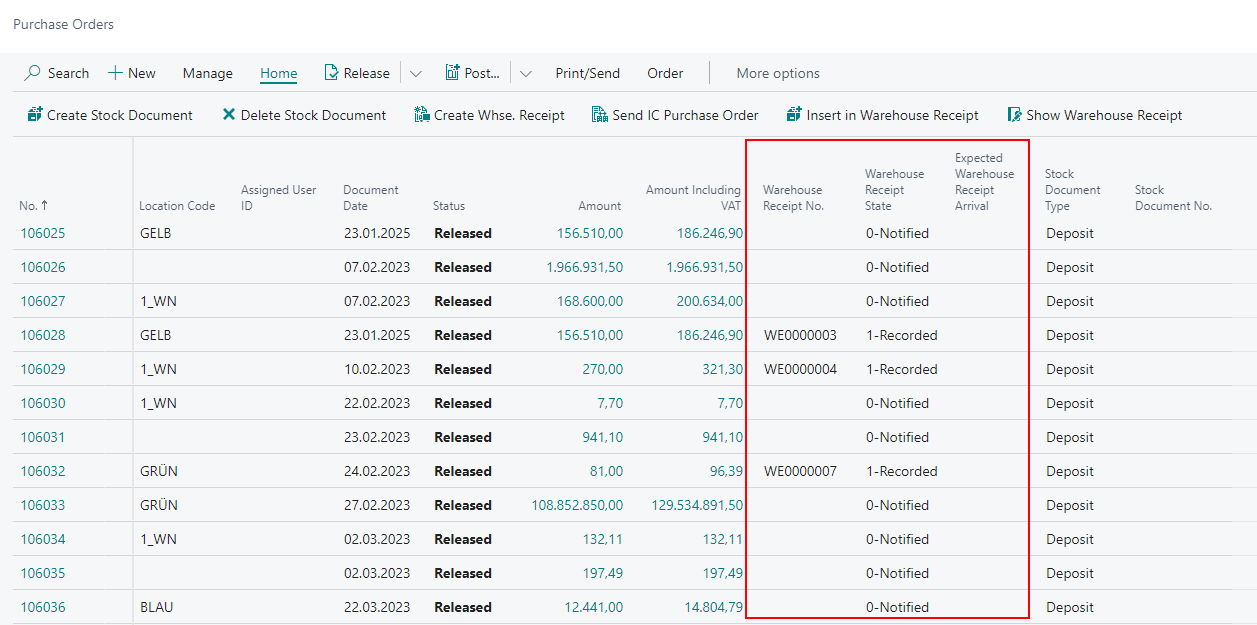
Added multiple new Columns on Purchase Order List - Item 69719
In order to improve the overview and to be able to see if there is already an assigned Warehouse Receipt, we have added the following columns to the Purchase Order List:
- Warehouse Receipt Number (clickable)
- Warehouse Receipt State
- Expected Warehouse Receipt Arrival
New Field Inbound Stock Post Code on Customer Card - Item 69230
We have removed the field Inbound Stock Post/Outbound Stock Post Code on the Customer Card and instead created the new field Inbound Stock Post Code. The Inbound Stock Post Code is the counterpart of the Outbound Stock Post Code. Here you enter a Code which is used to bill services for outside storage.
New columns in the SNCL Outbound Stock Post lines - Item 75075
With the last release 22, it was implemented that several different sub-packaging units can also be recorded in the packaging hierarchy. This was necessary as an item could be stored in warehouses with different sub-packagings. These sub-packaging units are mainly used to be able to pick / count the required quantities more quickly. In addition, a help function is offered in the MDE that enables the warehouse employee to calculate the withdrawal - as with a calculator (see A4.3). To extend this concept to other parts of the WMS, we first added two new columns to the SNCL Outbound Stock Post lines.
- Proposal SPU Inv. Unit of Measure
- Proposal SPU Number of Pieces
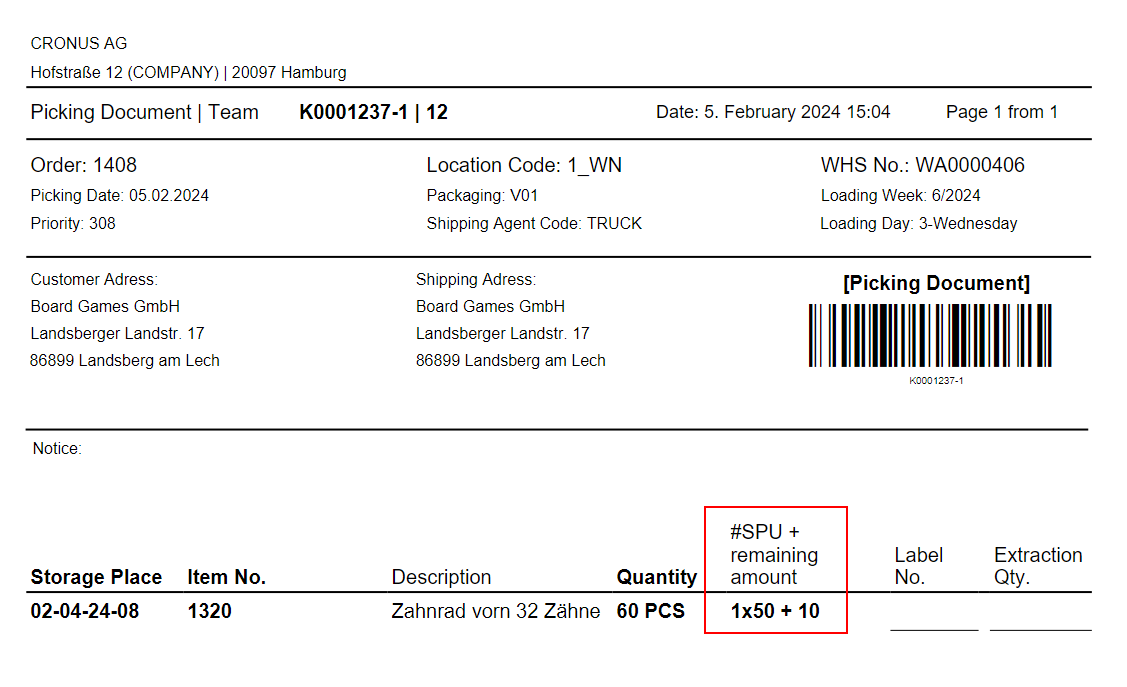
The first field is used to determine whether and with which SPU the Outbound Stock Post line can be picked. The SPU with the lowest level number in the packaging hierarchy is specified first. The Number of Pieces field shows how many of these SPUs are required.
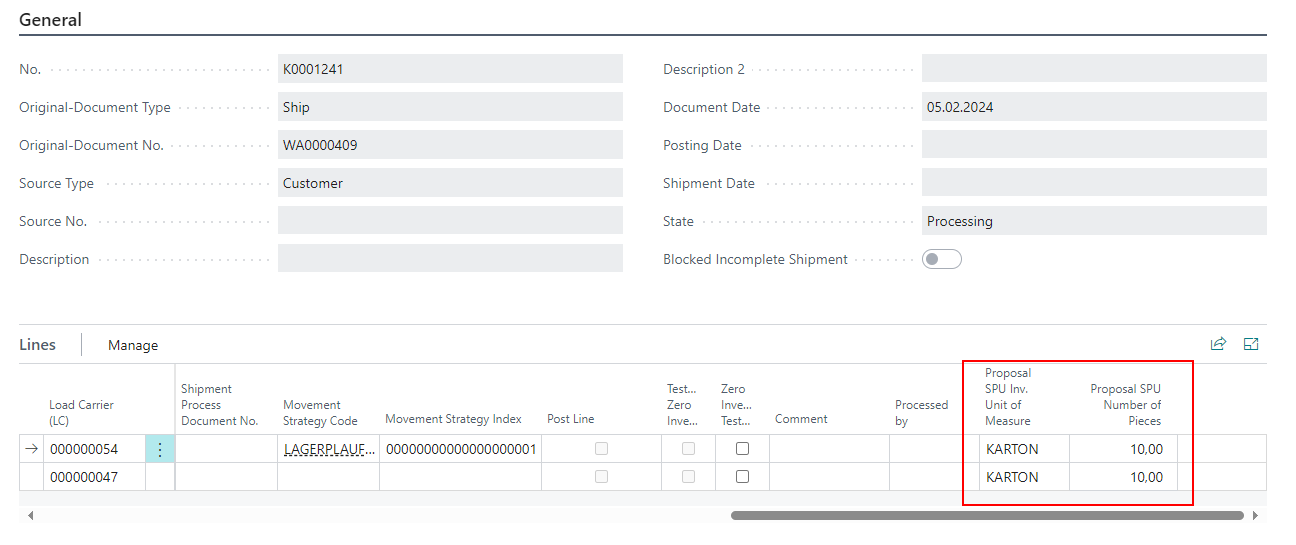
The fields are not editable and are for information purposes only. The proposal is also printed on the picking document.
Added more fields to Posted Warehouse Receipt and Time Protocol List - Item 63301
We have added a few more fields to the Posted Warehouse Receipt.
- Expected Arrival
- Warehouse Receipt Info
- Unloading Location
- Unloading Place
- Number of Load Carriers
- End Commercial Warehouse Receipt
These fields are now also recorded in the Time Protocol List.
Stocktaking
New Inventory found during Stocktaking added to the next Cycle Counting List - Item 69942
We have expanded the process of adding new inventory. Now, new inventories that exceed the set threshold values are automatically transferred to the next counting cycle.
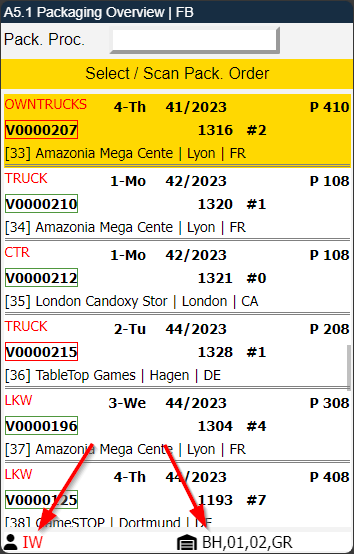
Employee Marking and Warehouses for of remaining Pickings - Item 70221
We have added a footer to the page A5.1 on the MDE. This footer contains the employee marking and a list of the warehouses with remaining pickings.
Selection of a PTU in A4.2 or A4.3 that is already in a packaging process - Item 70700
From now on, if a PTU is scanned in A4.2/A4.3 that is already in a packaging process but has not been partially or fully packed, a question will appear:
Continue picking in PTU and remove PTU from packaging process XYZ?
If the user chooses Yes, the PTU will be removed from the packaging process and given the status 2-Recorded. Otherwise, nothing happens.
Display of Stocktaking Type Inventory Correction in B5 - Item 80195
From now on the user can view and take actions on stocktakings of the type Inventory Correction on the B5 Perm. Stocktaking Pages.
Multiple Storage Place Counts possible within a single Stocktaking Period for Inventory Corrections - Item 71330
Normally, it is not possible to count storage places more than once within an inventory period defined via the Date formula field in the SIEVERS WMS setup. This rule generally makes sense, but it can get in the way of an inventory correction that falls within the inventory period. For this reason, we have removed the rule for inventory corrections. Stocktakings of the type inventory correction can now also count storage places that cannot actually be counted according to the date formula.
Changes to A1 Pages
- Info symbol now appearing on A1.2 and A1.2o when there is a Warehouse Receipt Info - Item 75342
- You can now open A1.1, A1.2 and A1.2o via the A2 menu without having to select a Warehouse Receipt first - Item 63799
- It's not possible anymore to enter A1.2k Load Carrier Overview | WR Filter from A1.2o Checked LC Overview as it makes no sense to filter Warehouse Receipts from a page with already checked Load Carriers - Item 80251
- Lot No. and BBD fields only show up on A1.GS1-SSCC page, when one of those values are mandatory for the item - Item 69734
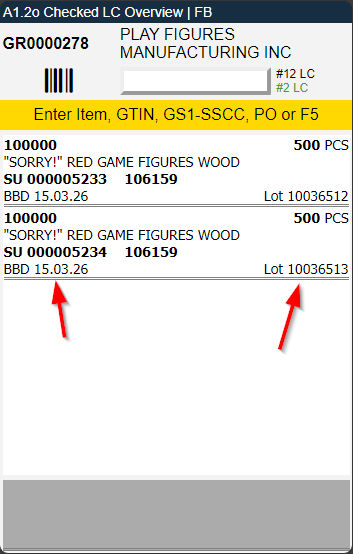
A1.2 and A1.2o: Display of Lot No. and BBD- Item 75352
If it is an item that is required to have a lot and sell-by date, the two values are now automatically shown on the pages A1.2 and A1.2o. If these are not filled, the fields appear but are empty.
A1.2 and A1.2o: Display of Ship-To Name and Ship-To Country for Special Orders - Items 75372 and 75373
The Warehouse Shipment MDE pages A1.2 and A1.2o now display the Ship-To Name and Ship-To Country Code when a Special Order is assigned to one of the allocated load carriers.
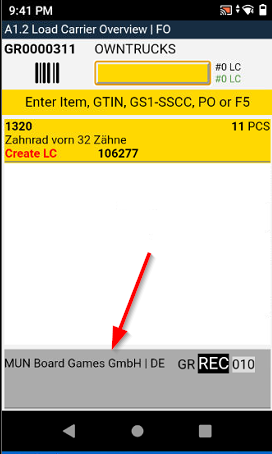
A1.2 and A1.2o: Footer now shows Storage Place from Allocated Load Carriers Line - Item 75392
The pages A1.2 and A1.2o now show the storage place from the Allocated Load Carriers Line in the footer if it is a different from the Warehouse Receipt Storage Place.
A1.2 instructions changed - Item 75408
We have removed the LC from the Enter Item, GTIN, LC, or PO instructions on page A1.2 because at this stage the user must attach the barcode to the carrier. It does not make much sense to require the user to attach the barcode to a specific carrier and then scan it, as it is likely that the user will simply scan the barcode while it is still in their hand. Instead, it is necessary to require the user to scan a barcode that ensures they are physically next to the items to be scanned.
Also, we added GS1-SSCC to the instructions.
Other MDE Changes
B1.1 SSCC Info now shows all SSCCs belonging to the Warehouse Shipment - Item 75118
We have recently implemented the new information page B1.1 SSCC Info. This page shows more information about the selected SSCC. We have improved the page by showing the whole warehouse shipment and highlighting the selected SSCC. This gives the user more information about the whole shipment than just the single SSCC.
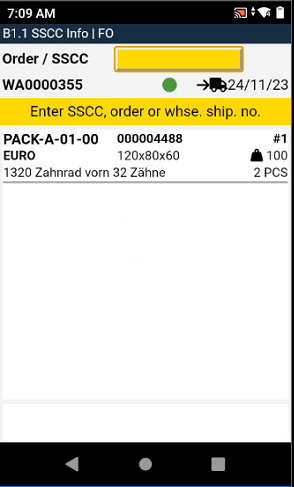
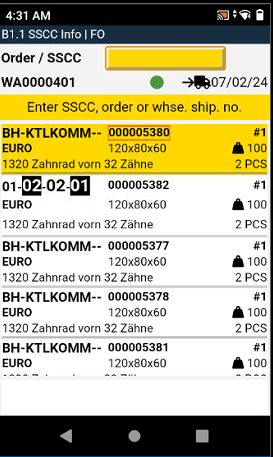
B1.1: Red Outline around SSCC No. when not packed yet - Item 75119
SSCCs are now always outlined in red on page B1.1 SSCC Info as long as they are not yet packed. As soon as they are packed, the outline disappears. This is to show the user that something still needs to be done here.
Open A7.1 Item Info from A7.2 Storage Place Info via Right Arrow Key - Item 75605
When the user looks at the info for a storage place, they may also want to see more about the stored item. This is now possible. To do this, press the right arrow key and enter 7.1 Item Info.
Improvements on Consolidation - Items 74820, 74852, 74854 and 748179
We have improved the consolidation functions for PTUs. As a reminder: PTU consolidation - is used to combine several PTUs for one order into one packaging in the packaging-related area.
If a PTU is scanned in A2.0 Internal Movements and the corresponding source document is assigned to a warehouse shipment and a packing team is entered - a Consolidation Storage Place is to be determined for the PTU. This also applies to the Unload TU function in A4.2 and A4.3.
If a picking team has already placed a PTU in a suggested Consolidation Storage Place for the selected order, the next PTU will always receive the same suggested place.
MDE Warehouse Receipt Filter now works with actual Quantity and not original Quantity - Item 75753
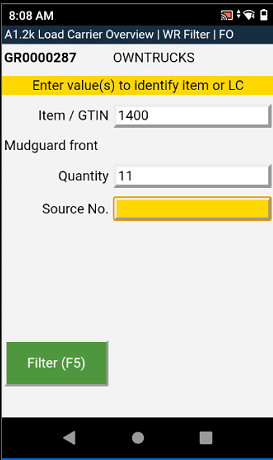
Users are able to filter a specific document line in A1.2k Load Carrier Overview | WR Filter for example by entering an Item No. or a GTIN and its quantity. Up until now the user had to enter the original quantity of the line. From now on you can filter by entering the actual quantity of the load carrier line or document line.
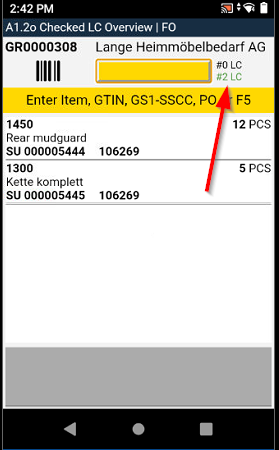
Green Number in Warehouse Receipt on MDE now shows checked Load Carriers - Item 75294
Previously, the green number on the warehouse receipt pages counted all load carriers that had already been recorded. As soon as a load carrier was created, it was included in the green number. We have questioned this again and have now changed it. From now on, the green number will only show the number of load carriers that have actually been checked.
Other Changes
Item References: Only a single Barcode per Item possible - Item 74862
If a barcode is entered several times for different units of measure in the item references, the system can no longer know which quantity should be entered for picking. For this reason, we limit the number of possible barcodes per unit of measure to 1. In addition, a barcode may not be re-entered for another item if the barcode entry already exists in the reference items.
Removed Create Item Ledger Entry field from SIEVERS WMS Setup - Item 70648
The SIEVERS WMS Setup included a field in the outside storage section called Create Item Ledger Entry where you could decide if you wanted the system to create item ledger entries in the outside storage context. We have decided that for the SIEVERS WMS system item ledger entries are always necessary and should therefore always be activated. This made the field obsolete and we removed it from the page while making it always on.
GS1-SSCC instead of Load Carrier No. on International Bill of Lading, Packlist Exportdata and Shipment List - Items 76902, 76901 and 76900
If a GS1-SSCC is stored on the load carrier, the last 9 characters of it will be printed on the International Bill of Lading, the Packlist Exportdata and the Shipment List instead of the Load Carrier number.
Minor changes
- Improved the error message when trying to create a load carrier without an entered weight Item 67771
- Added multiple help pages on the MDE - Items 70537, 70542, 70543, 70544 and 70545
- A2 pages on MDE now show Inventory Measure Code instead of Inventory Measure Code Description when selecting a load carrier - Item 75611
- A8 Team / Forklift on MDE: Team Code was 4 characters long, now 5 characters long - Item 71177
- A1.2k will now be pre-filled with the previously in A1.2 selected Item and Item Description - Item 75403
Bugfixes
MDE: Info Symbol on Packaging Pages always showing - Item 75584
We noticed that the info icon was always displayed on the packaging pages of the MDE. We have fixed this. Now it only appears when there is an information text in the packaging process.
Warehouse Shipment Planning Error when filtering empty Warehouse Shipments - Item 69769
We have fixed a bug which caused an error if the user set the filter in Warehouse Shipment Planning so that only empty Warehouse Shipments were shown.
Customer Validation fails when trying to change Shipping Agent - Item 73957
We have fixed a validation bug which occurred when trying to change the Shipping Agent in a sales order.
Identification of Item in Warehouse Receipt on MDE not working - Items 75407 and 75410
In the last version, we introduced an input check that should change the process so that items must first be clearly identified before proceeding further. This did not work perfectly in places, so that sometimes the process was continued even though no clear identification had yet been made. We have solved the problems that arose.
Wrong Description after Response Picking List - Item 69910
In a few cases, an error occurred after the response of the picking document. The description of the inventory measure was changed. We have identified and solved the problem.
Added Two Missing Fields in Address Take Over from Source Document in Shipping Order - Item 75412
In the latest Release 22, we have implemented a change in the address logic of Shipping Orders. Now the address information comes from the source document and not from the master data. Unfortunately, the fields Ship-to Phone No. and Ship-to E-Mail Address were overlooked. We have fixed this and added these fields to the logic.
Finishing Second Count on MDE not possible - Item 75488
We have fixed a bug that sometimes prevented the user from finishing the second count in mobile stocktaking because the system was trying to create another count and got stuck.
Counting a Storage Place on MDE results in wrong Quantity - Item 75490
We have fixed a bug that sometimes occurred when the user entered the correct amount of inventory in a single storage place count. The system would display the wrong quantity and throw an error about the stock inventory being non-existant.
Empty Storage Places added via Initial Stocktaking not showing up on MDE - Item 76853
We have fixed a small filtering error which caused empty storage places added via initial stocktaking to not show up on the mobile device.
Outside Storage Stocktaking: Storage Charges Customer not getting filled - Item 76872
We have fixed a bug that caused the field Storage Charges Customer to be left blank when creating a new stocktaking for an outside storage customer.
Simultaneous work on PTUs during packaging results in everything being in the second SSCC - Item 68565
We have fixed a bug that occurred when the user was working on multiple PTUs at the same time while packing. The items were always entered into the second created SSCC, even though the user scanned the first one.
Main Menu reverts back to Login - Item 75155
We have fixed a bug which sometimes caused the user to log out of the mobile device when using the A9 Main Menu function in the page menus.
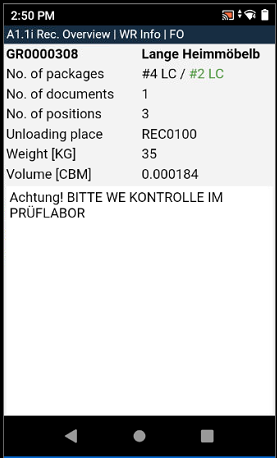
A1.2i and A1.1i: Weight, Volume and WR Info missing - Items 75303 and 75328
Until now, the weight, volume and WR Info were missing on the A1.2 info page. We added those fields. Total Weight and Total Volume are calculated from the master data weights of the items.
A1.2: Opened A1.4 despite identification not clear - Item 75407
We have fixed a bug which caused A1.4 to open despite the fact that the position was not clearly identified.
Outside Storage does not get correct internal indicator - Item 76034
If an outside storage item was deposited via the item journal with certain parameters, the stock entries did not receive an outside storage indicator and other fields were not filled correctly. As a result, outside storage stock was created that had no influence on outside storage billing. We have fixed this bug.
B5.5 Suggestions caused Bug in Zero Stocktaking - Item 75815
Since the last release, it has been possible to add new inventory via B5.5 during other processes, such as picking. However, there is a so-called zero stocktaking during picking. This is the moment when the stock is zeroed during picking. If you now want to register a new inventory, the system tries to pre-fill the form in B5.5 - but this is not possible due to the empty inventory. This leads to an error. For this reason, we have removed the pre-fill function from B5.5 for the time being.
Get Source Document in Warehouse Shipment Planning causes Error - Item 80326
We have fixed a bug which caused an error when the user tried to add new lines from a Outbound Stock Post Order to a Warehouse Shipment via Get Source Document.
Small Bugs and Spelling Mistakes
- Fixed a display bug on the MDE. Multiple pages were sometimes shifted slightly to the left - Item 65189
- Fixed a bug on A1.3 which cause wrong values to show up instead of BBD and Lot No. - 75395
- Fixed a bug that caused the entered values to remain in the Warehouse Receipt Filter A1.2k even after leaving the page, which made it necessary to remove them manually when reopening the page - Item 75422