Hinweis: Diese Release Info ist nur in Englisch verfügbar.
Features
Picking
Improved Picking Document Actions on Warehouse Shipment Planning - Item 90589
We have improved the picking document actions on the warehouse shipment planning by:
- Enhancing the Show Picking Document for Selection action: now automatically opens the picking document for the warehouse shipment if there is no picking document for the selected order
- Implementing the new action Show Picking Document in the Related section of the menu.
Added Columns to Cancel Released Items Page - Item 97915
Multiple columns have been added to the Cancel Released Items page:
- Item No.
- Variant Code
- Lot No.
- Serial No.
- Sell-by Date
These columns match the options fields on top of the page.
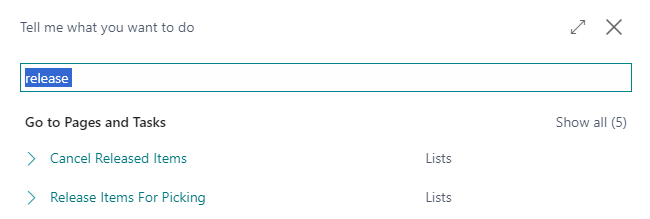
New Picking Pages Can Now Be Accessed Via Search - Item 97918
The pages Cancel Released Items and Release Items for Picking are no longer only accessible via picking documents page. You can now also open them directly via the Business Central search.
Warehouse Shipment
Warehouse Shipment Fields Filled from Transfer Order - Item 89603
From now on, the address data and the keyword of the transfer order are transferred to the warehouse shipment. The following address data is transferred:
- Ship-to name from Transfer to Name
- Ship-to address from Transfer to Address
- Ship-to postal code from Transfer to Post Code
- Ship-to city from Transfer to City
- Country/region code from Transfer to Country/Region Code
Outbound Stock Post Automation Now Creates Shipping Orders - Item 97870
Previously, when a Outbound Stock Post was initiated for an order with a shipping agent which is linked to a shipping portal, a shipping order was not generated automatically. This has now been corrected, ensuring that a shipping order is created when stock documents are generated through the Outbound Stock Post automations.
Added Journal Batch Name to SNCL Stocktaking - Item 94065
We have added the field
- Journal Batch Name
to the General section of the SNCL Stocktaking. A click on this will open the respective journal.
MDE
A2.0 and A2.1 Sorting Per Movement Strategy - Item 97335
The move order lines in A2.0 are now correctly sorted based on the team's move strategy. In addition, they are sorted according to the priority.
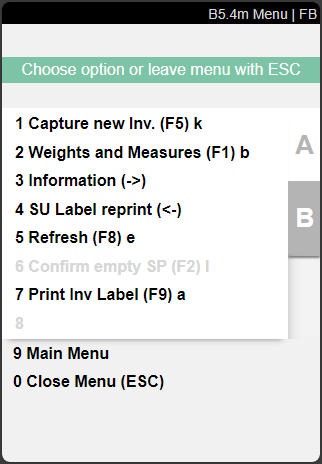
Changed B5.2o to B4 and Added Menu - Item 94072
We have renumbered the B5.2o Finished Counts page to B5.4 Finished Counts. We have also added a menu to the page:
New Field 'Level' In B5.0 Create Stocktaking - Item 94934
We have added the field *level to the B5.0 Create Stocktaking page. When a level is entered, only locations for inventory are identified that correspond to the entered level. When a storage location is scanned, the warehouse and shelf are filled as before, but the level must always be entered manually.
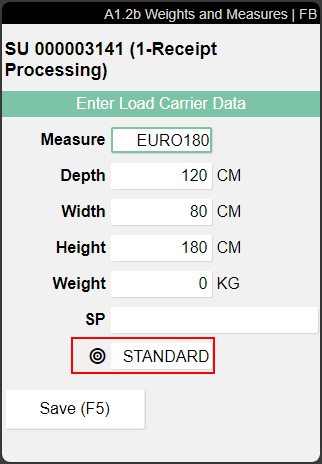
Manual Selection of Inbound Stock Post Strategy on A1.2b - Item 69737
We have implemented a new field on A1.2b Weights and Measures to enable mobile users to manually select an individual Inbound Stock Post strategy for load carriers. This feature is especially useful for items that are rarely received, allowing for better control over their storage direction.
Item References
GTIN Sync Improved - Item 97587
We have set up some time ago that an item reference entry with the type Barcode is automatically entered as a GTIN in the item card. From now on, not only the entry but also changes and deletions of the item reference entry will be synchronized. So if you enter a barcode and realize that it should actually be a customer, the GTIN you just entered will be deleted. The same applies to a deleted barcode.
New Setup Field GTIN Sync - Item 97622
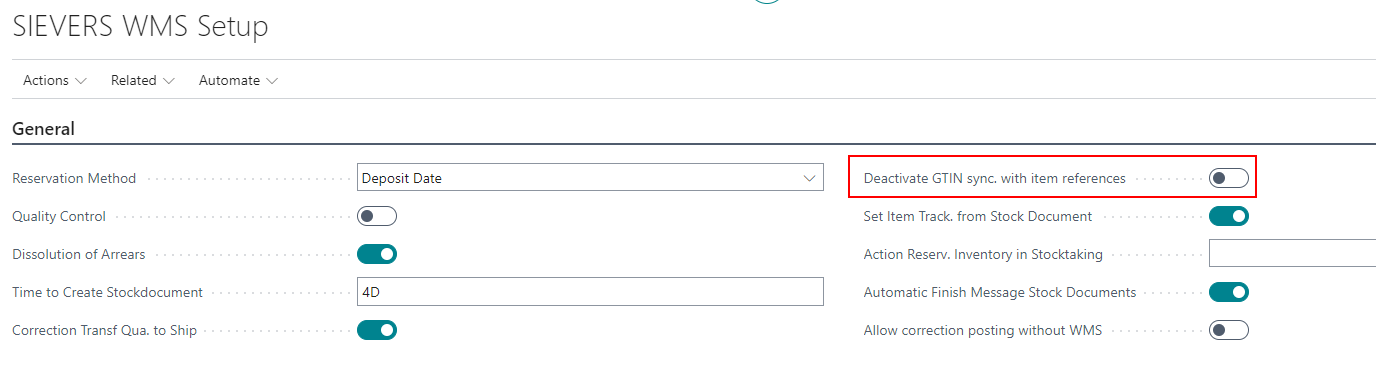
We have implemented a new setup field in the SIEVERS WMS setup general section:
- Deactivate GTIN sync. with item references: Normally, the GTIN field in the item card and the barcode entry in the item references of an item are synchronized with each other. You can use this option field to disable this behavior.
Small Changes
- Implemented error message which gets displayed when trying to drop a load carrier on a storage place which is part of the automatic transfer system: "The load carrier is partially or fully reserved and cannot be transferred automatically" - Item 89233
- A2 pages now also shows an i symbol when there is extra information in the Load Carrier - Item 93927
- B5.3 now displays the footer with the inventory and quantity fields instantly when the page is being opened. Until now you had to select a line to display it - Item 94069
- If a user presses F5 in B5.2o he can now record another new inventory for the currently selected - Item 94070
- The System notices the users now when Outbound Stock Post lines can't be added to existing warehoue shipments - Item 94265
- Improved error message when users try to create a stocktaking for a not existing warehouse or storage shelf - Item 95371
- Added option to deactivate Outbound Stock Post automation lines - Item 96820
- A4.3: Improved error message when trying to scan a storage place which is not allowed for the pick - Item 97076
Additional Changes
- Improved WMS info fields on warehouse shipment source documents - Item 96057
- Packaging team, unloading point and priority are now being saved on the warehouse shipment lines - Items 96118 and 98398
- Implemented a Deactivate field on the warehouse shipment automation page to deactivate individual lines - Item 96819
- Changing the sell-by date in the load carrier line now changes the sell-by date in all inventories in the load carrier - Item 97075
- SELECT getting printed on the picking document if an inventory swap is possible - Item 97343
- Lines with manual inventory selection no longer interrupt automatic Outbound Stock Posts - Item 97875
Bugfixes
Pressing Arrow Key Down Fast Enters Selected Line - Item 93973
We have fixed a bug that caused quickly pressing the down arrow key to be equivalent to pressing Enter, which opens the selected line.
Warehouse Shipment Planning Displays Source Documents Despite Being Empty - Item 94247
We have fixed a bug that sometimes showed a source document in warehouse shipment planning, even though the warehouse shipment planning overview was empty.
Warehouse Shipment Automation Enters Packaging Team Only Once - Item 97051
We have fixed a bug that sometimes occurred when automatically processing multiple outside storage documents. The packaging team was only entered in the first document line.
SSCC Label With Diverse SSCC Without Address - Item 97181
We have fixed a bug which caused the printed SSCC labels to be without address data when they are part of a diverse warehouse shipment - Item 97818
Reset of the Stock Document Type - Item 97833
We have fixed a bug which caused the stock document type to reset in a warehouse shipment if you reenter the same location code a second time.
Detailed Load Carrier Assignment Asking to Delete Load Carrier - Item 97966
We have fixed a bug that caused a query to incorrectly appear in certain situations during the detailed load carrier assignment in the warehouse receipt, asking whether the load carrier is empty and should be deleted. This error was related to an error caused by the packaging hierarchy.
Warehouse Shipment Posting Not Allowed - Item 97999
We fixed a bug that sometimes prevented warehouse shipment postings even though the shipping advice indicated that they should be allowed.
Error Message When Entering New Inventory - Item 98083
We have fixed a bug that caused an error message when you created a new inventory in a Load Carrier that was in a stocktaking process.
Small Bugs and Spelling Mistakes
- Removed an unnecessary error message which was displayed when trying to create a stock document from a sales credit memo - Item 87817
- Improved layout of the package content list - Item 97484