Hinweis: Diese Release Info ist nur in Englisch verfügbar.
Features
Load Carrier
New Field on SNCL Load Carrier Card - Item 69740
We have added a new field to the SNCL Load Carrier Card in the section Stock:
- Inbound Stock Post Strategy Code: This field will be automatically filled from the load carrier lines of the associated warehouse shipment. You can change the Inbound Stock Post strategy here for this individual Load Carrier if you want.
New Column on Posted Load Carrier List - Item 95728
We have added the new column
- Warehouse Shipment No.
to the posted Load Carrier list. A click on the number opens either the warehouse shipment planning pointed to the related warehouse shipment or the posted warehouse shipment.
Removed Setup Options - Item 96779
We have finally removed the fields
- Load Carrier retain Inv. Measure and
- Transport Load Carrier retain Inv. Measure
from the SIEVERS WMS setup page since they are not being used anymore. We have implemented other ways to retain inventory measure codes on the Load Carriers.
Picking
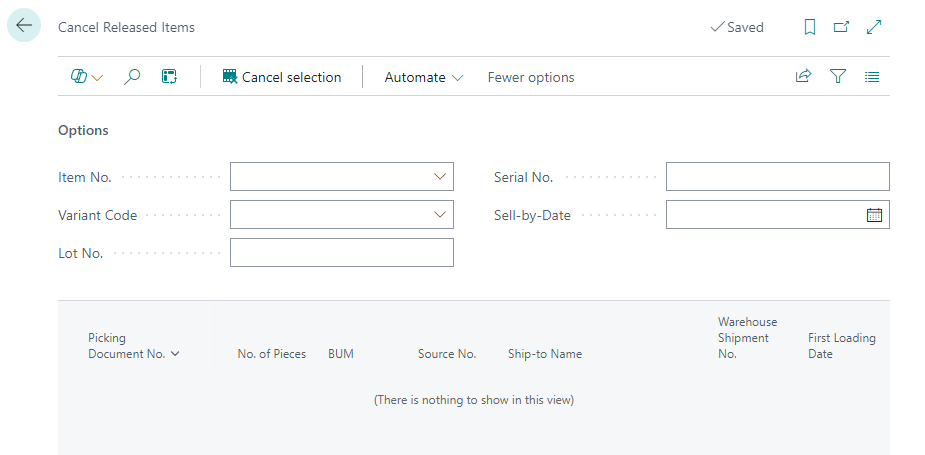
Cancel Released Documents via Filters - Item 91127
Since release 32 you can batch-cancel already released documents via the list action Cancel Released Items. However this action was not fully implemented yet since we have realized that it would be even better with more features we have not seen at first.
Pressing this button now opens the page Cancel Released Items you can precisely filter by
- Lot no.
- Variant
- Sell-by date and
- Serial no.
which picking lines you want to cancel.
New Setup Option - Item 97014
With the most recent release 35 we have implemented a feature to swap inventories inside of a load carrier. To improve this feature even more we have implemented a new setup in the SIEVERS WMS setup Load Carrier section:
- Validation Inventory No. in Picking: Activates the check against the inventory no. in picking if there is more than 1 inventory no. on a load carrier.
If the option is deactivated, the picker must scan the load carrier in any case. If the option is activated, the validation against the inventory is activated. This means that the correct inventory must be scanned and validated if there is more than one inventory no. on a load carrier.
Take Photos of Picked Items - Item 93946
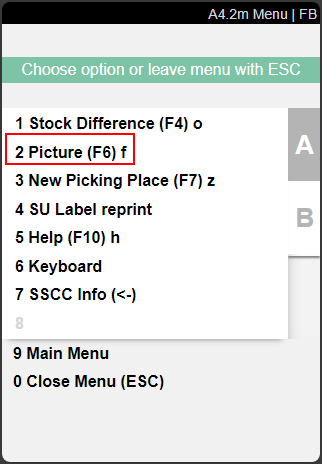
We have implemented the new feature 'Take Photos of Picked Items' in the picking document and the MDE pages A4.2 and A4.3. This feature is already present for the warehouse receipt and in A1.1. You can access the picture mode in A4.2 and A4.3 via menu B2 or F6.
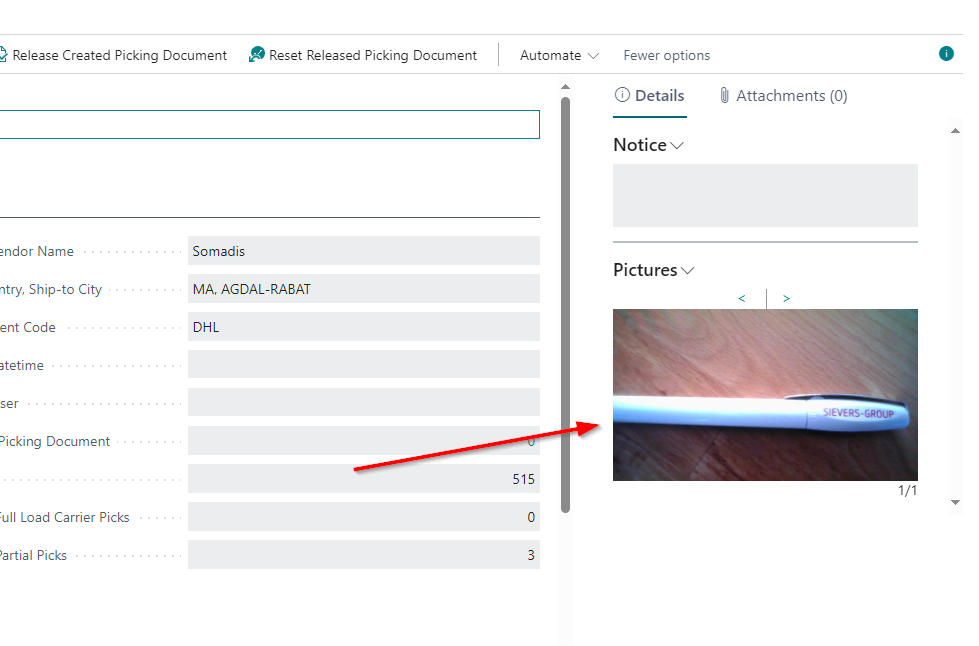
The pictures will be stored directly on the picking document in the Details section:
New Actions in Connection With Releasing Picking Documents - Item 95914
We have added several new actions to the picking document list and card:
- List
- Release Created Picking Documents: Releases all currently marked picking documents
- Card
- Release Created Picking Document: Releases this picking document
- Reset Released Picking Document: Resets status of this released picking document
Stocktaking
New Function: New Inventory on same Storage Load Carrier - Items 95877 and 90774
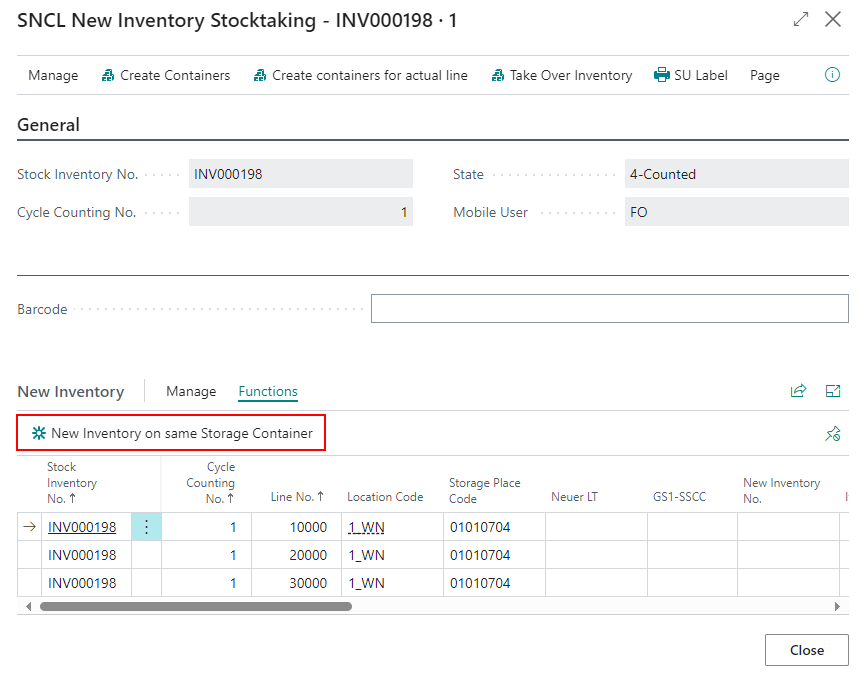
If new inventory is to be taken during a stocktaking, this has been possible for some time directly in the cycle counting list. The function New Inventory is available in the lines here. This opens a new window in which the new inventory can be recorded. You will now find the new function under Functions in the New Inventory lines:
- New Inventory on same Storage Load Carrier: Adds a new inventory line with the same storage Load Carrier
Inventory Swap Inside Load Carrier Allowed With Different Serial Numbers - Item 97042
In the latest release we have implemented a feature to swap inventories inside of a load carrier. We built it so that the swap can only take place if the sell-by date, lot no. and serial number match. With this release, we are removing the serial number restriction. With the next release, the serial number restriction will be introduced in such a way that it only applies if there is an explicit specification from the source document.
Changed Article to Item - Item 95969
We have changed all article captions to item to have a consistent wording.
Packaging
Improved A5.1 Packaging Process Overview - Item 93959
We have improved the instructions on A5.1. Also you can now enter the source document number of a packaging process to select it.
Loading
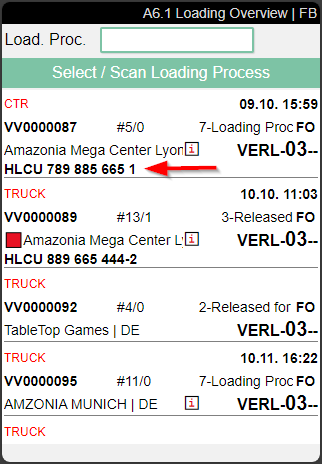
A6.1 Improvements - Item 93972
We have improved the A6.1 page with the following features:
- Load Carrier no. or license plate will be, if available, displayed in a fourth line in the overview. The Load Carrier no. will be prioritized over the license plate.
- License plates will not get wrapped anymore
Automatic Outbound Stock Post
We have implemented the first steps for the feature of the automatic Outbound Stock Post system. This automatically creates Outbound Stock Post documents for orders X days before the warehouse shipment loading date. The automation is executed by a job queue. The individual steps are described in detail below.
New Table: Outbound Stock Post Automation - Item 83489
We have created a new table which will serve as basic setup table for the Outbound Stock Post automation. This is where you can set up lines that are passed through when the automation is executed. The table has the following fields:
- Sorting: The automation lines are processed in this order when the automation is started
- Deactivated: If this field activated, the automation line is not applied
- Location Code: Determines that this automation will only be applied to orders in this location
- Description: Describes the automation line
- Source Document: Defines the source document type this automation line will be applied on. Right now there are only warehouse shipments possible
- Shipping Agent Code Filter: Determines that this automation will only be applied to orders of this shipping agent
- Lead Time: Determines the time in days how far before the delivery date a Outbound Stock Post may be created. If a 10 is entered here, a Outbound Stock Post may be created 10 days before the loading date
- Reservation Order: Determines the order in which the documents are sorted to create the Outbound Stock Posts
- Variable for Auto. Creation Filter: Here you can determine a variable as filter for the automatic Outbound Stock Post. You can find the corresponding counterpart of the field in the warehouse shipment planning. The optional field is called Variable for Aut. creation of stock doc..
- Delete Protocol after days: Specifies after how many days the protocol should be deleted. Can be disabled with 0
To start the Outbound Stock Post automation just press Start Processing in the menu. The next section describes what happens after you pressed the button.

Automatic Outbound Stock Post Processing - Item 83494
After the execution is started via the button or a job, all source documents with warehouse shipments that match the filter criteria are searched for. The filter criteria include
- Order type
- Shipping agent
- Variable for Aut. Creation of Stock Doc.
After that, a check is made to see if the lead time of, for example, three days before the loading date has been reached.
If that is the case, Outbound Stock Post documents are now created based on the source documents and sorted by delivery date and priority of the order. If the system finds that a stock document is empty, it is automatically deleted.
After the creation of the documents you may want to add more positions to it. The next section will deal with this topic.
Subsequent Recording of Items in Outbound Stock Post Documents - Item 83496
Previously, the subsequent entry of new items in Outbound Stock Post documents was a multi-step process. To reduce the effort required here, we have added a new feature to the SIEVERS WMS setup:
- Add to Warehouse Shipment from Source: If enabled, additionally entered lines in the source document are added to an existing warehouse shipment if conditions are matching. The conditions are the days before loading date and the shipping agent
::: Note This feature works both for automatic and manually created Outbound Stock Posts. :::
At the moment we are working on more features for this, for example a new indicator that is set when the stock document has been changed and a setup option to and a special option that allows you to prevent items from being automatically added to stock documents you have selected.
New Action Merge Inventories in SNCL Inventory List - Item 97006
We have added the action Merge Inventories to the SNCL Inventory List functions. This is a batch run that allows you to combine identical inventory items. This can be useful if you have many small inventory items in your warehouse that can be combined into large ones. Please keep in mind that these properties must be the same over the inventories to merge:
- Item No.
- Variant
- Lot No.
- Sell-by Date
- Serial No.
- Inbound Stock Post Customer (for outside storage)
You can filter the inventories to merge by
- Location Code
- Warehouse Code
- Storage Shelf Code
- Row Code
- Level Code
- Item No.
::: Note Please note that it is not possible to merge blocked inventories! :::
Small Changes
- A1.6 now shows always inventory measure code. Before it was only shown after entering dimensions and weight - Item 75948
- A5.2 entries show via i that there is a comment text assigned - Item 93962
- A6.1 State is now truncated if it is too long - Item 93971
- SNCL Inventory Card weight fields now show the respective units from the base unit of measures in the caption - Item 96002
- Added help page for B4 Unload - Item 96795
- A1.6: Errors now shown in red feedback zone instead of popup window - Item 95206
- A4.3 and A4.2 show feedback when inventory swap results in change of team assignment for the item - Item 94795
- Added Order / Pos. Info to A5.2 menu on position A5. Now all 5.x menus have this info - Item 93968
- Added info footer to A5.3 and A5.5 - Item 93969
- A5.2i weight and volume now display the unit of measure code from the base unit of measure list - Item 93978
- A4.2i weight and volume now display the unit of measure code from the base unit of measure list - Item 93980
- Improved A6.2 so that the license plates are not getting wrapped - Item 93983
- You can now delete multiple warehouse shipments at once in the Warehouse Shipment Planning via Actions -> Delete Selection - Item 89236
Additional Changes
- Storage Place: autom. allocation on SNCL Move Order now also uses the Inbound Stock Post strategy from the Load Carrier card. This is now new the priority 1 field. It overrides all the other fields such as the Inbound Stock Post strategy from the setup, the item category, the item card and the stockkeeping unit card. - Item 69739
- The states of warehouse shipments are now on warehouse shipment position level - Item 88521
- New comment text fields on move order pages - Item 93925
- Remove SP from Empty Load Carrier setup field in SIEVERS WMS setup now only works on Load Carriers that are not reusable - Item 96000
- Several new information fields for warehouse shipments at the sales order - Item 96037
- Inventory swap now also possible with different lot nos if no lot no. has been defined beforehand - Item 96984
- New action Merge Inventories in SNCL Inventory Overview: Merges inventories with the same characteristics inside of a single load carrier: - Item 97006
- Item no.
- Variant
- Lot No.
- SBD
- Serial No.
- Inbound Stock Post customer
- Improved quantity displayed on A4.3 when inventory swap is enabled - Item 97085
- Quantity suggestions on A4.3 first displayed after scanning inventory - Item 97092
- A3.2 and A3.3 now make use of the movement strategy defined for the team - Item 97334
- New Event for item transfer - Item 100368
Bugfixes
Shipping Agent Service Is Not Mirrored Multiple Times - Item 94233
We have fixed a bug where, if the shipping agent service was changed multiple times, it was not synchronized correctly into the source document.
Shipping Employee Erroneiously Required - Item 94259
We have fixed a bug that required a shipping employee to be created when a Outbound Stock Post document was created, even though the location did not require any shipping orders.
Error Stops Picking Document Release Process - Item 96968
We have fixed a bug that caused a very specific error to stop the entire automatic picking document release process. Now the error is simply logged and the release process is continued afterwards.
Check Replenishment Aborted - Item 97163
We have fixed a bug that caused the entire check replenishment process to be aborted even though only one replenishment line could not be created. Incorrect lines are now correctly skipped. Errors are now shown to the user collectively at the end of the process.
Job Queue for Automatic Outbound Stock Post Failed - Item 97416
We have fixed a bug that caused a blocked item in a stock document to cause the job queue for automatic Outbound Stock Post to fail.
Picking Documents Not Being Released After Releasing Picking Series - Item 93548
We have fixed a bug that caused picking documents to be created but not released after a picking series was released.
Stocktaking Error Because of Unit Mismatch - Item 97445
We have fixed a bug which caused the stocktaking to throw an error everytime an item was counted with the purchase unit instead of the base unit.
Small Bugs and Spelling Mistakes
- A5.5 did not show all 9 characters in PTU and SSCC field - Item 95308
- Changing shipping agent or shipping agent service in shipping order not possible - Item 94255
- Printed load carrier label log deleted after posting warehouse shipment - Item 96661
- Quantities on A4 sometimes not correct with diverse picking documents - Item 97052
- Wrong error message when not using SIEVERS WMS managed warehouse - Item 97498