Hinweis: Diese Release Info ist nur in Englisch verfügbar.
Features
New No. Series Are Created With "Allow Gaps in Nos." - Item 89982
When creating new number series, the Allow Gaps in Nos. indicator is now automatically set to true. The reason for this is that in special situations, numbers were blocked and processes were stopped. This should reduce locks on the number series as much as possible.
MDE
Improvements to A4.3, A5.5 and the SIEVERS Teams Card - Items 88117, 88118, 88119, 88120 and 88124
We have further optimized the MDE page A4.3 and A5.5 process. Part of this optimization is the implementation of two new fields on the SIEVERS Team card:
Quantity Suggestions Mobile: Impacts only mobile functions.
- 1-No suggestions: Quantities are never suggested in the corresponding mobile functions
- 2-With suggestions: Quantities are always suggested in the corresponding mobile functions. The quantity field in A4.3 is pre-assigned with the expected quantity.
- 3-Higher than threshhold with suggestions: Quantities are only suggested in the corresponding mobile functions if quantity is greater than threshhold. Remarks: Suggestion field should be maintained uniformly across all mobile functions. Threshhold should be 9.
Threshhold Mobile Suggestions: Specifies the threshhold above which quantities should be suggested in the corresponding mobile functions. This field is only editable if Quantity Suggestions Mobile is set to 3.
We have introduced these fields because we have found that entering large quantities is often not done accurately enough. In practice, counting takes a very long time, which quickly becomes a problem with large quantities of goods. We have therefore introduced the option of specifying a threshold value above which counting is no longer necessary. With the first field Quantity suggestions mobile you specify whether and how a quantity suggestion should appear in A4.3. The second field can only be edited if you have selected the third option in the first field. You can then specify the threshold value from which employees must enter the quantity manually in A4.3.
We have also implemented the following small improvements in A4.3 and A5.5:
- If the quantity entered in the "Remainder" field is confirmed, the calculated quantity is now automatically reported back.
- If the item has a SPU stored, the mask now automatically sets the focus to the quantity field if the required quantity/quantity remaining is smaller than the SPU
- Added an 'of' between the SPU and quantity
Photo Function Now Shows Last Taken Photo - Item 88936
Since a few months you are able to take pictures in A1 and A6. After taking a few pictures, you can swipe through them. Until now, the first photo taken was always shown first in the overview. We have changed this so that the last photo taken is now always shown first.
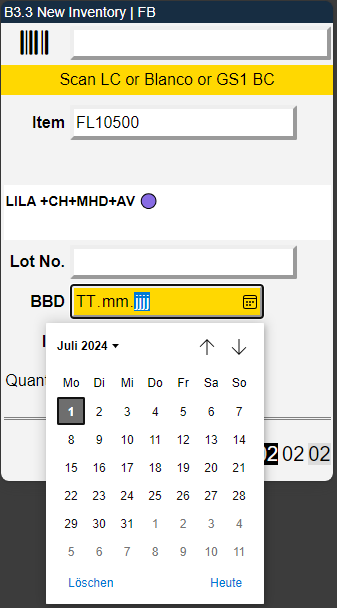
B3.3: Use Calendar to Enter BBD - Item 70486
To make it easier to enter expiration dates in B3.3, we have implemented a button to open a calendar where you can simply click on the desired date.
Picking
Changes to Picking Team Change Reaction - Item 88776
We have changed how the system reacts to changes made by the picking team on the "Print/Release picking documents" page. Previously, all Outbound Stock Post documents of the team were always changed to the newly entered team. Now it works like this:
- The change to the picking team only applies to the Outbound Stock Post lines that have the same picking document no. as in the release window
- Exception: In the case of series-oriented stock documents for which a picking document is only created when the series is released, the team without picking document no. may not be changed.
A4.3: Making Use of the Smalles Storage Unit - Item 87701
When confirming quantities in A4.3, you can now also scan the smallest storage unit of the item's packaging hierarchy.
A4.3: Use F7 To Search for New Inventory After Blocking - Item 88842
If you need to block an inventory in A4.3, you can now use menu A3 or F7 to automatically search for a new replacement inventory.
A4.3: GS1 Barcodes Only With Start Character - Item 89345
In A4.3 you can scan GS1 codes in the quantity and SPU field. Previously, you could scan any barcodes there. Now it is only possible to scan barcodes that include a start character.
Various Orders
We have added more features in the context of various orders.
- Instead of an order number, the abbreviation "DIVERS" is now printed on the printed picking document for stock transfer orders and purchasing complaints. The lowest priority of the orders contained is used as the priority. The quantities are printed totaled by picking team / consolidation no. and load carrier + item - Item 87917
- Picking Document Header will now be filled with Ship-To Name, Ship-To Country and Ship-To Address - Item 88256
- A4.1 now shows the Ship-To Name, Ship-To Country and Ship-To Address - Item 88089
- The fields Number of Full Load Carrier Picks and Number of Partial Picks now show the correct amount of picks in a various order picking document - Item 88092
- Packaging Card Information now shows DIVERS in the source no. field - Item 89973
- A4.3 and A4.3 now displays a sum of the picking quantity per consolidation no., div+picking document no. instead of order no. and the smallest priority of the orders in a various order pick - Items 86241 and 86240
- If a partial quantity is confirmed in A4.3, the first matching line in the Outbound Stock Post is now always served - Item 86242
- We have implemented an event that allows you to change mobile masks after each import, if necessary - Item 89186
Warehouse Receipt
Check for Shipping Agent and Vendor No. - Item 85652
We have implemented a check whether either the "Shipping Agent Code" or "Vendor No." field is filled. If neither of them is filled when releasing to the MDE, there is an error message.
Warehouse Shipment
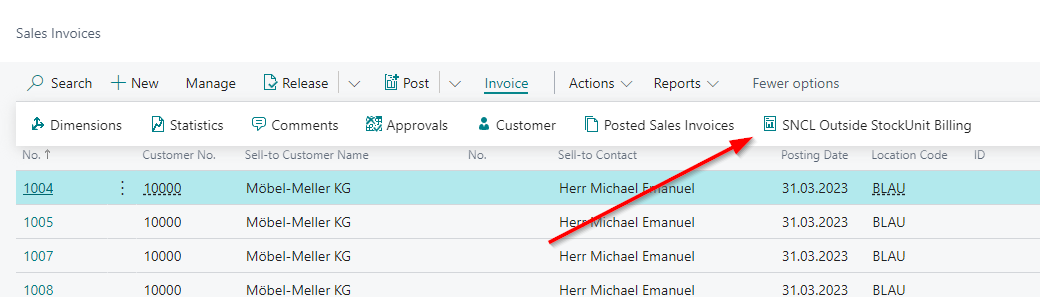
Outside Stock Unit Billing in Sales Invoices - Item 89106
We have implemented the button SNCL Outside Stock Unit Billing in the Sales Invoices list.
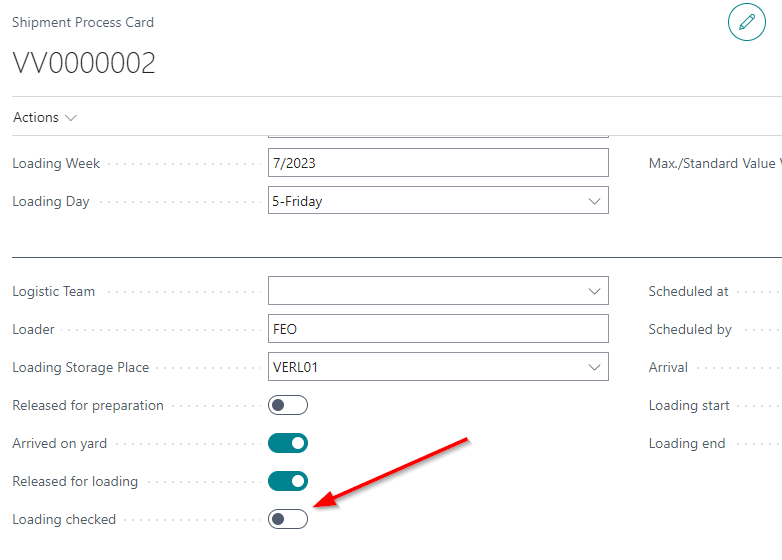
'Loading Checked' On Shipment Process Posts Warehouse Shipment - Item 70367
If you check the "Loading checked" box in the shipping process, the posting of the corresponding warehouse shipment is now triggered.
New Error Messages When Trying to Post Warehouse Shipment - Item 87582
We have added new messages that appear when the warehouse shipment cannot be posted.
- Case 1: The shipping agent requires loading for warehouse shipment, but there are no loaded storage Load Carriers. You have to create a Shipment Process.
- Case 2: Nothing packed in SSCCs. Dimensions, weight or inventory measures might be missing.
Resources
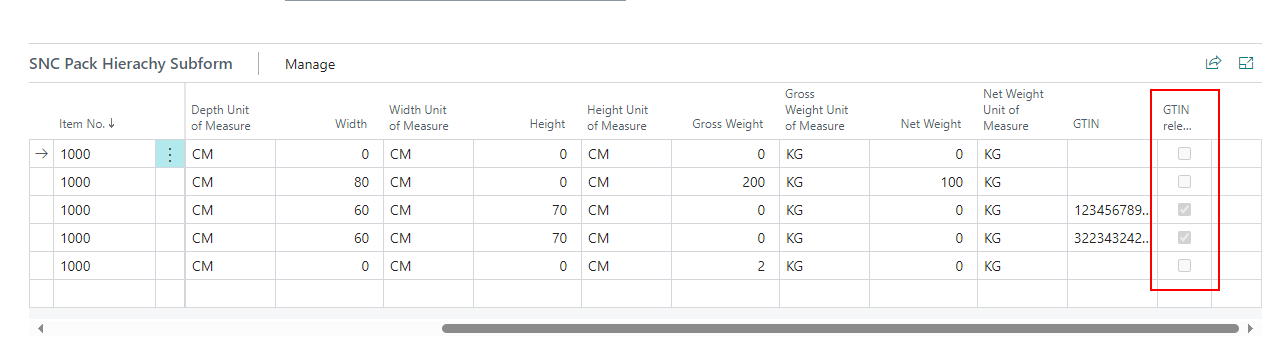
GTIN Relevant in Packaging Hierarchy - Item 87799
In the last release, we adapted the GTIN relevant radio button in the item references so that a barcode can be marked whose unit of measure corresponds to the base unit of the item. We have now also implemented this field in the packaging hierarchy. The GTIN relevant is automatically synchronized.
Removed Ability to Enter Resources into Assembly Order Lines - Item 85745
Previously, you could enter resources in lines in assembly orders. Unfortunately, you could also enter lines that are not stored in the parts list of the item. As these lines are not part of the Outside Storage Resources, they also cannot be billed. For these reasons, we have completely removed the option to enter resources in the lines.
Service Order Warehouse - Added Fields - Items 87511, 87507, 87509, 87516, 87533 and 87523
We have added more fields to some pages in the context of service orders warehouse.
The list structure template is like this:
Page
- First new field
- Second new field
Service Order Warehouse List
- Assembly Order No. / Posted Assembly Order No.
- Stocktaking No. / Posted Stocktaking No.
Posted Service Orders Warehouse List
- Assembly Order No. / Posted Assembly Order No.
- Stocktaking No. / Posted Stocktaking No.
Posted Service Order Warehouse
- Order No. (which is the original Service Order Warehouse)
Assembly Order
- Service Order Whse. No
Posted Assembly Order
- Posted Service Order Whse. No
Posted Stocktaking
- Service Order Warehouse No.
- Posted Service Order Warehouse No.
Posted Transfer Shipments
- Service Order Whse. No.
- Post. Service Order Whse No.
Posted Transfer Receipts
- Transfer Order No.
- Service Order Whse. No.
- Post, Service Order Whse. No.
Performance Improvements - Items 88471, 88481, 88494 and 89981
We have improved the performance of the warehouse shipment planning, the creation of warehouse shipments and the Picking List Print/Release window significantly. The main reason for the poor performance was that the availability in the warehouse was recalculated each time. We have now outsourced this to the job queues so that the availabilities are checked at a fixed interval. Please create a job queue entry for the warehouse shipment state. When you open warehouse shipment planning, you will also be asked to do this.

Automatic Stock Transfer Posting Now Also For Outside Storage - Item 88854
The automatic stock transfer posting now also works for outside storage inventory.
If you would like more information on automatic stock transfer posting, I recommend taking a look at the SIEVERS WMS documentation in the "Automatic Stock Transfer Posting" section.
Small Changes
- Removed the fields Over-receipt Quantity and Over-Receipt Code from the Sales Order since they are obsolete - Item 78845
- Removed the fields Posted Transfer Order Nos. and Transfer Order Nos. from the SIEVERS WMS Setup since they are obsolete - Item 89037
- Original-Document No. in SNCL Outbound Stock Post and SNCL Outbound Stock Post List now clickable. It leads to the Warehouse Shipment Planning - Item 85818
- Vendor no. in warehouse receipt will now be automatically filled when you create it from a purchase order - Item 76898
- More Tooltips - Items 88928, 89327, 89955
- Changed the order of the weight columns in the Load Carrier list - Item 85913
- MDE Login Page now shows company name - Item 89019
Bugfixes
A4.3: Some SPU Numbers Throw Errors - Item 89190
We have fixed a bug that prevented some SPU numbers from being entered in A4.3.
Outside Stock Unit Billing Used Description 2 - Item 87577
We have fixed a bug that caused description 2 to be used for outside stock unit billing with totaled items. This was not intended.
Various Orders: Sorting Without Movement Strategy - Item 87934
We have fixed a bug where the movement strategy had no influence on the sorting of the picking document for a various orders pick.
Various Orders: Picking Status Not Correctly Displayed - Item 87918
We have fixed a bug where the picking status of a various orders warehouse shipment was not correctly displayed in the warehouse shipment planning.
Various Orders: SSCC Not Correctly Transferred To Shipping Orders - Item 88172
We have fixed a bug which caused various order SSCCs to not correctly transfer to shipping orders.
No Warning Popping Up When Trying To Create Load Carriers In Warehouse Shipment - Item 89377
In the SIEVERS WMS setup, there are the option fields Reaction SBD Residual Term and Reaction Lot in the warehouse receipt section. If these are set to "Warning", a warning should normally appear when new load carriers are created in warehouse receipt to indicate missing lot no. or sell-by date. This did not work due to a bug. Now it works again.
Partial Postings of Assembly Orders Not Working - Item 87782
We have fixed a bug which sometimes led to errors when trying to partially post an assembly order.
Availability Warehouse Shipment Planning Not Being Updated - Item 90177
We have fixed a bug that caused the availability state in Warehouse Shipment Planning to no longer be calculated correctly after a performance optimization.
Picking Date in Warehouse Shipment Planning Not Being Filled - Item 90066
We have fixed a bug which caused the picking date column in the warehouse shipment planning not being filled.
Resource Lines Not Synchronized - Item 86197
We have found that resource lines that are deleted in the "Outside Storage Resource" page are sometimes not also automatically deleted in the service order warehouse. The fact that some lines are not deleted synchronously can lead to errors. We have therefore fixed this error. Deleted lines are now synchronized.
Small Bugs and Spelling Mistakes
- Changed SNC Order Type to SNC Order Types and SNC Order Type Category to SNC Order Type Categories - Item 85512
- Fixed a few small visual things on the MDE - Item 88698
- Fixed error message which showed up when you tried to enter negative no in #Days before Load. Date add to Whse. Ship. - Item 89362
- Fixed the front page link to the purchase return orders - Item 89231
- Fixed a bug that caused the customer option By Shipping Address to not work in copied orders - Item 87853