Hinweis: Diese Release Info ist nur in Englisch verfügbar.
Features
MDE
A4.1 and A5.1: Max. # of Documents - Items 70226 and 70227
In Release 22 we have added the field “Max. # Documents” to the logistics team cards. With this release, this field will finally become functional. If something is entered there, the teams on pages A4.1 and A5.1 will not be shown more than this number of documents.
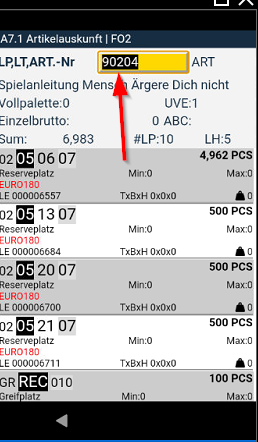
A7: Maximum Contrast - Item 85413
We have noticed that the highlighting of a scanned value in the scan field has a rather low contrast and is therefore difficult to see, especially in bright surroundings. For this reason, we have changed the highlighting on A7 to black and thus maximum contrast. We will also make this change on the other pages in the course of the next releases.
Expanded Help Files for A4.2 and A4.3 - Item 87064
We have expanded the help files for MDE pages A4.2 and A4.3. They now also explain the reason why the lines are sometimes highlighted in red.
Improved Feedback on A4.2 When Entering a Wrong Load Carrier Value - Item 87487
We have improved the feedback on MDE page A4.2 when you tried to enter a value which did not point to an existing load carrier. Now it says Invalid Barcode.
A4.2 and A4.3: Packing Quantities of Different Orders Together - Item 85936
It is now possible to pack quantities of different orders into one PTU/SSCC. The prerequisite for this is that the Outbound Stock Post lines have the same consolidation no. In A4.2, when a PTU is selected, the system checks whether it is the same consolidation number. If the consolidation no. is different, an error message is displayed. If it is the same number, you can continue as normal in A4.3.
A4.3 SPU Entry Improvement - Items 86002 and 87698
If an item is being progressed in A4.3, the system automatically jumps to the Quantity field after the scan. This process also makes sense in most cases - unless you have scanned an SPU. We have found that it makes more sense for the system to jump directly to the #SPU field in this case. We have now implemented this. You can now also simply scan a reference barcode in the SPU field.
Alternatively, the employee can still click manually in the quantity field after the scan.
Display of Storage Places - Item 84845
When creating new storage places in a warehouse, you can decide in which order the storage place code should be shown.
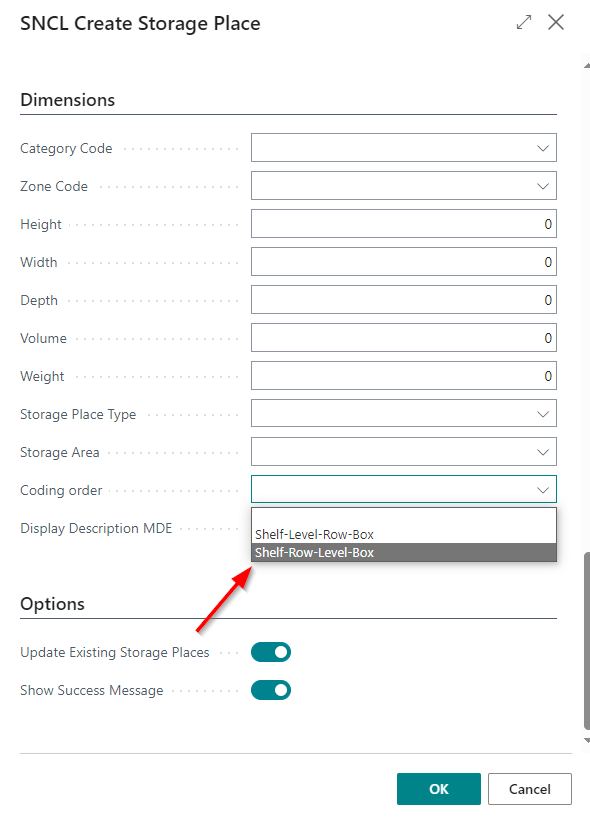
However, this decision previously only applied to the Business Central System. On the MDE, storage places were always shown in this order:
- Shelf-Level-Row-Box
We have now changed that. The code sequence in Business Central is now also crucial for the code sequence displayed on the MDE.
There are also the following new fields on the storage places:
- Display Storage Place Format: Enables the code format to be changed
- Display Description MDE: Specifies whether the storage place descriptions are shown on the MDE. Activation means that the normal storage place code is no longer shown and therefore the change of format has no effect.
In addition, the coding sequence of the storage places is now also taken into account when exporting and importing the setup.
Production Supply
Production Supply Team - Item 86669
We are now slowly starting to implement the topic of production supply. Many features will follow in the next few releases.
The central idea behind production supply is that production is supplied using a pull principle. This means that materials and resources should be provided based on actual demand and not on forecasts. This avoids wasting time, stock and materials.
In this item, the new team type Production supply was created as a beginning.
New Move Job Type 'Production Supply' - Item 85567
We have added the new move job type Production Supply. This move order type determines that only SIEVERS teams with the Production Supply team type can be assigned.
New Column on Move Job Lines - Item 86463
We have added a new column to the move job lines:
- Internal Transport Team
This column allows you to assign move order lines to individual teams. If the move order is of type Production Supply, only teams that are of type Production Supply are determined.
Team determination for move orders is based on the following priorities:
- Location Code
- Type *Internal transports
- Type Production supply
- Assigned storage area
| Move Job Type | Team Type |
|---|---|
| Storage Place Transfer | Internal Transport |
| Replenishment | Internal Transport |
| Inbound Stock Post | Internal Transport |
| Return Order | Internal Transport |
| Loading Preparation | Internal Transport |
| Manual Transfer | Internal Transport |
| Production Supply | Production Supply |
Frontpage
We have made some changes to the frontpage menu and the tiles.
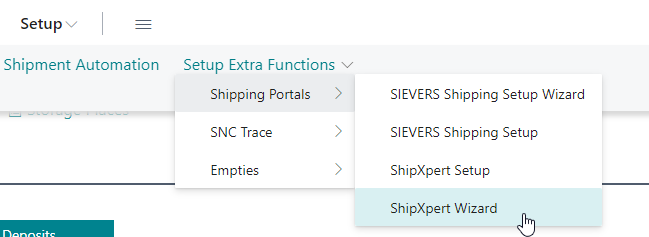
Added ShipXpert Setup Wizard to Menu - Item 85031
We have added the menu entry ShipXpert Wizard to the Setup Extra Functions menu section.
Changed Filter of Tile 'Storage Load Carrier in Receipt' - Item 85733
We have changed the filter of the tile Storage Load Carrier in Receipt in the section Receipt on the front page to storage Load Carriers with the state 1-Receipt Processing.
Stocktaking
Changing the Customer - Item 75927
You now have the option of manually changing the customer of a stocktaking as long as no stocktaking lines exist. This allows you to enter a customer manually before you have entered the first outside storage inventory line.
Warehouse Shipment
Added and Removed an Action on Warehouse Shipment Planning - Items 70345, 76899 and 88276
We have added the new action Post & Print Shipment on the warehouse shipment planning. At the moment, pressing it will always post the warehouse shipment and print the shipment note.
In the future, it will depend on the shipping agent, which documents are printed out. These will be the options:
- shipment note
- posted warehouse shipment
- packing list export data OR shipment list
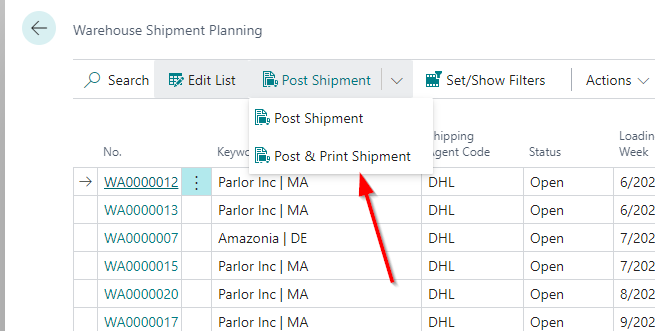
In the course of this we have also removed the option Daily Closing since a daily closing can also be done via the Set/show filters action and is therefore redundant.
Improvements to Adding Lines to a Warehouse Shipment - Item 85771
We recently added the field #Days before Load. Date add to Whse Ship. to the SIEVERS WMS setup. This field can be used to determine how many days before the loading date new lines can be added to the warehouse shipment. It is now possible to enter negative numbers in this field. This means that new lines can still be added to the warehouse shipment on the day of loading.
In addition to this, we have now added the Add to Warehouse Shipment from Source field. You can use this to determine whether lines can be added to a warehouse shipment at all.

Various Orders Handling
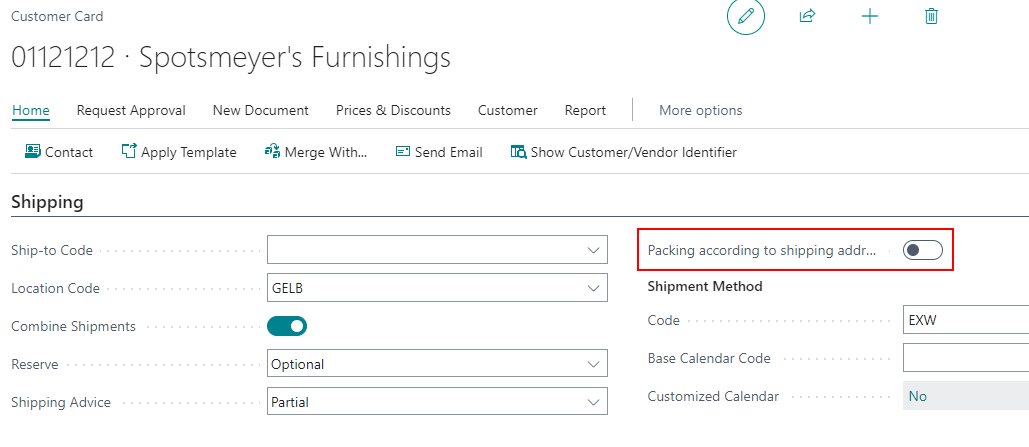
New Option 'Packing According to Shipping Address' in Customer and Vendor Card - Item 87027
We have implemented the new option Packing According to Shipping Address in the Shipping section of the customer card. Activating it causes the By Shipping Address indicator to be automatically set when a new warehouse shipment or a return order is created with this customer or vendor.
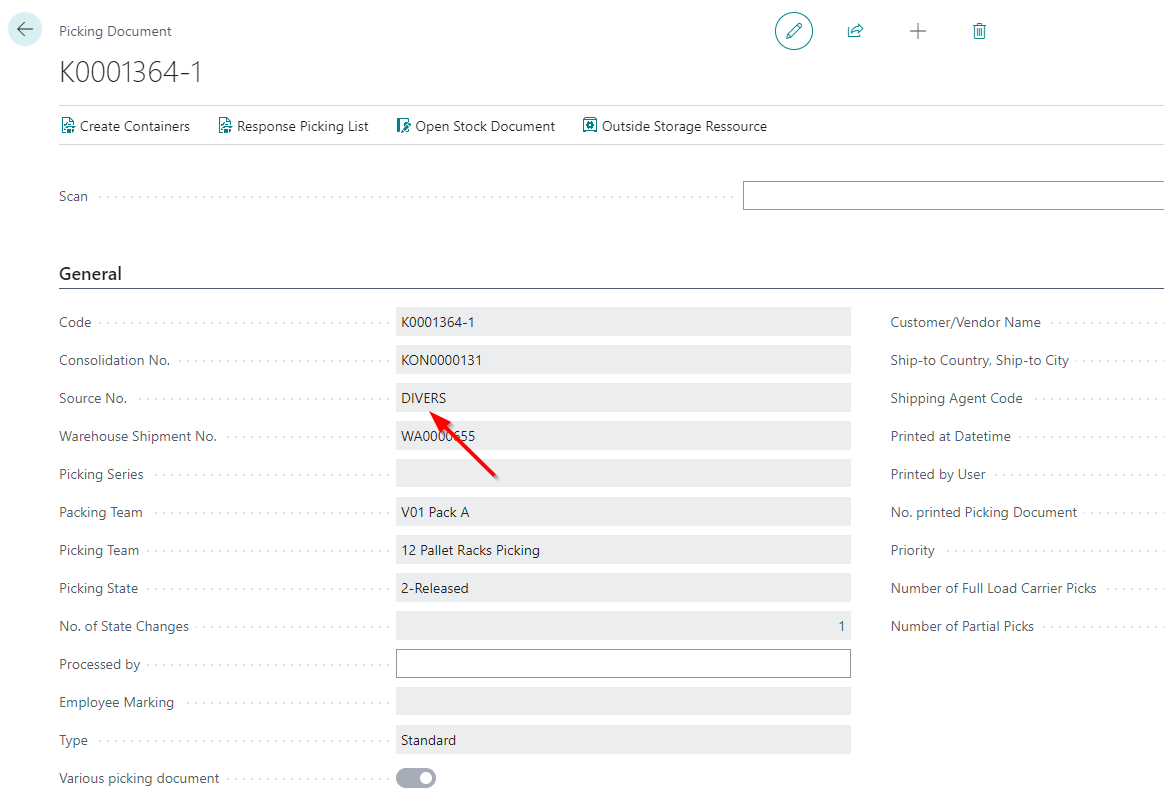
Picking Document - Items 86236 86237 86239 and 86380
In the last few releases, we have gradually implemented the diverse order handling topic. The term diverse order handling refers to cross-order packaging in one packaging process and or cross-order picking with various picking documents.
We have now implemented a few more changes:
- If it is a diverse picking document that contains lines for several source documents, diverse is displayed for the source no
- The lowest priority of the orders contained is printed as the priority
- The quantities are summarized by pick team / consolidation no. and load carrier + item
These changes apply both to the picking document (card and print on Business Central) and to the MDE pages A4.1, A4.2 and A4.3.
Additional Changes
Manual Inventory Selection: Selection of Several Lines Possible - Item 81461
We have made it possible to select several lines at the same time in the manual inventory selection and thus assign several load carriers/inventories to the document.
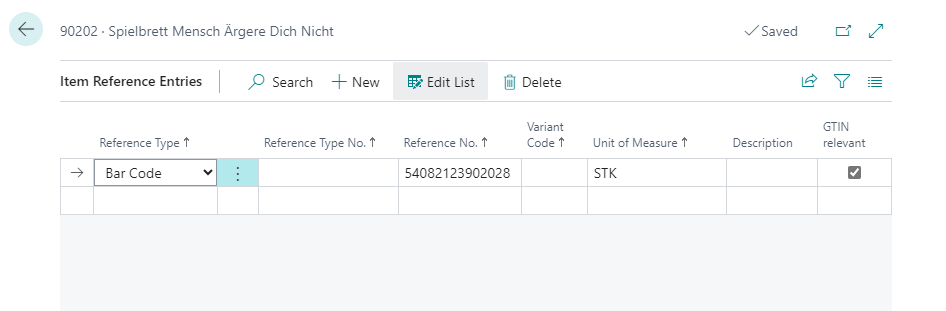
Item References: GTIN relevant With Basic Unit of Measure - Items 83605 and 87695
Previously, only those references could be marked as GTIN relevant in the item references for which there is an entry in the packaging hierarchy of the item whose utilization = sub-packaging unit (SPU).
We have now changed this. You now also have the option of marking references as GTIN relevant if the unit of measure corresponds to the base unit of the item. You can also use this GTIN already on the MDE A4 pages.
New Section On Released Production Order - Item 85523
This section is primarily used to determine the sources of the manufacturing components and the storage area of the finished product.
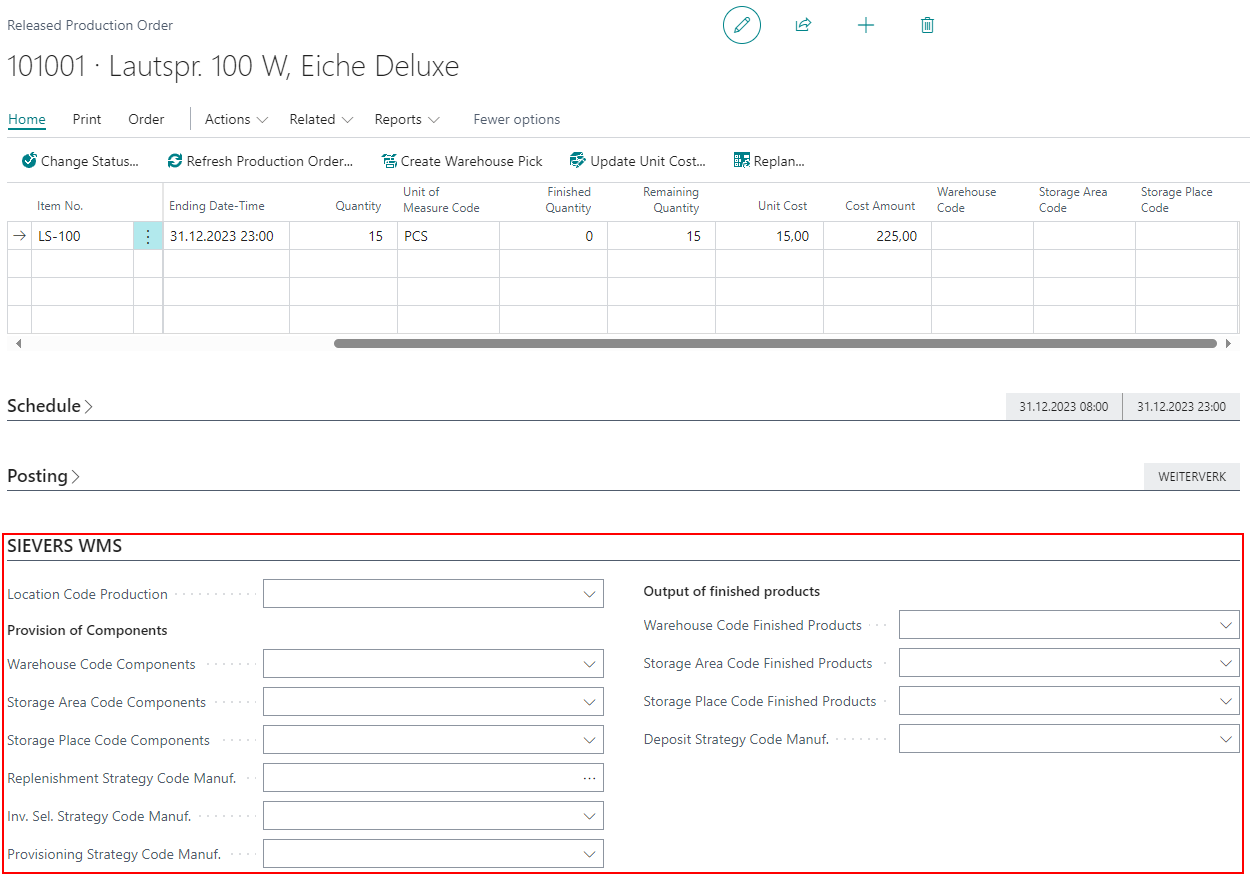
- Location Code Production: Defines the location code where the production components come from and the finished product goes to
- Warehouse Code/Storage Area/Storage Place Components: Defines the location from which the components are taken
- Replenishment Strategy/Inv. Sel. Strategy/Provisioning Strategy Code: Strategies that determine the inventories for replenishment, inventory selection and provisioning
- Warehouse Code/Storage Area/Storage Place Finished Products: Defines the target location of the finished product
- Inbound Stock Post Strategy Code Manuf.: Defines the strategy used to determine the target storage place for the finished product
Renamed Picking Document Fields - Item 81950
We have renamed two fields in the picking document and on the picking documents list:
- Number of Full Load Carrier => Number of Full Load Carrier Picks
- Number of Opening Load Carrier => Number Of Partial Picks
Small Changes
- Added several tooltips - Items 88243, 88304, 87075, 87451, 87735
- Warehouse Shipment link in transfer order menu now links correctly to the SNCL Warehouse Shipment Planning - Item 87393
Bugfixes
Assembly Order: Outbound Stock Post Charges Not Entered Correctly - Items 87494, 87503 and 87570
We have fixed a bug that caused the Outbound Stock Post charges for assembly orders not to be inserted correctly in the service order warehouse. Because of this error, the Outbound Stock Post charges were also not entered correctly in the outside stock unit billing.
SU Label Wrong Quantities - Item 87346
We fixed a bug which sometimes led to wrong quantities printed on the SU labels.
Item Labels Not Complete - Item 87347
We have fixed a bug that sometimes caused item labels not to get printed in the warehouse receipt.
Transfer of Load Carrier Data Not Working Properly - Item 87395
We have fixed a bug that caused the transfer of Load Carrier data from a stock transfer order to a warehouse receipt to not work correctly. The state was not correctly set in the load carrier lines.
Error When Trying to Post Warehouse Receipt For Transfer Order Leads To No Charge Entering - Item 84819
We have fixed a bug that caused no storage charges to be recorded in the service order warehouse when an error message was displayed in the warehouse receipt when posting a stock transfer order. For example, if no storage charges are entered for an item, a correct error occurs when posting the warehouse receipt. The user now adds the storage charges and posts the warehouse receipt successfully. However, the storage charges have still not been posted to the service order warehouse. We have now fixed this problem.
Unloading places for Various Order Handling are counted up incorrectly - Item 85668
We have fixed a bug that caused the wrong unloading places to be assigned for warehouse shipments in very specific cases.
Partial Posting with Various Order Handling Not Working - Item 87089
We have fixed a bug that prevented partial postings of SSCCs from being posted in the various order handling functions.
Wrong Size of Buttons on Photo Creation Screen - Items 85425 and 85427
The buttons on the photo screen were the wrong size and not arranged correctly. We have corrected this. In addition, the numbering of the photos has been improved and is now easier to read.
Outside Storage Resources Not Opening on Warehouse Shipment Planning for Transfer Orders - Item 874478
We have fixed a bug that prevented the outside storage resources of stock transfer orders from being opened in Warehouse Shipment Planning.
Various Order Handling: Not All Picking Documents Released - Item 87915
We have fixed a bug where some picking documents that were part of a various order handling could not be released together. This meant that several release runs had to be made.
Picking Team Determination Error - Item 88779
We have fixed a bug that caused the picking team determination to stop working in warehouse shipment. The bug was related to an indicator that was introduced with series picking.
Partial Postings of Warehouse Shipments
We have fixed several bugs regarding partial postings of warehouse shipments in the outside storage context.
- A bug caused all inventories to be used for the Outbound Stock Post charge calculation despite partial posting of a warehouse shipment - Item 87780
- A bug caused the Load Carrier data and quantities transferred from a stock transfer order to a warehouse shipment to be incorrect in the second partial posting - Items 87789, 87790 and 88562
Error When Trying To Post Outside Stock Unit Billing With Identical Number Range - Item 88384
We have fixed a bug where an outside stock unit billing could not be posted if the same number range is used for both the unposted and posted invoices. As part of this, we have now also added the ability to access the corresponding detail lines from the posted sales invoice.
Manual Response of Picking Document After Shortage Not Possible - Item 88640
We have fixed a bug that prevented picking documents from being reported back even though all lines have already been packed. This happened when a shortage occurred that was deleted.
Picking Series: Picking Document Is Deleted As Soon As a Outbound Stock Post Is Deleted - Item 88480
We have fixed a bug that caused a picking document of a picking series to be deleted because the user deleted a Outbound Stock Post line - although there were still other Outbound Stock Post lines.
Picking documents in a series are now only deleted if
- the last Outbound Stock Post line has been deleted or
- the last line of the picking series linked to the document has been deleted.
Small Bugs and Spelling Mistakes
- Spelling mistake on SIEVERS WMS Setup - Item 87416
- Fixed an issue where the system did not correctly display a newly created warehouse shipment in warehouse shipment planning - Item 83127
- Fixed a wrong error message on A4.3 when trying to scan a GTIN with a too large quantity - Item 87694
- Fixed a wrong message when trying to enter stock transfer charges - Item 87749
- Wrong link in the Service Order Whse. No. field on the stock transfer order - Item 87755